





Skip to content

The 10 Best SSD External Hard Drives in 2026

September 28, 2026-By The Top Zone

Transparency Note: This post contains affiliate links. As an Amazon Associate, we earn from qualifying purchases at no extra cost to you.

SSD external hard drives use flash storage instead of spinning platters. They are usually smaller, quieter, and faster than portable HDDs. Buyers should focus on sustained transfer speed, capacity, connection type, and everyday portability.

Choosing among SSD external hard drives involves real trade-offs. Faster USB standards may need newer computers and cables, while rugged designs can cost more. Peak speed claims may not reflect long transfers, and higher capacity often raises the price sharply. Some models also support features such as hardware encryption or water resistance, but not every device includes them.

This guide compares SSD external hard drives using published specifications, review coverage, and reported buyer experiences. Looking for all types? See our Best External Hard Drives.

Quick Overview

Our Top Picks

#1. Samsung T9 2TB External SSD

Samsung T9 2TB External SSD
Our Score 8.2 / 10 Score details
Performance8.3
Reliability8.6
Portability8.3
Compatibility7.1
Value8
How we research & score
BrandSamsung
Capacity2 TB
Drive TypeSSD
InterfaceUSB 3.2 Gen 2x2
Max Read Speed2000 MB/s
Dimensions0.6 x 3.5 x 2.4 in
Weight0.3 lb
  • Stable, disconnect-free operation
  • Backups stay consistently fast
  • Great capacity for cost
  • Interface-dependent speeds

For SSD external hard drives, the Samsung T9 2TB stands out with its USB 3.2 Gen 2x2 interface and advertised read speeds up to 2000 MB/s. Its compact 0.3 lb design makes it easy to carry, while published specifications list 2TB of storage. Research-based user feedback points to stable operation and consistently fast backups, making it a strong fit for large photo libraries, video files, and daily work backups.

The main trade-off is interface-dependent speed. You need a compatible USB 3.2 Gen 2x2 port to approach the rated performance, and slower ports will reduce transfer speeds. It suits users who want a portable SSD with high capacity and dependable everyday performance, especially when their computer supports the full interface.

→ Read full review

#2. Corsair EX300U 1TB External SSD

Corsair EX300U 1TB External SSD
Our Score 8.2 / 10 Score details
Performance8.7
Reliability7.3
Portability8.6
Compatibility7.7
Value8.5
How we research & score
BrandCorsair
Capacity1 TB
Drive TypeSSD
InterfaceUSB 3.2 Gen 2
Max Read Speed1100 MB/s
  • Backups stay consistently fast
  • Compact and low-heat
  • Great capacity for cost
  • Windows BSOD reports
  • Lower TBW endurance

For SSD external hard drive use, the Corsair EX300U 1TB stands out with fast, consistent backup performance in a compact design. Its USB 3.2 Gen 2 connection supports read speeds up to 1100 MB/s, making large photo, video, and project files quicker to move than with most portable HDDs. The drive is also reported to stay cool during normal transfers, which suits travel and everyday backups.

Research does point to trade-offs. Some Windows users report blue-screen errors, so buyers should keep system drivers and backups current. Its lower stated TBW endurance may also matter for heavy daily writes. This drive is best for users who want fast portable storage for backups, media libraries, and file transfers, rather than constant high-volume recording.

→ Read full review

#3. Samsung T7 Touch 2TB External SSD

Samsung T7 Touch 2TB External SSD
Our Score 8.1 / 10 Score details
Performance8
Reliability8
Portability8.6
Compatibility8.1
Value8.2
How we research & score
BrandSamsung
Capacity2 TB
Drive TypeSSD
InterfaceUSB 3.2 Gen 2
Max Read Speed1050 MB/s
Dimensions0.3 x 3.3 x 2.2 in
Weight0.1 lb
  • Stable, disconnect-free operation
  • Backups stay consistently fast
  • Great capacity for cost
  • Security behavior varies

For SSD external hard drives, the Samsung T7 Touch 2TB stands out for combining fast transfers with fingerprint security. Samsung rates its USB 3.2 Gen 2 connection for read speeds up to 1050 MB/s. Research-based assessments also point to stable, disconnect-free operation and consistently fast backups. Its 2TB capacity suits photo libraries, video projects, and regular computer backups.

The compact 0.3 x 3.3 x 2.2-inch body weighs 0.1 lb, making it easy to carry without external power. It works best for users who want quick storage with added access control. Security behavior can vary by device and setup, so check compatibility before relying on fingerprint access alone.

→ Read full review

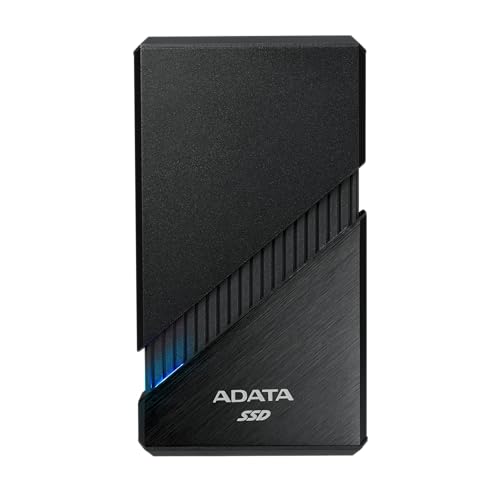
#4. ADATA SE920 1TB External SSD

ADATA SE920 1TB External SSD
Our Score 8.1 / 10 Score details
Performance8.6
Reliability7.6
Portability8.2
Compatibility7.6
Value7.8
How we research & score
BrandADATA
Capacity1 TB
Drive TypeSSD
InterfaceUSB-C
Max Read Speed3800
  • Backups stay consistently fast
  • High read speed
  • Compact and low-heat
  • Lower bandwidth interface

Within SSD external hard drives, the ADATA SE920 1TB stands out for its high stated read speed of up to 3800 MB/s. That makes it well suited to large photo libraries, video files, and frequent backups. Published specifications list a USB-C connection, while research-based scoring gives it strong marks for performance and portability. Its compact design and low heat also suit mobile work.

The main trade-off is its lower-bandwidth interface, which can limit real-world speeds on compatible devices. The 3800 MB/s figure is a maximum claim, not a guaranteed transfer rate. Choose the SE920 if fast file handling matters and your computer can support its connection. For older USB systems, the speed advantage may be smaller.

→ Read full review

#5. SanDisk Extreme Portable 1TB External SSD

SanDisk Extreme Portable 1TB External SSD
Our Score 8.0 / 10 Score details
Performance8.1
Reliability7.6
Portability8.1
Compatibility8.1
Value8.3
How we research & score
BrandSandisk
Capacity1 TB
Drive TypeSSD
InterfaceUSB-C
Max Read Speed1050 MB/s
Dimensions0.4 x 4 x 2.1 in
Weight0.1 lb
  • Backups stay consistently fast
  • Works smoothly across devices
  • Great capacity for cost
  • Lower bandwidth interface
  • File-loss/unmounting anecdotes

For SSD external hard drive use, this SanDisk stands out as a small, bus-powered drive with strong everyday speed. SanDisk rates the 1 TB model for read speeds up to 1050 MB/s through USB-C. That makes large backups, photo libraries, and video files feel quick. Its 4 x 2.1 x 0.4 inch body and 0.1 lb weight also suit travel. Research-based feedback points to smooth use across devices, though the USB interface has lower bandwidth than faster SSD options.

This drive fits users who want quick portable storage without a bulky setup. Its 1 TB capacity balances working files and backups well. Reliability feedback is generally positive, but some reported experiences mention file loss or unexpected unmounting. Keep another copy of important data, especially during travel or long transfers.

#6. Lexar SL500 2TB External SSD

Lexar SL500 2TB External SSD
Our Score 7.9 / 10 Score details
Performance8.1
Reliability7.2
Portability8.5
Compatibility8.1
Value8.1
How we research & score
BrandLexar
Capacity2 TB
Drive TypeSSD
InterfaceUSB 3.2 Gen 2
Max Read Speed2000 MB/s
Dimensions2 x 3.1 x 2.8 in
Weight0.1 lb
  • Backups stay consistently fast
  • Works smoothly across devices
  • Great capacity for cost
  • Sustained write throttling
  • USB 3.2 port dependency

For an SSD external hard drive, the Lexar SL500 stands out with a rated read speed of up to 2000 MB/s and 2 TB of storage. Its small, 0.1 lb design suits travel, quick backups, and moving large files between devices. The USB 3.2 Gen 2 interface also supports smooth everyday use across compatible systems.

Long transfers may slow as sustained writes continue, so it is not ideal for heavy workloads that run for hours. Its speed also depends on a USB 3.2 Gen 2 connection and a compatible host device. This drive best fits users who want fast portable storage for backups, media libraries, and regular file transfers.

#7. LaCie Rugged SSD4 1TB External SSD

LaCie Rugged SSD4 1TB External SSD
Our Score 7.8 / 10 Score details
Performance8
Reliability7.2
Portability7.8
Compatibility8.6
Value7.9
How we research & score
BrandSeagate
Capacity1 TB
Drive TypeSSD
InterfaceUSB-C
Max Read Speed4000
Form Factor2.5 in
Weight0.3 lb
  • Backups stay consistently fast
  • Works smoothly across devices
  • High read speed
  • Lower bandwidth interface

For an SSD external hard drive, the LaCie Rugged SSD4 1TB stands out with its high stated read speed of up to 4000 MB/s. That makes it well suited to moving large photo, video, and backup files. The SSD design also supports quick access and quiet, responsive everyday use. Its USB-C connection helps it work smoothly across modern computers and other compatible devices.

The main trade-off is its lower-bandwidth interface, which may limit real-world speeds compared with faster connection standards. At 0.3 lb, it remains easy to carry, making it a practical choice for mobile backups and media work. It is best for users who want fast, consistent transfers in a compact drive and already use USB-C equipment.

#8. SanDisk Extreme Portable 2TB External SSD

SanDisk Extreme Portable 2TB External SSD
Our Score 7.7 / 10 Score details
Performance7.8
Reliability7.1
Portability8.2
Compatibility8.1
Value8.1
How we research & score
BrandSandisk
Capacity2 TB
Drive TypeSSD
InterfaceUSB-C
Max Read Speed1050 MB/s
Form Factor2.5 in
Dimensions0.4 x 4 x 2.1 in
Weight0.1 lb
  • Works smoothly across devices
  • Great capacity for cost
  • High read speed
  • Lower bandwidth interface

For SSD external hard drives, the SanDisk Extreme Portable 2TB stands out as a compact, bus-powered drive with a rated read speed of up to 1050 MB/s. Its 2TB capacity suits photo libraries, video files, and regular backups. The USB-C connection also makes it a practical choice across modern laptops and other compatible devices.

The main trade-off is its lower-bandwidth interface compared with faster USB or Thunderbolt SSDs. That can limit transfers on newer systems, especially during large file jobs. Still, its small 0.1 lb design and broad device support make it a strong fit for travel, portable work, and everyday storage.

#9. Kingston XS2000 2TB External SSD

Kingston XS2000 2TB External SSD
Our Score 7.7 / 10 Score details
Performance7.4
Reliability7.2
Portability8.9
Compatibility7.4
Value8
How we research & score
BrandKingston
Capacity2 TB
Drive TypeSSD
InterfaceUSB-C
Max Read Speed2000
Dimensions0.5 x 2.7 x 1.3 in
Weight0.1 lb
  • Faster solid-state
  • High read speed
  • Great capacity for cost
  • USB 3.2 dependency
  • Performance-spec mismatch

For an SSD external hard drive, the Kingston XS2000 2TB stands out for its small size and claimed 2000 MB/s read speed. Its USB-C connection and 0.1 lb weight make it easy to carry with a laptop or camera kit. The solid-state design should also feel much quicker than a portable HDD for backups, media work, and moving large files.

That speed depends on a compatible USB 3.2 connection, so older ports may limit performance. The listed peak speed may not match long real-world transfers, especially under heavy workloads. This drive suits users who want a very light 2TB SSD and have newer USB hardware to support it.

→ Read full review

#10. PNY RP60 1TB External SSD

PNY RP60 1TB External SSD
Our Score 7.7 / 10 Score details
Performance7.2
Reliability7.7
Portability7.9
Compatibility8
Value8.3
How we research & score
BrandPNY
Capacity1 TB
Drive TypeSSD
InterfaceUSB 3.2 Gen 2
Max Read Speed2000 MB/s
Dimensions3.83 x 2.36 x 0.49 in
Weight0.1 lb
  • High read speed
  • Great capacity for cost
  • USB-C cross-device support
  • No USB-A adapter

For an SSD external hard drive, the PNY RP60 stands out with a claimed read speed of up to 2000 MB/s. Its 1 TB capacity suits fast backups, media libraries, and moving large files between compatible devices. The USB 3.2 Gen 2 interface and USB-C connection also make it a practical choice for newer laptops, tablets, and phones.

Its 0.1 lb weight and compact 3.83 x 2.36 x 0.49 in body suit travel. However, the package does not include a USB-A adapter, so older computers may need an adapter. This drive is best for users with USB-C devices who want high peak read speed in a very light SSD.

→ Read full review

What to Look For

Sustained Speed: Check the stated sequential read speed and the interface behind it. USB 3.2 Gen 2 SSDs can suit large file transfers, while Thunderbolt models may reach higher speeds with compatible computers. Peak figures do not guarantee the same speed throughout a long transfer.

Capacity and Price: Match capacity to your files, backups, and working space. A 1 TB SSD may suit travel and routine backups, while 2 TB gives more room for video, photo, and game libraries. Compare the price per TB before paying extra for a small speed increase.

Portability and Protection: Look for a compact, bus-powered enclosure that needs no power brick. Weight, cable size, heat, and resistance to drops or water matter when you carry the drive. A protective shell can help, but it does not replace another backup.

Compatibility: Confirm the port, cable, operating system support, and required formatting before buying. USB-C ports can use different speeds, and some drives need an adapter for older USB connections. Console support may also depend on the console and its file system.

Reliability and Security: Review reports of disconnects, overheating, corruption, and long-term failures. Features such as hardware encryption, password access, or included backup software can add useful protection, but they may require a specific app or operating system.

How We Picked

Products were identified through broad research across review sites, manufacturer specifications, and buyer forums. We then filtered the list to models that qualify as SSD external hard drives, excluding portable HDDs and other storage types.

Scoring used the same research-based pillar framework as the main External Hard Drives post. Performance, reliability, portability, compatibility, and value were weighted to allow direct comparison among SSD external hard drives. Scores reflect available evidence and published specifications, not physical testing by The Top Zone.

Frequently Asked Questions

What should I check before buying an external SSD?

Check its interface, capacity, stated read speed, and included cables. USB 3.2 Gen 2 models often offer speeds near 1,000 MB/s, while faster USB-C or Thunderbolt models need matching ports. Also check heat control, warranty coverage, and device support.

Are SSD external hard drives good for moving large video files?

Yes. External SSDs handle large video files much faster than most portable HDDs. Their solid state design also keeps transfers quiet and responsive. Long transfers can still slow down when the drive gets hot or its cache fills.

How should I care for an external SSD?

Eject the drive before unplugging it, especially during file transfers. Keep it cool, dry, and protected from drops. Maintain another backup because an SSD is not a replacement for a backup system.

When should I choose an HDD instead of an external SSD?

Choose an HDD when you need several terabytes at the lowest cost. HDDs work well for large media libraries and backups that you rarely access. Choose an SSD when you value speed, quiet operation, shock resistance, or frequent travel.

How do external SSDs compare with other external hard drives?

External SSDs usually load files and complete backups much faster than HDDs. They are smaller, lighter, quieter, and better suited to travel. HDDs generally offer more storage for less money, while SSDs often provide better everyday performance.

See Also