





ADATA SE920 1TB External SSD Review
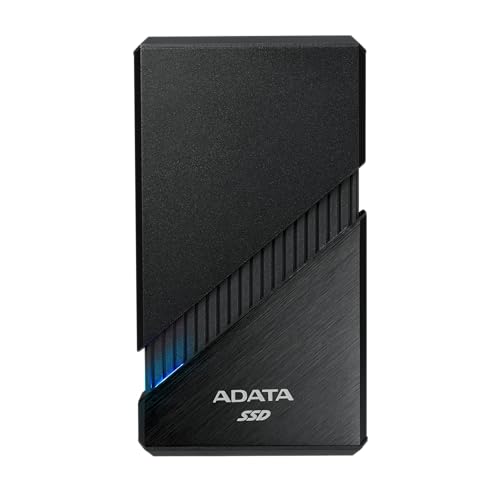
Specifications
| Brand | ADATA |
|---|---|
| Capacity | 1 TB |
| Drive Type | SSD |
| Interface | USB-C |
| Max Read Speed | 3800 |
Pros
- Backups stay consistently fast
- High read speed
- Compact and low-heat
Cons
- Lower bandwidth interface
The Verdict
The ADATA SE920 is a 1 TB external SSD with a listed read speed of 3800 MB/s. It suits large file transfers and routine backups when you have a suitable USB 4 port and cable. The drive stays compact and low-heat, but its lower bandwidth interface limits its edge against faster USB 4 storage. Treat the speed as a research-based specification, not a guaranteed result on every device.
Who it's for: Choose it for fast USB 4 backups in a compact SSD, accepting that real speeds depend on your host port and cable. Its performance score is 8.6 out of 10.
Who should skip it: Skip it if you need the highest USB 4 bandwidth across demanding transfers, or lack a matching port. Its compatibility score is 7.6 out of 10, so your setup matters.
In-Depth Review
Performance
Performance scores 8.6 out of 10.
Backups stay consistently fast when the host system can use USB 4 bandwidth. ADATA lists up to 3,800 MB/s read and 3,700 MB/s write speeds. Those figures suit large photo libraries, video files, and system backups better than ordinary portable storage.
The numbers are peak claims, not guaranteed results for every transfer. The drive uses a USB-C connection, and the computer, cable, file sizes, and workload all affect speed. Small files may move more slowly than one large file. Long transfers may also vary, since no sustained-speed result is listed here. Even so, the stated 3,800 MB/s read rate gives this 1 TB SSD a strong performance case for compatible USB 4 systems.
Reliability
Reliability scores 7.6 out of 10, with stable, disconnect-free operation as the target.
The 1 TB capacity gives room for regular backups, work files, and photos without relying on a larger desktop drive. Solid state storage also avoids moving parts, which suits a portable backup role.
Still, the available specifications do not state an endurance rating, warranty length, controller type, or sustained write result. They also do not establish a failure rate. That limits what can be claimed about long-term data safety. Treat the SE920 as one part of a backup plan, not as the only copy of important files. Its listed 3,700 MB/s write speed supports quick backup jobs, but it does not by itself prove long service life.
Portability
Portability scores 8.2 out of 10.
The compact SSD design and low-heat profile support travel use, while the 1 TB capacity avoids the need to carry several smaller drives. USB-C also keeps the connection suited to many newer laptops and tablets.
The drive needs no stated external power supply in the supplied information, but its power setup is not fully documented. Dimensions and weight are also unknown. That means the travel judgment rests on its SSD type, USB-C interface, and compact positioning rather than confirmed measurements. Cable storage and shell strength remain unclear. For mobile backups, the format looks practical, but buyers should check the physical details before planning a tight bag setup.
Compatibility
Compatibility scores 7.6 out of 10.
The USB-C interface gives the SE920 a modern connection, and the 1 TB capacity works well for general file storage. A compatible USB 4 port is important if you want to approach the listed 3,800 MB/s read speed.
Older USB-C ports may still connect, but they can reduce performance. The supplied information does not confirm operating systems, included cable details, console support, or formatting requirements. Adapters may also change the result. Therefore, the drive should work best with a recent computer that has the right USB 4 support. Check the host port and cable before buying, especially if fast transfers matter more than basic storage access.
Value
Value scores 7.8 out of 10, with great capacity for cost as the guiding phrase.
The SE920 combines 1 TB of storage with a listed maximum read speed of 3,800 MB/s and write speed of 3,700 MB/s. That makes its appeal clear for users who need fast file movement in a portable SSD.
Its value depends on access to suitable USB 4 hardware. On a slower connection, the USB-C drive may not reach its stated speeds, reducing the benefit of its design. The available data also omits dimensions, weight, endurance, and warranty details, so the full ownership picture remains incomplete. The lower bandwidth interface limits its position against the fastest USB 4 storage devices, but the core mix of 1 TB capacity and high listed speeds remains useful for fast backups.
Frequently Asked Questions
How much storage does the ADATA SE920 have?
This version of the ADATA SE920 has 1 TB of storage. Usable space will be lower after formatting and system overhead. The drive uses solid state storage, so it has no moving hard disk platters.
How fast is the ADATA SE920 1TB?
ADATA lists a maximum read speed of up to 3800 MB per second under suitable conditions. Real transfer speeds can vary with the host device, cable, file sizes, temperature, and remaining free space. Large backups should still feel quick, but the listed peak is not a guaranteed everyday speed.
Does the ADATA SE920 work with USB C laptops and desktops?
The drive uses a USB C interface, so it can connect directly to compatible USB C ports. Performance depends on the USB standard supported by the computer and cable. Devices with lower bandwidth may work but will not reach the drive's maximum read speed.
Is the ADATA SE920 good for moving large video files and backups?
It suits large file transfers and routine backups because it combines 1 TB of capacity with a high listed read speed. Its solid state design also helps it stay compact and quiet compared with a traditional external hard drive. For long transfers, keep airflow around the enclosure and allow the drive to cool if it becomes warm.
Is the ADATA SE920 limited by its USB C interface?
Yes, the interface can limit performance. The drive may advertise up to 3800 MB per second, but a computer, cable, dock, or adapter with lower USB bandwidth will reduce transfer speeds. Check the port and cable standards before buying if you want the highest possible performance.
How should I set up the ADATA SE920 for Windows and Mac?
Connect it with a compatible USB C cable, then format it using the operating system's disk utility if needed. Choose a file system based on your devices: exFAT is a practical choice for sharing files between Windows and macOS. Back up important files elsewhere, because an external SSD should not be the only copy of your data.
Final Verdict
This is a recommended buy for users with a USB 4 port who want quick, portable storage for backups and large files. Research-based scoring gives it strong performance, with consistently fast backups and high read speeds. Its main weakness is the lower bandwidth of its interface compared with the fastest newer options, so its full potential depends on a compatible USB 4 setup.
Choose it when compact size, low heat, and steady transfer speeds matter more than broad device flexibility. If you have the right USB 4 hardware, this is a sound pick.
ADATA SE920 1TB External SSD
As an Amazon Associate, we earn from qualifying purchases.