





Skip to content

The 8 Best External Hard Drives in 2026

September 28, 2026-By The Top Zone

Transparency Note: This post contains affiliate links. As an Amazon Associate, we earn from qualifying purchases at no extra cost to you.

External hard drives add storage without opening a computer or replacing its internal drive. They can hold backups, media libraries, work files, and game data. The better choices balance speed, capacity, reliability, and ease of use instead of relying on one headline specification.

Choosing one is harder because SSDs transfer files faster and resist movement, while HDDs usually provide more capacity for less money. Advertised peak speeds may not match long transfers, and USB standards can be confusing. Features such as high burst speed, fingerprint access, or a rugged case may matter less than sustained performance, backup habits, cable support, and reported reliability.

This guide compares selected external drives across performance, reliability, portability, compatibility, and value. It also lists key specifications, including capacity, drive type, interface, speed, dimensions, and weight, so you can match each option to a specific use.

Quick Overview

Top Picks

Best Overall

Samsung T9 2TB External SSD
Our Score 8.2 / 10 Score details
Performance8.3
Reliability8.6
Portability8.3
Compatibility7.1
Value8
How we research & score
BrandSamsung
Capacity2 TB
Drive TypeSSD
InterfaceUSB 3.2 Gen 2x2
Max Read Speed2000 MB/s
Dimensions0.6 x 3.5 x 2.4 in
Weight0.3 lb
  • Stable, disconnect-free operation
  • Backups stay consistently fast
  • Great capacity for cost
  • Interface-dependent speeds

The Samsung T9 fits the Best Overall role because it combines a compact 2 TB SSD with USB 3.2 Gen 2x2 speeds. Samsung rates sequential reads up to 2000 MB/s, giving large file transfers and backups a strong starting point. Its small 0.3 lb body also suits travel and desk use.

Research-based feedback points to stable, disconnect-free operation and consistently fast backups. The bus-powered design keeps setup simple, while the 2 TB capacity leaves room for photo libraries, video projects, and system backups. Its 0.6 x 3.5 x 2.4 inch size makes it easy to carry without an external power brick.

The main limitation is interface-dependent speed. Devices without USB 3.2 Gen 2x2 support may run well below the rated peak. If you want a fast, compact drive for large files and dependable backups, this is the one to get.

Also ranked #1 in: SSD External Hard Drives

→ Read full review

Best Value

Corsair EX300U 1TB External SSD
Our Score 8.2 / 10 Score details
Performance8.7
Reliability7.3
Portability8.6
Compatibility7.7
Value8.5
How we research & score
BrandCorsair
Capacity1 TB
Drive TypeSSD
InterfaceUSB 3.2 Gen 2
Max Read Speed1100 MB/s
  • Backups stay consistently fast
  • Compact and low-heat
  • Great capacity for cost
  • Windows BSOD reports
  • Lower TBW endurance

The Corsair EX300U 1TB fits the Best Value role by pairing SSD speed with a useful 1TB capacity. Its USB 3.2 Gen 2 connection supports read speeds up to 1100 MB/s, making it a strong choice for fast everyday storage and backups.

Large file transfers should feel quick, while the compact, bus-powered design keeps travel simple. It also stays relatively cool during use, which suits laptops and smaller workspaces. The 1TB capacity gives room for photos, projects, games, and backup files without stepping up to a larger drive.

Windows BSOD reports are a concern, and the lower TBW rating may matter to users who write very large amounts of data every day. If you want fast, portable storage for regular backups and files without carrying a bulky drive, this is the one to get.

→ Read full review

Best Rugged

Samsung T7 Touch 2TB External SSD
Our Score 8.1 / 10 Score details
Performance8
Reliability8
Portability8.6
Compatibility8.1
Value8.2
How we research & score
BrandSamsung
Capacity2 TB
Drive TypeSSD
InterfaceUSB 3.2 Gen 2
Max Read Speed1050 MB/s
Dimensions0.3 x 3.3 x 2.2 in
Weight0.1 lb
  • Stable, disconnect-free operation
  • Backups stay consistently fast
  • Great capacity for cost
  • Security behavior varies

The Samsung T7 Touch 2TB fits the Best Rugged role through its compact solid state design and built-in fingerprint security. At about 3.3 by 2.2 by 0.3 inches and 0.1 pounds, it is easy to carry. Its SSD design also avoids the moving parts used in traditional hard drives.

USB 3.2 Gen 2 supports read speeds up to 1050 MB/s, so large backups should feel quick on compatible devices. Research-based user feedback also points to stable, disconnect-free operation and consistent backup speeds. The 2TB capacity suits photo libraries, work files, and travel backups without making the drive bulky.

The main drawback is that its security behavior can vary by device and setup, so fingerprint access may not work the same everywhere. This drive is for people who need fast, portable storage with extra security and without a bulky desktop enclosure.

→ See full ranking

→ Read full review

Best with USB 4

ADATA SE920 1TB External SSD
Our Score 8.1 / 10 Score details
Performance8.6
Reliability7.6
Portability8.2
Compatibility7.6
Value7.8
How we research & score
BrandADATA
Capacity1 TB
Drive TypeSSD
InterfaceUSB-C
Max Read Speed3800
  • Backups stay consistently fast
  • High read speed
  • Compact and low-heat
  • Lower bandwidth interface

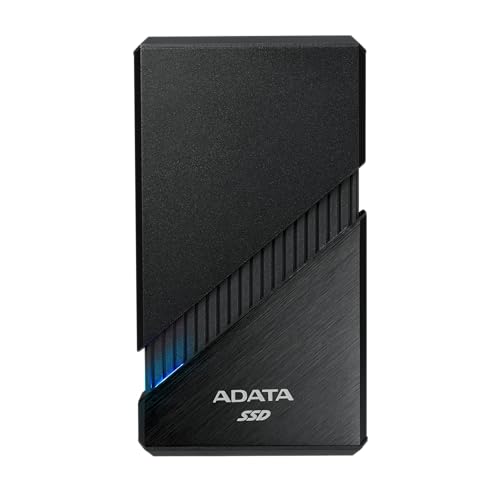
The ADATA SE920 fits the Best with USB 4 role because it is built for very fast USB 4 transfers. Its listed read speed reaches 3800 MB/s, giving large file work and backups a strong speed advantage when paired with a suitable USB 4 port.

Backups should stay consistently fast, and the SSD design keeps the drive compact and low-heat compared with many desktop storage options. Its USB-C connection also suits newer laptops and tablets. The 1 TB capacity is a practical size for work files, photos, and regular backups.

The main trade-off is its lower bandwidth interface compared with the fastest USB 4 storage devices, so actual speeds depend on the host port and cable. If you need a compact SSD for fast USB 4 backups without carrying a bulky drive, this is the one to get.

→ Read full review

Best Lightweight

Kingston XS2000 2TB External SSD
Our Score 7.7 / 10 Score details
Performance7.4
Reliability7.2
Portability8.9
Compatibility7.4
Value8
How we research & score
BrandKingston
Capacity2 TB
Drive TypeSSD
InterfaceUSB-C
Max Read Speed2000
Dimensions0.5 x 2.7 x 1.3 in
Weight0.1 lb
  • Faster solid-state
  • High read speed
  • Great capacity for cost
  • USB 3.2 dependency
  • Performance-spec mismatch

The Kingston XS2000 2TB fits the Best Lightweight role because it is a tiny, bus-powered SSD that weighs just 0.1 lb. Its compact 0.5 x 2.7 x 1.3 inch body is easy to slip into a pocket or laptop bag. That makes it a strong travel drive for quick file access.

Its USB-C connection supports a stated read speed of up to 2,000 MB/s, which should feel much faster than a portable hard drive for large files and backups. The 2TB capacity also leaves room for photos, video, games, and work files. As an SSD, it runs quietly and responds quickly for everyday storage tasks.

That top speed depends on a compatible USB 3.2 connection, and real transfers may not match the headline figure. The listed speed can also feel mismatched with some devices and cables. If you need a very small drive for fast mobile storage without carrying a power adapter, this is the one to get.

→ Read full review

Best with USB C

PNY RP60 1TB External SSD
Our Score 7.7 / 10 Score details
Performance7.2
Reliability7.7
Portability7.9
Compatibility8
Value8.3
How we research & score
BrandPNY
Capacity1 TB
Drive TypeSSD
InterfaceUSB 3.2 Gen 2
Max Read Speed2000 MB/s
Dimensions3.83 x 2.36 x 0.49 in
Weight0.1 lb
  • High read speed
  • Great capacity for cost
  • USB-C cross-device support
  • No USB-A adapter

The PNY RP60 fits the Best with USB C role through its USB 3.2 Gen 2 interface and USB-C support. Its 1 TB SSD uses a compact, bus-powered design, making it a practical choice for moving files between newer laptops, tablets, and other USB-C devices.

PNY rates the drive for read speeds up to 2000 MB/s, which should make large file transfers and backups feel quick when the host device supports the full connection speed. The 0.1 lb body is easy to carry, and its small 3.83 x 2.36 x 0.49 inch shape takes little room in a bag. The 1 TB capacity also suits photo libraries, project files, and game storage.

The main drawback is the lack of a USB-A adapter, so older computers may need an extra adapter or cable. This drive is best for people who want fast, light storage for USB-C devices without carrying a bulky external drive.

→ Read full review

Best for Desktop Backups

SanDisk Desk Drive 8TB External SSD
Our Score 7.6 / 10 Score details
Performance8.3
Reliability7.4
Portability6.6
Compatibility8
Value7.7
How we research & score
BrandSandisk
Capacity8 TB
Drive TypeSSD
InterfaceUSB-C
Max Read Speed1000 MB/s
Dimensions1.6 x 3.9 x 3.9 in
Weight0.6 lb
  • Backups stay consistently fast
  • Works smoothly across devices
  • Generous storage
  • Somewhat bulky for trips
  • Lower bandwidth interface
  • External power required

The SanDisk Desk Drive 8TB fits the Best for Desktop Backups role because it combines a large 8TB capacity with SSD speed. Its 1000 MB/s maximum read speed should make large backup jobs feel much quicker than typical portable hard drives. The desktop design also suits a fixed workspace.

Backups should stay consistently fast, especially when moving large photo, video, or project folders. USB-C connectivity helps it work smoothly across supported computers and other devices. Its 8TB capacity leaves room for repeated backups and growing files without constant cleanup.

The trade-off is portability. At 1.6 x 3.9 x 3.9 inches and 0.6 lb, it is somewhat bulky for trips, and it needs external power. If you need fast, high-capacity backups at a desk without relying on a slower HDD, this is the one to get.

→ Read full review

Best HDD

LaCie Mobile Drive 5TB External Hard Drive
Our Score 7.3 / 10 Score details
Performance6.7
Reliability7.3
Portability7.5
Compatibility8.1
Value8.1
How we research & score
BrandLaCie
Capacity5 TB
Drive TypeHDD
InterfaceUSB-C 3.2
Max Read Speed130 MB/s
Form Factor2.5 in
Dimensions4.7 x 0.8 x 3.4 in
Weight0.7 lb
  • Works smoothly across devices
  • Great capacity for cost
  • Lightweight design
  • Speed dips under load
  • Expectation mismatch

The LaCie Mobile Drive fits the Best HDD role because it combines 5 TB of storage with a compact, bus-powered design. Its 2.5-inch body weighs 0.7 lb, making it easy to carry for backups and media files.

USB-C 3.2 support helps it work smoothly across compatible computers and other devices. LaCie rates sequential read speed at up to 130 MB/s, which suits everyday file transfers and backups. Its lightweight build and broad device support also make setup simple.

Like many portable HDDs, speed can dip during longer or heavier transfers. That can make large backups feel slower than expected. If you need lots of portable storage without the higher cost and lower capacity of an SSD, this is the one to get.

→ See full ranking

→ Read full review

What to Look For

Capacity: Choose enough space for your current files plus future growth. A backup drive should usually hold more than the device or folder it protects.

Drive Type: SSDs offer faster access, lower noise, and better resistance to movement. HDDs usually cost less per terabyte, making them useful for large archives and desktop backups.

Interface and Speed: Check both the connector and the USB or Thunderbolt standard on your computer. Compare stated sequential read speeds, but treat peak figures as best-case results rather than guaranteed long-term transfer rates.

Reliability: Look for consistent user reports about disconnects, overheating, data errors, and long-term use. No external drive replaces a second backup stored elsewhere.

Portability: For travel, check weight, dimensions, power needs, cable length, and enclosure strength. A bus-powered 2.5-inch drive is easier to carry than a desktop unit with a power brick.

Compatibility: Confirm support for your operating system, console, or other device. Some drives may need reformatting for macOS, Windows, game consoles, or cross-platform use.

Price and Value: Compare price per terabyte alongside speed and build quality. A faster SSD may justify its cost for frequent transfers, while an HDD often offers better value for inactive files.

How We Selected These Products

Products were discovered through broad web searches across review sites, buyer forums, retailer pages, and best-of lists. We did not rely on one source. Available third-party commentary and search snippets informed reported strengths and drawbacks, but snippets are incomplete, and owner identities or purchase status were not independently verified.

Retailer listings supplied availability, pricing, and specification details where available. Those listings are not independent verification of manufacturer claims, and unknown specifications remain unknown. This is AI-assisted desk research, not physical testing by The Top Zone.

Each product received a research-based assessment across Performance, Reliability, Portability, Compatibility, and Value using a category-specific AI-assisted framework. Final curation focused on products that fit distinct roles, such as travel, desktop backups, or faster connections, rather than simply ranking every product by score.

Frequently Asked Questions

Which external drive is best for large file transfers?

Choose a portable SSD with a USB 3.2 Gen 2x2 or USB4 connection. The Samsung T9 2TB External SSD is the strongest all-around pick, with speeds up to 2000 MB/s on compatible devices. Check your computer port first, since slower ports reduce its speed.

What is the difference between portable and desktop external drives?

Portable drives are smaller, lighter, and usually draw power from the USB port. Desktop drives often hold more data, but they may need a power adapter and stay on a desk. Choose a portable model for travel and a desktop model for large home backups.

How should I set up and care for an external drive?

Format the drive for your devices before storing important files, and safely eject it before unplugging. Keep HDDs away from drops and movement while they run. SSDs handle travel better, but every drive should have a second backup.

Is a higher price always better for external hard drives?

No. Higher prices often buy faster SSD storage, larger capacity, or newer ports, but they do not guarantee better value. A basic HDD can offer much more storage per dollar, while a mid-priced SSD may deliver the best balance of speed and cost.

Why do some external drives feel slow during long transfers?

Peak speed ratings usually apply to short bursts and require a matching cable and port. Some SSDs slow down after their cache fills, while HDDs have lower speeds from the start. For frequent large backups, look for strong sustained performance and use the fastest supported connection.