




The 8 Best Smartphones in 2026

Transparency Note: This post contains affiliate links. As an Amazon Associate, we earn from qualifying purchases at no extra cost to you.

Smartphones are your everyday computer. They handle calls, photos, maps, payments, and streaming in one pocket-sized device. The right one feels fast, keeps going through the day, and delivers photos you can count on. The wrong one looks good in specs but feels frustrating in daily use.

Picking one is hard because specs can mislead. Bigger numbers do not always mean better results, especially for cameras and battery life. Refresh rate matters, but only if the phone also stays smooth under load. Fast processors help, yet some phones throttle when they heat up. Camera megapixels can sound impressive while autofocus, stabilization, and low-light processing do the real work. Storage and RAM also vary by model and can affect app switching and future updates.

This guide compares top options using the same real-world criteria. You will see what performance feels like, how main rear camera photos turn out, and how long the battery lasts. You will also get clear targets for display quality and comfort, plus notes on build, software, and value for money.

Quick Overview

Apple iPhone 16 Pro Max
Best Overall Apple iPhone 16 Pro Max
Apple iPhone 17 Pro
Best for Multitasking Apple iPhone 17 Pro
Samsung Galaxy S24 Ultra
Best 512GB Samsung Galaxy S24 Ultra
Samsung Galaxy S26 Ultra
Best Privacy Display Samsung Galaxy S26 Ultra
Google Pixel 9a
Best Gemini AI Google Pixel 9a
Google Pixel 8 Pro
Best for Low Light Google Pixel 8 Pro
Apple iPhone 16
Best Compact Apple iPhone 16
Google Pixel 7a
Best Value Google Pixel 7a

Top Picks

Best Overall

Apple iPhone 16 Pro Max
Our Score
8.8 / 10
hover for details
Performance
9.3
Camera
9
Battery
9
Display
8.7
Build
8.7
Software
8.7
Value
8
BrandApple
Display Size6.9 in
Display TypeOLED
Refresh Rate120 Hz
ProcessorApple A18 Pro
Ram8 GB
Storage256 GB
Rear Camera48 MP
Battery Capacity4676 mAh
  • Blazing daily speed
  • Consistently sharp photos
  • All-day endurance
  • Limited RAM for multitasking
  • AI features delayed
  • Accidental camera-button taps

For a Best Overall pick, the iPhone 16 Pro Max stands out because it feels consistently fast in day-to-day use. That kind of smoothness matters more than raw specs for most people, and this model delivers that across apps, scrolling, and heavier tasks.

Camera results are consistently sharp, with strong detail and good color in real-world photos. Video is also steady thanks to its stabilization, making clips look clean even when you move. Battery life lands in the all-day range, and performance stays responsive without obvious slowdown.

One drawback is multitasking RAM, at 8 GB, which can feel limiting if you keep many apps open. AI features can also roll out slowly, and the camera button can trigger accidental taps. If you want the most reliable all-around iPhone experience for photos, speed, and long battery days without fuss, this is the one to get.

Also ranked #1 in: 120Hz Smartphones

→ Read full review

Best for Multitasking

Apple iPhone 17 Pro
Apple iPhone 17 Pro
Our Score
8.7 / 10
hover for details
Performance
9.3
Camera
9
Battery
8.6
Display
8.7
Build
8.3
Software
8.1
Value
7.9
BrandApple
Display Size6.3 in
Display TypeLTPO OLED
Refresh Rate120 Hz
Ram12 GB
Storage256 GB
Rear Camera48 MP
  • Blazing daily speed
  • Consistently sharp photos
  • Fast, dependable charging
  • Wi-Fi drops intermittently
  • Carrier provisioning issues
  • Rare black splotches

This iPhone fits the Best for Multitasking role because it stays responsive while you juggle apps, tabs, and background tasks. The standout is its smooth 120 Hz LTPO OLED display, which makes switching screens and scrolling feel instant. With a fast, modern chip and a focus on sustained responsiveness, daily work stays fluid even when things get busy.

Speed is the main strength, with blazing day to day performance that feels quick in apps and during multitask sessions. Photos are also consistently sharp thanks to the 48 MP main camera, which produces detailed results with dependable autofocus. Battery life is solid for a full day of mixed use, and charging is fast and dependable when you need a top up.

Not everything is perfect. Some users report intermittent Wi-Fi drops, plus rare issues like carrier provisioning hiccups and occasional black splotches. If you want a phone that feels fast under multitasking pressure and you rely on steady photo quality, this is a strong choice, as long as you are willing to troubleshoot those connectivity edge cases.

→ Read full review

Best 512GB

Samsung Galaxy S24 Ultra
Our Score
8.6 / 10
hover for details
Performance
9.1
Camera
8.9
Battery
8.1
Display
8.6
Build
8.7
Software
8.2
Value
8
BrandSamsung
Display Size6.8 in
Display TypeAMOLED
Refresh Rate120 Hz
ProcessorSnapdragon 8 Gen 3 for Galaxy
Ram12 GB
Storage256 GB
Rear Camera200 MP
Battery Capacity5000 mAh
  • Blazing daily speed
  • Reliable night shots
  • Fast, dependable charging
  • Low brightness mura
  • Scrolling touch quirks

This is a strong fit for the Best 512GB role because the Galaxy S24 Ultra is built for people who keep a lot on their phone. With 512GB of storage, it matches the kind of heavy use that also demands top-end speed. The 6.8 in AMOLED screen and 120 Hz refresh rate help that experience stay smooth while you store, sync, and create large files.

Day-to-day performance feels fast and steady. The Snapdragon 8 Gen 3 for Galaxy keeps apps responsive, and gaming stays smooth for long sessions. Camera results are also dependable, especially at night, where details hold up and autofocus stays quick. Battery life lands in a comfortable zone for a full day, and charging is fast enough to top up without long waits.

The main drawback is low brightness mura, which can show up on darker screens. You may also notice scrolling touch quirks during more precise browsing. If you want maximum storage and consistent day-to-day speed with a reliable camera, this is the one to get.

→ See full ranking

→ Read full review

Best Privacy Display

Samsung Galaxy S26 Ultra
Our Score
8.4 / 10
hover for details
Performance
9.1
Camera
8.5
Battery
8.1
Display
7.9
Build
8.3
Software
8.3
Value
7.8
BrandSamsung
Display Size6.89 in
Display TypeAMOLED
ProcessorQualcomm Snapdragon 8 Elite Gen 5
Ram12 GB
Storage512 GB
Rear Camera200 MP
Battery Capacity5000 mAh
  • Blazing daily speed
  • Reliable night shots
  • Fast, dependable charging
  • Reduced text clarity
  • Sharpness inconsistencies
  • Incremental upgrade letdown

The Galaxy S26 Ultra fits the "Best Privacy Display" slot because Samsung keeps the screen readable from the angles you do not want. With privacy-focused viewing controls, your content stays harder to see when someone looks over your shoulder. It is the kind of screen behavior that matters on trains, in offices, and at home.

Day-to-day use feels fast. The Snapdragon 8 Elite Gen 5 platform delivers blazing daily speed with strong multitasking and steady responsiveness. Battery life stays dependable for typical heavy use, and charging is quick and reliable. On the imaging side, it turns in reliable night shots, so low-light photos look usable more often than not.

The trade-off is text clarity and some uneven sharpness. Small details can look softer than expected, and sharpness may vary between shots. If you need a screen that helps protect what you see without giving up speed, this is the one to get.

→ Read full review

Best Gemini AI

Google Pixel 9a
Google Pixel 9a
Our Score
8.3 / 10
hover for details
Performance
8.1
Camera
8.4
Battery
8.6
Display
8.2
Build
8.2
Software
8.6
Value
8.1
BrandGoogle
Display Size6.3 in
Display TypepOLED
Refresh Rate120 Hz
ProcessorTensor G4
Ram8 GB
Storage128 GB
Rear Camera48 MP
Battery Capacity5100 mAh
  • Reliable night shots
  • Strong value at price
  • Smooth under pressure
  • Limited multitasking RAM
  • Too little built-in storage

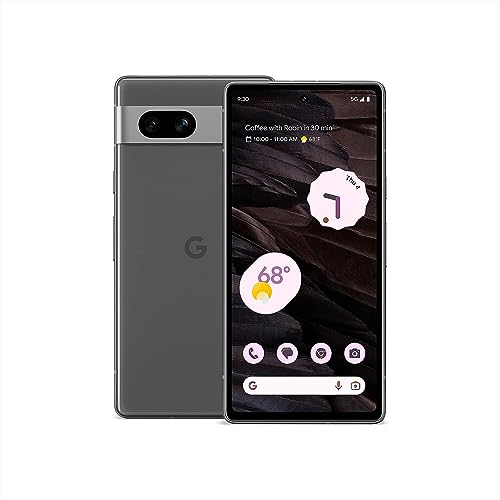
This is a strong pick for the Best Gemini AI slot because the Pixel 9a is built around Googles AI helpers in day to day tasks. The experience feels quick and practical, and it stays smooth while you chat, edit, and search using Gemini in the background.

In daily use, it stays responsive, thanks to the Tensor G4, with enough speed to handle apps without stutter. The camera is also a highlight, with reliable night shots and consistent results from its 48 MP main rear camera. Battery life is another win, with a 5100 mAh cell that holds up through a typical day, and the display stays fluid at 120 Hz.

The main catch is storage. With only 128 GB, you may need to manage photos and downloads. If you want the best Gemini AI experience on a fast, dependable phone, this is a good choice, especially if you do not keep large media libraries on-device.

→ See full ranking

→ Read full review

Best for Low Light

Google Pixel 8 Pro
Google Pixel 8 Pro
Our Score
8.3 / 10
hover for details
Performance
8.6
Camera
8.8
Battery
7.3
Display
8.2
Build
8.1
Software
8.2
Value
8.3
BrandGoogle
Display Size6.7 in
Display TypeLTPO OLED
Refresh Rate120 Hz
ProcessorGoogle Tensor G3
Ram12 GB
Storage128 GB
Rear Camera50 MP
Battery Capacity5050 mAh
  • Reliable night shots
  • High 120 Hz smoothness
  • Strong value at price
  • Too little built-in storage
  • Zoom inconsistency
  • Camera launch bug

For low light, the Pixel 8 Pro is a strong pick because its night shots look steady and reliable. Google is especially good at keeping photos bright without turning them into mushy, over-smoothed images. In darker rooms and at night outside, it tends to deliver pictures you actually want to keep.

That night performance is backed by a fast, smooth daily experience. A 120 Hz LTPO OLED display feels great for quick camera checks and scrolling. Under the hood, the Google Tensor G3 keeps things responsive for everyday tasks, with minimal lag. The camera also tends to feel consistent, so you are not constantly fixing focus or exposure after the fact.

One catch is storage. With 128 GB built in, you may manage space sooner than you want, especially if you shoot lots of video. There is also a known camera launch bug that can be annoying when you just want to snap quickly. If you want the most dependable low-light photos with a smooth screen, get the Pixel 8 Pro, but consider a higher storage option if you hate deleting files.

→ Read full review

Best Compact

Apple iPhone 16
Apple iPhone 16
Our Score
8.3 / 10
hover for details
Performance
8.8
Camera
8.5
Battery
8.1
Display
7.2
Build
8.6
Software
8.3
Value
8
BrandApple
Display Size6.1 in
Display TypeOLED
Refresh Rate60 Hz
ProcessorApple A18
Ram8 GB
Storage128 GB
Rear Camera48 MP
Battery Capacity3561 mAh
  • Flagship-grade chipset
  • Reliable night shots
  • Fast, dependable charging
  • Only 60 Hz scrolling
  • Too little built-in storage
  • Small battery capacity

Designed for people who want top-tier performance in a smaller body, the Apple iPhone 16 fits the Best Compact slot thanks to its 6.1 in OLED display. It stays easy to hold and still feels like a modern daily driver.

Under the hood, the A18 chipset keeps things fast and smooth for apps and multitasking. The camera is also a strong point, with consistent 48 MP main shots that turn in reliable night photos. Battery life is solid too, helped by fast, dependable charging that gets you back on track quickly.

The main downside is the 60 Hz refresh rate, so scrolling feels less fluid than on many rivals. Storage is another limit, with just 128 GB starting point and a small 3561 mAh battery capacity. If you want a compact iPhone with fast performance and strong night photos, this is the one to get, as long as you can live with 60 Hz and limited storage.

→ Read full review

Best Value

Google Pixel 7a
Google Pixel 7a
Our Score
7.9 / 10
hover for details
Performance
8
Camera
8.2
Battery
6.6
Display
7.6
Build
8.2
Software
8.2
Value
8.5
BrandGoogle
Refresh Rate90 Hz
Ram8 GB
Rear Camera64 MP
Battery Capacity4385 mAh
  • Reliable night shots
  • Strong value at price
  • Clean, feature-rich UI
  • Drains faster than expected
  • Limited RAM for multitasking
  • Slow charging

Google Pixel 7a fits the Best Value role because it nails the everyday stuff that matters most, especially its reliable camera processing. You get a phone that feels smooth for daily tasks and takes strong photos without needing to tweak settings.

On the camera side, night shots are a standout. Images tend to stay sharp with good detail, even after dark. Performance is also solid for day-to-day use, with a responsive feel backed by a 90 Hz display and 8 GB of RAM. Software helps too, since the UI stays clean and feature-rich, and daily navigation feels polished.

The main trade-off is battery and charging. Battery life drains faster than expected for some users, and charging feels slow. If you want a dependable camera and a simple, steady Android experience, Pixel 7a is a great pick, especially if you do not mind charging overnight or topping up more often.

→ Read full review

What to Look For

Performance: Choose a phone that stays responsive in daily tasks, not just in benchmarks. Look for strong sustained speed during gaming and long camera sessions. Pay attention to reviews that mention heat, lag, or stuttering after heavy use.

Camera: Focus on the main rear camera. Check sharpness, autofocus speed, HDR balance, and how skin tones look. For video, look for stabilization and consistent exposure in motion. Low light matters, so prioritize reviews that test night mode and street scenes.

Battery: Battery life should cover a full day for your habits, including screen-on time. Check reported endurance in mixed use, not only standby. Also verify charging speed and whether real-world users say the battery holds up over time.

Display: A good display is bright, color-accurate, and easy to read outdoors. Match your preference with the panel type and refresh rate. Look for smooth motion, but also for touch responsiveness and stable brightness outdoors.

Build: Durability affects how the phone ages. Check for a solid feel, good button click, and minimal flex. If you are hard on phones, confirm water resistance and look for feedback about scratch resistance and glass robustness.

Software: Software quality shows up in smoothness, stability, and update support. Avoid phones with frequent bugs, heavy bloat, or slow feature delivery. Look for clear update timelines and reports that the interface stays fast over time.

Value: Compare the phone to close alternatives at the same price. A model can be expensive and still fall short if it compromises on camera reliability, battery endurance, or display comfort. Decide which trade-offs you can live with, and where you should not.

How We Selected These Products

We started by finding widely reviewed smartphones from broad web searches across major review sites, buyer forum threads, and best-of lists. We did not rely on one publication or a single ranking page. We then read a large volume of customer reviews to spot repeat problems, such as slow focus, battery drain, overheating, or slow updates, and to confirm which strengths people actually used.

Next, we verified availability and key specifications directly against Amazon listings. We then scored each phone across the pillar categories, including Performance, Camera, Battery, Display, Build, Software, and Value, using an objective framework focused on real use. Final picks favored phones that stand out for distinct roles, such as multitasking, low-light photography, strong storage options, or strong software support, rather than simply chasing the highest overall score.

Frequently Asked Questions

Which smartphone is best for multitasking?

Choose Apple iPhone 17 Pro if you multitask heavily. It pairs top performance with higher RAM than the iPhone 16 Pro range. That extra headroom helps keep more apps running smoothly. You also get iOS multitasking that stays responsive over long sessions.

What key differences should I expect between budget, midrange, and premium smartphones?

Budget phones usually trade away speed, camera consistency, and long battery life. Midrange models often deliver strong everyday use, with smaller compromises in one or two areas. Premium phones usually offer better sustained performance, brighter smoother displays, and more reliable cameras. You also tend to get stronger long-term support from top brands.

How can I prevent battery drain issues on a new smartphone?

After setup, give the phone time to finish syncing apps and photos. Background activity can cause unusual drain for the first few days. Use Battery Saver when you know you will be away from a charger. If drain stays severe, check for rogue apps and restart after major updates.

Is a higher price always better for smartphones?

Not always. Some phones cost much more but only improve one area, like camera or display. Others deliver strong day to day value at a lower price. In this list, Google Pixel 7a leads the value score even with fewer premium perks.

Why do flagship smartphones sometimes still have display or battery complaints?

Even top models use complex displays and power saving features. That can create problems for some users, like uneven brightness, flicker sensitivity, or fast drain on certain settings. Battery life also depends on how you use the phone, like QHD plus and 120Hz. So a flagship can be best overall and still not be perfect for everyone.

What separates best camera phones from the rest in real life?

The biggest differences come from reliability, not just megapixels. Look for consistent autofocus, stable video, and solid low light results. Top cameras also handle moving subjects with less shutter delay. In this set, Apple iPhone 16 Pro Max and Samsung Galaxy S24 Ultra score highly for consistency.

Share:
On Key
You Might Also Like