“120Hz Smartphones” here means a phone that can run a 120Hz refresh rate for smoother motion and scrolling. For buyers, that matters most in everyday apps like social feeds, maps, and camera preview. It also matters for touch response, animation smoothness, and gaming feel.
Picking the right one is harder than it looks. Many phones drop below 120Hz to save power, so battery life can take a hit. Display brightness and color can vary a lot even at the same refresh rate. Chip choice affects sustained speed, and camera results can differ sharply by lighting and video mode.
If you want guidance across every kind of handset, not just 120Hz models, Looking for all types? See our Best Smartphones.
Quick Overview
Our Top Picks
#1. Apple iPhone 16 Pro Max

Specifications
| Brand | Apple |
|---|---|
| Display Size | 6.9 in |
| Display Type | OLED |
| Refresh Rate | 120 Hz |
| Processor | Apple A18 Pro |
| Ram | 8 GB |
| Storage | 256 GB |
| Rear Camera | 48 MP |
| Battery Capacity | 4676 mAh |
Pros
- Blazing daily speed
- Consistently sharp photos
- All-day endurance
Cons
- Limited RAM for multitasking
- AI features delayed
- Accidental camera-button taps
The iPhone 16 Pro Max is the top pick in 120Hz smartphones because the motion stays smooth for real life, not just for scrolling. With a 6.9 in OLED panel running at 120 Hz, animations feel quick and text stays steady when you pan, game, or swipe between apps. Performance also stays responsive over time, which matters when you use that high refresh rate all day.
That smooth experience comes with a couple of practical trade-offs. The phone has 8 GB of RAM, so heavy multitasking can feel tighter than some Android rivals with more memory. Camera controls can also take a little getting used to, since accidental taps happen more easily than you would expect. If you want the cleanest 120Hz feel, strong all day battery life, and consistently sharp photos, this is the safest choice.
#2. Samsung Galaxy S24 Ultra

Specifications
| Brand | Samsung |
|---|---|
| Display Size | 6.8 in |
| Display Type | AMOLED |
| Refresh Rate | 120 Hz |
| Processor | Snapdragon 8 Gen 3 for Galaxy |
| Ram | 12 GB |
| Storage | 256 GB |
| Rear Camera | 200 MP |
| Battery Capacity | 5000 mAh |
Pros
- Blazing daily speed
- Reliable night shots
- Fast, dependable charging
Cons
- Low brightness mura
- Scrolling touch quirks
The Galaxy S24 Ultra is a top choice for anyone who wants a smooth 120Hz feel without giving up everyday speed. The 6.8 in AMOLED screen looks fluid in scrolling and games, and the phone stays fast in day-to-day multitasking. Performance scores high partly because it handles heavy use without turning sluggish, so the high refresh rate stays useful, not just on paper.
The main trade-off is display tuning. Some users may notice low brightness mura, and touch response can be a bit quirky when scrolling. If you care most about a consistently responsive, 120Hz experience and pair it with dependable charging and reliable night photos, this is an easy pick, even if the display is not perfect at every brightness level.
#3. Apple iPhone 16 Pro

Specifications
| Brand | Apple |
|---|---|
| Display Size | 6.3 in |
| Display Type | LTPO OLED |
| Refresh Rate | 120 Hz |
| Processor | Apple A18 Pro |
| Ram | 8 GB |
| Storage | 256 GB |
| Rear Camera | 48 MP |
| Battery Capacity | 3582 mAh |
Pros
- Blazing daily speed
- Reliable night shots
- High 120 Hz smoothness
Cons
- Limited RAM for multitasking
- Post-update battery drain
The iPhone 16 Pro stands out in the 120Hz smartphone group because the 120 Hz LTPO OLED display stays fluid without feeling harsh on the eyes. Scrolling, animations, and touch response feel smooth day after day, and the A18 Pro keeps things moving fast in regular use. Even when you push the phone with heavier apps, it remains responsive, so the high refresh rate does not feel wasted.
The main trade-off is multitasking memory. With 8 GB RAM, switching between many demanding apps can be less forgiving than on some Android rivals, especially after longer sessions. Battery life is also a bit inconsistent after updates, so light users will likely be fine, but heavy screen time or frequent background activity may require closer monitoring.
#4. Samsung Galaxy S24+

Specifications
| Brand | Samsung |
|---|---|
| Display Size | 6.7 in |
| Display Type | AMOLED |
| Refresh Rate | 120 Hz |
| Processor | Snapdragon 8 Gen 3 / Exynos 2400 |
| Ram | 12 GB |
| Storage | 256 GB |
| Rear Camera | 50 MP |
| Battery Capacity | 4900 mAh |
Pros
- High 120 Hz smoothness
- Reliable night shots
- Fast, dependable charging
Cons
- Post-update drain
- Account access friction
The Samsung Galaxy S24+ stands out in 120Hz Smartphones thanks to its smooth, steady feel day to day. The 6.7 in AMOLED panel runs at 120 Hz, making scrolling, animations, and gaming motion look cleaner than 60 Hz phones. In daily use, it stays responsive without obvious stutter, so the high refresh rate feels consistent rather than just a spec on paper. It also pairs that smooth display with dependable night photography, which matters when you want both fluid motion and usable camera results in the same phone.
The trade-off is software and account friction. Some users may notice post-update battery drain, and getting into accounts can feel a bit more involved than expected. This is best for people who prioritize a truly smooth 120 Hz experience and want reliable cameras, and who are willing to work with Samsung's setup and update behavior.
#5. Google Pixel 8 Pro

Specifications
| Brand | |
|---|---|
| Display Size | 6.7 in |
| Display Type | LTPO OLED |
| Refresh Rate | 120 Hz |
| Processor | Google Tensor G3 |
| Ram | 12 GB |
| Storage | 128 GB |
| Rear Camera | 50 MP |
| Battery Capacity | 5050 mAh |
Pros
- Reliable night shots
- High 120 Hz smoothness
- Strong value at price
Cons
- Too little built-in storage
- Zoom inconsistency
- Camera launch bug
The Pixel 8 Pro is a top pick for anyone who cares about smooth motion, since it pairs a 6.7 in LTPO OLED display with 120 Hz refresh. Scrolling feels fluid, and touch response stays quick for everyday tasks like feeds, maps, and switching apps. It also keeps performance steady in normal use, so the UI motion and animations do not feel like they slow down.
The trade-off is storage. With only 128 GB, you may run into space limits sooner than you expect, especially if you save lots of photos and videos. Camera performance is strong in many situations, but there can be some inconsistency with zoom, plus occasional camera launch quirks.
#6. OnePlus 15

Specifications
| Brand | OnePlus |
|---|---|
| Display Size | 6.78 in |
| Display Type | AMOLED |
| Refresh Rate | 165 Hz |
| Processor | Snapdragon 8 Elite Gen 5 |
| Ram | 16 GB |
| Storage | 512 GB |
| Rear Camera | 50 MP |
| Battery Capacity | 7300 mAh |
Pros
- Fast, dependable charging
- Reliable night shots
- High 120 Hz smoothness
Cons
- Thermal instability reports
The OnePlus 15 stands out in the 120Hz smartphone crowd with a very smooth 165 Hz AMOLED experience. Scrolling feels crisp, and everyday animations stay steady when you switch apps or browse fast. It also pairs that smooth motion with strong responsiveness from a Snapdragon 8 Elite Gen 5 setup, so the higher refresh rate actually shows up in daily use, not just in spec sheets.
The main trade-off is heat. Some users report thermal instability, which can matter during long gaming sessions or heavy camera work. If you want top-tier fluidity and reliable charging, this is a strong pick, but if you are very sensitive to throttling, it is worth paying attention to real-world performance in your typical routines.
#7. Samsung Galaxy Z Fold6

Specifications
| Brand | Samsung |
|---|---|
| Display Size | 7.6 in |
| Display Type | AMOLED |
| Refresh Rate | 120 Hz |
| Processor | Snapdragon 8 Gen 3 for Galaxy |
| Ram | 12 GB |
| Storage | 512 GB |
| Rear Camera | 50 MP |
| Battery Capacity | 4400 mAh |
Pros
- High 120 Hz smoothness
- Flagship-grade chipset
- Well-built and sturdy
Cons
- Awkward cover ergonomics
- Limited software novelty
For people chasing true 120Hz smoothness, the Samsung Galaxy Z Fold6 is notable for how well that fluid feel carries over to a large folding display. The 7.6 in AMOLED panel makes scrolling, app switching, and pen-like precision feel responsive, and the Snapdragon 8 Gen 3 for Galaxy keeps daily use quick and stable. In a sub-category where 120Hz can sometimes feel inconsistent across screens, this one stays smooth in motion and multitasking.
The main trade-off is comfort and software style rather than speed. The folded-phone ergonomics can feel awkward with the cover shape, and there is less novelty than you get from newer swing-and-fold ideas. It is best for buyers who want a big, 120Hz display for work and media, and who do not mind living with a bulkier form factor.
#8. Google Pixel 8a

Specifications
| Brand | |
|---|---|
| Display Size | 6.1 in |
| Display Type | OLED |
| Refresh Rate | 120 Hz |
| Processor | Tensor G3 |
| Ram | 8 GB |
| Storage | 128 GB |
| Rear Camera | 64 MP |
| Battery Capacity | 4492 mAh |
Pros
- Reliable night shots
- Strong value at price
- Clean, feature-rich UI
Cons
- Thermal performance dips
- Scenario camera misses
The Pixel 8a stands out in the 120Hz smartphone group with a smooth 120 Hz OLED display that feels steady in daily scrolling and app switching. The biggest day-to-day wins come from Google’s clean software and dependable camera processing. Night photos are consistently strong, and most shots look natural without heavy edits. Overall, it is a comfortable pick for people who want the fluid feel of 120Hz without giving up a reliable Pixel camera experience.
The main trade-off is performance stability under heat. In longer or heavier tasks, it can dip thermally, which may reduce sustained smoothness. Camera results also do not always hit, since some scenes can look inconsistent. This phone fits best if you care more about smooth everyday use and consistent night photography than peak sustained performance.
#9. Samsung Galaxy Z Flip6

Specifications
| Brand | Samsung |
|---|---|
| Display Size | 6.7 in |
| Display Type | AMOLED |
| Processor | Snapdragon 8 Gen 3 for Galaxy |
| Ram | 12 GB |
| Storage | 256 GB |
| Rear Camera | 50 MP |
Pros
- Well-built and sturdy
- Strong value at price
- OLED/AMOLED contrast
Cons
- Flex Window complexity
- Fold UX learning curve
The Samsung Galaxy Z Flip6 stands out for people who want a 120Hz-like smooth feel but also need a foldable form factor. The cover and main displays make everyday scrolling and swiping feel fluid, and that matters more than usual on a fold. You spend time in short bursts, like checking messages on the outer screen, and higher refresh motion helps the phone feel responsive instead of laggy.
The trade-off is the fold experience itself. The Flex Window is powerful, but its behavior takes time to learn, and switching between cover and inner use can slow you down at first. If you want the smoothest, simplest 120Hz phone experience with the least thinking, a candy-bar model will feel easier. If you like the compact shape and accept a short learning curve, the Z Flip6 is a strong match.
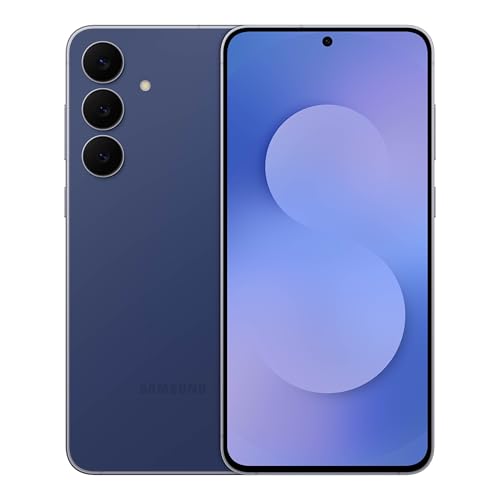
#10. Samsung Galaxy S25 FE
Specifications
| Brand | Samsung |
|---|---|
| Display Size | 6.7 in |
| Display Type | AMOLED |
| Refresh Rate | 120 Hz |
| Processor | Exynos 2400 |
| Ram | 8 GB |
| Storage | 256 GB |
| Rear Camera | 50 MP |
| Battery Capacity | 4900 mAh |
Pros
- High 120 Hz smoothness
- Flagship-grade chipset
- Fast, dependable charging
Cons
- Limited RAM for multitasking
- Cloud-dependent AI lag
- Value concerns
The Samsung Galaxy S25 FE stands out in the 120Hz smartphone group thanks to its smooth AMOLED 120 Hz experience on a 6.7 in display. Scrolling feels fluid, animations look steady, and gaming and social feeds stay responsive without the stutter some midrange options show. Day to day performance also stays quick, helped by the Exynos 2400, so the high refresh rate actually feels usable rather than cosmetic.
The main trade-off is multitasking. With 8 GB of RAM, running lots of apps can lead to quicker reloads than you would get from higher RAM rivals. Camera results are solid in normal light, but low light and video can be more hit or miss, and some AI features can feel slow if your connection is weak. This is a good pick for people who want consistently smooth 120 Hz motion and dependable charging, and who can live with lighter multitasking muscle.
What to Look For
Real 120Hz behavior: Check whether the phone truly stays near 120Hz in common use, not only in a special mode. Look for settings that control refresh rate and read reviews that test smoothness during long sessions.
Display quality at high brightness: Prioritize OLED with strong outdoor readability. Even a 120Hz panel feels disappointing if it is dim, washed out, or hard to read in daylight.
Performance that stays fast: A 120Hz screen exposes any stutter. Favor phones with a modern flagship processor and good thermal control so scrolling and games stay smooth over time.
Battery life with 120Hz enabled: The refresh rate can raise power use. Aim for phones that still deliver a full day under typical use, and verify charging speed if you rely on fast top ups.
Camera consistency for video and night: A smooth display does not fix weak camera processing. Compare how the main rear camera performs for sharpness, autofocus, stabilization, and low-light results across real scenes.
How We Picked
Products were identified through broad research across review sites and buyer forums, then filtered to only those that qualify as 120Hz Smartphones.
Scoring used the same objective pillar framework as the main Smartphones post, allowing direct comparison of products within this sub-category. Each phone was assessed on Performance, Camera, Battery, Display, Build, Software, and Value to select the top 120Hz options for day-to-day use.
Frequently Asked Questions
Do all 120Hz smartphones keep 120Hz all the time?
Not always. Many phones switch refresh rates based on what you do, like scrolling versus gaming. This helps save battery. Check for adaptive refresh support if you want the smooth look most of the time.
Is a 120Hz screen worth it for everyday use, not just gaming?
Yes, if you notice smooth scrolling and faster-feeling touch response. Apps open and move more fluidly when animations run smoother. You may also feel it in social feeds and web browsing. If you mostly read static pages, the gain feels smaller.
How can I get the best battery life on a 120Hz smartphone?
Use Adaptive or Auto brightness and keep battery saver off only when you need it. Turn down screen brightness in low light. If your phone lets you choose a lower refresh rate, try 60Hz for long days away from a charger. Also watch for apps that keep running in the background.
Should I buy a 120Hz smartphone or a cheaper 60Hz model?
Choose 120Hz if you care about smooth scrolling, gaming, or very responsive feel. Choose 60Hz if your budget is tight and you want the best value in cameras and battery. Many buyers feel the difference most during daily swipes and motion-heavy apps. Decide based on how much you use those activities.
When would I consider a different smartphone type instead of a 120Hz phone?
Consider a rugged phone if you need better drop and water protection. Consider a foldable if you want tablet-like space for media and multitasking. Consider a smaller phone if you want easier one-hand use and less power drain. If your top priority is camera or charging speed, other phone types can also fit better than refresh rate alone.