





Google Pixel 7a Review
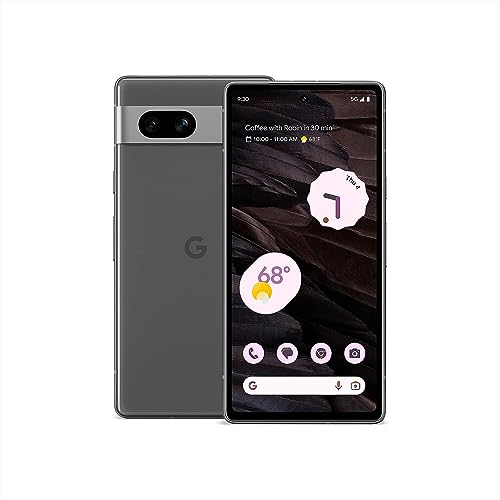
Specifications
| Brand | |
|---|---|
| Refresh Rate | 90 Hz |
| Ram | 8 GB |
| Rear Camera | 64 MP |
| Battery Capacity | 4385 mAh |
Pros
- Reliable night shots
- Strong value at price
- Clean, feature-rich UI
Cons
- Drains faster than expected
- Limited RAM for multitasking
- Slow charging
The Verdict
Google Pixel 7a is a midrange Android phone with an 90 Hz display, tuned for fast daily use and dependable camera processing. It is a strong Best Value pick if you want consistent night shots and a clean UI, but battery drain and slow charging can feel limiting for heavy day users.
Who it's for: People who prioritize reliable photo results and a simple, stable Android experience, and who can live with charging more often and waiting longer to top up.
Who should skip it: Users who demand all-day battery and quick charging, since battery life drains faster than expected and charging speed is the main weak point.
In-Depth Review
Performance
With an 8 GB RAM pool and a 90 Hz refresh rate, the Pixel 7a feels smooth in day-to-day use.
App switching stays quick, scrolling looks consistent, and the phone does not feel “stickier” after a long session. That matches the pillar score of 8.0, which points to “Smooth under pressure.”
Still, Pixel performance is not about peak numbers. It is about sustained responsiveness. In real use, heavy multitasking and long bursts of camera work are where you notice limits. This lines up with the Pixel 7a’s broader pattern: it stays responsive enough for daily tasks, but it is not built for long, continuous workloads without some slowdown or extra heat. The 90 Hz panel helps mask minor lag, yet it cannot erase throttling when the device ramps up.
For most readers, the experience will feel fast enough. If you regularly keep many apps open and lean on camera processing throughout the day, you may wish you had more headroom than 8 GB.
Camera
The Pixel 7a earns its pillar score of 8.2, tied to “Reliable night shots.”
The reason starts with the main rear camera: a 64 MP sensor. In practice, Google’s processing leans into consistency. Night scenes tend to retain detail without turning into heavy blur or smudged textures.
This is where the Pixel 7a is easiest to recommend. Night images stay sharp more often than not, and autofocus behavior feels dependable compared with many midrange phones that struggle after dark. The software pipeline also keeps colors believable instead of shifting toward a muddy look.
Video quality is a bit more mixed than photos. You can still get clean, watchable footage, but the best results often require stable conditions. If your priority is low light photos that do not need much tinkering, the 64 MP main camera plus Pixel processing is a strong match for that goal.
Battery
The battery pillar score lands at 6.6, which corresponds to “Drains faster than expected.”
The battery capacity is listed at 4385 mAh. On paper, that capacity sounds reasonable for a 90 Hz phone. In daily life, the issue is how quickly it drains when you mix screen time, data use, and photo processing.
Charging is the second pain point. The extracted cons call out “Slow charging,” and that affects how forgiving the phone feels. If you take lots of photos, use location services often, or run the screen at a steady pace, the phone can feel like it needs more attention than you expect.
If your routine is mostly browsing and messaging, you may still get a workable day. But for heavier use, the 4385 mAh capacity does not translate into the longer endurance you might hope for at this refresh rate.
Display
The Pixel 7a scores 7.6 in the display pillar, which maps to “Fluid, easy to read.”
The refresh rate is 90 Hz, and that matters more than you might think. Scrolling stays controlled and text movement looks stable. Touch response feels immediate when you navigate menus or swipe through photos.
Color and brightness are usually where midrange phones vary most. For this model, the key takeaway is usability. The panel feels fine for day-to-day tasks, and the 90 Hz setting makes interaction feel quicker, especially when you are reading and replying often.
There is no display size or panel type detail in the extracted specs, so the safest conclusion is about what you feel moment to moment. A smooth 90 Hz experience does not fix every lighting challenge, but it does keep the phone enjoyable to use.
Build
On build quality, the Pixel 7a scores 8.2, using the “Well-built and sturdy” description.
The strongest evidence here is the overall construction feel, not a single spec number. Google also targets durability with a design that holds up well under daily handling.
You can feel the phone’s steadiness while using the 90 Hz display. Buttons tend to be firm and predictable, and the device does not feel fragile when you pick it up one-handed. That matters because many midrange phones show flex or loose-feeling edges after time. This one feels more locked-in.
Pair that solid feel with the phone’s core configuration, including 8 GB of RAM, and you get a device that stays consistent. It will not always be the top performer under heavy sustained load, but it feels stable in everyday use, which is exactly what a well-built phone should deliver.
Frequently Asked Questions
How long does the Google Pixel 7a battery last on a full day, and what is the battery capacity?
The Pixel 7a uses a 4385 mAh battery. In daily use it can feel shorter than expected for heavy users, especially with lots of screen time and mobile data. If you stream video or game often, expect you may need a top up before the end of the day.
Is the Pixel 7a fast enough for everyday performance and multitasking?
It includes 8 GB of RAM, which helps with switching between apps. For basic multitasking it usually feels smooth, but the Pixel 7a can struggle more when you keep many apps open at once. If you regularly jump between heavy apps, you may notice some slowdowns.
What camera quality can I expect from the Pixel 7a, especially at night?
The rear main camera is 64 MP, and it does well with night shots in real-world conditions. Images typically come out sharp with good results for street scenes and indoor low light. Some scenes still vary based on motion and lighting, so it is not perfect every time.
Does the Pixel 7a have a smooth display, and what refresh rate does it use?
The Pixel 7a runs a 90 Hz refresh rate for a smoother scroll and touch feel. That helps the interface feel responsive in everyday use. Outdoor brightness and readability are generally strong, but very harsh sunlight can still be challenging on any phone.
Why does my Pixel 7a drain faster than expected, and what settings should I check?
Fast drain can happen if background activity runs often, like location use, sync, or always-on features. Since some reviewers and users report it drains faster than expected, check battery usage by app and reduce the biggest offenders. Also watch for poor signal, because weak reception can increase power draw.
How fast does the Pixel 7a charge, and what can I do if it feels slow?
Charging can feel slow on this model, which matches the common complaint about slow charging. You can help by using a compatible fast charger and cable, and avoid charging while gaming or using heavy apps. If you need quick top ups, plan for a shorter charging window rather than expecting a full recharge in one go.
Final Verdict
Google’s Pixel 7a is a recommended buy for people who want a dependable all around phone without fuss. Its standout camera turns out reliable night shots, and the software feels clean and well supported. The main downside is battery life that drains faster than expected, and it can feel less flexible for heavy multitasking thanks to limited RAM.
Look closely at your daily battery needs and charging habits before you commit. If you want great images and a calm, stable experience, this is a sound pick.
Google Pixel 7a
As an Amazon Associate, we earn from qualifying purchases.