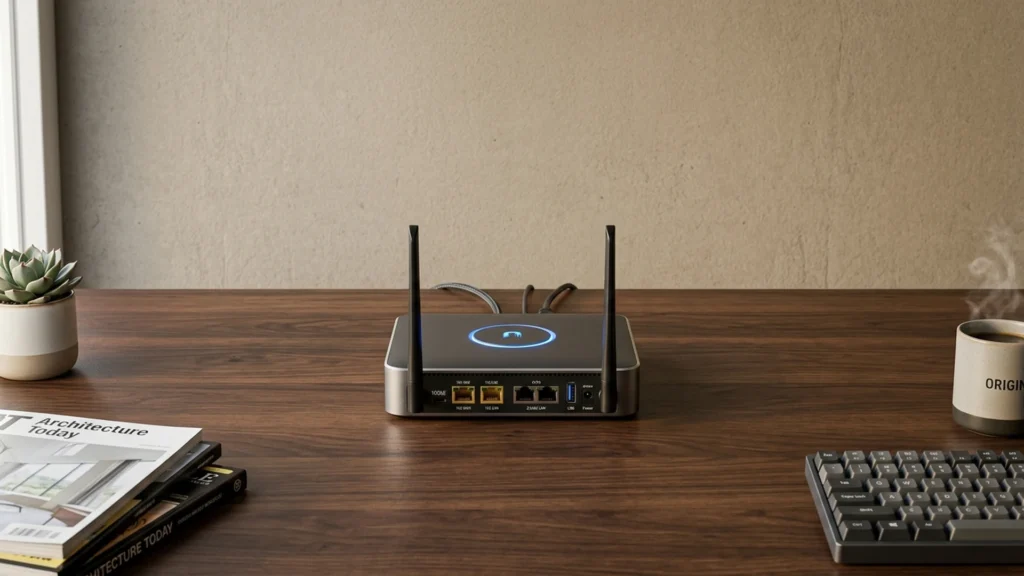
Routers with dual 10GbE ports are built for people who want more than fast Wi-Fi. They include two multi-gig Ethernet ports that can handle 10GbE traffic for the WAN, LAN, or wired backhaul. This matters if you run a NAS, a desktop with a 10GbE adapter, a media server, or multiple access points that need a stable wired link.
Picking one gets tricky fast. You trade raw wireless performance for a specific port layout, so one model may suit “wired-first” setups while another fits a larger Wi-Fi-only home. You also need to check real throughput and stability when many devices run at once. Dual 10GbE ports also push prices up, so value depends on how well the router supports routing features, QoS, and long-term firmware updates.
Looking for all types? See our Best Routers.
Quick Overview
Our Top Picks
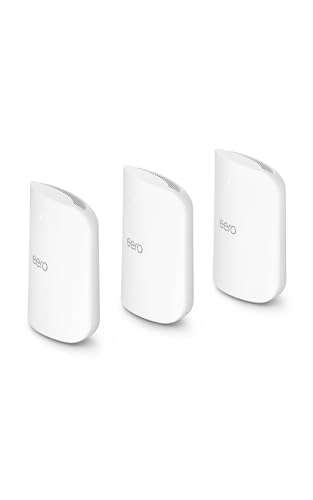
#1. eero Max 7 Router
Specifications
| Brand | eero |
|---|---|
| Router Type | Mesh Router |
| Wifi Standard | Wi-Fi 7 |
| Wifi Bands | Tri-Band |
| Max Wireless Speed | 4300 Mbps |
| Coverage Area | 7500 sq ft |
| Ethernet Ports | 2 x 10 Gbps WAN, null x null LAN |
| Security Features | WPA3, Parental Controls, VPN Support, Automatic Updates |
Pros
- Low-latency, steady speeds
- Consistent multi-room coverage
- Stable with mature firmware
Cons
- High-price feature tradeoff
- Limited power-user controls
- Non-Max mixing limits
The eero Max 7 stands out for this category because it pairs Wi-Fi 7 with 2 x 10GbE WAN ports, giving you real room for fast internet connections and multi-link setups. In day-to-day use, it feels quick and steady, with low latency that helps gaming and calls. With tri-band mesh coverage rated up to 7500 sq ft, it also keeps speeds consistent across rooms, which matters when the 10GbE link is actually being used.
The main trade-off is control. Advanced power-user options feel limited compared to router systems aimed at labs and custom setups. It also uses an eero mesh approach, so mixing in non-Max eero gear may not match the same performance goals. This is a strong fit if you want a stable, mature mesh that can take advantage of dual 10GbE internet without turning setup into a project.
#2. ASUS ZenWiFi BQ16 Pro Router

Specifications
| Brand | ASUS |
|---|---|
| Router Type | Mesh Router |
| Wifi Standard | Wi-Fi 7 |
| Wifi Bands | Quad-Band |
| Max Wireless Speed | 30000 Mbps |
| Coverage Area | 8000 sq ft |
| Ethernet Ports | 2 x 10 Gbps WAN, 0 x 10 Gbps LAN |
| Security Features | Parental Controls, VPN Support |
Pros
- Low-latency, steady speeds
- Consistent multi-room coverage
- Thoughtful, easy-to-use tools
Cons
- High price premium
- Value upgrade doubts
- Mounting inconvenience
The ASUS ZenWiFi BQ16 Pro stands out in routers with dual 10GbE ports because it targets fast wired backhaul and multi-gig home networks without making you choose between speed and room-to-room Wi-Fi. With 2 x 10Gbps WAN ports and a mesh design, you can steer heavy traffic like backups, large downloads, or gaming updates across Ethernet uplinks, while the Wi-Fi handles day-to-day streaming and browsing in parallel. In practice, it tends to keep latency steady, which matters when several devices are active at once.
The main trade-off is fit. This system is a better match for households that already use, or plan to use, 10GbE WAN and want reliable coverage over a larger footprint. If your network stays mostly on slower links, the upgrade can feel harder to justify, and mounting the nodes may take a bit more effort than simpler single-router setups.
#3. ASUS ROG Rapture GT-BE98 Pro Router

Specifications
| Brand | ASUS |
|---|---|
| Router Type | Gaming Router |
| Wifi Standard | Wi-Fi 7 |
| Wifi Bands | Quad-Band |
| Max Wireless Speed | 30000 Mbps |
| Coverage Area | 6000 sq ft |
| Ethernet Ports | 2 x 10 Gbps WAN, 4 x 2.5 Gbps LAN |
| Usb Ports | 2 x USB |
| Security Features | VPN Support |
Pros
- Sub-3ms latency
- Broad home coverage
- Latest Wi-Fi support
Cons
- MLO compatibility issues
- Static IP instability
- IoT device dropouts
The ASUS ROG Rapture GT-BE98 Pro is notable in this dual 10GbE lane because it pairs two 10GbE WAN ports with a gaming-first Wi-Fi 7 setup. That mix matters if you run a fast home lab, multiple PCs, or heavy downloads and want low delay when traffic spikes. Real-time use feels quick, and the router keeps strong throughput across a large home area around 6000 sq ft.
That said, it is not a set-and-forget router for every setup. There are known pain points with MLO compatibility, plus reports of static IP instability and some IoT dropouts. If you have newer clients that work well with Wi-Fi 7 and you are comfortable tuning settings, it is a compelling pick for dual 10GbE users who prioritize speed and low latency.
#4. ASUS ZenWiFi BT10 Router

Specifications
| Brand | ASUS |
|---|---|
| Router Type | Mesh Router |
| Wifi Standard | Wi-Fi 7 |
| Wifi Bands | Tri-Band |
| Max Wireless Speed | 18000 Mbps |
| Coverage Area | 6000 sq ft |
| Ethernet Ports | 2 x 10 Gbps WAN, 0 x 10 Gbps LAN |
| Usb Ports | 1 x USB 3 |
| Security Features | Parental Controls, VPN Support |
Pros
- Low-latency, steady speeds
- Consistent multi-room coverage
- Thoughtful, easy-to-use tools
Cons
- Pricy for two nodes
The standout angle here is dual 10GbE connectivity on the back end, meant for people who want more than fast Wi-Fi. With 2 x 10 Gbps WAN and a tri-band Wi-Fi 7 mesh design, the ASUS ZenWiFi BT10 Router targets low-latency, steady performance for gaming, multi-stream households, and big file transfers. In day-to-day use, it feels consistent across rooms, so clients stay snappy instead of slowing down when you move from the living room to a bedroom.
The main trade-off is that this is not a casual upgrade. The two-node setup can be pricey for smaller homes that only need gigabit Ethernet, and the benefits of 10GbE matter most when you have matching network gear or heavy wired use. If you run lots of devices, use VPN sometimes, and care about smoother multi-room coverage, it is a strong fit for enthusiasts and power users.
#5. TP-Link Archer BE900 Router

Specifications
| Brand | TP-Link |
|---|---|
| Router Type | Wireless Router |
| Wifi Standard | Wi-Fi 7 |
| Wifi Bands | Quad-Band |
| Max Wireless Speed | 24000 Mbps |
| Ethernet Ports | 2 x 10 Gbps WAN, 4 x 2.5 Gbps LAN |
| Usb Ports | 2 x USB 3 |
| Security Features | Parental Controls, VPN Support |
Pros
- Low-latency, steady speeds
- Consistent multi-room coverage
- Thoughtful, easy-to-use tools
Cons
- Some disconnects over time
- Version MLO inconsistency
- Short support window
The TP-Link Archer BE900 stands out for people who need fast wired backhaul and future-proof home networking. It pairs dual 10GbE WAN links with four 2.5GbE LAN ports, which is a practical combo for running a multi-gig switch, NAS, or workstation without bottlenecks. In day to day use, it keeps low-latency, steady throughput, and the Wi-Fi performance stays consistent across multiple rooms.
The main trade-off is stability over long stretches. Some users report occasional disconnects, and MLO behavior can feel inconsistent. This makes it a better fit for enthusiasts and power users who will stay on top of firmware updates and mostly use the router in a well-managed home network.
#6. ASUS RT-BE96U Router

Specifications
| Brand | ASUS |
|---|---|
| Router Type | Wireless Router |
| Wifi Standard | Wi-Fi 7 |
| Wifi Bands | Tri-Band |
| Max Wireless Speed | 18513 Mbps |
| Coverage Area | 5400 sq ft |
| Ethernet Ports | 2 x 10 Gbps WAN, 0 x null LAN |
| Security Features | Antivirus |
Pros
- Consistent multi-room coverage
- Latest Wi-Fi support
- Thoughtful, easy-to-use tools
Cons
- Weaker security support
- Firmware compatibility issues
The ASUS RT-BE96U stands out for dual 10GbE WAN, which fits well when you want two very fast internet links or a backup path without giving up high-speed routing. Pair that with Wi-Fi 7 tri-band performance and you get a router that stays quick for streaming and gaming, even when multiple devices are active. In larger homes, it also keeps signal quality more consistent across rooms than many 10GbE-focused routers.
The trade-off is in software and security. Firmware compatibility issues can slow down setup or break certain combinations, and security support is less complete than you might expect from a top-tier router. This is a strong choice if your priority is fast dual 10GbE connectivity and reliable day-to-day coverage, but you should be ready to be patient with updates and double-check security settings.
What to Look For
Dual 10GbE port placement: Confirm whether the two 10GbE ports are split as 1 WAN plus 1 LAN, or both usable for LAN or backhaul. Buyers who want wired backhaul for multiple access points should prioritize a layout that keeps two high-speed Ethernet paths available without awkward workarounds.
True wired throughput support: Dual 10GbE only helps if the router can route at high speed under real loads. Look for models that maintain stable performance with simultaneous streaming, downloads, and multiple client traffic, not just short bursts in lab tests.
Wi-Fi generation and multi-device handling: Even with great Ethernet, Wi-Fi still carries day-to-day traffic. Choose a router that uses the newest practical Wi-Fi generation in this class and can keep speeds steady across many active devices, especially on 5 GHz or 6 GHz.
Coverage fit for your layout: Larger homes and multi-floor setups need predictable signal reach. Check the stated coverage area as a starting point, then match it to wall types and room count. If you plan to add more nodes, verify that the router supports smooth expansion for consistent coverage.
Core security and control features: With a high-speed home network, you also want basic protections that do not break under load. Prioritize WPA3 support, guest networking, and features like automatic updates and access control so you can manage devices without constant manual work.
How We Picked
Products were identified through broad research across review sites and buyer forums. Then we filtered to only routers that qualify as having two 10GbE Ethernet ports available for high-speed use in the home, not just a single 10GbE connection or occasional 10GbE behavior.
Scoring used the same objective pillar framework as the main Routers post. Performance, coverage, reliability, features, and value were compared within this dual 10GbE group so picks reflect real-world daily use and not just Ethernet spec sheets.
Frequently Asked Questions
What does it mean for a router to have dual 10GbE ports?
It usually means the router includes two 10 gigabit Ethernet ports. You can use them for a fast WAN link, a fast LAN connection, or both. This helps move large downloads and backups without the bottleneck of slower Ethernet.
How do I choose between using a 10GbE port for WAN versus for LAN?
Use 10GbE WAN when your internet service or upstream equipment supports 10GbE. Use 10GbE LAN when you need fast transfers between wired devices like NAS, PCs, and servers. Many buyers do WAN on one 10GbE port and LAN on the other for maximum flexibility.
Will dual 10GbE ports speed up my Wi-Fi automatically?
Not always. Wi-Fi speed depends on your Wi-Fi generation, device radios, and signal strength. Dual 10GbE mainly boosts wired performance and reduces slow network bottlenecks for Wi-Fi clients that need to pull data from fast storage or the internet.
How do routers in this sub-category differ from each other?
The biggest differences are Wi-Fi generation and coverage, plus the router software experience. Some models include stronger multi-device performance and better traffic control like QoS. Others focus on raw wired throughput and may trade off some Wi-Fi range or advanced settings.
When should I choose a different router type instead of a dual 10GbE router?
Choose a different type if most of your traffic stays on Wi-Fi and you do not have 10GbE WAN or wired upgrades. If you only need normal Gigabit speeds, a simpler router can cost less and still feel fast. You should also consider a mesh router type if you need whole-home coverage more than high-speed Ethernet.
How does dual 10GbE compare with standard routers in real-world use?
For wired tasks, it can feel dramatically faster during backups, large downloads, and NAS access. For everyday browsing, the gain can be small if your bottleneck is Wi-Fi signal or the internet plan. The best results happen when your internet, switch, and storage also support high speeds.