




The 3 Best 5-Inch GPS Navigators in 2026

Transparency Note: This post contains affiliate links. As an Amazon Associate, we earn from qualifying purchases at no extra cost to you.

5-inch GPS navigators are built for quick route checks and simple lane guidance while you drive. For buyers, the screen size should be large enough to read road names and turns at a glance, but not so large that it blocks your view.

Picking the right one gets tricky because smaller screens and mid-range prices often trade off something. You may see weaker live traffic support, slower rerouting when you miss a turn, or less dependable map updates.

If you want help beyond this size class, check the main roundup for the full picture: Looking for all types? See our Best GPS Navigators.

Quick Overview

Garmin dezl 580 5" GPS Navigator
#1 Garmin dezl 580 5" GPS Navigator
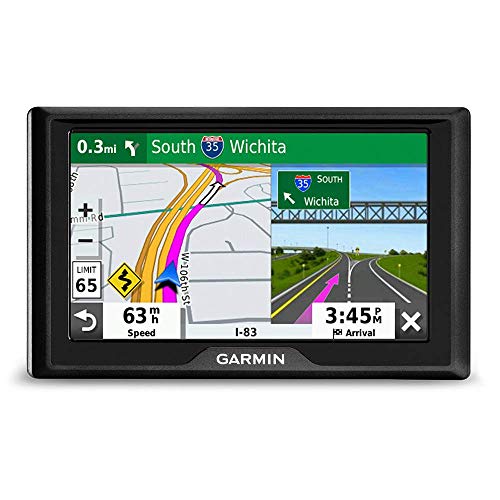
Garmin Drive 53 GPS Navigator
#2 Garmin Drive 53 GPS Navigator
Garmin Drive 52 5" GPS Navigator
#3 Garmin Drive 52 5" GPS Navigator

Our Top Picks

#1. Garmin dezl 580 5" GPS Navigator
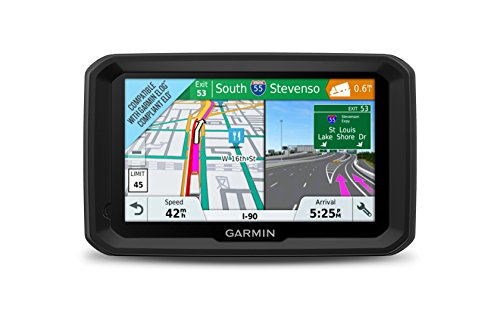
Garmin dezl 580 5" GPS Navigator
Our Score
8.0 / 10
hover for details
Navigation
8.6
Display
8.1
Features
8.5
Battery
5.9
Value
8.1
BrandGarmin
Screen Size5 in
Map CoverageNorth America
Map UpdatesLifetime Map Updates
Traffic UpdatesLive Traffic
Voice ControlVoice Control
  • Accurate turns, great lock
  • Easy-to-read day visibility
  • Lifetime map updates
  • Poor standby battery life
  • Cab-focused portability

The Garmin dezl 580 5 stands out among 5-inch GPS navigators for how steady and correct it stays during real driving. People report accurate turns and strong GPS lock, plus smooth rerouting when you miss a turn. The 5-inch screen is also easy to read in daytime, which matters when you are checking directions at a glance.

The main trade-off is battery behavior. It is better suited to trips where you can keep it powered, since standby battery life is weak. If you mostly drive with charging available and want dependable route guidance with lifetime map updates and live traffic, it is a top fit for this size class.

→ Read full review

#2. Garmin Drive 53 GPS Navigator

Garmin Drive 53 GPS Navigator
Our Score
8.0 / 10
hover for details
Navigation
8.1
Display
8.5
Features
8.1
Battery
6.3
Value
8.4
BrandGarmin
Screen Size5 in
Screen Resolution800 x 480 px
Touchscreen TypeCapacitive Touchscreen
Map CoverageNorth America
Map UpdatesLifetime Map Updates
Traffic UpdatesTraffic Alerts
  • Accurate turns, great lock
  • Easy-to-read day visibility
  • Lifetime map updates
  • Battery drain concerns
  • Overheating reports

Garmin Drive 53 is a strong pick in the 5-inch GPS navigator class because its turn guidance feels dependable and easy to follow. Users report accurate turns and a great GPS lock, and the screen is easy to see in daylight, which matters when you glance at the road cues. North America maps come with lifetime updates, so you are not stuck with stale roads for long.

The main trade-off is power. Some buyers mention battery drain and overheating, so it may not be the best choice for long unplugged rides or warm, sun-heavy dashboards. If you mostly drive with the charger plugged in and want clear routing that gets you back on track quickly, this model fits well.

→ Read full review

#3. Garmin Drive 52 5" GPS Navigator

Garmin Drive 52 5" GPS Navigator
Our Score
7.7 / 10
hover for details
Navigation
8
Display
8.1
Features
7.6
Battery
6
Value
8.3
BrandGarmin
Screen Size5 in
Screen Resolution480 x 272 px
Touchscreen TypeCapacitive Touchscreen
Map CoverageUnited States & Canada
Traffic UpdatesLive Traffic
  • Accurate turns, great lock
  • Easy-to-read day visibility
  • Live traffic rerouting
  • Short trips, quick drop
  • Offline map gaps
  • Update workflow frustration

This 5-inch Garmin Drive 52 stands out in the 5-Inch GPS Navigator group for day-to-day route guidance that feels dependable. Users report accurate turns and a strong GPS lock, plus live traffic rerouting when plans change. The screen is also easy to read while driving, with clear visibility even in bright conditions.

The main trade-off is how it handles shorter trips and map freshness. Some buyers note the battery does not last long for frequent quick drives, and there can be offline map gaps. Updates can also feel frustrating, so this is best for people who mostly rely on the current route and traffic, and who are willing to manage map update steps when needed.

What to Look For

Clear 5-inch readability: Choose a 5 in class display you can read in sunlight. Look for sharp resolution and a touchscreen that responds quickly when you enter an address or change routes on the move.

Reliable navigation behavior: Test how the unit handles missed turns and road changes. The best 5-inch models recalculate fast, keep routes logical, and provide lane guidance that matches what you see ahead.

Maps and update method: Confirm the map coverage you need and the update type you will actually use. Lifetime Map Updates is often the simplest path for long-term buyers, while manual or subscription options can add friction.

Traffic usefulness: Live Traffic or at least Traffic Alerts matters if you commute or drive in busy areas. Avoid units that only provide vague traffic notices or require a workaround through a phone.

Battery runtime for quick trips: If you use it in a rental or need a short, unplugged segment, look for dependable battery life. A practical battery means fewer resets and less reliance on the charger.

How We Picked

Products were identified through broad research across review sites and buyer forums, then filtered to only those that qualify as 5-Inch GPS Navigators.

Scoring used the same objective pillar framework as the main GPS Navigators post, allowing direct comparison of products within this sub-category.

Frequently Asked Questions

What screen resolution and brightness should I look for in a 5-inch GPS navigator?

Choose a 5-inch screen with clear resolution, such as 480 x 272 px or higher. Bright screens help you read turns in daylight. Touch should feel quick, not laggy, so you can enter addresses safely while stopped.

Do 5-inch GPS navigators handle lane guidance and missed-turn rerouting well?

The best models guide lanes clearly and re-route fast after a missed turn. Look for strong navigation scores and user reports of correct turns. Good rerouting means you see a new route within a few seconds.

How do map updates work for 5-inch navigators, and what should I choose?

Some units offer Lifetime Map Updates, while others use Wi-Fi Map Updates. Pick the update method that matches how often you travel. If you drive often, Lifetime or easy Wi-Fi updates keep roads and exits more accurate.

When should I choose a different GPS navigator type instead of a 5-inch model?

Choose another type if you need a larger screen for complex routes or lots of driving in bright sun. You may also want a different setup if you rely heavily on live traffic or advanced planning tools. If you mostly do local trips, a 5-inch model often fits well.

How do 5-inch GPS navigators compare to smaller or larger screen GPS units?

A 5-inch navigator usually balances readability and easy mounting. Smaller screens can feel cramped for maps and lane views. Larger units may be easier to read at a glance, but they can take more space in your car.

See Also

Share:
On Key
You Might Also Like