Smart glasses are wearable computers built into eyewear. They can show a small display, play audio, take calls, capture photos, and run AI or voice features. Some models focus on media viewing. Others focus on audio, alerts, or hands-free help.
Choosing is hard because the trade-offs are real. Display brightness and focus matter more than raw numbers. Battery life often drops fast with active use, not standby. Cameras can look good in specs but fail in low light. Connectivity issues can cause lag, missing notifications, or audio cutting out. Comfort also varies, especially between frames that feel balanced and those that pinch or slide.
This guide breaks the selection down into the factors that change daily use. You will see what to prioritize for core features, comfort, battery, build, and overall value. You will also find a short method for comparing models so you can decide fast and avoid common traps.
Quick Overview
Top Picks
Best Overall
Specifications
| Brand | Meta |
|---|---|
| Form Factor | Smart Glasses |
| Display Technology | LCOS |
| Display Resolution | 2880 x 1620 px |
| Camera Resolution | 12 MP |
| Connectivity | Bluetooth |
| Battery Life | 8 hr |
Pros
- Reliable voice & translation
- Fast recharge, low drain
- Crisp image clarity
Cons
- Default 1080p recording
- Poor battery repairability
- Prescription mismatch
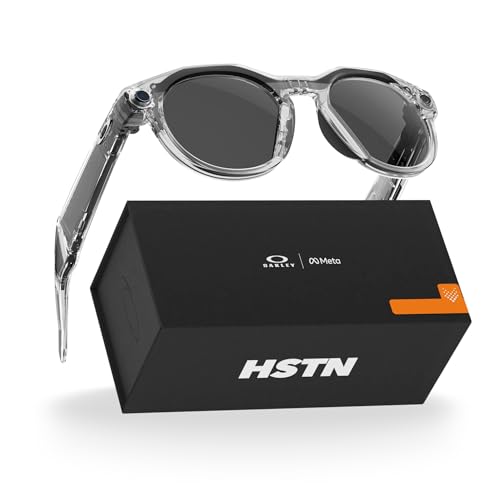
Meta HSTN smart glasses fit the Best Overall slot because they stay useful in day to day moments, especially with dependable voice and translation. The experience is polished enough that the smart parts feel like they work, not like a demo. For most people, that reliability matters more than chasing the most advanced spec sheet.
Core tech performance is strong, with crisp image clarity and reliable voice and translation in real use. Battery life also holds up, around 8 hr, with low drain when you are not using it. Comfort lands in a good middle spot too, scoring 7.6, with a stable feel for normal movement and longer sessions.
The main trade-off is recording quality, with default 1080p recording that does not satisfy people who want camera first results. There are also concerns around prescription matching and battery repairability. If you want smart glasses that work smoothly for voice, translation, and daily prompts, choose this one, but do not pick it if you need high end video capture or worry about fit and service options.
Also ranked #1 in: Meta AI Smart Glasses · Camera Smart Glasses
Best Micro-OLED

Specifications
| Brand | VITURE |
|---|---|
| Form Factor | XR Glasses |
| Display Technology | Micro-OLED |
| Field Of View | 58° |
| Weight | 0.2 oz |
Pros
- Reliable voice & translation
- Lightweight and stable
Cons
- Dies early with mixed use
- Prescription-lens inconsistency
- Firmware-dependent features
VITURE Beast XR Smart Glasses fit the Best Micro-OLED role because the display is the main event. Micro-OLED panels give sharp, vivid visuals for media and quick glance apps, and the system stays usable instead of turning into a blurry mess. With a 58 degree field of view, the view feels wide enough for everyday watching and reading.
The core tech also shines in how you interact with it. Voice and translation come through reliably, so you can keep moving and still get help from the glasses. Comfort is strong too. At about 0.2 oz, they feel light, and they hold steady during normal walking and daily tasks. Audio and the overall responsiveness land in the sweet spot, with fewer annoying delays than you would expect at this category.
The main drawback is battery behavior. With mixed use, they can die early, which forces more frequent charging than many people want. There is also some prescription-lens inconsistency, and some parts of the experience depend on firmware updates. If you want crisp Micro-OLED visuals plus dependable voice and translation, and you can charge often, these are a good match.
Best Value

Specifications
| Brand | RayNeo |
|---|---|
| Form Factor | AR Glasses |
| Display Technology | Micro-OLED |
| Display Resolution | 1920 x 1080 px |
| Field Of View | 47° |
| Weight | 0.2 oz |
Pros
- Reliable voice & translation
- Lightweight and stable
- Worth it for daily use
Cons
- Dies early with mixed use
- Adaptation time required
RayNeo Air 3s Pro Smart Glasses fit the Best Value slot because they focus on day to day usefulness, not flashy extras. The standout trait is how dependable the voice and translation work feels in real situations. For many people, that matters more than peak display specs.
You get solid core tech performance from the voice assistant and translation. Notifications also tend to be consistent, so you are not constantly checking your phone. Comfort is another win, with a lightweight build and a stable fit during normal movement. That balance helps when you wear them for longer stretches.
The main downside is battery life in mixed use, it can run low sooner than expected. There is also an adaptation period, since you need a bit of time to get used to the way the glasses operate. If you want reliable voice translation and easy daily comfort without wanting a heavy charging routine, these are a strong choice.
Best for Large Screens

Specifications
| Brand | VITURE |
|---|---|
| Form Factor | XR Glasses |
| Display Technology | Micro-OLED |
| Field Of View | 52° |
| Connectivity | Direct Connection to Virtually Any USB-C Device |
| Weight | 0.2 lb |
Pros
- Advanced display optics
- Reliable voice & translation
- AR-focused feature set
Cons
- Dies early with mixed use
- Accessory dock dependency
- Native feature limitations
These VITURE Luma Pro XR glasses fit the Best for Large Screens slot thanks to their micro-OLED display optics and strong AR style viewing. The main point is simple, you get a big, immersive screen look that works well for watching content and staying locked onto what is in front of you.
The core tech feels polished when you use them day to day. Voice commands and translation come through reliably, and the connection path to USB-C sources keeps things stable. Comfort is also a strong match, with a light 0.2 lb build that stays wearable for longer sessions. Add solid audio performance and the overall latency feels low enough for real viewing.
The trade-off is battery life, they tend to die early with mixed use. You also end up relying on the accessory dock for the smoothest setup, and some native smart options are limited compared to what you might expect from AI glasses. If you want a large, screen-like experience with dependable voice and translation, and you can charge often or use them near a power source, these are a smart pick.
Best with USB-C

Specifications
| Brand | Rokid |
|---|---|
| Form Factor | AR Glasses |
| Display Technology | Micro-OLED |
| Display Resolution | 1920 x 1080 px |
| Field Of View | 50° |
| Camera Resolution | 12 MP |
| Connectivity | USB-C |
| Weight | 2.6 oz |
Pros
- Crisp image clarity
- Advanced display optics
- Lightweight and stable
Cons
- Dies early with mixed use
- Limited connectivity
- Creaks slightly under pressure
This is a good match for the Best with USB-C role because Rokid Max2 runs through a USB-C connection for its smart-eye workflow. If you want a direct, cable-based setup instead of relying on extra wireless links, this is the angle to consider. The standout is the micro-OLED image, with crisp clarity and advanced display optics that stay readable in use.
Comfort is a strong point. At 2.6 oz, the glasses feel light and stay stable during movement. The image quality helps with day-to-day viewing, and the 12 MP camera adds useful context when you need quick capture. In practice, the overall experience feels smooth more often than not, backed by responsive optics and a clean visual presentation.
The main drawback is battery performance. They tend to die early with mixed use, so you may need frequent recharging. If you want clear micro-OLED visuals and a stable, lightweight fit, but you do not mind short sessions or top-ups, this is the one to get.
Best with Wi-Fi

Specifications
| Brand | XREAL |
|---|---|
| Form Factor | AR Glasses |
| Display Technology | Micro-OLED |
| Field Of View | 57°F |
| Connectivity | Wi-Fi 6, Bluetooth 5.2 |
| Weight | 0.2 lb |
Pros
- Reliable voice & translation
- Lightweight and stable
- Advanced display optics
Cons
- High standby drain
- Not top-tier picture quality
- Batteryless tether use
XREAL One Pro fits the Best with Wi-Fi role because it leans on fast wireless for smart, low-lag use. If you want voice and translation that stay dependable while you move, Wi-Fi 6 plus Bluetooth 5.2 helps it feel steadier than phone-tethered setups.
In daily use, the core experience lands well. The display optics use Micro-OLED, and the image looks clear for long stretches. Audio is also solid, and voice and translation run reliably, which matters more than raw spec sheets. Comfort is another win, with a lightweight, stable fit that does not wobble during normal movement.
Still, standby drain is high, so you will want to plan charging if you leave them idle. Batteryless tether use is also a constraint for outings that need more freedom. If you want consistent voice and translation in a Wi-Fi-connected routine and you care about comfort, these are a strong pick.
Best Audio
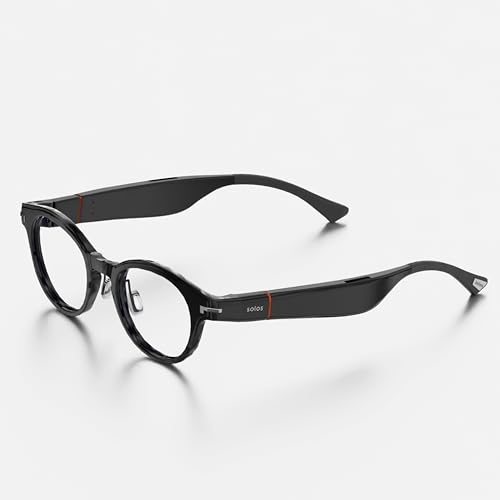
Specifications
| Brand | SOLOS |
|---|---|
| Form Factor | Audio Glasses |
| Connectivity | Bluetooth 5.2 |
| Battery Life | 10 hr |
Pros
- Long-lasting battery
- Modern wireless support
- Worth it for daily use
Cons
- Audio-only glasses
- Not airtight
- Unfinished build feel
SOLOS AirGo A5 Hydro 8 fits the Best Audio role because it focuses on what you hear. There is no video feed to distract you. Instead, you get audio through the glasses as your daily listening gear.
Comfort scores well for long wear, with a balanced feel that works for everyday movement. Core tech stays dependable, thanks to Bluetooth 5.2 support and smooth day to day use. Battery life also stands out, with up to 10 hr per charge for mixed listening and calls, so you are less likely to hunt for a charger mid-day.
The main trade-off is that they are audio-only smart glasses. That means you do not get the full visual side of AR or on-lens prompts. The build also feels a bit unfinished, which may matter if you are hard on gear. If you want glasses for reliable listening and calls, without needing a display, these are a strong pick.
Best for Water Resistance
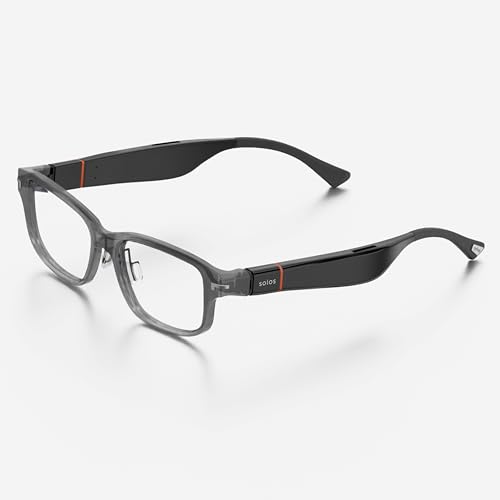
Specifications
| Brand | SOLOS |
|---|---|
| Form Factor | Audio Glasses |
| Camera Resolution | 16 MP |
| Battery Life | 10 hr |
| Weight | 0.9 oz |
Pros
- Lightweight and stable
- Higher-resolution camera
- IP67 durability
Cons
- Dies early with mixed use
- Occasional lag, minor glitches
- Audio-only glasses
For water-resistant smart eyewear, the SOLOS AirGo A5 Hydro 7 is built for real life outside. Its standout trait is IP67 durability, which helps it handle rain, splashes, and dust without feeling fragile. If you plan to wear glasses during workouts, commutes, or travel, that rating makes the biggest difference.
Comfort is another strong point. At just 0.9 oz, the frame stays light and stable, so you can wear it longer without constant readjusting. Core tech is solid for audio glasses, with a 16 MP camera that gives you a useful capture option when you want a closer look later. The build also feels dependable, which matters for gear that will get bumped around.
The trade-off is battery and focus. It can die earlier than expected with mixed use, and there are occasional laggy moments and minor glitches. Also, it is audio-first rather than true display glasses, so you get less visual guidance. If you want rugged, water-ready smart eyewear for audio and occasional camera use, this is the one to get.
Best Display-Free
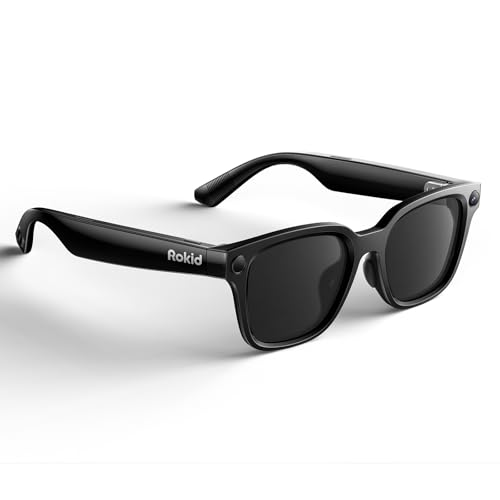
Specifications
| Brand | Rokid |
|---|---|
| Form Factor | AI Glasses |
| Camera Resolution | 12 MP |
| Battery Life | 6 hr |
| Weight | 0.1 lb |
Pros
- Worth it for daily use
- Lightweight and stable
- Real-time translation
Cons
- Dies early with mixed use
- Display-free interaction limits
- Reported performance boundaries
For the Best Display-Free role, Rokid 2026 AI Glasses focus on audio and voice-first help instead of any built-in screen. That makes them easier to use while walking, commuting, or working, since you do not need to look at a display to get answers. The big win is real-time translation, with the glasses handling prompts in a natural, on-the-go way.
Comfort is a standout for day-long wear. At around 0.1 lb, they feel light and stay stable during normal movement. Core tech also lands well for a display-free design, especially for quick back-and-forth voice use. The included 12 MP camera supports common AI tasks when you need to capture what you see.
The main downside is battery life. With mixed use, they can die early, around 6 hr, so you may need more frequent charging than you expect. If you want translation and voice AI without looking at a screen, and you can manage charging, this is a strong pick.
What to Look For
Core Tech: Check whether the main smart features feel reliable in day-to-day use. Look for clear display output when active, solid audio quality, and fast responses for voice or AI tasks. Pay attention to latency and how often features misfire. Stable app behavior and consistent notifications matter more than feature lists.
Comfort: Prioritize fit before specs. A good pair sits evenly, with no pressure hot spots on the nose and temples. Weight balance matters during walking and talking. If you plan long sessions, choose frames that stay stable instead of sliding when you turn your head.
Battery: Treat battery life as a practical limit, not a best-case number. Consider how long it lasts with mixed use like display, audio, and calls. Also check recharge time and how much it drains when you leave it idle. You want predictable day-to-day performance, not frequent top-ups.
Build: Look for a sturdy frame and reliable lens integration. Pay attention to hinge tightness and overall rigidity. Scratch resistance and finish quality matter because glasses get rubbed by cases, bags, and daily handling. Loose parts or creaky hinges are early warning signs.
Display Type (form factor): Use the product type to set expectations. AR glasses and XR glasses are usually built around a display. Audio glasses tend to prioritize speakers and alerts. AI glasses vary widely, from display-free styles to models with a screen. Pick the type that matches how you want to use them.
Display Tech and Resolution: If the glasses include a display, confirm the display technology and resolution you will actually see. Waveguide designs and Micro-OLED panels behave differently for sharpness and readability. Higher resolution per eye helps with text and small UI elements, while poor clarity makes even good apps frustrating.
Camera and Connectivity: For camera use, check the camera resolution and real-world results in reviews, especially indoors. For connectivity, confirm whether the model uses Bluetooth, Wi-Fi, or USB-C. The right connection affects latency, call quality, and how stable the glasses feel across a phone or network.
How We Selected These Products
We found products through broad web searches across review sites, buyer forums, and best-of lists. We did not rely on one outlet because smart glasses often differ by firmware and regional availability.
Next, we read a large volume of real customer reviews to identify the issues that repeat. We focused on problems buyers actually encounter, like audio dropouts, display blur, app crashes, or battery drain. We also tracked what people consistently liked, such as comfort during movement and dependable voice control.
Finally, we verified availability and core specs against Amazon listings. Each model was scored using the pillar framework from this guide, then we curated the final picks to cover different real roles. The goal was to match products to use cases, not to crown a single winner for every buyer.
Frequently Asked Questions
Which Smart Glasses are best for daily hands-free calls and audio?
Pick audio-first models when you want strong calls and voice comfort. SOLOS AirGo A5 Hydro 8 and SOLOS AirGo A5 Hydro 7 focus on audio and long wear, not a big display. They also aim for translation through an app, but assistant and translation accuracy can be hit or miss.
Which Smart Glasses are best if I mainly want a bright, sharp virtual screen?
Choose a display-first XR model with Micro-OLED optics. VITURE Beast XR Smart Glasses and VITURE Luma Pro Smart Glasses stand out for clarity and immersion. If you want a more budget-friendly option, RayNeo Air 3s Pro Smart Glasses is the top value pick based on its display experience.
What setup and care habits matter most for Smart Glasses?
Keep the lenses clean with a microfiber cloth, and store the glasses in a case when not in use. For display models, check fit and eye alignment so text stays sharp. For audio or display-free models, keep the mic openings clear and charge reliably before long days.
Is a higher price always better for Smart Glasses?
No, higher price does not always mean better results. In this set, Meta HSTN Smart Glasses leads overall, but RayNeo Air 3s Pro Smart Glasses scores highest on value. Some pricier XR glasses shine on display quality, while others have weaker battery data.
Why do many Smart Glasses feel less reliable than their specs suggest?
Real-world AI, voice, and app behavior can vary by setup. Some products rely more on connected devices, which can make performance less consistent. Others have reliability risk with certain lens configurations or software updates.
Do most Smart Glasses struggle with battery life?
Battery is mixed across the category. Meta HSTN Smart Glasses and SOLOS AirGo A5 Hydro 8 score well for day-long use, while several display-first models have limited or unverified runtime. If you plan to use a bright display often, treat battery claims as “best case” and plan for charging.