The 3 Best Quiet 3D Printers in 2026

Transparency Note: This post contains affiliate links. As an Amazon Associate, we earn from qualifying purchases at no extra cost to you.

Quiet 3D Printers are the FDM and enclosed or semi-enclosed machines that print with fewer loud vibrations and less speaker-like noise. Quiet buyers usually want consistent results for home use, like small rooms, shared spaces, and overnight runs.

Picking one is hard because quiet modes often trade speed for lower noise. You also have to balance auto leveling and tuning time against long-term reliability. The right choice depends on your prints, your tolerance for setup, and how much cleanup you will do.

Use this guide to match a quieter printer to your workflow, then move on to the bigger list when you are ready to broaden your options. Looking for all types? See our Best 3D Printers.

Quick Overview

Bambu Lab A1 Mini 3D Printer
#1 Bambu Lab A1 Mini 3D Printer
Flashforge Adventurer 5M Pro 3D Printer
#2 Flashforge Adventurer 5M Pro 3D Printer
Creality K2 Combo 3D Printer
#3 Creality K2 Combo 3D Printer

Our Top Picks

#1. Bambu Lab A1 Mini 3D Printer

Bambu Lab A1 Mini 3D Printer
Our Score
8.2 / 10
hover for details
Print Quality
8.7
Reliability
7.4
Ease
8.5
Features
7.9
Value
8.2
BrandBAMBULAB
Printing TechnologyFDM
Build Volume180 x 180 x 180 mm³
Max Print Speed500 mm/s
Max Nozzle Temperature300 °C
  • Sharp layers, accurate dimensions
  • Simple leveling, smooth workflow
  • Strong results, reasonable costs
  • Small build capacity
  • Basic-detail limited
  • Messy poop system

Bambu Lab A1 Mini stands out for quiet 3D printing by keeping output consistent while reducing the time you spend babysitting prints. In day to day use, it delivers sharp layers and accurate dimensions, so you spend less time sanding or reprinting just to fix rough edges. Setup feels simple, with an approach that makes it easier to get good results quickly. The overall workflow stays smooth, which matters when you want reliable prints in shared spaces.

The main trade-off is size. With a 180 x 180 x 180 mm build area, it is best for small parts, prototypes, and upgrades rather than larger builds. There is also a limit on fine detail, so the cleanest results may still need some tuning for very intricate models. The poop management system can be messy, so plan for quick cleanup even if the printer itself is calmer during operation.

→ Read full review

#2. Flashforge Adventurer 5M Pro 3D Printer

Flashforge Adventurer 5M Pro 3D Printer
Our Score
7.7 / 10
hover for details
Print Quality
7.5
Reliability
7.4
Ease
8.3
Features
7.8
Value
8
BrandFLASHFORGE
Printing TechnologyFDM
Max Print Speed600 mm/s
Max Nozzle Temperature280 °C
Max Bed Temperature110 °C
Supported MaterialsTPU, ASA, PLA, ABS, PETG, PLA-CF, PETG-CF
  • Strong results, reasonable costs
  • Simple leveling, smooth workflow
  • Fast printing speed
  • Basic-detail limited
  • Slicer compatibility limitations
  • Nozzle clogging risk

In a category where noise is the main deal breaker, the Flashforge Adventurer 5M Pro stands out for staying practical during everyday use. The workflow is also calm and predictable: simple leveling, smooth operation, and fast runs up to 600 mm/s help you spend less time waiting around. For quiet printing at home, this matters because fewer failed starts mean fewer loud reprints and less constant supervision.

The main trade-off is that it is not the best choice if you care most about tiny details. Fine surfaces can look basic, and very detailed models may need more cleanup. It also carries some nozzle clogging risk, and slicer support can be limiting compared with more widely supported printer ecosystems. This makes it a good pick for home users who print often, want an easier setup, and can accept mid-level detail for reliable, frequent output.

#3. Creality K2 Combo 3D Printer

Creality K2 Combo 3D Printer
Our Score
7.5 / 10
hover for details
Print Quality
7.7
Reliability
6.7
Ease
7.7
Features
7.6
Value
7.8
BrandCreality
Printing TechnologyFDM
Build Volume260 x 260 x 260 mm
Max Print Speed600 mm/s
Max Nozzle Temperature300 °C
Max Bed Temperature100 °C
Supported MaterialsPLA, ABS, PETG
  • Large build capacity
  • Fast printing speed
  • Strong heated bed
  • Occasional clogs or poor adhesion
  • Touchscreen issues
  • Chamber heater problems

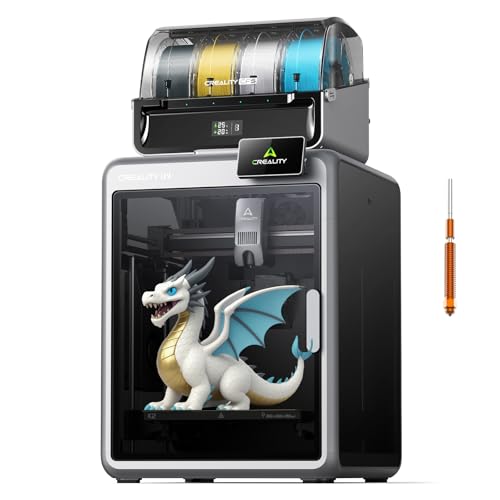
This printer stands out for quiet-room living more than most high-speed FDM models. Its 260 x 260 x 260 mm build area and fast up to 600 mm/s speeds mean you spend less time running long jobs. The heated bed can reach 100 °C, which helps reduce reprints and those extra hours that can turn a near-quiet workflow into noise and frustration.

The trade-off is that it is not always smooth and hands-off. Users report occasional clogs or poor adhesion, plus touchscreen issues and chamber heater problems. If you want the quietest experience, plan on dialing in settings and keeping an eye on filament flow early on. This is best for makers who accept a small amount of troubleshooting to keep print runs reliable.

What to Look For

Noise control by design: Look for enclosed or well-damped builds plus print modes that target vibration noise. If the printer exposes the fan, belts, or stepper motion to open air, expect more audible ringing during fast moves.

Print quality you can trust: Quiet prints still need sharp edges and stable surfaces. Prioritize layer consistency and fewer artifacts like stringing and visible ringing, since these issues create extra sanding and reruns.

Reliability for long, low-noise sessions: Quiet printing often means longer runs. Choose machines that hold calibration, keep bed adhesion stable, and finish prints without clogging or sensor interruptions.

Ease of leveling and ongoing maintenance: A quieter printer should not be harder to run. Favor models that reduce manual leveling steps and make filament loading, purge, and routine checks simple.

Practical features for calmer printing: Helpful additions include auto bed leveling, a heated bed suited to your materials, and power-loss recovery when prints run unattended. Large build volume matters too, since you can spread prints out and reduce repeated starts.

How We Picked

Products were identified through broad research across review sites and buyer forums, then filtered to only those that qualify as Quiet 3D Printers. We focused on FDM machines that reduce audible vibration through enclosure or damping, and we screened for reports of manageable day-to-day noise.

Scoring used the same objective pillar framework as the main 3D Printers post, allowing direct comparison of products within this sub-category. Print quality, reliability, ease of use, features, and value were weighted so a quieter printer still earns its place through repeatable output and low babysitting.

Frequently Asked Questions

What makes a 3D printer feel truly quiet during prints?

Quiet printers often use smart fan control, low-noise stepper drivers, and tighter motion settings. Some also enclose the printer to reduce sound from travel moves. Still, you will hear some noise during extrusion and bed heating.

Will quiet printing affect print quality, like layer lines or stringing?

It can, but only if quiet modes push speeds too low or change cooling. Most quiet-focused machines still let you tune temperature, fan speed, and retraction. If you notice more stringing, adjust retraction and print cooling in the slicer.

How do I keep a quiet printer reliable without constant tinkering?

Start with a clean build plate and use the same filament brand and settings each time. Then check the nozzle and bed are dry before every long print. Run auto bed leveling if available, and keep the firmware and slicer profile updated.

When should I choose a different type of 3D printer instead of a quiet printer?

Choose a different type if you need very fast prints, very large build volume, or different materials. For example, if you want smooth miniatures, resin printers often beat quiet FDM for surface finish. If you need tough engineering parts, look for printers built for higher heat materials.

How do quiet FDM printers compare to resin printers for sound and daily mess?

Quiet FDM printers usually produce far less odor and they do not need liquid resin handling. Resin printing can be very low noise, but it needs careful post-processing and ventilation. Quiet FDM is often easier for a shared room, while resin needs more safety steps.

See Also

Share:
On Key
You Might Also Like