




The 7 Best Capless USB Flash Drives in 2026

Transparency Note: This post contains affiliate links. As an Amazon Associate, we earn from qualifying purchases at no extra cost to you.

Capless USB flash drives keep the USB plug protected without a loose cap. That matters for daily carry, quick file swaps, and getting to work fast. In this sub-category, you want a drive that fits tight laptop ports, reads and writes reliably, and still works after repeated plugging.

Picking one is harder than it sounds because capless designs limit space. That can reduce cooling and memory quality, which affects sustained write speed. You also have to watch real storage capacity and avoid overhyped speed claims, since many compact drives slow down after the first burst.

Use this guide to choose by daily usability, speed you can feel, and build you can trust. If you need options beyond capless models, Looking for all types? See our Best USB Flash Drives.

Quick Overview

Patriot Supersonic Rage Prime 250GB USB Flash Drive
#1 Patriot Supersonic Rage Prime 250GB USB Flash Drive
SanDisk Extreme Fit 256GB USB Flash Drive
#2 SanDisk Extreme Fit 256GB USB Flash Drive
SanDisk Ultra Fit 128GB USB Flash Drive
#3 SanDisk Ultra Fit 128GB USB Flash Drive
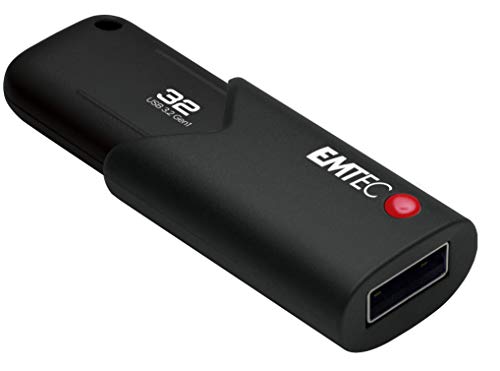
Emtec Click Secure B120 32GB USB Flash Drive
#4 Emtec Click Secure B120 32GB USB Flash Drive
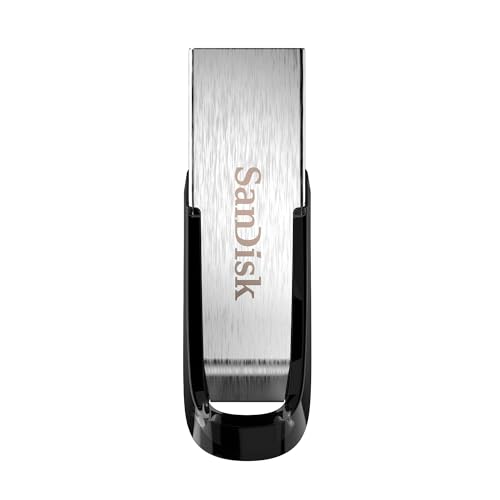
SanDisk Ultra Flair 32GB USB Flash Drive
#5 SanDisk Ultra Flair 32GB USB Flash Drive
Emtec Click Easy B110 64GB USB Flash Drive
#6 Emtec Click Easy B110 64GB USB Flash Drive
HP X796 32GB USB Flash Drive
#7 HP X796 32GB USB Flash Drive

Our Top Picks

#1. Patriot Supersonic Rage Prime 250GB USB Flash Drive

Patriot Supersonic Rage Prime 250GB USB Flash Drive
Our Score
7.7 / 10
hover for details
Performance
8.1
Capacity
8.3
Build Quality
7.1
Design
8.2
Security
5.9
Value
8.1
BrandPatriot Memory
Storage Capacity250 GB
Usb StandardUSB 3.2 Gen 2
Read Speed442 MB/s
Connector TypeDual USB-A/C
Form FactorCapless
Dimensions0.4 x 0.8 x 2.1 in
  • Consistently fast large-file transfers
  • Plenty of usable space delivered
  • Fair price, solid day-to-day performance
  • Security features are buggy
  • No data encryption

This capless drive stands out because it stays fast for real transfers, not just quick test reads. With a USB 3.2 Gen 2 interface and a rated 442 MB/s read speed, it is a practical choice for moving large files, like video folders and backup snapshots. The lack of a cap also helps since you can plug it in and leave it there, without worrying about a cover getting lost.

The main trade-off is security. User-facing protection sounds great, but reports point to buggy security tools, and there is no data encryption. If you mainly need quick, dependable storage for shared files or routine transfers, this is a strong pick in the capless category. If you store sensitive documents that must be protected at the device level, you will want a different drive.

→ Read full review

#2. SanDisk Extreme Fit 256GB USB Flash Drive

SanDisk Extreme Fit 256GB USB Flash Drive
Our Score
7.5 / 10
hover for details
Performance
7.4
Capacity
8.6
Build Quality
7.3
Design
8
Security
5
Value
7.9
BrandSandisk
Storage Capacity256 GB
Usb StandardUSB 3.2 Gen 1
Read Speed400 MB/s
Connector TypeUSB-C
Form FactorCapless
  • Plenty of usable space delivered
  • Easy to insert and remove
  • High read speed
  • Security features are buggy
  • Inconsistent sustained writes
  • No confirmed hardware encryption

SanDisk Extreme Fit 256GB stands out in the capless USB flash drive category because it keeps the connector covered, with no cap to lose. It uses a USB-C connector, so it works cleanly with modern laptops and phones that support USB-C. In day to day use, it reads large files fast, which helps when you move videos, installers, or backups off a computer.

The main trade-off is write behavior. Sustained writes feel inconsistent, so moving big folders can slow down after the initial burst. Also, the security side is less reliable than you would want, and there is no confirmed hardware encryption. This is a solid pick for frequent, casual transfers where you mainly care about fast reads and a no-cap design.

#3. SanDisk Ultra Fit 128GB USB Flash Drive

SanDisk Ultra Fit 128GB USB Flash Drive
Our Score
7.4 / 10
hover for details
Performance
7.1
Capacity
8.3
Build Quality
6.8
Design
8.1
Security
6.1
Value
8.3
BrandSandisk
Storage Capacity128 GB
Usb StandardUSB 3.2 Gen 1
Read Speed400 MB/s
Dimensions0.2 x 1.2 x 0.6 in
Security FeaturesPassword Protection
  • Plenty of usable space delivered
  • High read speed
  • Plug-and-stay convenience
  • Software-dependent security
  • Security setup feels clunky
  • Heat buildup

This capless, low-profile SanDisk Ultra Fit is notable because it stays simple and convenient when you plug it in often. With a compact 0.2 x 1.2 x 0.6 in body and a USB 3.2 Gen 1 link, it fits easily in a laptop bag or the side of a monitor without a cap to lose. In day to day use, the 400 MB/s rated read speed translates well for moving large files like photos and videos.

The main trade-off is security. Its password protection depends on software setup, which can feel clunky compared with drive-level lock systems. Also, longer transfers can cause noticeable heat buildup, so it is better for occasional backups or sneaker-net file moves than for heavy, nonstop writing sessions.

#4. Emtec Click Secure B120 32GB USB Flash Drive

Emtec Click Secure B120 32GB USB Flash Drive
Our Score
7.3 / 10
hover for details
Performance
6.7
Capacity
7.9
Build Quality
7.3
Design
7.9
Security
5.8
Value
8.5
BrandEmtec
Storage Capacity32 GB
Usb StandardUSB 3.2 Gen 1
Read Speed100 MB/s
Write Speed20 MB/s
Form FactorSlide
Security FeaturesHardware Encryption
  • Fair price, solid day-to-day performance
  • Security features are buggy
  • Slow write speed

The Emtec Click Secure B120 stands out in a capless-style use case because the drive uses a slide mechanism, so you do not deal with a lost cap. It also includes hardware encryption, which makes it a practical grab-and-go option when you need to move files between computers without extra steps. On top of that, its real-world read speed hits around 100 MB/s, which feels responsive for copying large files once data starts streaming.

The trade-off is in sustained writing and security behavior. Write speed drops to about 20 MB/s, so longer transfers can take noticeably more time. Even more important, user reports point to buggy security tools, which can make the “secure” part less dependable day to day. This drive fits best for people who want a simple slide design and fast reads, but it is not the safest pick if you rely heavily on the encryption workflow.

→ Read full review

#5. SanDisk Ultra Flair 32GB USB Flash Drive

SanDisk Ultra Flair 32GB USB Flash Drive
Our Score
7.3 / 10
hover for details
Performance
6.6
Capacity
8.2
Build Quality
7.3
Design
7.9
Security
5.5
Value
8.5
BrandSandisk
Storage Capacity32 GB
Usb StandardUSB 3
Read Speed150 MB/s
Write Speed150 MB/s
Form FactorCapless
Security FeaturesPassword Protection
  • Plenty of usable space delivered
  • Fair price, solid day-to-day performance
  • Capless secure design
  • Security features are buggy
  • Writes slow after cache fills
  • Variable unit quality

The SanDisk Ultra Flair 32GB stands out in capless USB flash drives because its no-cap design keeps the connector covered and easy to carry. It is a USB 3 drive rated for up to 150 MB/s reads and writes, which fits typical file copying for photos, documents, and quick backups. With 32 GB of storage, it is a practical size for moving files between a laptop and a desktop without worrying about losing a cap.

The main trade-off is reliability during longer transfers. User reports point to writes slowing after the initial cache fills, and the security setup is not consistently smooth. This makes it a better pick for everyday, shorter file moves than for large, sustained backup jobs or anyone who needs dependable password protection every time.

#6. Emtec Click Easy B110 64GB USB Flash Drive

Emtec Click Easy B110 64GB USB Flash Drive
Our Score
7.2 / 10
hover for details
Performance
6.6
Capacity
8.2
Build Quality
7.1
Design
8
Security
5.2
Value
8.5
BrandEmtec
Storage Capacity64 GB
Usb StandardUSB 3.2 Gen 1
Form FactorSlide
  • Plenty of usable space delivered
  • Easy to insert and remove
  • Fair price, solid day-to-day performance
  • Writes slow after cache fills
  • Security features are buggy

The Emtec Click Easy B110 is notable in the capless USB flash drive category thanks to its slide-style, capless feel. You can plug it in quickly and you do not have to worry about losing a cap during frequent use. Setup is also straightforward, which makes it a practical pick for everyday file sharing between laptops and computers.

The trade-off shows up in longer transfers. After the drive uses its fast cache, writes slow down, so it is not the best choice for moving large backups in one go. Security is also a weak point, since reports point to buggy security behavior. If you mostly move small files and want a simple capless design, this one fits, but heavy writers and security-reliant users may want a different option.

#7. HP X796 32GB USB Flash Drive

HP X796 32GB USB Flash Drive
Our Score
7.1 / 10
hover for details
Performance
6.3
Capacity
7.6
Build Quality
7.7
Design
8.1
Security
5
Value
8.1
BrandHP
Storage Capacity32 GB
Usb StandardUSB 3.2 Gen 1
Read Speed75 MB/s
Write Speed100 MB/s
Form FactorCapless
Dimensions0.3 x 2.1 x 0.7 in
  • Easy to insert and remove
  • Compact size
  • Durable metal casing
  • Writes slow after cache fills
  • Security features are buggy

This capless HP X796 is notable for its sturdy, all-metal body and easy plug in, plug out design. At 0.3 x 2.1 x 0.7 in, it stays compact in a pocket or laptop bag, and the connector feels straightforward to use without a loose cap to lose. In daily file moving, its 75 MB/s read speed lines up well for common tasks like copying docs and media off a computer.

The trade-off shows up in longer transfers. Writes can slow down after the drive’s cache fills, so big file copies and backups may take longer than the headline write rate suggests. It is also not a great pick if you need reliable security, since reports point to buggy security features.

What to Look For

Consistent Transfer Speed: Check for drives that hold up after the cache fills. For capless models, sustained write speed matters more than the first fast seconds when moving photos, videos, or backups.

Capacity That Matches the Label: Confirm the capacity you pay for is the capacity you get. Stick to reputable brands and avoid drives with suspiciously low storage for the price.

Connector Fit in Tight Ports: Capless drives often plug straight into the port with minimal housing. Look for designs that do not wobble, and pick sizes that do not block neighboring ports on laptops and docks.

Build Quality for Frequent Use: Since there is no cap to protect the connector, the housing needs to be sturdy. Prioritize solid shells, tight USB fitting, and designs that resist cracking from repeated insertion.

Practical Daily Security: Some capless drives include encryption or a lock feature. If you store sensitive files, choose a model with real security features and easy setup, not vague software promises.

How We Picked

Products were identified through broad research across review sites and buyer forums, then filtered to only those that qualify as Capless USB Flash Drives.

Scoring used the same objective pillar framework as the main USB Flash Drives post, allowing direct comparison of products within this sub-category.

Frequently Asked Questions

What does capless mean on a USB flash drive?

A capless drive has no removable plastic cover over the USB connector. This helps you avoid losing the cap. It also makes it faster to plug in and unplug for quick tasks.

Are capless USB drives easier to carry and use day to day?

Yes. Most capless designs stay small and pocket friendly because they do not need extra parts. They also reduce daily wear from repeatedly taking a cap on and off.

How should I care for a capless USB flash drive to prevent damage?

Keep the connector clean and dry before you plug it in. Avoid putting it in a tight pocket with loose coins or keys that can scratch contacts. If it gets dirty, use a dry, soft cloth to wipe the metal tip gently.

Do capless USB flash drives have different security options than other USB drives?

Some capless models include hardware encryption, while others offer no built in security. If you need password protection for files, look for a drive that explicitly lists hardware encryption or a password or PIN feature. Software encryption tools can vary by computer, so hardware features are usually more reliable.

When should I choose a different type of USB flash drive instead of capless?

Choose a different style if you want extra protection for the connector. For example, capped designs can better shield the metal contacts when the drive sits in a messy bag. Also consider a different interface, like USB C, if your devices only have USB C ports.

See Also

Share:
On Key
You Might Also Like