A 17-Inch Laptop Cooling Pad is a large base designed to match the footprint of 16 to 17-inch laptops. Buyers in this size need stable support, airflow that reaches the full bottom area, and controls that do not get in the way of typing or a mouse hand.
Choosing one is hard because the biggest pads often add bulk and weight without guaranteeing better cooling. You also trade fan strength against noise, and you may lose comfort if height adjustment feels limited or if the pad wobbles at the angles you use most.
If you want coverage for all laptop sizes and types, see our Best Laptop Cooling Pads. You can then narrow down by size using this 17-inch guide.
Quick Overview
Our Top Picks
#1. KLIM Ultimate RGB 17" Cooling Pad

Specifications
| Brand | KLIM |
|---|---|
| Supported Laptop Size | 10-17.3 in |
| Number Of Fans | 1 |
| Fan Speed | 750 RPM |
| Adjustable Height Levels | 4 Levels |
| Dimensions | 1.7 x 16.7 x 12.4 in |
| Weight | 2.2 lb |
Pros
- Sturdy construction, clean fit
- Low noise during use
- Smart buy for power
Cons
- Cooling inconsistency
The KLIM Ultimate RGB 17 stands out in 17-inch laptop cooling pads because it stays easy to live with while you use it for longer sessions. It has a sturdy frame, a clean fit, and four height levels that lift your laptop into a more comfortable typing angle. The pad also runs quietly, so fan noise stays in the background during work, study, and everyday gaming.
The main trade-off is that cooling can feel a bit inconsistent across the laptop base. In practice, you may see stronger results in some hot spots than others, especially under heavy sustained load. This is a good pick if you want solid build, stable positioning, and low noise for large laptops up to 17.3 inches, but you should not expect perfectly even temperature drops everywhere.
#2. Targus Chill Mat 17" Cooling Pad

Specifications
| Brand | Targus |
|---|---|
| Supported Laptop Size | 17 in |
| Number Of Fans | 2 |
| Fan Speed | 2500 RPM |
| Adjustable Height Levels | 4 Levels |
| Dimensions | 1 x 16 x 11 in |
| Weight | 2 lb |
Pros
- High RPM cooling
- Low noise during use
Cons
- No speed control
- Some hotspot reduction
The Targus Chill Mat 17 stands out for its high RPM airflow aimed at 17-inch laptops. With 2 fans running up to 2500 RPM, it can take the edge off heat during long sessions. You also get 4 height levels, which helps you find a comfortable typing angle without rocking as much as slimmer stands.
The main trade-off is control. It has no speed settings, so you run it at one level rather than matching the fan power to your workload. Cooling improvements are noticeable, but not uniform, so some hotspots may still show up under heavy use. This makes it a good fit if you want simple, steady cooling and a more ergonomic setup, not if you want fine-tuned airflow.
#3. Targus Chill Mat Plus 17" Cooling Pad
Specifications
| Brand | Targus |
|---|---|
| Supported Laptop Size | 17 in |
| Number Of Fans | 2 |
| Fan Speed | 2500 RPM |
| Adjustable Height Levels | 4 Levels |
| Dimensions | 13.25 x 9.25 x 1 in |
| Weight | 2 lb |
Pros
- Rock-solid, easy adjust
- Stable laptop grip
- Wrist comfort boost
Cons
- Cooling uneven distribution
- Fan noise drift
- Some hotspot reduction
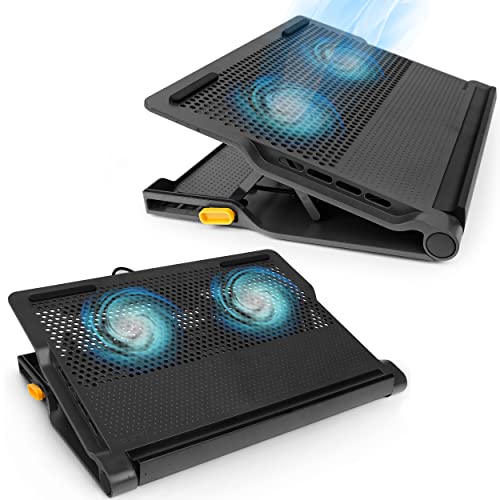
For a 17-inch laptop cooling pad, the Targus Chill Mat Plus 17 stands out most in how stable it feels during long typing sessions. It has four height levels and a firm, non-slip laptop grip, so your screen position and wrist comfort stay steady. The angled setup also helps keep your hands in a more natural spot, which matters when you work or game for hours.
The trade-off is cooling that is not perfectly even across the base. Some hotspot reduction happens, but temperatures can still vary by where the vents sit. Fan noise also tends to drift upward as use continues, so quieter work may require keeping speeds lower and taking short breaks.
What to Look For
Supported laptop size fit: Confirm the pad supports 17 in laptops, not just 15 to 16 in models. A good fit matters because airflow and fan placement only help where the laptop base sits.
Fan count and fan speed: Look for at least 2 fans and check the advertised fan speed in RPM. Higher RPM can improve sustained cooling on 17-inch chassis, where heat usually spreads across a wider base.
Speed settings that you can control: Choose a pad with multiple speed levels, since 1 to 2 speeds often feel quiet for office use and higher speeds help during gaming or long renders. Fewer settings usually mean you pick between undercooling and extra noise.
Noise level in real use: For 17-inch pads, the fans can spin faster and stay in your workspace. Prioritize models that keep noise reasonable at the speed you expect to use most.
Adjustable height levels and stability: Check the number of discrete height levels and how steady the base feels when lifted. You want a typing angle that holds firm, since wobble makes longer sessions tiring.
How We Picked
Products were identified through broad research across review sites and buyer forums, then filtered to only those that qualify as 17-Inch Laptop Cooling Pads.
Scoring used the same objective pillar framework as the main Laptop Cooling Pads post, allowing direct comparison of products within this sub-category.
Frequently Asked Questions
What laptop sizes fit a 17-inch cooling pad best?
Most 17-inch cooling pads fit laptops around 16 to 17 inches. Still, measure your laptop base width and depth first. Make sure the fan area lines up with your laptop vents. A good fit helps airflow reach the right spots.
How much height adjustment should I look for on a 17-inch cooling pad?
Look for at least 3 height levels. More levels can help you match your typing comfort. Stable tilt matters most, especially on a desk. If the pad wobbles at higher angles, it can feel uncomfortable fast.
How do I clean a cooling pad after dust builds up?
Unplug the pad first and let it cool. Use a soft brush or dry cloth to remove surface dust. If your pad allows it, gently blow out vents with short bursts of air. Avoid soaking the fan housing or using wet wipes.
When should I choose a different type of laptop cooling pad instead of a 17-inch model?
Choose another type if your laptop is much smaller than 17 inches. Some pads fit better and cool more evenly for smaller bases. You may also switch types if you need a very quiet pad for office use. If noise bothers you, focus on quieter fan control rather than size alone.
How do 17-inch cooling pads compare with smaller options for cooling and comfort?
A 17-inch pad usually covers more of the laptop base. That can help reduce hot spots during long sessions. Smaller pads may be enough for light use and can feel more portable. For heavy gaming, larger coverage often gives more even airflow.