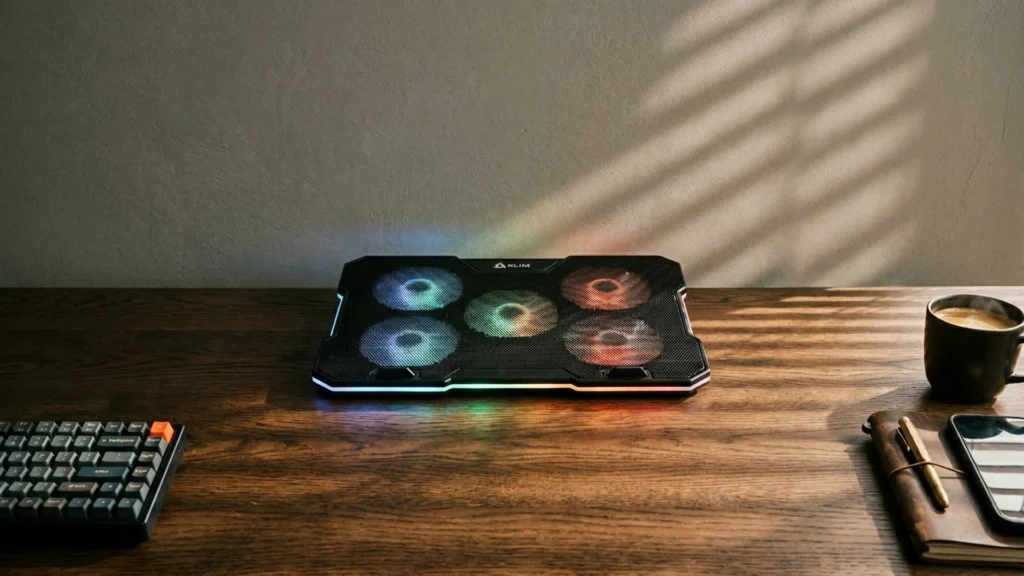
RGB laptop cooling pads add fan lights to the cooling pad category, but the buying priority stays the same. You still need airflow that actually cools the laptop base. In this sub-category, the pad should fit your laptop size, keep the fans positioned under the vents, and stay stable when you raise the front edge for typing comfort.
Picking an RGB model is harder than it looks because the lighting changes how manufacturers design the surface and controls. You often trade fan strength for a slimmer frame, stronger airflow for lower noise, or adjustability for a steadier platform. Many pads also have multiple settings that affect both cooling and sound, so you need to check more than the RGB effects.
To match the right features to your workload, use this RGB-focused checklist and the ranked picks below, then compare them against your laptop size and your tolerance for fan noise. Looking for all types? See our Best Laptop Cooling Pads.
Quick Overview
Our Top Picks
#1. KLIM Ultimate RGB 17" Cooling Pad

Specifications
| Brand | KLIM |
|---|---|
| Supported Laptop Size | 10-17.3 in |
| Number Of Fans | 1 |
| Fan Speed | 750 RPM |
| Adjustable Height Levels | 4 Levels |
| Dimensions | 1.7 x 16.7 x 12.4 in |
| Weight | 2.2 lb |
Pros
- Sturdy construction, clean fit
- Low noise during use
- Smart buy for power
Cons
- Cooling inconsistency
This cooling pad stands out in the RGB laptop cooling pads category because it combines a simple, sturdy stand with subtle RGB lighting and a calmer fan experience. The KLIM Ultimate RGB 17 supports 10 to 17.3 inch laptops and uses a single 750 RPM fan, but the build feels solid on a desk and the anti slip base helps keep your laptop steady during long work sessions. Noise stays low enough that fan sound does not take over your focus.
The main trade off is cooling consistency. In heavier gaming or sustained loads, you may still see hot spots depending on where your laptop vents sit. This makes it a great match for students and everyday users who want an easy, stable setup with RGB ambiance, but less ideal if you need perfectly even temperature drops across the whole base for demanding sessions.
#2. Thermaltake Massive 20 RGB Cooling Pad

Specifications
| Brand | Thermaltake |
|---|---|
| Supported Laptop Size | 19 in |
| Number Of Fans | 1 |
| Fan Speed | 600 - 800 RPM |
| Adjustable Height Levels | 3 Levels |
| Dimensions | 1.8 x 14 x 18.5 in |
| Weight | 3.4 lb |
Pros
- Good large-laptop fit
- Sturdy steel mesh
Cons
- Limited laptop compatibility
- Single-fan cooling
- Low RPM cooling
Thermaltake Massive 20 RGB stands out in the RGB laptop cooling pad category because it targets larger laptops while keeping the look front and center. The steel mesh base feels solid, and the 3 height levels help you find a comfortable typing angle. A single 19 in class fan can still make a noticeable difference for day to day use, especially when heat builds up near the middle of the laptop.
The main trade-off is cooling coverage. With only one fan running at 600 to 800 RPM and limited airflow paths, it may struggle to pull down temperatures evenly on every model, and you can end up with hot spots during heavier gaming or sustained workloads. This is best for people who want a stable, RGB-accented pad for a larger laptop and are okay with simpler, single-fan cooling.
#3. llano V12 15.6"-19" Cooling Pad

Specifications
| Brand | llano |
|---|---|
| Supported Laptop Size | 15.6-19 in |
| Number Of Fans | 5 |
| Fan Speed | 2800 RPM |
| Speed Settings | 3 Settings |
| Adjustable Height Levels | 3 Levels |
| Dimensions | 2.8 x 16.9 x 13 in |
| Weight | 4 lb |
Pros
- Adjustable height
- Quiet low modes
- Intuitive controls
Cons
- Noticeable fan hum
- Noise under load
- Inconsistent thermal drops
This llano V12 stands out as a solid all-rounder in the RGB laptop cooling pad lane, mainly because the 3 height levels and 5-fan layout make it easy to position for airflow under long work sessions. The controls feel straightforward, and the lower modes stay relatively calm for everyday use. When you run it harder, the cooling does not feel random, thanks to the broad fan coverage meant for 15.6 to 19 inch laptops.
The trade-off is noise. Even on moderate settings, there is a noticeable fan hum, and it can get more distracting under load. If your top priority is quiet cooling for late-night study or meetings, you may find other pads better suited. If you want a practical adjustable setup with RGB-style desk appeal, this is a good fit for gamers and multitaskers who can tolerate some extra sound.
#4. Razer Adaptive Smart 14"-18" Cooling Pad

Specifications
| Brand | Razer |
|---|---|
| Supported Laptop Size | 14-18 in |
| Number Of Fans | 1 |
| Fan Speed | 3000 RPM |
| Dimensions | 4.5 x 15.6 x 11.5 in |
Pros
- Consistent temperature drops
- Sturdy construction, clean fit
- High RPM cooling
Cons
- Limited height comfort
- Noticeable fan hum
- Single-fan cooling
This Razer pad stands out in the RGB laptop cooling pad crowd because it keeps its cooling stable under load while adding the visual vibe most people buy for. The single fan hits up to 3000 RPM, and real temperature drops stay consistent during long sessions. That steady airflow helps most with hot spots that build up at the laptop base, which is where cooling pads matter most.
The trade-off is comfort and quietness. The height setup does not feel as friendly for long typing or desk work, so your posture may need frequent tweaks. You should also expect a noticeable fan hum, which can be distracting in quiet rooms. If you want one focused fan solution with strong cooling and RGB style, it fits well, but it is not the best pick for people who prioritize a calm, adjustable typing platform.
#5. TopMate C11 15.6"-17.3" Cooling Pad

Specifications
| Brand | TopMate |
|---|---|
| Supported Laptop Size | 11-17.3 in |
| Number Of Fans | 6 |
| Fan Speed | 2400 RPM |
| Adjustable Height Levels | 5 Levels |
| Dimensions | 1.7 x 16.1 x 11.7 in |
| Weight | 2.4 lb |
Pros
- High RPM cooling
- More airflow coverage
- Fits more laptops
Cons
- USB instability
This TopMate C11 stands out for RGB Laptop Cooling Pads shoppers who want broad compatibility and strong airflow. It supports 11-17.3 in laptops and uses 6 fans at up to 2400 RPM, which helps spread cooling across more of the laptop base than smaller pads. The 5 height levels also make it easier to find a comfortable typing angle for long sessions, so the RGB look does not come at the cost of desk usability.
The main trade off is USB stability. If your setup uses a bus-powered hub or a loose connection, the pad can feel less reliable. This is a good pick for users running gaming or heavy workloads on a larger laptop, but keep an eye on the USB connection for consistent fan control and lighting.
What to Look For
Supported laptop size: Check the listed supported range before anything else. An RGB pad that barely fits can block vents and reduce airflow where you need it most, even if the lights look good.
Fan coverage and number of fans: Look for a pad that places its fans where your laptop intakes sit. More fans can help spread airflow, but uneven placement can still create hot spots under the keyboard area.
Fan speed and speed settings: Higher RPM usually means more cooling under sustained loads. Also verify the number of speed settings so you can reduce fan noise during work and raise it for gaming or long renders.
Noise level at common speeds: RGB pads can run louder because manufacturers size fans to handle cooling plus extra internal space. Target a lower dB noise level and make sure the middle speed feels usable for classes, calls, or late-night play.
Adjustable height levels and stability: Choose pads with enough discrete height levels to reach a comfortable typing angle. If the pad wobbles on your desk, the lighting does not matter, and airflow can shift away from the vents.
How We Picked
Products were identified through broad research across review sites and buyer forums, then filtered to only those that qualify as RGB Laptop Cooling Pads. The list focused on models with clearly defined lighting features plus real fan hardware suitable for sustained laptop use.
Scoring used the same objective pillar framework as the main Laptop Cooling Pads post, allowing direct comparison of products within this sub-category. Performance, ergonomics, build quality, noise, and value determined the final ranking so RGB effects never replace the core cooling and daily usability tests.
Frequently Asked Questions
Do RGB laptop cooling pads cool better than non RGB pads?
RGB lights do not cool the laptop by themselves. What matters most is fan airflow and how evenly the fans cover the bottom of the laptop. Pick a pad with strong, well placed fans for better temperature drops during gaming.
What fan and fan speed specs should I look for in an RGB cooling pad?
Look for how many fans the pad uses and the highest fan speed rating in RPM. More fans can help spread airflow, but the fan speed matters too. Also check how many speed settings it offers, so you can reduce noise during work.
How do I choose the right supported laptop size for an RGB cooling pad?
Match the pad size range to your laptop model or screen size. Many pads list a supported range like 14 to 18 inches or 15.6 to 19 inches. If your laptop base area does not line up with the fan zone, you may get weaker cooling.
How should I set the height levels for typing and cooling?
Use the lowest height for stable typing, then move up if your laptop needs more airflow. Height can also help keep vents from blocking against the desk. If the pad wobbles, choose a lower setting or a pad with a more rigid frame.
Should I consider a different type of laptop cooling pad instead of an RGB model?
Choose a non RGB pad if you care more about quiet cooling than looks. If you use your laptop often on the bed or couch, you may also prefer a stand style designed for lap use. For maximum airflow, prioritize performance first and then pick RGB only if the cooling matches your needs.
How do RGB cooling pads compare to other laptop cooling pads by supported laptop size?
RGB pads often come in common ranges like 15 to 17 inches or 14 to 18 inches. Other types may offer more extreme fit options for very small or very large laptops. Always check the supported size range and ensure the fan area lines up with your laptop vents.