AI-Powered Mini Computers are small desktop units built for on-device AI tasks, like running AI assistants locally, using image and video tools, and speeding up creative workflows. Buyers in this space need enough CPU power for model and app tasks, enough RAM to keep projects open, and fast storage so AI apps load without delays.
Picking the right one is harder than it sounds. The main trade-offs are heat and noise during long AI runs, whether the system has the ports you need for cameras, microphones, and external drives, and how much real performance you get at the asking price. Some compact models feel fine for office work but slow down once AI tools run continuously.
To cover the full range of small desktop needs, including non-AI use cases, see our Best Mini Computers. That list helps you compare AI-first options against broader mini PC picks.
Quick Overview
Our Top Picks
#1. GEEKOM A9 Max Mini Computer

Specifications
| Brand | GEEKOM |
|---|---|
| Processor | AMD Ryzen AI 9 HX 370 |
| Memory | 32 GB |
| Storage | 1 TB SSD |
| Graphics | Radeon 890M |
| Wireless | WiFi 7, Bluetooth 5.4 |
| Usb Ports | 4 Ports |
| Dimensions | 1.8 x 5.3 x 5.2 in |
| Weight | 3.7 lb |
Pros
- Smooth multitasking performance
- Reliable Wi-Fi and Bluetooth
- Spacious fast SSD
Cons
- Bulky and heavy
- Thermal evidence thin
- Premium durability unknown
The GEEKOM A9 Max stands out in AI-Powered mini computers because it pairs a Ryzen AI 9 HX 370 with 32 GB of RAM and a 1 TB SSD for fast, steady daily use. Multitasking feels smooth, web browsing stays responsive, and office work and media playback do not bog down. The Radeon 890M iGPU also helps keep light creative tasks moving without constant fuss.
There is a trade-off. At 3.7 lb and with a bulkier footprint than many thin minis, it is harder to hide behind a monitor. Cooling appears more like a thin margin setup, so long heavy loads may get warm. If you want an AI-capable mini that feels quick day to day and you do not mind a slightly heavier box, this is a strong fit.
#2. ASUS ROG NUC Mini Computer

Specifications
| Brand | ASUS |
|---|---|
| Processor | Intel Core Ultra 9 (Series 2) ARL-HX |
| Memory | 32 GB |
| Storage | 1 TB SSD |
| Graphics | NVIDIA GeForce RTX 5070 Mobile |
| Wireless | Wi-Fi 6E, Bluetooth 5.3 |
| Usb Ports | 6 Ports |
Pros
- Smooth multitasking performance
- Stable thermals under load
- Compact footprint, practical layout
Cons
- High price premium
- Limited user wireless proof
This ASUS ROG NUC Mini Computer stands out in the AI-Powered Mini Computers set because it pairs a top-tier Intel Core Ultra 9 (Series 2) ARL-HX CPU with an NVIDIA GeForce RTX 5070 Mobile GPU. That mix makes it a strong choice for AI workloads that need more than just CPU power, like running local AI tools, handling heavier notebooks, and keeping multiple apps smooth at once. With 32 GB RAM and a 1 TB SSD, it feels responsive for real daily use, not just benchmarks.
The main trade-off is practical: you get a lot of compute in a compact box, but the wireless setup is the least proven part, so reliability may vary by your room setup. It also carries a premium that may not fit everyone, especially if you mainly do office work or light learning projects. This is best for people who want a compact desktop replacement and plan to use the GPU for AI tasks, not just background automation.
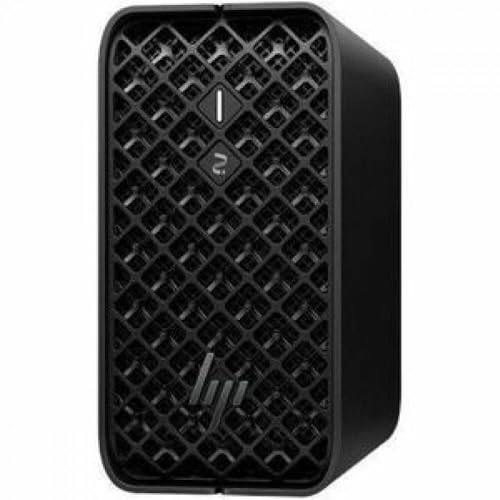
#3. HP Z2 Mini Mini Computer
Specifications
| Brand | HP |
|---|---|
| Processor | Ryzen AI MAX PRO 385 |
| Memory | 32 GB |
| Storage | 1 TB SSD |
| Graphics | AMD Radeon 8050S Graphics |
| Dimensions | 11.5 x 19.6 x 7.6 in |
| Weight | 5.1 lb |
Pros
- Smooth multitasking performance
- Reliable Wi-Fi and Bluetooth
- Compact footprint, practical layout
Cons
- Warms up noticeably
This HP Z2 Mini Mini Computer stands out for AI-Powered Mini Computers because it keeps day to day work feeling fast and stable. The Ryzen AI MAX PRO 385 with 32 GB RAM handles multitasking smoothly, and the 1 TB SSD helps apps and projects open quickly. For AI workflows that involve lots of switching between tools, browsers, and office apps, the system feels responsive rather than bogged down.
The main trade-off is cooling. It warms up noticeably during longer sessions, which can be a dealbreaker for quiet, all day use in tight spaces. If you plan to run steady workloads, this is best for users who can give it airflow and who value compact setup and reliable Wi-Fi and Bluetooth over staying cool to the touch.
What to Look For
CPU headroom for AI apps: Look for a CPU that delivers quick app launches and stable performance during sustained loads. This matters for local model work, batch processing, and keeping multiple AI tools running at once.
RAM capacity for local workflows: Aim for at least 16 GB for comfortable AI tool use, especially when you keep a browser, editor, and AI app open. More RAM reduces slowdowns when projects, caches, and model files grow.
SSD speed and capacity: Choose an SSD with enough space for AI apps, downloads, and working files. Fast storage also helps when you swap between datasets, models, and media projects.
Graphics that match your AI workload: Confirm what the mini PC can use for AI acceleration. Integrated graphics can work for lighter AI tasks, but buyers who plan heavier local work should prioritize models with a clear, usable graphics option for their expected tools.
Cooling and noise under continuous load: AI tasks often run longer than normal office work. Prioritize mini PCs that stay stable without heavy throttling, and that keep fan noise at a manageable level for a desk setup.
How We Picked
Products were identified through broad research across review sites and buyer forums, then filtered to only those that qualify as AI-Powered Mini Computers. The goal was to keep models that are consistently discussed for on-device AI use, not just general-purpose mini PCs.
Scoring used the same objective pillar framework as the main Mini Computers post, allowing direct comparison of products within this sub-category. Performance, connectivity, cooling, compactness, build quality, and value were weighted to reflect what AI buyers feel day to day, especially during longer runs and multi-app sessions.
Frequently Asked Questions
What makes a mini computer “AI-powered” for everyday use?
These mini computers usually include a newer CPU and strong built-in graphics. Many also support AI tools and local AI apps, depending on the model. You get faster results for tasks like summaries, captions, and basic image work.
Do I need a lot of RAM for AI features on a mini computer?
You will feel the difference with more RAM. For light AI tasks, 16 GB is a common sweet spot. For bigger models or heavier multitasking, 32 GB helps you avoid slowdowns.
How much storage do I need if I plan to run AI apps locally?
AI tools and model files can take up space quickly. A 512 GB SSD can work for smaller tools and regular files. If you want room for more models, 1 TB is the safer choice.
How do I choose between the top options in this sub-category?
Start with performance and real cooling. Look for a mini computer that stays responsive under load. Then compare practical things like the number of USB ports and the size so it fits your desk setup.
When should I choose a different type of mini computer instead of an AI-powered one?
Choose a simpler mini computer if you only browse the web and use office apps. You should also switch if you never plan to run AI apps locally. In those cases, you can save money and still get a smooth experience.
How do AI-powered mini computers compare to other mini computers in connectivity?
AI-powered models often include enough ports for daily AI workflows. Many support modern Wi-Fi and stable Bluetooth for headsets and controllers. If you need multiple displays or more peripherals, check the USB port count first.