USB flash drives are small storage sticks that plug into a USB port to move files fast. They work for photos, installers, documents, and quick backups. They also fit easily in a bag or key ring, so they get used more than you might expect.
Choosing one is harder than it sounds. The advertised speed often does not match real transfers. Many drives slow down after their small cache fills, especially during long writes like video or backups. Capacity can also be misleading on low-quality models. Finally, some drives have security features that are hard to set up or that fail in daily use.
This guide explains what matters and how to compare drives you will actually live with. You will learn which USB version, speeds, connector type, size, build, and security choices to prioritize. Then you can pick a model that matches your file sizes and your risk level for lost or sensitive data.
Quick Overview
Top Picks
Best Overall

Specifications
| Brand | Sandisk |
|---|---|
| Storage Capacity | 1000 GB |
| Read Speed | 1000 MB/s |
| Connector Type | Dual USB-A/C |
| Security Features | Hardware Encryption |
Pros
- Consistently fast large-file transfers
- Plenty of usable space delivered
- Easy to insert and remove
Cons
- Clunky security setup
This SanDisk Extreme PRO dual drive fits the Best Overall slot because it stays consistently fast for real transfers, especially with large files and long writes. The dual USB-A and USB-C design also makes it easy to use across laptops, tablets, and phones with adapters or the right port.
In day to day use, it turns big read and write workloads into smooth transfers, which is why it earns high marks for performance. You also get a full 1000 GB of storage that matches what you expect from a major brand. The build feels solid, and the connectors are easy to insert and remove, so it works well for frequent plugging and moving files around.
The main downside is the security experience. The hardware encryption is there, but setup can feel clunky. If you want a dependable 1TB drive for backups, photo and video transfers, and everyday file moving, and you can tolerate a more annoying security setup, this is the one to get.
Also ranked #1 in: Dual Port USB Flash Drives
Best USB-C Connector

Specifications
| Brand | PNY |
|---|---|
| Storage Capacity | 1000 GB |
| Usb Standard | USB 3.2 Gen 2 |
| Read Speed | 1000 MB/s |
| Write Speed | 800 MB/s |
| Connector Type | USB-C |
| Dimensions | 0.4 x 2.5 x 0.75 in |
Pros
- Consistently fast large-file transfers
- High capacity
- Frequent plugging, no wobble
Cons
- No explicit encryption
- Limited connector
A USB-C flash drive fits the “Best USB-C Connector” role when you want direct plug-in use on phones and newer laptops. The PNY Pro Elite V3 uses a USB-C connector, so you skip adapters for most USB-C devices.
In daily transfers, it stays strong with large files. The drive is rated up to 1000 MB/s read and 800 MB/s write, and it delivers consistent speed when moving big folders. It also gives you a full 1TB of storage, and the body holds up well to frequent plugging without wobble.
The main drawback is limited security. There is no explicit encryption or lock feature listed. If you want a fast 1TB USB-C drive for backups and big media, but do not need built-in protection, this is the one to get.
Best Retractable

Specifications
| Brand | ADATA |
|---|---|
| Storage Capacity | 256 GB |
| Usb Standard | USB 3.2 Gen 2 |
| Write Speed | 100 MB/s |
| Connector Type | USB-C |
| Form Factor | Retractable |
Pros
- Consistently fast large-file transfers
- Plenty of usable space delivered
Cons
- No encryption support
- Security features are buggy
- Limited connector
As a Best Retractable pick, the ADATA UE800 focuses on protecting its connector with a retractable USB-C design. That cover helps when you toss it in a bag, and it keeps the plug from getting worn as quickly.
On speed, it holds up well for large files. It delivers consistently fast transfers in real-world use, with a rated 100 MB/s write speed and strong large-file performance. The 256 GB size is also a practical fit for backups and media, with plenty of usable space reported.
The main downside is security. There is no encryption support, and the security features that exist can be buggy. If you want reliable, retractable USB-C storage for everyday transfers, this is a solid choice, as long as you do not need drive-level protection.
Best Military Security
Specifications
| Brand | Kingston |
|---|---|
| Storage Capacity | 64 GB |
| Usb Standard | USB 3.2 Gen 1 |
| Read Speed | 145 MB/s |
| Write Speed | 115 MB/s |
| Connector Type | USB-C |
| Dimensions | 0.4 x 3.1 x 0.8 in |
| Security Features | Hardware Encryption |
Pros
- Plenty of usable space delivered
- Easy to insert and remove
- Reliable password protection
Cons
- Writes slow after cache fills
- Limited connector
- High price overkill
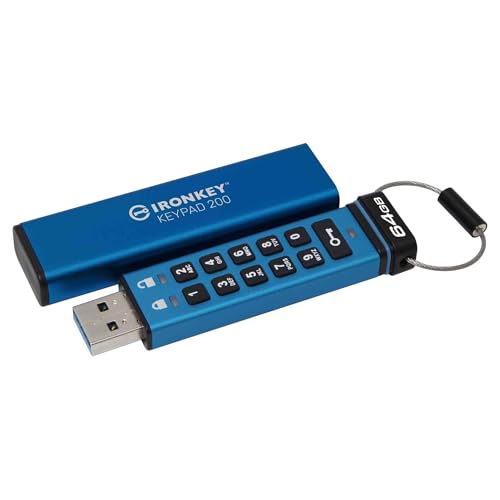
This drive fits the Best Military Security slot because it relies on built-in hardware encryption and a keypad for access. You do not need to trust a software app to keep data locked down. Enter a code to use it, which suits people who want simpler, offline protection.
Capacity is not the weak link, with 64GB of usable storage for documents and backups. Setup is straightforward thanks to the password-protected, PIN-style login. Build and everyday handling also feel solid, and it is easy to plug in and pull out. For transfers, it posts strong read speeds around 145MB/s, though sustained writes are less impressive.
The main drawback is that writes slow down after the drive fills its cache, so big, long backups may take longer than the headline numbers suggest. The connector is also more limited than standard USB-A sticks. If you need strong, self-contained access control for sensitive files and do not mind the trade-off on sustained write speed, this is the one to get.
Best Capless

Specifications
| Brand | Patriot Memory |
|---|---|
| Storage Capacity | 250 GB |
| Usb Standard | USB 3.2 Gen 2 |
| Read Speed | 442 MB/s |
| Connector Type | Dual USB-A/C |
| Form Factor | Capless |
| Dimensions | 0.4 x 0.8 x 2.1 in |
Pros
- Consistently fast large-file transfers
- Plenty of usable space delivered
- Fair price, solid day-to-day performance
Cons
- Security features are buggy
- No data encryption
A capless drive keeps things simple, and the Patriot Supersonic Rage Prime fits the Best Capless role well. Its Dual USB-A/C connector means you can plug it into older PCs and newer laptops without swapping adapters. The no-cap design also avoids the usual lost-cover problem.
Performance stays strong for day to day work, especially when moving large files. Its USB 3.2 Gen 2 setup targets high read speeds, and real-world transfers of big media and backups tend to remain consistent. You also get a full 250GB of usable space for documents, photos, and project folders.
The main downside is security. The drive's security approach can be buggy, and there is no data encryption. If you need a reliable capless USB stick for regular file transfers and backups, this is a good choice, as long as you do not rely on built-in protection for sensitive data.
Best for OTG

Specifications
| Brand | Lexar |
|---|---|
| Storage Capacity | 128 GB |
| Usb Standard | USB 3.2 Gen 1 |
| Read Speed | 100 MB/s |
| Write Speed | 100 MB/s |
| Connector Type | Dual USB-A/C |
| Form Factor | Swivel |
| Security Features | Hardware Encryption |
Pros
- High capacity
- High write speed
- Strong security
Cons
- Clunky security workflow
- Heating during use
For on-the-go file sharing, the Lexar D40E fits the Best for OTG role thanks to its dual USB-A and USB-C connection. That lets it plug into phones, tablets, and laptops without an extra adapter. The swivel design also helps keep the connectors accessible while you move.
Speed stays solid for day-to-day transfers, with rated read and write speeds of 100 MB/s under USB 3.2 Gen 1. It also delivers strong capacity at 128 GB, so you can carry full photo sets, installers, and backups in one place. For privacy, it includes hardware encryption, which is better than relying on separate app tools.
The main downside is a clunky security workflow, plus it can heat up during use. If you want an OTG-friendly drive that works on both USB-C and USB-A devices and you need built-in hardware encryption, this is a good match. If you hate extra steps for locking and unlocking files, look elsewhere.
Best Value
Specifications
| Brand | Emtec |
|---|---|
| Storage Capacity | 32 GB |
| Usb Standard | USB 3.2 Gen 1 |
| Read Speed | 100 MB/s |
| Write Speed | 20 MB/s |
| Form Factor | Slide |
| Security Features | Hardware Encryption |
Pros
- Fair price, solid day-to-day performance
Cons
- Security features are buggy
- Slow write speed
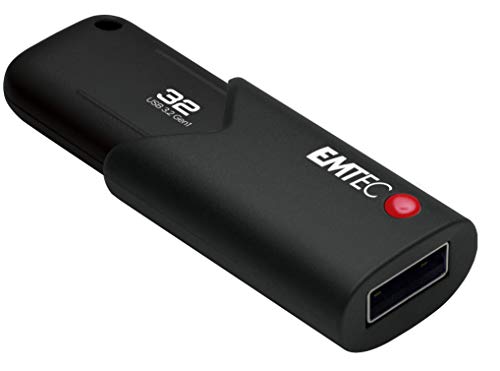
For a Best Value pick, the Emtec Click Secure B120 focuses on everyday usability with a simple slide design and hardware encryption. It is a good match if you want a mainstream USB 3.2 Gen 1 drive that is easy to keep on hand for school work, files, and backups.
Real-world speeds are decent for the price tier, with listed read speeds around 100 MB/s and write speeds around 20 MB/s. Build feels straightforward and practical, and the slide form factor helps you avoid losing a cap. The 32 GB capacity is enough for many photo and document batches, plus it stays a reliable size for frequent transfers.
The weak spot is security. The hardware encryption setup is there, but reports point to buggy behavior, and performance can suffer during writes. If you need a dependable USB drive for daily file moves and you can live with uneven encryption reliability, this is the one to get.
What to Look For
Performance: Check both read speed and write speed, then favor models that keep steady write speed on larger files. Sustained writes matter more than short bursts. If a drive only looks fast in ideal tests, it will feel slow during real copying.
Storage Capacity: Pick a capacity that fits your longest job. For frequent backups, go higher than you think you need. Also watch for warning signs like unusually low prices for very high stated capacity.
USB Standard: Match the drive to your device ports. USB 3-class drives are the norm for decent transfer times, while USB 2 models usually feel sluggish. If your laptop has modern ports, do not buy a slower interface just to save a few dollars.
Read Speed: Use read speed to judge how quickly files open on the destination device. Higher read speeds help with copying large files and loading media. Still, read speed alone does not guarantee good copying time.
Write Speed: Use write speed to judge how fast the drive saves new data. Look for strong write numbers, then prioritize drives with stable performance for long writes. This is where many budget drives fall behind.
Connector Type: Choose USB-A if you use older computers and TVs. Choose USB-C if you need one drive for newer phones and laptops. If you switch between devices often, dual USB-A and USB-C can reduce swapping and mistakes.
Form Factor / Security Features: Pick a design you will not abandon. Capless designs reduce the chance of a lost cap, while retractable styles can protect the connector. If you need protection, look for true built-in Hardware Encryption, Password Protection, or PIN Protection. If you do not see a solid security label, assume you get No Security.
How We Selected These Products
Products were found through broad web searches across review sites, buyer forums, and best-of lists, not from a single publisher. I then read a large set of real customer reviews to understand what buyers actually complained about, such as slow sustained writes, connection issues, or failing security features.
Availability and listed specs were verified directly against Amazon product pages. Each drive was scored using the same pillar framework: Performance, Capacity, Build Quality, Design, Security, and Value. The scoring favors results that match real-world usage, not only headline numbers.
The final picks focus on distinct jobs. Some models target speed for large files. Others target safer carry designs or stronger built-in security. The goal is a shortlist that makes sense for different use cases, not a single ranking.
Frequently Asked Questions
Which USB flash drive is best for fast, large file transfers?
Look for drives that report very high read speeds and also hold up during long writes. In this group, the strongest transfer performers tend to be the premium fast models like SanDisk Extreme PRO Dual Drive 1TB USB Flash Drive and PNY Pro Elite V3 1TB USB Flash Drive. Also, keep in mind that some flash drives slow down after burst or cache fills, so reviews about sustained writing matter.
What is the key difference between budget and premium USB flash drives?
Budget drives usually give decent speed for documents and small media, but their sustained write performance can be weaker. Premium drives more often deliver consistently high transfer speeds and better build quality. You also get more advanced features in the premium tier, including real hardware security on some models.
How do I protect the USB connector and make a drive last longer?
Use a capless design with a protective slider or retractable body when you carry the drive daily. Avoid bending the connector or leaving it loose in a bag with metal objects. When you store it, keep it in a case or pouch to reduce dust and physical wear.
Why do some USB flash drives feel much slower than their speed claims?
Advertised speeds often come from best case tests, like reading one file from a fast setup. Real transfers can be slower, especially during long writes after the drive uses its cache. This is why you should trust sustained performance reports more than short benchmark results.
Is buying a higher capacity USB flash drive always better value?
Not always, because price per GB can be close between nearby sizes. Also, your use matters. For example, 64GB or 128GB can fit documents and photos, while 256GB to 1TB makes more sense for 4K video, big backups, and frequent file shuffling.
Do security features like encryption actually protect your data on a lost drive?
Encryption helps protect data from other people who find the drive. Drives with keypad or PIN access, like Kingston IronKey Keypad 200 64GB USB Flash Drive, add stronger device based control. Many standard drives only offer encryption software, which can be harder to use and may not match your exact threat level.