
Skip to content

The 7 Best Tablet Stands in 2026

September 26, 2026-By The Top Zone

Transparency Note: This post contains affiliate links. As an Amazon Associate, we earn from qualifying purchases at no extra cost to you.

Tablet stands hold a device at a usable height and angle for viewing, typing, drawing, or calls. They range from compact desktop holders to clamp-on arms and tall floor models. Good stands stay steady while you tap the screen. Poor ones wobble, slide, or sag when you adjust them.

Choosing one is harder than it looks. A wide angle range may not help if the hinge cannot hold its position. A high weight limit can also mislead if the base feels light with a large tablet attached. Foldable models travel well, but often give up some stability. You also need to check tablet size, case clearance, height range, and whether the stand supports portrait and landscape use.

This guide compares leading tablet stands across stability, adjustability, build quality, portability, and value. It also covers tablet size support, stand type, height, viewing angle, load capacity, materials, dimensions, and weight. Use these details to match each model with your desk, bedside, travel, or large-tablet needs.

Quick Overview

RAM MOUNTS Tab-Tite Tablet Mount
Best Overall RAM MOUNTS Tab-Tite Tablet Mount
OMOTON Adjustable Desk Tablet Stand
Best Value OMOTON Adjustable Desk Tablet Stand
Almoz Swivel and Tilt Tablet Stand
Best for Large Tablets Almoz Swivel and Tilt Tablet Stand
JSAUX Universal Fold-Flat Tablet Stand
Best Foldable JSAUX Universal Fold-Flat Tablet Stand
Anker 551 USB-C Hub Tablet Stand
Best with USB-C Anker 551 USB-C Hub Tablet Stand
LISEN Adjustable Desk Tablet Stand
Best for Full Rotation LISEN Adjustable Desk Tablet Stand
MAGIPEA Gooseneck Clamp Tablet Stand
Best Gooseneck MAGIPEA Gooseneck Clamp Tablet Stand

Top Picks

Best Overall

RAM MOUNTS Tab-Tite Tablet Mount
Our Score
8.5 / 10
hover for details
Stability
8.9
Adjustability
8.9
Build Quality
8.6
Portability
7.4
Value
7.7
BrandRAM MOUNTS
Supported Tablet Size9-10.5 in
MaterialAluminum / ABS Plastic
  • No-wobble stability
  • Smooth, secure adjustments
  • Sturdy hinges, quiet fit
  • Limited size compatibility

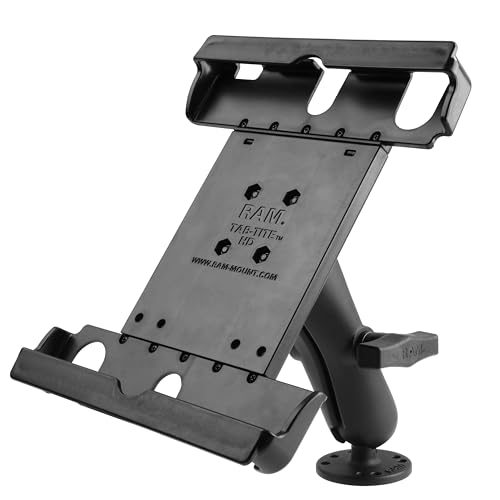
The RAM MOUNTS Tab-Tite Tablet Mount earns Best Overall for its no-wobble hold and secure fit. Its aluminum and ABS plastic build keeps a 9 to 10.5 inch tablet steady during taps, swipes, and typing.

Smooth adjustments make it easy to set a comfortable viewing position, while the sturdy hinges hold their place without noisy movement. The mount feels well made in daily use, and its protective fit helps keep the tablet secure without adding much fuss.

Compatibility is limited to a narrower 9 to 10.5 inch size range, so it will not suit every tablet. If you want a stable, adjustable mount for a compatible tablet, this is the one to get.

→ Read full review

Best Value

OMOTON Adjustable Desk Tablet Stand
Our Score
8.2 / 10
hover for details
Stability
8.2
Adjustability
8.2
Build Quality
8.2
Portability
8
Value
8.5
BrandOMOTON
Supported Tablet Size4-15.6 in
Stand TypeDesktop
Adjustable Height4.13-5.9 in
Viewing Angle360 deg
Max Load Capacity7.3 lb
MaterialAluminum
Product Weight1.1 lb
  • Steady, wobble-free
  • Smooth tilts, secure stops
  • Crisp hinges, quiet grip
  • Limited height adjustment
  • Low weight capacity

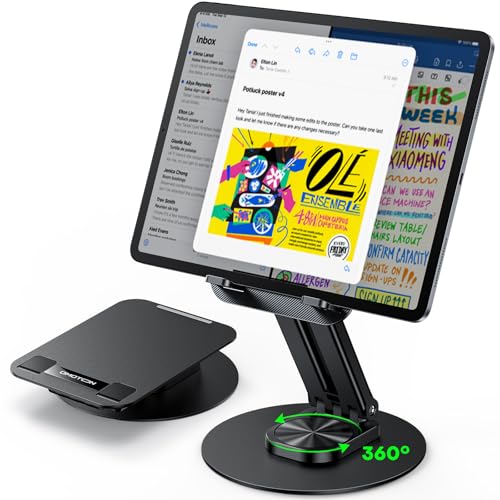
The OMOTON Adjustable Desk Tablet Stand earns its Best Value spot with a steady aluminum frame and useful support for tablets from 4 to 15.6 inches. It suits desks, counters, and bedside tables without taking up much room.

Its wide base stays firm during tapping, swiping, and light typing. Smooth tilts hold their position, while the 360-degree viewing range makes portrait and landscape use easy. Crisp hinges and quiet grip pads also help protect the tablet. At 1.1 pounds, it is simple to move between rooms.

The main trade-off is limited height adjustment, from 4.13 to 5.9 inches. Its 7.3-pound load limit may also restrict use with heavier setups. If you need a stable, easy-to-move stand for everyday tablet viewing without extra bulk, this is the one to get.

Also ranked #1 in: 360 Rotating Tablet Stands

→ Read full review

Best for Large Tablets

Almoz Swivel and Tilt Tablet Stand
Our Score
8.2 / 10
hover for details
Stability
8.3
Adjustability
8.3
Build Quality
8.6
Portability
7.2
Value
7.9
BrandAlmoz
Supported Tablet Sizeup to 21 in
Stand TypeDesktop
Viewing Angle25-58 deg
MaterialAluminum
Product Weight0.9 lb
  • No-wobble stability
  • Smooth, secure adjustments
  • Sturdy hinges, quiet fit
  • Narrow tilt range

The Almoz Swivel and Tilt Tablet Stand suits large tablets, including models up to 21 inches. Its aluminum frame stays steady on a desk, even when you tap or swipe a big screen. That makes it a strong pick for large displays that can overwhelm lighter stands.

Its sturdy hinges hold their position, while the swivel action makes it easy to switch between portrait and landscape views. Adjustments feel smooth and secure, and the quiet fit adds to its solid build. At 0.9 pounds, it also remains fairly easy to move between desks or rooms.

The main trade-off is the narrow 25 to 58 degree tilt range, which limits some viewing positions. If you need firm support for a large tablet without a bulky stand, this is the one to get.

→ Read full review

Best Foldable

JSAUX Universal Fold-Flat Tablet Stand
Our Score
8.1 / 10
hover for details
Stability
8.1
Adjustability
7.8
Build Quality
8
Portability
8.5
Value
8.3
BrandJSAUX
Supported Tablet Sizeup to 10 in
Stand TypeFoldable
MaterialAluminum
  • Steady, wobble-free
  • Crisp hinges, quiet grip
  • Lightweight and easy setup
  • Narrow compatibility
  • Not truly fold-flat
  • Angle range unclear

The JSAUX Universal Fold-Flat Tablet Stand fits the Best Foldable role with its light aluminum frame and simple folding design. It is easy to set up, move between rooms, and pack for travel. The stand supports tablets up to 10 inches.

Its base stays steady during tapping and swiping, with little wobble on a desk. Crisp hinges hold the stand in place, while quiet grip pads help protect the tablet. The lightweight build also makes daily setup quick and easy.

Compatibility is narrower than the universal name suggests, and the stand does not fold completely flat. Its angle range is also unclear, so it suits basic viewing more than precise positioning. If you need a compact stand for tablets up to 10 inches without a heavy frame, this is the one to get.

→ See full ranking

→ Read full review

Best with USB-C

Anker 551 USB-C Hub Tablet Stand
Our Score
8.0 / 10
hover for details
Stability
8.3
Adjustability
7.6
Build Quality
8.7
Portability
7.7
Value
7.6
BrandAnker
Stand TypeFoldable
Viewing Angle70-180 deg
MaterialAluminum
Product Dimensions5.6 x 5.5 x 1.1 in
Product Weight1.4 lb
  • No-wobble stability
  • Sturdy hinges, quiet fit
  • Durable metal build
  • No pocketability

The Anker 551 fits the Best with USB-C role because it combines a tablet stand with a built-in USB-C hub. It keeps your tablet raised while helping connect more desk accessories. Its foldable aluminum body also suits a clean desktop setup.

Stability is a clear strength. The wide base stays steady during tapping, swiping, and typing. Sturdy hinges hold their position, and the quiet fit feels controlled when you adjust the 70-180 degree viewing range. Protective contact points help keep the tablet secure, while the metal build should handle regular use well.

The trade-off is portability. At 1.4 pounds and 5.6 x 5.5 x 1.1 inches, it folds down but is not pocketable. If you need a steady USB-C stand for a desk, without flimsy hinges or a wobbly base, this is the one to get.

→ Read full review

Best for Full Rotation

LISEN Adjustable Desk Tablet Stand
Our Score
8.0 / 10
hover for details
Stability
8.1
Adjustability
7.8
Build Quality
8
Portability
7.8
Value
8.3
BrandLISEN
Supported Tablet Size4.0-15.9 in
Stand TypeDesktop
Viewing Angle360 deg
MaterialABS Plastic / Silicone
Product Dimensions6.7 x 4.6 x 1 in
Product Weight0.95 lb
  • Steady, wobble-free
  • Wide device support
  • Crisp hinges, quiet grip
  • Brittle plastic build

The LISEN Adjustable Desk Tablet Stand fits the Best for Full Rotation role because its holder turns a full 360 degrees. You can switch between portrait and landscape without lifting the stand. It supports tablets from 4 to 15.9 inches on a compact desktop base.

A wide base keeps the stand steady during tapping, swiping, and light typing. Its crisp hinges hold viewing positions well, while the silicone grip stays quiet and helps protect the tablet. At 0.95 pounds and 6.7 by 4.6 inches, it also moves easily between work areas.

The main concern is the brittle plastic build, which may not match the long-term strength of metal stands. This stand is for anyone who needs smooth full rotation and steady desk use without carrying a bulky mount.

→ Read full review

Best Gooseneck

MAGIPEA Gooseneck Clamp Tablet Stand
Our Score
8.0 / 10
hover for details
Stability
8.2
Adjustability
7.9
Build Quality
8.2
Portability
7.2
Value
8.2
BrandMAGIPEA
Supported Tablet Size4.7-13 in
Stand TypeGooseneck
Viewing Angle360 deg
MaterialAluminum
Product Weight0.8 lb
  • No-wobble stability
  • Sturdy hinges, quiet fit
  • Worth every penny
  • Bending effort required

For the Best Gooseneck role, this stand stands out for its flexible aluminum arm and 360-degree viewing range. It holds tablets from 4.7 to 13 inches, making it useful for phones, compact tablets, and larger models.

Its clamp keeps the stand steady during tapping and swiping, while the sturdy hinges help prevent unwanted movement. The fit stays quiet, and the aluminum build feels ready for regular use. At 0.8 pounds, it is also easy to move between a desk and bedside table.

The arm takes some effort to bend into place, so frequent repositioning can feel tiring. If you need a strong, flexible tablet mount and do not mind setting the arm carefully, this is the one to get.

→ Read full review

What to Look For

Stability: Look for a wide or weighted base, firm hinges, and non-slip contact points. The stand should remain steady during tapping, swiping, and typing, even with a heavier tablet.

Adjustability: Check the height, tilt, rotation, and orientation range. Smooth movement matters, but each joint must lock firmly and hold its position without sagging.

Tablet Size Support: Confirm the supported screen range and check whether it includes your tablet with its case attached. Large tablets need stronger hinges and a deeper support ledge.

Stand Type and Portability: Choose Desktop for a simple workstation setup, Clamp-On or Gooseneck for flexible positioning, and Foldable for travel. Compare folded size and weight before buying a portable model.

Viewing Angle and Height: A broad tilt range helps with glare, typing, and calls. Adjustable height is useful for raising a tablet closer to eye level and reducing neck strain.

Build Quality and Materials: Aluminum and steel parts usually provide better long-term support than thin plastic. Also inspect hinge construction and padded contact points, which protect the tablet from scratches.

Load Capacity and Dimensions: Compare the maximum load with your tablet's weight, then consider the stand's footprint and overall size. A compact base saves space, while a larger base often improves balance.

For more focused picks, see Best Pillow Tablet Stands.

How We Selected These Products

We discovered products through broad web searches across review sites, buyer forums, and best-of lists. The research did not rely on a single source or one type of recommendation.

We read a large volume of real customer reviews to identify common problems and the features buyers valued most. We verified product availability and listed specifications directly against Amazon, including size support, dimensions, weight, materials, and load limits.

Each product received scores for Stability, Adjustability, Build Quality, Portability, and Value using the same weighted framework. Final curation focused on products that serve distinct roles, such as large tablets, foldable use, USB-C connectivity, or full rotation, rather than simply ranking models by total score.

Frequently Asked Questions

Which tablet stand is best for a vehicle or other high vibration setup?

Choose a mount with a firm clamp or fixed hardware, not a light folding stand. RAM MOUNTS Tab-Tite Tablet Mount offers the strongest stability in this group when you match the cradle and ball components to your tablet. It suits vehicles, boats, and other setups where vibration is a concern.

What is the main difference between budget and premium tablet stands?

Budget stands often use lighter materials and offer basic angle changes. Premium models usually add stronger hinges, heavier bases, better protective pads, or extra features such as USB-C ports. A higher price helps most when you need long-term durability, heavy tablet support, or a specialized mounting system.

How should I set up and care for a tablet stand?

Place desktop stands on a flat, clean surface and keep the tablet centered over the base. Tighten hinges or clamps only until the tablet stays in position, since over-tightening can damage the hardware. Wipe dust from the pads and joints, and check screws or hinges if the stand starts to wobble.

Is a higher price always better for tablet stands?

No. The scores show that value depends on the design and your use case, not just the price. Low-cost stands can offer strong folding and desk performance, while premium models often charge more for rugged mounting, better materials, or built-in connectivity.

Why do many tablet stands score lower for portability?

Stability often requires a wide base, heavy metal, or a strong clamp, which adds size and weight. Gooseneck and fixed mounts also need a suitable surface each time you move them. Fold-flat models are easier to pack, but they may not support heavy tablets as firmly at extreme angles.

Related comparisons