Skip to content

The 9 Best Foldable Tablet Stands in 2026

September 26, 2026-By The Top Zone

Transparency Note: This post contains affiliate links. As an Amazon Associate, we earn from qualifying purchases at no extra cost to you.

Foldable tablet stands collapse for storage or travel, then open to support a tablet on a desk, table, or bedside surface. Buyers need a stable base, useful viewing angles, and a folding design that fits their tablet without blocking ports or buttons.

The main trade-off is between portability and strength. Slim stands pack easily but may wobble with larger tablets or heavy typing. Larger models often feel steadier, yet take more room in a bag. Buyers must also weigh adjustment range, hinge stiffness, protective pads, and price.

We compared these factors across the leading models in this category. Looking for all types? See our Best Tablet Stands.

Quick Overview

JSAUX Universal Fold-Flat Tablet Stand
#1 JSAUX Universal Fold-Flat Tablet Stand
Nulaxy Dual Folding Aluminum Tablet Stand
#2 Nulaxy Dual Folding Aluminum Tablet Stand
Anozer Foldable Adjustable Tablet Stand
#3 Anozer Foldable Adjustable Tablet Stand
Anker 551 USB-C Hub Tablet Stand
#4 Anker 551 USB-C Hub Tablet Stand
LISEN Adjustable Desk Tablet Stand
#5 LISEN Adjustable Desk Tablet Stand
Satechi OntheGo 7-in-1 Hub Tablet Stand
#6 Satechi OntheGo 7-in-1 Hub Tablet Stand
MOFT Snap Tablet Stand 9.7"-12.9"
#7 MOFT Snap Tablet Stand 9.7"-12.9"
Amazon Basics Multi-Angle Foldable Tablet Stand
#8 Amazon Basics Multi-Angle Foldable Tablet Stand
MoKo Foldable Multi-Angle Tablet Stand
#9 MoKo Foldable Multi-Angle Tablet Stand

Our Top Picks

#1. JSAUX Universal Fold-Flat Tablet Stand

JSAUX Universal Fold-Flat Tablet Stand
Our Score
8.1 / 10
hover for details
Stability
8.1
Adjustability
7.8
Build Quality
8
Portability
8.5
Value
8.3
BrandJSAUX
Supported Tablet Sizeup to 10 in
Stand TypeFoldable
MaterialAluminum
  • Steady, wobble-free
  • Crisp hinges, quiet grip
  • Lightweight and easy setup
  • Narrow compatibility
  • Not truly fold-flat
  • Angle range unclear

For a foldable tablet stand, the JSAUX Universal Fold-Flat Tablet Stand stands out for its steady desktop support in a light, easy-to-carry design. Its aluminum body stays firm during tapping, swiping, and light typing. Crisp hinges hold their position, while the quiet grip helps keep a tablet from shifting. Setup is quick, and the stand folds for storage or travel.

This stand suits users who want a compact holder for smaller tablets up to 10 inches. Its narrow compatibility limits use with larger models, and the design may not fold completely flat. The available angle range is also unclear, so it is best for simple desk, kitchen, or bedside viewing rather than setups that need precise height or tilt control.

→ Read full review

#2. Nulaxy Dual Folding Aluminum Tablet Stand

Nulaxy Dual Folding Aluminum Tablet Stand
Our Score
8.0 / 10
hover for details
Stability
8.1
Adjustability
7.9
Build Quality
7.9
Portability
8
Value
8.5
BrandNulaxy
Supported Tablet Sizeup to 13 in
Stand TypeFoldable
Viewing Angle270 deg
MaterialAluminum
Product Dimensions4.1 x 3.5 x 3.1 in
Product Weight0.2 lb
  • No-wobble stability
  • Easy to fold and carry
  • Worth every penny
  • static desk use

For a foldable tablet stand, the Nulaxy Dual Folding Aluminum Tablet Stand stands out for its strong mix of stability and portability. It folds easily and weighs just 0.2 lb, so it fits well in a bag or drawer. The aluminum frame stays steady during tapping and swiping, while the 270-degree viewing range supports comfortable portrait or landscape viewing. It supports tablets up to 13 inches and measures only 4.1 x 3.5 x 3.1 inches.

This is a strong choice for static desk use, bedside viewing, video calls, or travel. Its compact design makes setup simple, but it is less suited to users who need frequent repositioning during active work. The sturdy build, protective contact points, and no-wobble performance make it a dependable pick among foldable stands.

#3. Anozer Foldable Adjustable Tablet Stand

Anozer Foldable Adjustable Tablet Stand
Our Score
8.0 / 10
hover for details
Stability
8.1
Adjustability
7.6
Build Quality
8.1
Portability
8.3
Value
8.3
BrandAnozer
Supported Tablet Size4.7-15.6 in
Stand TypeFoldable
Adjustable Height3.16-6.26 in
Viewing Angle90-135 deg
MaterialAluminum
Product Dimensions1.1 x 5.6 x 3.9 in
Product Weight0.7 lb
  • No-wobble stability
  • Better viewing flexibility
  • Easy to fold and carry
  • Limited height range
  • Adjustment precision limits

Among foldable tablet stands, the Anozer Foldable Adjustable Tablet Stand stands out for combining easy packing with steady desk use. Its aluminum frame folds down for travel and weighs only 0.7 lb. Rubber contact points help keep tablets steady during tapping and swiping. It supports devices from 4.7 to 15.6 inches and adjusts from 3.16 to 6.26 inches high. The 90 to 135 degree viewing range also suits reading, video calls, and streaming.

The trade-off is a limited height range and less precise positioning than larger desktop stands. It works best for users who move between rooms or travel often, yet still want a firm stand for everyday viewing. It is less suited to users who need a tall setup or very fine angle control.

#4. Anker 551 USB-C Hub Tablet Stand

Anker 551 USB-C Hub Tablet Stand
Our Score
8.0 / 10
hover for details
Stability
8.3
Adjustability
7.6
Build Quality
8.7
Portability
7.7
Value
7.6
BrandAnker
Stand TypeFoldable
Viewing Angle70-180 deg
MaterialAluminum
Product Dimensions5.6 x 5.5 x 1.1 in
Product Weight1.4 lb
  • No-wobble stability
  • Sturdy hinges, quiet fit
  • Durable metal build
  • No pocketability

Unlike many foldable tablet stands that favor light travel, this Anker model puts stability first. Its durable aluminum build and sturdy, quiet hinges keep a tablet steady during tapping, swiping, and typing. The 70-180 deg viewing range supports upright viewing, low-angle use, and positions between them. At 5.6 x 5.5 x 1.1 in, it folds into a compact shape for drawers or bags.

The 1.4 lb weight gives it a planted feel, but limits pocketability. It suits desks, kitchen counters, and bedside tables better than frequent carry. Choose it when firm support and long-term build quality matter more than the smallest travel footprint.

→ Read full review

#5. LISEN Adjustable Desk Tablet Stand

LISEN Adjustable Desk Tablet Stand
Our Score
8.0 / 10
hover for details
Stability
8.1
Adjustability
7.8
Build Quality
8
Portability
7.8
Value
8.3
BrandLISEN
Supported Tablet Size4.0-15.9 in
Stand TypeDesktop
Viewing Angle360 deg
MaterialABS Plastic / Silicone
Product Dimensions6.7 x 4.6 x 1 in
Product Weight0.95 lb
  • Steady, wobble-free
  • Wide device support
  • Crisp hinges, quiet grip
  • Brittle plastic build

For a foldable tablet stand, the LISEN Adjustable Desk Tablet Stand stands out with its steady, wobble-free base in a compact 0.95-pound design. It folds down to 6.7 x 4.6 x 1 inches, making it easy to move between desks or pack for travel. Its 360-degree viewing range supports portrait and landscape use, while the wide holder fits tablets from 4 to 15.9 inches.

Quiet, crisp hinges and silicone contact points make repositioning smooth and protect the device during daily use. The main trade-off is its ABS plastic build, which feels less durable than a metal folding stand. It is best for users who want broad tablet support, stable desk viewing, and simple portability without carrying a heavier stand.

→ Read full review

#6. Satechi OntheGo 7-in-1 Hub Tablet Stand

Satechi OntheGo 7-in-1 Hub Tablet Stand
Our Score
8.0 / 10
hover for details
Stability
8.3
Adjustability
7.1
Build Quality
8.3
Portability
8.6
Value
7.6
BrandSatechi
Stand TypeFoldable
MaterialAluminum / ABS Plastic / Nylon
Product Dimensions0.7 x 4.3 x 4.3 in
Product Weight0.4 lb
  • No-wobble stability
  • Sturdy hinges, quiet fit
  • Easy to fold and carry
  • Cable management needed

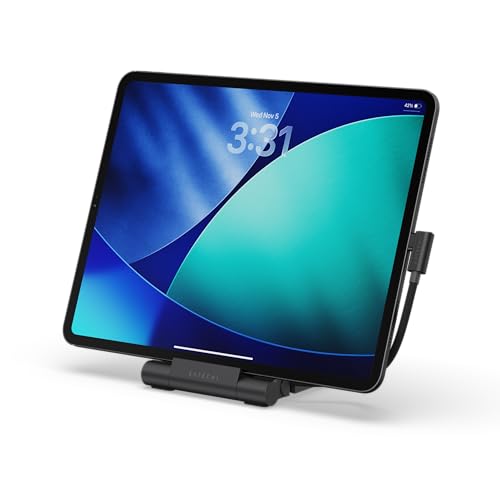
Unlike many foldable tablet stands, the Satechi OntheGo 7-in-1 Hub Tablet Stand combines a compact support frame with a built-in hub. Its aluminum, ABS plastic, and nylon build feels sturdy, while the hinges stay quiet and firm during tapping or swiping. At just 0.4 lb and 0.7 x 4.3 x 4.3 inches, it folds easily into a bag. It also stays steady on a desk, earning a strong stability score of 8.3.

The trade-off is limited adjustment information, so this stand suits users who want a simple, portable setup rather than a highly flexible mount. The hub adds useful connectivity, but connected cables can clutter the small footprint. Plan some cable management if you use several devices at once.

#7. MOFT Snap Tablet Stand 9.7"-12.9"

MOFT Snap Tablet Stand 9.7"-12.9"
Our Score
7.9 / 10
hover for details
Stability
8.2
Adjustability
7.6
Build Quality
7.7
Portability
8.2
Value
7.8
BrandMOFT
Supported Tablet Size9.7-13 in
Stand TypeFoldable
MaterialPolyurethane / Recycled Fiberglass
Product Dimensions8.3 x 5.9 x 0.14 in
Product Weight0.4 lb
  • No-wobble stability
  • Broad tablet support
  • Quick snap attachment
  • Angle preset limitation
  • Nonreusable sticker adhesive

Unlike most foldable tablet stands, the MOFT Snap Tablet Stand attaches directly to a tablet with a quick snap connection. Its broad support area keeps 9.7- to 13-inch tablets steady during tapping and swiping. At just 0.14 inches thick and 0.4 pounds, it folds nearly flat for travel. The polyurethane and recycled fiberglass build also feels more substantial than a simple plastic prop.

The trade-off is limited angle choice. Preset positions work well for common viewing and typing, but they cannot match a fully adjustable stand. The adhesive attachment is not reusable, so placement deserves care. This stand suits tablet owners who want strong desk stability without carrying a bulky frame.

#8. Amazon Basics Multi-Angle Foldable Tablet Stand

Amazon Basics Multi-Angle Foldable Tablet Stand
Our Score
7.8 / 10
hover for details
Stability
8
Adjustability
8
Build Quality
7.1
Portability
7.9
Value
8.4
BrandAmazon Basics
Supported Tablet Size4-10 in
Stand TypeFoldable
Max Load Capacity11 lb
MaterialZinc Alloy
Product Weight0.4 lb
  • No-wobble stability
  • Smooth, secure adjustments
  • Worth every penny
  • Limited size compatibility
  • Plastic clamp failure

For a foldable tablet stand, the Amazon Basics Multi-Angle model stands out for its firm, compact design. It folds easily for storage, weighs only 0.4 lb, and still supports up to 11 lb. Its zinc alloy build keeps a tablet steady during tapping and swiping. Smooth angle adjustments also make it useful for reading, watching videos, or video calls.

This stand suits users who want reliable support in a small package. Compatibility is limited to tablets from 4 to 10 inches, so larger models may not fit. The plastic clamp can also fail over time, which is the main concern for long-term use.

#9. MoKo Foldable Multi-Angle Tablet Stand

MoKo Foldable Multi-Angle Tablet Stand
Our Score
7.8 / 10
hover for details
Stability
7.7
Adjustability
8.1
Build Quality
7.2
Portability
8
Value
8.4
BrandMoKo
Supported Tablet Size6-12.9 in
Stand TypeFoldable
MaterialABS Plastic / Rubber
Product Dimensions5.7 x 3.9 x 0.6 in
Product Weight0.2 lb
  • Smooth tilts, secure stops
  • Lightweight and easy setup
  • Solid features, fair price
  • portability remains good

Foldability is the MoKo stand's main strength. It folds into a compact 5.7 x 3.9 x 0.6 inch shape and weighs just 0.2 lb, so it is easy to move between rooms or pack for travel. Rubber contact points help keep tablets from sliding, while the smooth tilt adjustment stops securely. It supports tablets from 6 to 12.9 inches and sets up with little effort.

The ABS plastic body keeps the stand light, though it feels less substantial than metal models. Its 7.7 stability score suits reading, streaming, and video calls, but heavy typing may cause some movement. This is a good choice for users who want a small, flexible desktop stand that stores easily without giving up useful viewing adjustments.

What to Look For

Stability: Choose a wide, balanced base with firm hinges and non-slip pads. It should stay steady when you tap, swipe, or type, especially with a larger tablet.

Folding Design: Check the folded size, weight, and hinge movement. A good foldable stand closes flat enough for a bag but opens without loose joints or awkward setup.

Adjustability: Look for a useful tilt range and secure angle settings. Height adjustment helps with video calls and bedside use, while rotation supports portrait and landscape viewing.

Fit and Protection: Confirm the supported tablet size and check the ledge depth. Soft pads should protect the device while leaving charging ports accessible.

Build Quality and Value: Aluminum or steel parts usually provide better long-term support than thin plastic. Compare the materials, load capacity, and adjustment features with the price.

How We Picked

We identified products through broad research across review sites and buyer forums, then filtered the results to include only stands that qualify as foldable tablet stands. We focused on models that collapse for storage or transport and support common tablet sizes.

Scoring used the same objective pillar framework as the main Tablet Stands post. We rated stability, adjustability, build quality, portability, and value, then applied the stated weights to allow direct comparison within this sub-category.

Frequently Asked Questions

What should I check before buying a foldable tablet stand?

Check the supported tablet size, viewing angle, and maximum load. A wide base, firm hinges, and padded contact points help prevent wobble and scratches. Also check the folded size if you plan to carry it.

Are foldable tablet stands stable enough for typing?

Many are stable for light typing when placed on a hard, level surface. Choose a stand with a broad base, strong hinges, and a front lip that supports the tablet. Heavy typing may still cause movement on lightweight models.

How should I care for a foldable tablet stand?

Keep the hinges and support slots free of dust and crumbs. Wipe the stand with a soft, slightly damp cloth, then dry it fully. Do not force stiff hinges, since excess pressure can loosen or damage them.

Why do foldable tablet stands have different adjustment ranges?

Simple folding stands usually offer several tilt positions but limited height adjustment. Larger desktop models may raise the tablet higher and support more viewing angles. Hub stands can add ports, but they often weigh more and fold less compactly.

When should I choose another type of tablet stand instead?

Choose a clamp-on stand when you need to save desk space or mount a tablet beside a bed. A gooseneck model works better for close viewing from a bed or sofa. Choose a floor stand when you need standing-height use.

How do foldable tablet stands compare with fixed desktop stands?

Foldable stands are easier to store, carry, and reposition. Fixed desktop stands often provide a heavier base and greater stability, but they take up more space. For travel and flexible desk use, a foldable model is usually the better choice.

See Also