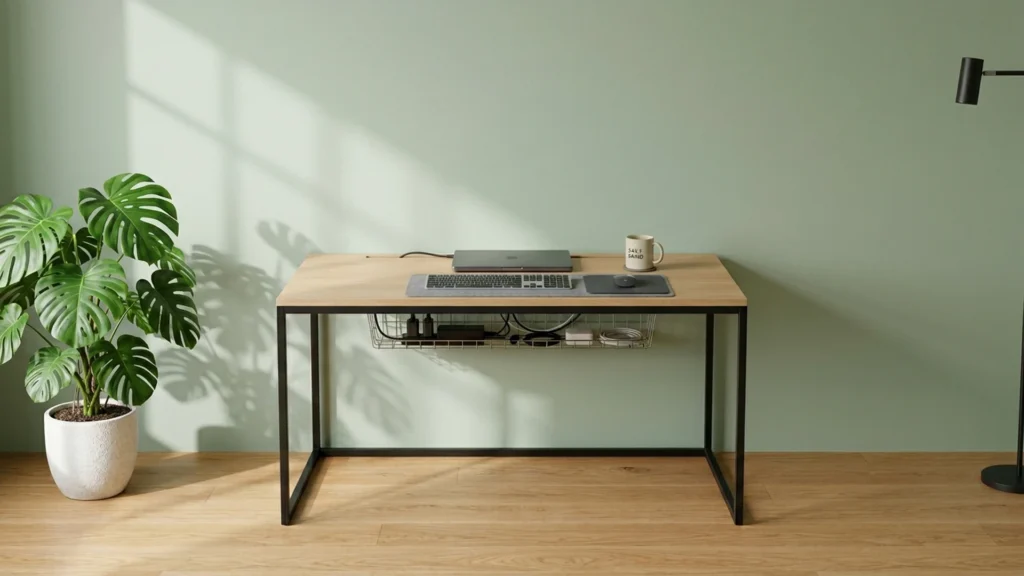
Computer Desks with Cable Management are desks that route cords in ways you can maintain. Look for built-in cable cutouts or grommets, plus under-desk trays or other paths that keep cables off the floor and away from chair wheels. This sub-category matters if you use a monitor, dock, gaming gear, or a work laptop, where power and video lines multiply fast.
Picking one is hard because cable management often trades against other needs. Many desks that manage wires also use electric standing frames or unusual shapes. That can reduce under-desk clearance, change where the keyboard can sit, or add more hardware that you must keep aligned. You also face a space problem. A tray or outlet that helps your setup can also take room from storage or legroom.
Use this guide to match cable features to your equipment and posture, then compare models using the same checklist as the main review. Looking for all types? See our Best Computer Desks.
Quick Overview
Our Top Picks
#1. Secretlab 3MAGE-B17B Standing Computer Desk

Specifications
| Brand | Secretlab |
|---|---|
| Desk Type | Standing Desk |
| Overall Dimensions | 28.3 x 25.2 x 70 in |
| Height Range | 28.3-46.1 in |
| Cable Management | Cable Tray,Built-In Outlet |
Pros
- Sturdy, wobble-free
- Wide height adjustability
- Helps keep cords organized
Cons
- Very long delivery times
- Limited model-specific feedback
This standing desk is a strong pick for people who want fewer desk cables in a computer desk setup. The Secretlab 3MAGE-B17B keeps power and cords under control with an under-desk cable tray and a built-in outlet. It also reaches a useful height range of 28.3-46.1 in, so you can adjust without bringing the keyboard and monitor into awkward angles. The frame feels steady and wobble-free during normal typing and mouse use, which matters when your monitor arm and cables shift slightly with each movement.
The main trade-off is delivery. Very long delivery times can be a dealbreaker if you need your workstation ready soon. It is also best suited for buyers who value a taller standing range and clean cable routing, not for those who want lots of separate storage compartments or lots of add-on shelf space.
#2. Arozzi ARENA-NA-PURE-BLACK Arena Gaming Computer Desk

Specifications
| Brand | Arozzi |
|---|---|
| Desk Type | Gaming Desk |
| Overall Dimensions | 63 x 32.3 x 71-81 in |
| Height Range | 27.95-31.88 in |
| Material | MDF |
| Weight Capacity | 176 lb |
| Cable Management | Cable Cutout |
Pros
- Sturdy, wobble-free
- Wide height adjustability
- Clean cable routing
Cons
- Limited legroom
- Limited evidence durability
This Arozzi Arena desk stands out in computer desks with cable management because it uses a built-in cable cutout and keeps routing cleaner than many basic gaming desks. The height range of about 28 to 32 inches also helps you dial in a comfortable setup, instead of forcing your monitor too high or too low. Build feels solid and stays wobble-free during normal typing and mouse use.
The main trade-off is legroom. At 63 inches wide and 32.3 inches deep, you may feel a bit cramped under the desktop, especially with a larger chair or bulky cable boxes near the floor. It is also an MDF desk, so durability is more about how it is built and maintained over time, not about solid wood.
#3. OffiGo Electric L-Shaped Standing Computer Desk

Specifications
| Brand | OffiGo |
|---|---|
| Desk Type | L-Shaped Desk |
| Overall Dimensions | 30.7 x 31.5 x 63 in |
| Height Range | 29.9-46.1 in |
| Number Of Drawers | 4 |
| Cable Management | Cable Tray |
Pros
- Wide height adjustability
- Helps keep cords organized
- More desk storage drawers
Cons
- Potential wobble concerns
- Small desk footprint
- Limited finish evidence
This L-shaped standing desk stands out for making cable clutter easier to manage day to day. It includes an under-desk cable tray, and the setup includes four drawers, so you can keep power bricks and small accessories closer to the work area instead of on the floor. Height adjustment runs from 29.9 to 46.1 in, which helps you match your screen and keyboard position without fighting the desk layout.
The main trade-off is space and stability. With dimensions of 30.7 x 31.5 x 63 in, the footprint can feel tight for larger monitors and wide peripherals. There are also potential wobble concerns, so it is best suited to lighter loads and careful placement on a solid floor. If you want a cleaner corner workstation with drawer storage and organized wiring, this one is a strong fit.
#4. DeskShow SD03-060-BK Electric Standing Computer Desk

Specifications
| Brand | DeskShow |
|---|---|
| Desk Type | Standing Desk |
| Overall Dimensions | 29 x 28 x 60 in |
| Height Range | 27.95-45.67 in |
| Weight Capacity | 220 lb |
Pros
- Sturdy, wobble-free
- Worth every dollar
- Wide height adjustability
Cons
- Limited legroom
This DeskShow standing desk stands out in a cable-management-focused desk search because it stays solid while you work, which makes wire routing easier to maintain. It is listed as wobble-free, and the height adjustment runs from 27.95 to 45.67 in, so you can move from seated to standing without wrestling the desk frame or shifting your monitor setup. For most people, that stability matters when you are trying to keep cords from pulling loose at the worst moments.
The main trade-off is legroom. With overall dimensions of 29 x 28 x 60 in and a note of limited legroom, it may feel tight for larger chairs or people who prefer more knee space at desk height. This is a better fit for small to medium workstations where you can place a monitor and keyboard centrally, then route cables along the back and under-desk area without needing extra space for your legs.
#5. AODK Electric Standing Computer Desk

Specifications
| Brand | AODK |
|---|---|
| Desk Type | Standing Desk |
| Overall Dimensions | 30.9 x 21.2 x 55 in |
| Height Range | 29.9-46.1 in |
| Weight Capacity | 176.4 lb |
| Number Of Drawers | 2 |
| Cable Management | Cable Tray, Hidden Wire Routing |
Pros
- Worth every dollar
- Wide height adjustability
- Helps keep cords organized
Cons
- Low weight capacity
- No shelf storage
- Limited dual-monitor space
This AODK electric standing desk stands out for cable control in a crowded home office setup. A cable tray and hidden wire routing keep power and video lines from becoming a tangle under the desktop. The height range of 29.9-46.1 in also makes it easier to switch positions without letting cables pull tight every time you raise or lower the surface.
The main trade-off is practical desk space and stability for heavier gear. With a weight capacity listed at 176.4 lb, it may not be ideal if you plan to stack monitors, speakers, and a lot of add-ons. There is no shelf storage, and dual-monitor room feels tight, so this works best for simpler setups where cable management matters most.
#6. Veken ODHOME123 Large Electric Standing Computer Desk

Specifications
| Brand | Veken |
|---|---|
| Desk Type | Standing Desk |
| Overall Dimensions | 28.3 x 23.6 x 55.1 in |
| Height Range | 28.3-46.5 in |
| Material | Wood |
| Cable Management | Cable Tray |
Pros
- Worth every dollar
- Wide height adjustability
- Helps keep cords organized
Cons
- Some flex noted
- Limited legroom
- Okay look, dated feel
This Veken standing desk stands out in the computer desk with cable management category thanks to its under-desk cable tray and wide height adjustment (28.3 to 46.5 in). That combo makes it easier to keep power bricks, charging cables, and monitor cords from spreading across the floor. It also helps you match the desk height to your setup, which can make long work sessions feel less cramped.
The main trade-off is desk rigidity. Some flex shows up, and legroom feels limited for wider stances. If you want a height-adjustable computer desk that keeps wiring contained and you sit close to the desk edge, this is a practical pick. If you need maximum under-desk space or a rock-solid feel, you may want to look at sturdier frames.
#7. JOISCOPE Power Outlet Reversible Shelf Computer Desk
Specifications
| Brand | JOISCOPE |
|---|---|
| Desk Type | Computer Desk |
| Overall Dimensions | 29.5 x 47.2 x 19.7 in |
| Material | Engineered Wood |
| Weight Capacity | 330 lb |
| Number Of Shelves | 2 |
| Cable Management | Built-In Outlet |
Pros
- High weight capacity
- Helps keep cords organized
Cons
- Limited legroom
- Some flex noted
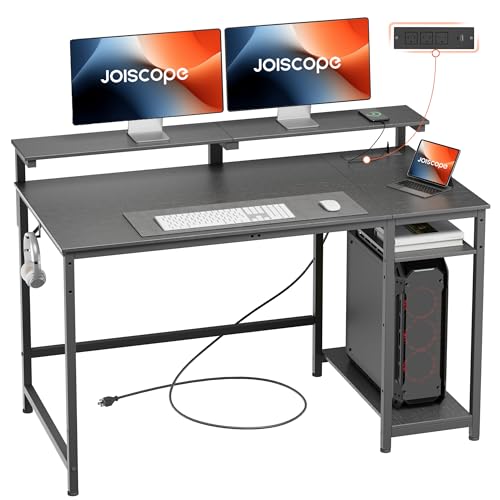
This desk stands out in computer desks with cable management thanks to its built-in power outlet near the desktop. That makes it easier to plug in a monitor, lamp, or charging station without relying on long extension cords. With two shelves and a 330 lb weight capacity, it also works well for heavier setups and keeps some gear off the main work surface.
The trade-off is comfort. At 29.5 x 47.2 x 19.7 in, legroom can feel tight for larger users, and some flex shows up under load. This is best for people who want simple cable control and storage, but do not need a lot of space for stretching their legs during long sessions.
#8. VITESSE Z-Shaped Gaming Computer Desk
Specifications
| Brand | VITESSE |
|---|---|
| Desk Type | Gaming Desk |
| Overall Dimensions | 28.5 x 55.1 x 23.6 in |
| Material | Steel |
| Weight Capacity | 260 lb |
| Cable Management | Grommet |
Pros
- High weight capacity
- Worth every dollar
- Tidy cable routing
Cons
- Some flex noted
- Limited legroom
- Limited ergonomic proof
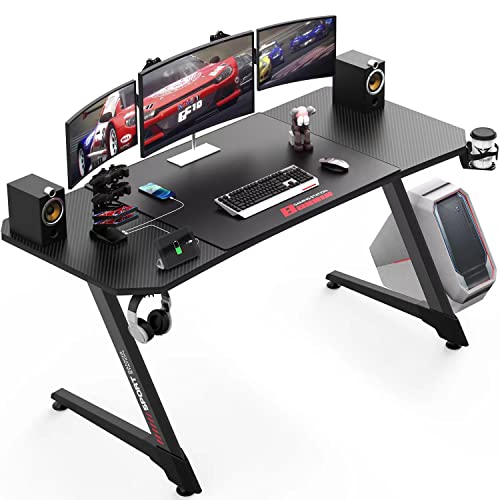
Built around a simple grommet for wire routing, the VITESSE Z-Shaped Gaming Computer Desk is notable in this sub-category for keeping cables out of sight during daily use. With a 260 lb weight capacity and a steel frame, it stays stable under heavier monitor arms and gaming setups. You also get a clean, uncluttered look because the main routing point helps gather power leads and other cords into one path instead of spreading across the desk.
The main trade-off is comfort and spacing. Users report some flex, and legroom feels tight in the 28.5 x 55.1 x 23.6 in footprint. This makes it a better fit for people with shorter sessions or more compact desk layouts than for those who need lots of knee space or a long, ergonomic workstation.
What to Look For
Grommets and cable cutouts: Choose desks that include a clear wire path from the back of the desk toward the underside. A dedicated grommet or cutout helps you route power bricks and charging cables without pinching or bending them at the edge of the desktop.
Under-desk cable tray or routing path: Check for a tray or similar space where cables can sit while you adjust your gear. This keeps cords from hanging near your knees and prevents cable drag during keyboard or monitor reach changes.
Frame stiffness with a cable-loaded setup: Cable management can pull weight and tension from multiple directions. Prioritize desks that feel solid when you lean on the desk and when you move from sit to stand. Wobble usually shows up more with a monitor arm and power bricks mounted or placed toward the back.
Usable ergonomics at your height range: If the desk is adjustable, confirm the height range matches your seated posture. A cable-managed desk still must let you keep a relaxed shoulder angle and enough knee clearance, so the wire path does not force you into a stretched reach.
Extra power and storage that fit the same cord plan: Some desks include features like built-in outlets or reversible shelves. Only pick these if the outlet location supports your device layout. Otherwise, you can end up with cables that still need extra length and messy rerouting.
How We Picked
Products were identified through broad research across review sites and buyer forums, then filtered to only those that qualify as Computer Desks with Cable Management.
Scoring used the same objective pillar framework as the main Computer Desks post, allowing direct comparison of products within this sub-category.
Frequently Asked Questions
What cable management features should I look for in a computer desk?
Look for a grommet hole or cable cutout near the back. An under-desk cable tray also helps keep power bricks and cords in one place. If the desk has a built-in outlet, check that the cord routing stays simple and doesn't block the leg space.
Will a standing or electric desk make cable management harder?
It can, if you route cables loosely and let them hang in the gap. A desk with a cable tray or a routing channel helps keep wires in a safe path while you raise and lower it. Use slack that allows full height range without tugging or pinching.
How do I prevent cable clutter when I have a monitor, PC, and chargers?
Bundle the cords into two groups: power and data. Run both groups through the same grommet or channel so they stay off the floor. Use Velcro straps to shorten loops and keep the area under the desk clear.
How should I route cables to avoid pinching or damage?
Route cables toward the back of the desk and keep them below the tabletop edge. Avoid sharp bends right after a port or power brick. If the desk is height adjustable, check the routing at both the lowest and highest positions.
Should I choose a cable-management desk over a basic computer desk?
Choose cable management if your setup includes multiple power sources like a PC, monitor, speakers, or a docking station. It also helps if you hate cords on the floor or want easier cleaning. If your setup uses only one or two cords, a basic desk may work fine.
How do cable-management desks compare to other computer desks for daily use?
They usually make daily tasks faster because you can find and swap cables more easily. You also get a tidier work area, which helps with cleaning and keeps airflow around your PC better. The tradeoff is that you may need a bit more time to route everything correctly the first time.