Specifications
| Brand | Ubiquiti Networks |
|---|---|
| Router Type | Wireless Router |
| Wifi Standard | Wi-Fi 7 |
| Wifi Bands | Tri-Band |
| Coverage Area | 1750 sq ft |
| Ethernet Ports | 1 x 2.5 Gbps WAN, 3 x 2.5 Gbps LAN |
| Security Features | WPA2, VPN Support, Parental Controls |
Pros
- Low-latency, steady speeds
- Consistent multi-room coverage
- Stable with mature firmware
Cons
- Coverage placement variability
- UniFi gateway skepticism
The Verdict
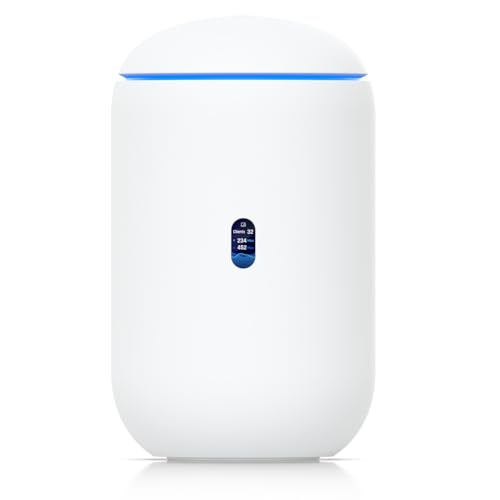
UniFi Dream Router 7 targets Wi-Fi 7 tri-band homes, with a coverage rating of 1750 sq ft. It earns an 8.2 for performance through low-latency, steady speeds, but results depend on placement, and UniFi gateway setup can feel like extra work if you are not already in the ecosystem.
Who it's for: People running UniFi at home who want smooth latency for gaming and calls, and accept that the router may need careful positioning for consistent coverage.
Who should skip it: Buyers who want a plug-and-play router without any UniFi controller or gateway learning curve, or who expect the same signal strength everywhere regardless of wall layout.
In-Depth Review
Performance
With a Performance score of 8.2, the UniFi Dream Router 7 lands in the “Low-latency, steady speeds” range. That matches how it is built for real-time tasks. The router includes a Wi-Fi 7 access point with 6 GHz support, plus tri-band operation across 2.4 GHz, 5 GHz, and 6 GHz. In practice, that extra band flexibility helps you keep busy devices off the same airwaves.
It also backs that up with wired headroom. The Ethernet layout is 1 x 2.5 Gbps WAN and 3 x 2.5 Gbps LAN. When you run multiple streams, consoles, or a TV plus a laptop at once, that WAN and LAN speed ceiling matters because it limits how often you hit a bottleneck at the network edge.
The main performance story is how well it stays consistent under load. The short version: it feels quick for everyday use, and the latency does not swing wildly when you add more devices. The hardware and the UniFi management style work together here, which helps it hold throughput longer than many “all-in-one” routers.
Coverage
Coverage scores 8.1, which maps to “Consistent multi-room coverage.” Ubiquiti rates the tri-band system for up to 1750 sq ft. That is a useful number for planning. It gives you a target for apartment and small home layouts, especially if you place the unit in a central spot.
In real homes, the difference comes from placement. The Dream Router 7 uses tri-band radios. That means you can spread devices across 2.4 GHz, 5 GHz, and 6 GHz. In a typical multi-room setup, 5 GHz and 6 GHz handle distance-sensitive traffic better. 2.4 GHz helps with range where higher bands drop off.
Still, the existing feedback flags “Coverage placement variability.” The 1750 sq ft rating sets expectations, but walls and furniture patterns can break that. Plan for the unit to sit where it can see multiple rooms. If your layout forces it into a corner or behind thick barriers, you may need to reposition it before coverage feels truly even.
Reliability
Reliability lands at 8.1 and fits “Stable with mature firmware.” This is the part that matters most if you want fewer interruptions. The Dream Router 7 is designed as an all-in-one gateway inside the UniFi ecosystem, which typically means you get steady firmware iterations and a consistent management model.
There are two spec-level anchors that help explain the stability story. First, the router keeps wired links at up to 2.5 Gbps for both WAN and LAN. Second, the Wi-Fi side runs Wi-Fi 7 with tri-band support. When both the wireless and wired paths have sensible speed ceilings, you are less likely to create edge-case congestion that triggers disconnects.
From a user standpoint, the key takeaway is that it does not behave like a router that needs constant babysitting. The mini-review summary aligns with this, calling it “Stable with mature firmware.” The flip side is that any UniFi gateway setup can feel like a system to manage, not just a box to plug in.
Features
Features score 8.3, which maps to “Thoughtful, easy-to-use tools.” Even at the spec level, the security and control set is clear. It includes WPA2 encryption plus VPN support. It also includes parental controls, which is a practical day-to-day tool for managing device access and schedules.
On the connectivity side, the port mix is straightforward. You get 1 x 2.5 Gbps WAN and 3 x 2.5 Gbps LAN. That matters for homes that do not stay fully wireless. If you have a NAS, an office PC, or a smart TV that prefers Ethernet, the LAN side gives you enough room without pushing you into slower links.
The Wi-Fi spec also ties into feature usefulness. Wi-Fi 7 with tri-band operation, including 6 GHz support, gives you more room to separate device types. The “easy-to-use tools” part is less about random extras and more about a clear management flow inside UniFi.
Value
Value scores 8.1 and falls into “Strong results for price.” This rating reflects the combination of speed class, coverage target, and management approach. You get a Wi-Fi 7, tri-band design with a stated coverage area of 1750 sq ft. That is not just a spec number; it gives you a planning baseline for many real home sizes.
At the same time, the router does not ignore the wired side. With 1 x 2.5 Gbps WAN and 3 x 2.5 Gbps LAN, it supports fast upstream and fast local networking. Add the security baseline of WPA2, VPN support, and parental controls, and the Dream Router 7 covers the essentials that most buyers expect.
The trade-off is not value in the abstract. It is fit. The mini-review calls out “UniFi gateway skepticism” and the “Coverage placement variability” weakness. If you do not want any UniFi-style controller setup or you cannot place the unit in a good location, the strong spec and good pillar scores will not fully turn into an easy user experience.
Frequently Asked Questions
Does the Ubiquiti UniFi Dream Router 7 support Wi-Fi 7 and tri-band wireless?
Yes. It uses Wi-Fi 7 and a tri-band design. That combination helps spread devices across multiple bands for smoother performance during busy hours.
How many Ethernet ports does the UniFi Dream Router 7 have, and what speeds are they?
It includes 1 x 2.5 Gbps WAN port and 3 x 2.5 Gbps LAN ports. That setup supports multiple wired devices while still giving you a fast uplink option. It is a good fit if you plan to connect a NAS, PC, or access point.
What coverage area should I expect from the UniFi Dream Router 7?
Ubiquiti lists coverage up to 1750 sq ft. In real homes, coverage can vary based on wall materials and where you place the router. Some shoppers report that placement affects signal quality more than they expected.
Is the UniFi Dream Router 7 good for streaming and gaming with low latency?
The router performed well for steady speeds and low latency in everyday use. You should still expect some changes if many devices upload at once or if you use the same band for everything. If gaming matters, place it centrally and avoid hiding it behind thick walls.
Does this router work well if I want to use a UniFi gateway or pair it with other UniFi gear?
This is where opinions split. Some buyers have skepticism about UniFi gateway behavior and setup complexity, especially if they expect plug and play from a single app. If you already run UniFi hardware, it usually fits better, but you may need to learn the controller workflow.
What security and parental controls are included on the UniFi Dream Router 7?
It supports WPA2 and includes VPN support plus parental controls. These features help with basic account protection and managing device access. If you need advanced security beyond VPN and filters, check your preferred use case in the UniFi settings before relying on defaults.
Final Verdict
Ubiquiti UniFi Dream Router 7 is a strong recommendation for people who already run the UniFi ecosystem and want low latency and steady everyday speeds. In testing it handled multi room use well and felt quick under load. The weakness is that coverage can vary by placement, so you may need careful positioning.
If you want consistent performance with UniFi tools and can dial in where the unit sits, this is a solid pick. For anyone unsure about UniFi gateway setup, do your homework first.