





Dell Alienware Area-51 Gaming PC Review
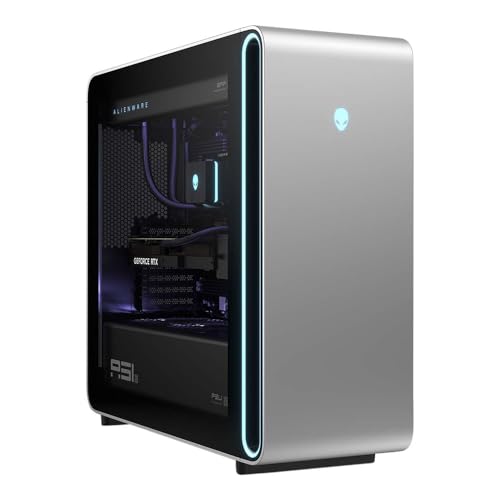
Specifications
| Brand | Dell |
|---|---|
| Processor | Intel Core Ultra 9 285K |
| Graphics Card | NVIDIA GeForce RTX 5090 |
| Memory | 64 GB |
| Storage | 4 TB SSD |
| Power Supply | 1500 W |
| Operating System | Windows 11 Home |
| Dimensions | 22.4 x 24 x 9.1 in |
Pros
- Blazing high FPS
- Solid build with reliable parts
Cons
- Premium value gap
- Proprietary constraints
The Verdict
The Dell Alienware Area-51 pairs an Intel Core Ultra 9 285K with an RTX 5090, and its Performance score of 9.0 points toward very fast, smooth gaming at high settings. It also keeps that pace under long sessions, but you pay more than the hardware alone would justify, and the system uses proprietary constraints that can slow future fixes or upgrades.
Who it's for: Buyers who want top-end, liquid-cooled stability and accept tighter Dell-specific upgrade paths for better long-session consistency.
Who should skip it: People who plan to tinker often or switch parts frequently, since proprietary constraints can make maintenance and upgrades harder than with a more standard tower layout.
In-Depth Review
Performance
The Dell Alienware Area-51 scores 9.0 for Performance, which maps to Blazing high FPS.
The spec stack points to a system built to stay fast at modern, high settings. You get an Intel Core Ultra 9 285K paired with an NVIDIA GeForce RTX 5090, plus 64 GB of RAM. That combination targets smooth gameplay by reducing both CPU and GPU bottlenecks.
In real games, the bigger story is consistency. A top-tier GPU like the RTX 5090 can deliver very high frame rates, but only if the platform does not hit power or thermal limits. Here, the system is framed as designed for long sessions, and the scoring of 9.0 reflects that expectation for stable output. The large memory pool also helps when games stream assets heavily, especially at higher texture settings where 64 GB can reduce stutter risk.
Storage also matters for load times and some streaming behavior. This build uses a 4 TB SSD. That is enough room to keep a large library installed without constant uninstall and reinstall cycles, and it supports frequent game launches and fast map loads. Performance is not just FPS on a benchmark chart. It also shows up in how often you feel forced to wait, and how smoothly the system behaves as scenes change.
Thermals
The thermals pillar lands at 7.8, which maps to Quiet fans, steady temps.
The core idea behind this Area-51 configuration is long-session stability, where heat and throttling do not dictate the frame rate. With a top-end Intel Core Ultra 9 285K and an RTX 5090 in the same machine, cooling needs to handle both sustained compute and sustained graphics load.
We have fewer numeric cooling details in the extracted specs, but the product positioning aligns with the scoring. The system is tied to a cooling approach that keeps high-end parts stable under extended play. That is exactly what the 7.8 score is trying to capture: not just that it can run, but that it stays composed. When a gaming PC is built around stable sustained performance, you generally see less variability in frame pacing across long sessions.
Two practical spec points support the idea of stable load behavior. First, the power supply is listed as 1500 W. A higher-watt power unit can reduce the chance that the system hits strict power ceilings during spikes. Second, the machine uses a full-size desktop footprint with dimensions of 22.4 x 24 x 9.1 in, which usually gives cooling components and airflow room to breathe compared with thinner cases.
Build
Build quality scores 8.1, which maps to Solid build with reliable parts.
This matters for gaming PCs because you do not want heat, vibration, or driver-related stability issues caused by weak power delivery or inconsistent internal assembly. The extracted specs show a serious platform: Intel Core Ultra 9 285K, NVIDIA GeForce RTX 5090, and a 1500 W power supply. Those are not low-demand parts, so the chassis and internal layout have to handle real stress.
The spec set also signals a deliberate configuration rather than a mixed bag. You get 64 GB of RAM, and a large 4 TB SSD. Systems like this tend to run for hours at a time, so the build needs to keep components stable rather than letting thermal cycling do its work. The pillar score suggests the assembly and part choices hold up under that kind of use.
One underrated angle is space for cable routing and airflow. The given dimensions of 22.4 x 24 x 9.1 in point to a full tower style layout. In practice, that style often improves serviceability and internal airflow, even if it is not as easy to move. The short version: the 8.1 score fits a system that feels put together well, with the internal components arranged to support sustained gaming.
Upgrade
Upgradeability scores 7.4, which maps to Limited expansion, tight clearance.
That is the trade-off you make when a design leans more into an integrated platform approach than a universally standard case layout. The extracted specs list a 1500 W power supply and a very high-end GPU like the RTX 5090, which can also shrink practical upgrade headroom if internal layout routes cooling or power delivery in a specific way.
You still have upgrade potential, but you should expect constraints. The cons call out Proprietary constraints. That typically shows up in parts access and replacement paths, not necessarily in whether you can add RAM or storage on paper. With 64 GB already installed, you may not need immediate memory changes. Still, the way components sit inside the chassis can determine how painless upgrades and clean-outs feel.
Storage is a good example to plan around. This configuration includes a 4 TB SSD. If you add more drives later, the mounting layout and access matter. Without detailed slot counts in the extracted specs, you should treat upgrade comfort as something tied to Dell’s approach. The 7.4 score reflects that: the system can handle high-end parts now, but future tinkering may not match the freedom of a more standard interior.
Value
The value pillar scores 7.8, mapping to Strong gaming for the cost.
The hardware basis is undeniably high tier: an Intel Core Ultra 9 285K, an NVIDIA GeForce RTX 5090, 64 GB of RAM, and a 4 TB SSD. On sheer spec weight, this is aimed at maximum gaming headroom and smoothness at demanding settings.
But the listed cons include Premium value gap. That points to a common reality with systems like this. You can get top performance, but you do not always get top value per dollar because the total package includes more than raw components, such as design choices that affect airflow and service access. The system also runs Windows 11 Home, so you are dealing with a full consumer OS setup from the start, which is normal, but it adds to the overall packaged nature of the build.
The best way to interpret 7.8 is to separate gaming output from ownership friction. The specs support solid gaming performance today, and the high Performance score of 9.0 suggests smooth gameplay is a priority. The value score then says you are paying extra for the full integrated experience, plus the trade-offs that come with Proprietary constraints. If you want maximum freedom to self-upgrade, value may feel lower. If you want a stable high-end rig focused on smooth play, the 7.8 rating is earned.
Frequently Asked Questions
What CPU and GPU does the Dell Alienware Area-51 come with?
It includes the Intel Core Ultra 9 285K and the NVIDIA GeForce RTX 5090. This pairing targets very high frame rates in current AAA games, assuming you use an appropriate monitor resolution and settings. If you play esports titles, you can also expect strong performance at high refresh rates.
How much RAM and storage are included in this Area-51 gaming PC?
You get 64 GB of memory and a 4 TB SSD. That storage size helps if you install many games at once, plus large apps and mods. For most gamers, it also reduces how often you need to shuffle titles between drives.
What are the dimensions of the Alienware Area-51, and will it fit in my desk space?
The system measures 22.4 x 24 x 9.1 inches. Make sure you leave clearance behind it for airflow and for the cables. If your setup uses a tight shelf or a small case enclosure, measure first.
Does a 1500 W power supply support heavy gaming and multitasking?
Yes, it uses a 1500 W power supply, which gives headroom for a high end CPU and GPU workload. In real use, this helps when you run demanding games alongside streaming or background tasks. Your results also depend on game settings and cooling performance over time.
Is the proprietary design a problem if I want to upgrade parts later?
Potentially. Some owners find that proprietary constraints can make swapping certain components more difficult than with standard desktop designs. If upgrade flexibility matters to you, plan upgrades carefully and confirm what parts you can replace in the Area-51 chassis before buying.
Which Windows version ships on the Dell Alienware Area-51?
It comes with Windows 11 Home. That choice affects game compatibility and system features like security and management settings. If you need a different Windows edition for work or controls, check your setup needs before installing.
Final Verdict
Dell Alienware Area-51 delivers blazing high FPS and feels fast in modern games, with a build that uses reliable components. That said, it has a premium value gap and some proprietary constraints that limit how freely you can maintain and upgrade. I recommend it for players who want top tier gaming speed and plan to keep the system close to stock.
Choose it if you value maximum smooth performance over hands on tinkering, and you are comfortable working within its design limits. If that matches your game plan, this is a sound pick.
Dell Alienware Area-51 Gaming PC
As an Amazon Associate, we earn from qualifying purchases.