




The 7 Best Digital Microscopes in 2026

Transparency Note: This post contains affiliate links. As an Amazon Associate, we earn from qualifying purchases at no extra cost to you.

Digital microscopes use a camera sensor and a screen to show close-up detail. They sit between a basic handheld magnifier and a full lab microscope. They also make it easy to capture photos and video for later review.

Picking one is harder than it looks. Many listings mix real optical performance with exaggerated zoom marketing. You can also see sharpness drop at higher magnification, slow frame rates that cause lag, and sensors that produce noisy, washed-out images. Setup and focusing can also be awkward, especially on models that claim high magnification but do not give enough working distance or stable illumination.

This guide helps you compare models by imaging quality, day-to-day usability, build stability, lighting, and value. You will get clear buying criteria and a research-backed shortlist for different inspection needs, like smooth video, large screens, compound viewing, and 3D inspection.

Quick Overview

Dino-Lite Edge AM4113T Digital Microscope
Best Overall Dino-Lite Edge AM4113T Digital Microscope
Andonstar AD407 Pro Digital Microscope
Best for Smooth Video Andonstar AD407 Pro Digital Microscope
SWIFT SW350T Digital Microscope
Best Compound SWIFT SW350T Digital Microscope
Jiusion HD 2MP Digital Microscope
Best Value Jiusion HD 2MP Digital Microscope
Koolertron 7" LCD Digital Microscope
Best Large Display Koolertron 7" LCD Digital Microscope
TOMLOV TM3K-3D Digital Microscope
Best for 3D Inspection TOMLOV TM3K-3D Digital Microscope
SKYBASIC 50X-1000X WiFi Digital Microscope
Best with Wi-Fi SKYBASIC 50X-1000X WiFi Digital Microscope

Top Picks

Best Overall

Dino-Lite Edge AM4113T Digital Microscope
Our Score
7.7 / 10
hover for details
Imaging
7.7
Usability
7.7
Build
7.8
Lighting
7.9
Value
7.7
BrandDino-Lite
Magnification Range20x-50x, 200x
Sensor Resolution1.3 MP
Illumination TypeLED
ConnectivityUSB
Frame Rate30 fps
  • Easy software setup
  • Integrated thumbwheel control
  • Built-in LED lighting
  • Low magnification
  • Low camera resolution
  • Limited connectivity

This Dino-Lite Edge model fits the Best Overall slot because it is simple to get a steady, usable view. The integrated thumbwheel makes fine adjustments quick, so you spend less time fighting focus and more time looking at the details.

Image quality stays solid for everyday work, with a smooth live view around 30 fps and clear results across its main range. Usability is also strong, thanks to easy software setup and an intuitive workflow through USB. For visibility, the built-in LED lighting helps you see surface texture without heavy setup.

The main downside is the limited reach at the top end, with low magnification and a 1.3 MP sensor that can feel soft for very small details. If you want a straightforward digital microscope for common inspection tasks, and you do not need extreme detail at the highest zoom settings, this is the one to get.

→ Read full review

Best for Smooth Video

Andonstar AD407 Pro Digital Microscope
Our Score
7.4 / 10
hover for details
Imaging
7.4
Usability
7.2
Build
7.1
Lighting
7.4
Value
7.9
BrandAndonstar
Magnification RangeUp to 270X
Sensor Resolution4 MP
Display Size7 in
Illumination TypeLED
ConnectivityUSB, HDMI
Frame Rate120 fps
  • Large screen display
  • Smooth video capture
  • Multiple modern ports
  • Low magnification
  • Tight solder clearance
  • Awkward micro-aiming

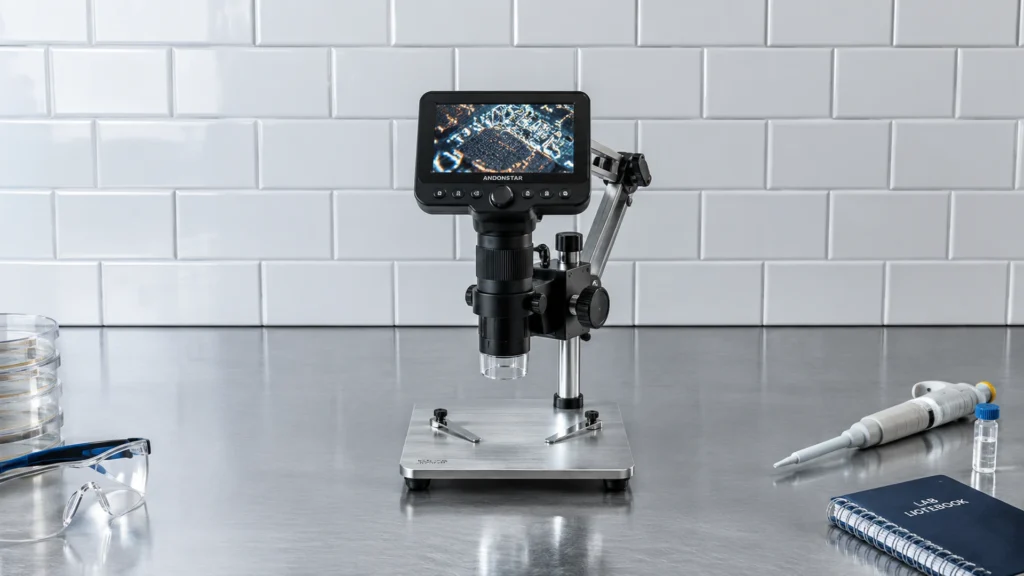
This microscope fits the Best for Smooth Video role because it keeps a steady live view for recording, not a choppy one. The AD407 Pro targets motion-heavy inspection, backed by a 7 in screen and a stated 120 fps frame rate.

In practice, the imaging is fairly usable for day-to-day work, with a 4 MP sensor that helps capture clear detail on the display. You also get multiple ways to connect, using USB and HDMI, which makes it easier to share footage or view on a bigger screen. The lighting setup is also friendly, since it uses LED illumination for even visibility across many small tasks.

One trade-off is the focusing and precision at higher magnification, including awkward micro-aiming and tight solder clearance around the working area. If you need smooth video and an easy viewing workflow for electronics, crafts, or general inspection, this is the one to get.

→ Read full review

Best Compound

SWIFT SW350T Digital Microscope
Our Score
7.3 / 10
hover for details
Imaging
6.8
Usability
7.6
Build
7.2
Lighting
7.7
Value
7.7
BrandSWIFT
Magnification Range40x-2500x
Sensor Resolution5 MP
Display Size10.1 in
Working Distance0.29 mm
Illumination TypeLED
  • High magnification
  • Large screen display
  • Beginner-friendly setup
  • Decent clarity, slight blur
  • Tight working distance

This SWIFT SW350T digital microscope fits the Best Compound role because it balances high magnification with easy viewing. The standout is its 10.1-inch screen, which keeps your sample in sight as you zoom from 40x up to 2500x.

In day-to-day use, the controls feel beginner-friendly, and the setup does not require constant tweaks. Lighting is strong enough for most routine inspection, with LED illumination that helps surface detail pop. Build quality is also solid for this class, with a stable base and focus that holds steady during typical probing.

The main trade-off is image sharpness at the top end, where clarity drops slightly and some blur shows up. It also has a tight working distance of 0.29 mm, so thicker items may be harder to fit. If you want a simple digital microscope for small samples and mixed inspection tasks, without fighting the interface, this is a good pick.

Also ranked #1 in: 5MP Camera Digital Microscopes

→ See full ranking

→ Read full review

Best Value

Jiusion HD 2MP Digital Microscope
Our Score
7.2 / 10
hover for details
Imaging
6.6
Usability
7.6
Build
6.8
Lighting
7.3
Value
8.7
BrandJiusion
Magnification Range40x-1000x
Sensor Resolution2 MP
Display Size2.5 in
Illumination TypeLED
ConnectivityUSB-C, micro USB
  • Great value overall
  • High magnification
  • LED brightness control
  • Low camera resolution
  • Decent clarity, slight blur
  • Small screen

This Jiusion HD 2MP Digital Microscope fits the Best Value slot because it combines a wide 40x-1000x magnification range with practical LED brightness control. It is a good pick for casual inspection when you want to zoom in a lot without needing a big lab setup.

On usability, the workflow feels straightforward for most people, with a simple USB-C or micro USB connection to view and save on a screen. Lighting scores well too, since the LED brightness control helps you get usable contrast on different surfaces. For build, it is stable enough for typical hobby tasks, and the image stays viewable while you adjust magnification within the range.

The main letdown is imaging clarity. The camera is 2 MP, and the live view can look slightly blurry as you push the top end of the range. The screen is also on the small side at 2.5 in, which makes fine details harder to judge. If you want a beginner-friendly microscope for electronics, parts, and light repair work, this is the one to get, as long as you are okay with limited detail at the highest magnification.

Also ranked #1 in: LCD Screen Digital Microscopes

→ Read full review

Best Large Display

Koolertron 7" LCD Digital Microscope
Our Score
7.2 / 10
hover for details
Imaging
6.8
Usability
7.6
Build
6.2
Lighting
7.6
Value
8.3
BrandKoolertron
Magnification Range1x-1200x
Sensor Resolution12 MP
Display Size7 in
Illumination TypeLED
ConnectivityUSB
Frame Rate30 fps
  • Great value overall
  • High magnification
  • Large screen display
  • Decent clarity, slight blur
  • Slight wobble under zoom
  • Choppy frame rate

A large screen is the main reason this Koolertron 7 LCD Digital Microscope fits the Best Large Display slot. The 7 in display makes it easier to inspect tiny parts without crowding your face close to the lens. Live viewing also feels more comfortable when you want to share what you see.

It pairs that screen with a 1x to 1200x zoom range and a 12 MP camera, so you have room to explore fine detail. Illumination stays practical thanks to built-in LED lighting, and USB connectivity keeps setup straightforward for most users. The controls are also easy to learn for day to day checks.

Clarity is decent but not perfect, with slight blur at the top end, plus some slight wobble under higher zoom. The preview can also feel choppy at times, which hurts when you try to line up focus. If you want a big 7 in viewing screen for hobby work, soldering checks, or general inspection without complicated setup, this is a good choice.

→ Read full review

Best for 3D Inspection

TOMLOV TM3K-3D Digital Microscope
Our Score
7.0 / 10
hover for details
Imaging
6.6
Usability
7.3
Build
6.8
Lighting
7
Value
7.8
BrandTOMLOV
Sensor Resolution5 MP
Display Size10.1 in
Illumination TypeLED
ConnectivityHDMI, USB
  • Large screen display
  • Easy lens switching
  • Decent clarity, slight blur
  • Slight wobble under zoom

This TOMLOV model fits the Best for 3D Inspection role because it pairs a large 10.1 in screen with simple lens switching. That combination helps you keep your view steady while you inspect height changes and surface texture.

Imaging is mostly solid, with decent clarity for everyday details. The large display makes fine positioning easier, and the lens switching keeps you moving between views without much fuss. Lighting stays practical for close work, and the HDMI and USB connections make it easy to show what you see on a bigger screen.

The main downside is slight blur, especially as you push the zoom. There is also slight wobble under zoom, which can soften edges. If you want a big-screen setup for quick 3D checks and you can work around minor softness at higher zoom, this is a good match.

→ Read full review

Best with Wi-Fi

SKYBASIC 50X-1000X WiFi Digital Microscope
Our Score
7.0 / 10
hover for details
Imaging
6.5
Usability
7
Build
6.3
Lighting
7.3
Value
8.7
BrandSKYBASIC
Magnification Range50x-1000x
Sensor Resolution2 MP
Sensor TypeCMOS
Display Size4.3 in
Illumination TypeLED
ConnectivityWi-Fi, USB
  • Great value overall
  • High magnification
  • Multiple modern ports
  • Low camera resolution
  • Stand wobble issues
  • Decent clarity, slight blur

This SKYBASIC model earns its place as Best with Wi-Fi because it lets you view your samples on a phone or tablet without staying tethered to the microscope. That wireless workflow makes it easier to show what you are seeing, and it suits quick checks for small parts, electronics, or craft details.

Imaging is the main trade-off. The camera uses a 2 MP CMOS sensor, and real-world clarity is only decent, with slight blur, especially toward the top end of 50x-1000x. Still, the display is a roomy 4.3 in, and the setup is straightforward. You also get multiple modern ports, including Wi-Fi and USB, which helps when you want to save or transfer images.

The weak spot is physical stability. Stand wobble can show up during fine focusing, which can make high magnification harder to keep sharp. If you want Wi-Fi viewing and a simple workflow for everyday inspection, this is a good pick, as long as you can work carefully with the stand.

→ Read full review

What to Look For

Magnification Range: Look for the stated range, then judge whether it is supported by real working distance and stable focus. Wide ranges are useful, but only if the image stays clear near the top end. If the listing does not describe working distance or the focus method, treat the high end as less dependable.

Sensor Resolution: Choose a sensor resolution that supports detail, not just a large number. Higher resolution helps when you need fine text, tiny parts, or surface texture. Still, pair it with good lighting, since low light will turn detail into noise.

Sensor Type: Prefer CMOS sensors when available, since many digital microscopes use them for live viewing and reasonable low-light performance. If you see unusual sensor claims, focus on what you experience on the live image. A “better” sensor type that produces laggy, noisy frames will not help.

Display Size: A larger display makes it easier to find the focus plane and inspect edges. For quick checks, aim for a screen that is easy to read without leaning in. If the screen is small, you may miss fine defects even when the camera is sharp.

Working Distance: Working distance determines how much room you have between the lens and the object. More distance helps with taller samples, avoids scratching fragile parts, and makes lighting easier. For small electronics and watch work, enough working distance matters as much as magnification.

Illumination Type: Check whether the microscope uses LED Ring Light, Top LED, Bottom LED, or dual illumination. Ring and dual setups help reduce glare and reveal surface texture. Bottom lighting helps with thin, translucent items. Uneven lighting turns raised details into glare and hides shadows.

Connectivity: Match the connection type to your workflow. USB suits direct capture to a computer. HDMI helps when you want a bigger monitor. If the model offers Wi-Fi, confirm it supports reliable transfers and stable live viewing, not just file downloads.

How We Selected These Products

We found digital microscopes through broad web searches across review sites, buyer forums, and best-of list roundups. We did not rely on one publication or one retailer page, because camera specs and magnification claims can vary by listing.

We then read a large volume of real customer reviews to understand the problems buyers actually faced. We focused on complaints tied to image sharpness, top-end performance, lag during live viewing, inconsistent illumination, and friction in setup and focusing.

Finally, we verified availability and key specs directly against Amazon listings. Each model was scored using an objective framework aligned to the pillar names: Imaging, Usability, Build, Lighting, and Value. The final picks emphasize distinct strengths for real tasks, like smooth video capture, large-screen inspection, compound microscope style use, and 3D-focused inspection, rather than ranking everything by one score.

Frequently Asked Questions

Which digital microscope works best for PCB inspection and soldering?

Pick a model that gives stable live view, clear lighting for small parts, and good depth cues. In this set, the Andonstar AD407 Pro Digital Microscope stands out for smooth video capture and electronics use. Its 7-inch screen and HDMI workflow make it easier to align tiny components during repair.

What is the biggest difference between entry-level and premium digital microscopes?

Entry-level models often have weaker image detail at higher magnification and more software or connection friction. Premium options usually keep the live image sharper and more stable for longer sessions. You also tend to get better lighting control and more dependable capture performance.

How should I set up and focus a digital microscope for the best image?

Start with proper lighting, then place the sample at the correct working distance. Use the lowest magnification first, then zoom in step by step instead of jumping straight to the top. If the image looks soft, adjust the brightness and reposition slightly, not just the focus.

Is a higher price always better for digital microscopes?

Not always. Some mid-priced models deliver stronger image usability than more expensive options because their live view stays smooth and practical. Value products can also score higher on features that matter for real tasks, like screens and lighting control.

Why do many digital microscopes feel less useful at the top magnification?

High magnification can magnify blur, noise, and lighting limits. Many models also use digital zoom, which does not add real detail. As you push the range, you may need stronger lighting and careful positioning to keep the image crisp.

Why do Wi-Fi digital microscopes sometimes seem less reliable than USB or HDMI options?

Wi-Fi models rely on an app connection and stable wireless signals. When the signal drops, you may see freezing, delays, or reconnects that break your workflow. USB and HDMI setups often feel more consistent for long sessions and video capture.

Share:
On Key
You Might Also Like