




Wi-Fi connected smart irrigation systems are sprinkler controllers that let you schedule watering through an app over your home network. For buyers, the real job is reducing guesswork. The controller should handle zone schedules, run rain delays, and adjust run times using local weather or ET data so you do not overwater or miss cycles.
Choosing one gets hard because Wi-Fi features create trade-offs. Some models work well only if you have the right zone wiring. Others need more setup time to fine-tune sensor input and seasonal schedules. You also have to consider how stable the Wi-Fi link is, how well alerts and remote control work, and whether the system depends on a subscription for core functions.
If you want help picking across the full product lineup, including non-Wi-Fi options and add-on timers, start with our broader guide. Looking for all types? See our Best Smart Irrigation Systems.
Quick Overview
Our Top Picks
#1. Rachio 3 16-Zone Smart Irrigation System

Specifications
| Brand | Rachio |
|---|---|
| Installation Type | Indoor/Outdoor |
| Zones Supported | 16 Zones |
| Connectivity | Wi-Fi |
| Weather Adjustments | Weather-Based |
| Sensor Compatibility | Rain Sensor / Soil Moisture Sensor / Flow Sensor |
| Smart Home Integration | Alexa / Google Assistant / HomeKit |
| Power Source | AC Power |
Pros
- Accurate rain-delay handling
- Reliable alerts, minimal drops
- Intuitive zone scheduling
Cons
- Zone calibration sensitivity
- Wi‑Fi setup friction
- Warranty coverage limitations
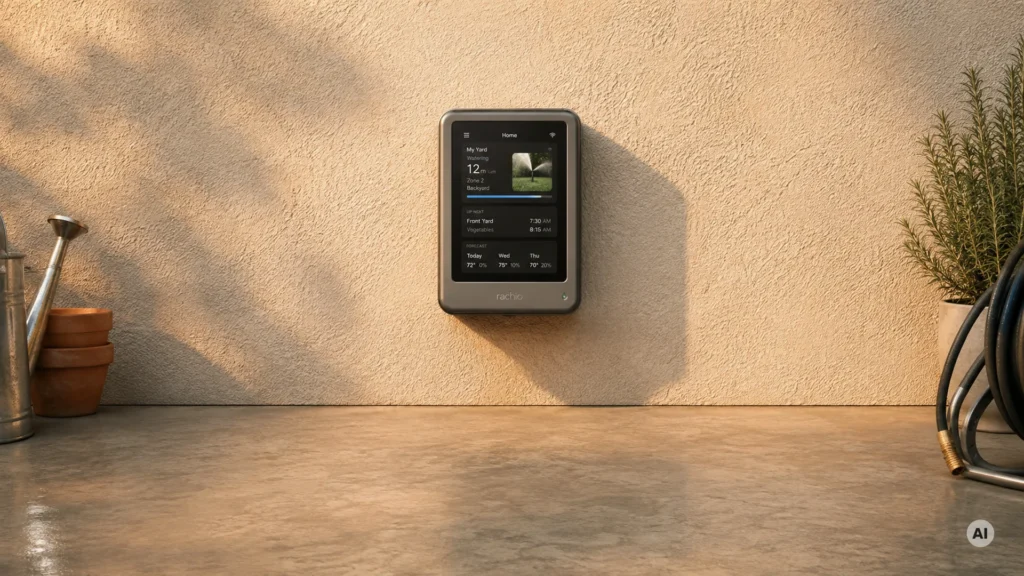
For a Wi-Fi connected irrigation setup, the Rachio 3 16-Zone stands out for how well it handles watering decisions without babysitting. Its weather based scheduling and rain delay logic help prevent wasted runs when storms move in. In daily use, the app delivers dependable remote control and alerts, with fewer connectivity dropouts than many systems in this category. You can also fine tune watering per zone, which makes it easier to match different grass, shrubs, and shade patterns across a property.
The main trade-off is setup and tuning. Zone calibration can feel a bit sensitive, so you may need to spend some time getting runtime and coverage dialed in. Wi-Fi setup can also take a few tries, especially if your network setup is picky. This is best for homeowners who want hands off scheduling with smart updates, and who are willing to do initial setup carefully for the most consistent results.
#2. Rachio 3 8-Zone Smart Irrigation System

Specifications
| Brand | Rachio |
|---|---|
| Zones Supported | 8 Zones |
| Connectivity | Wi-Fi |
| Weather Adjustments | Weather-Based |
| Smart Home Integration | Alexa |
| Power Source | AC Power |
Pros
- Accurate rain-delay handling
- Reliable alerts, minimal drops
- Stable firmware updates
Cons
- otherwise predictions may be off
- Zone calibration required
- Wi-Fi pairing resets
If you want Wi-Fi connected irrigation that actually changes behavior based on weather, the Rachio 3 is a strong pick. It handles rain delay in a dependable way, and it keeps users informed with alerts that tend to stay consistent when you are away from home. With an 8-zone setup and weather-based scheduling, you can run each area on its own plan while still letting forecast changes nudge runtime.
The main trade-off is setup and calibration. Expect to spend time dialing in zone settings so predictions line up with your yard. Some owners also report Wi-Fi pairing resets, which means you may need to re-do the connection steps if the controller loses its setup. This model fits best for homeowners who are comfortable doing that initial tuning and then checking the app periodically.
#3. Hunter PRO-HC 12-Zone Smart Irrigation System

Specifications
| Brand | Hunter |
|---|---|
| Installation Type | Outdoor |
| Zones Supported | 12 Zones |
| Connectivity | Wi-Fi |
| Weather Adjustments | Weather-Based / Rain Delay |
| Sensor Compatibility | Rain Sensor / Soil Moisture Sensor |
Pros
- Reliable alerts, minimal drops
- Intuitive zone scheduling
- ET and forecast aware
Cons
- Rain-skip delay concern
- Subscription value doubt
- Reset touchscreen glitches
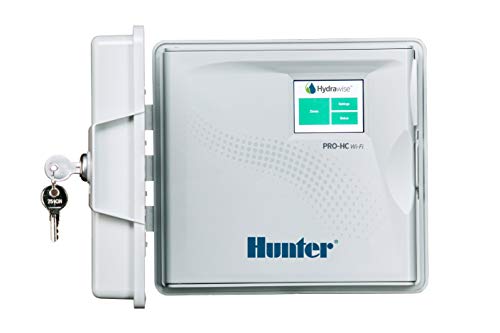
This 12-zone Wi-Fi connected controller stands out for how much it automates day-to-day watering without constant attention. It uses weather-based scheduling along with ET and forecast awareness, then lets you fine-tune rain delay and run behavior zone by zone. In practice, that means fewer manual schedule tweaks when conditions shift, and it still gives you alerts when something needs your look.
The main trade-off is how you interpret rain-skip behavior. Some buyers report concern with the rain-skip delay, and the touchscreen reset can feel a bit glitchy after long use. If you want a solid, homeowner-friendly smart controller and you are comfortable checking the system after unusual weather days, it is a good fit. If you prefer very strict control over rain delay timing, you may want to watch early runs before fully trusting it.
#4. Hunter PRO-HC 12-Station Smart Irrigation System

Specifications
| Brand | Hunter |
|---|---|
| Installation Type | Outdoor |
| Zones Supported | 12 Zones |
| Connectivity | Wi-Fi |
| Weather Adjustments | Weather-Based / Rain Delay |
Pros
- Accurate rain-delay handling
- Reliable alerts, minimal drops
- Intuitive zone scheduling
Cons
- Touchscreen unresponsive
- Low review satisfaction
For a Wi-Fi connected smart irrigation setup, the Hunter PRO-HC 12-Station stands out for how it handles rain delays in a way that feels dependable. It uses weather-based controls to pause watering when rain is likely, then resumes normal schedules without you having to remember to check the forecast. In daily use, that automation reduces repeat manual overrides across up to 12 zones, which is a big deal if your landscape has different plants and watering needs.
The main trade-off is reliability of the user interface. Some reviewers report a touchscreen that becomes unresponsive, and overall review satisfaction is lower than you would want from a controller you interact with often. If you prefer running changes from the app and want strong weather-based rain-delay behavior for a 12-zone system, it is a solid fit. If you rely heavily on the controller screen itself for quick day-to-day adjustments, you may want to look for a model with more consistent touch performance.
#5. Rachio Smart Hose Timer Smart Irrigation System

Specifications
| Brand | Rachio |
|---|---|
| Installation Type | Outdoor |
| Zones Supported | 8 Zones |
| Connectivity | Wi-Fi |
| Weather Adjustments | Weather-Based / Rain Delay |
| Smart Home Integration | Alexa / Google Assistant / IFTTT |
| Power Source | Battery |
Pros
- Stable firmware updates
- Intuitive zone scheduling
- Great value for zones
Cons
- Missing end alerts
- Limited advanced scheduling
- Battery-only upkeep
If you want Wi-Fi control without turning irrigation into a tech project, the Rachio Smart Hose Timer is a strong fit. With 8 zones and weather-based scheduling plus rain delay, it reduces the everyday guesswork that comes with fixed timers. The app experience is also a big part of why it stands out in this sub-category, since you can manage zones remotely and rely on stable firmware updates to keep things working over time.
The main trade-off is on the “fine tuning” side. It has limited advanced scheduling, and some alerts are missing, including end alerts. It also runs on battery power, so plan on periodic battery upkeep. This makes it best for homeowners who want dependable, mostly hands-off Wi-Fi watering with clear zone schedules, not for those who need highly complex timing rules or very detailed notifications.
#6. Rain Bird ARC8 8-Station Smart Irrigation System

Specifications
| Brand | Rain Bird |
|---|---|
| Installation Type | Indoor/Outdoor |
| Zones Supported | 8 Zones |
| Connectivity | Wi-Fi |
| Weather Adjustments | Weather-Based |
| Smart Home Integration | Alexa / Google Assistant |
Pros
- Intuitive zone scheduling
- Great value for zones
- Works with major platforms
Cons
- not as strong
This Rain Bird ARC8 stands out for homeowners who want Wi-Fi control without turning irrigation into a tech project. With 8 programmable zones and weather-based scheduling, it handles everyday watering decisions and keeps each zone on its own plan. The Wi-Fi connection also makes remote checking and adjustments straightforward, and it works with Alexa and Google Assistant for quick voice control.
The main trade-off is that it is not the strongest option if you need advanced sensing beyond basic weather adjustments. If your setup is mainly standard sprinklers and you want reliable, zone-by-zone scheduling with dependable app and Wi-Fi access, this is a solid fit. It is less ideal for buyers chasing the most sensor-driven automation and the most flexible integration options.
#7. Rain Bird ARC6 6-Station Smart Irrigation System

Specifications
| Brand | Rain Bird |
|---|---|
| Installation Type | Indoor |
| Zones Supported | 6 Zones |
| Connectivity | Wi-Fi |
| Weather Adjustments | Weather-Based |
| Sensor Compatibility | Rain Sensor |
| Smart Home Integration | Alexa / Google Assistant |
| Power Source | AC Power |
Pros
- Plugs into most setups
- Great value for zones
- ET and forecast aware
Cons
- Indoor-only controller
- Learning curve
- Setup UX friction
Rain Bird ARC6 stands out in Wi-Fi connected irrigation because it blends forecast-aware watering with ET and zone scheduling across 6 control stations. In day to day use, that means less guesswork when weather swings, and fewer chances of overwatering during warm, wet stretches. It also stays easy to manage remotely, with Alexa and Google Assistant support for quick control and checks.
The main trade-off is practical rather than technical. The controller is indoor only, so it needs an interior mounting spot and proper wiring to reach outdoor valves. There is also a learning curve in the setup and app experience, which can slow you down if you want everything running immediately.
#8. Orbit B-hyve XR 8-Zone Smart Irrigation System

Specifications
| Brand | Orbit |
|---|---|
| Installation Type | Indoor/Outdoor |
| Zones Supported | 8 Zones |
| Connectivity | Wi-Fi |
| Weather Adjustments | Weather-Based |
| Smart Home Integration | Alexa / Google Assistant |
| Power Source | AC Power |
Pros
- ET and forecast aware
- Handles many zones
- Great value for zones
Cons
- Smart logic confusion
- Setup calibration variance
- Overactive rain delay
Orbit B-hyve XR is a strong fit for homeowners who want Wi-Fi control without giving up weather-aware watering. With 8 zones, it supports a larger layout than many connected controllers, and it leans on ET and forecast-based adjustments to help keep schedules from drifting as conditions change. Alexa and Google Assistant support also makes it easy to check status or make quick changes from the house.
The trade-offs show up in day-to-day tuning. Some users may find the smart logic slightly confusing, especially when rain delays seem to stay active longer than expected. Setup calibration can also vary, so take time to verify zone run times and sensor alignment before relying on automation fully. This is best for people who are willing to spend a bit of effort getting settings right, then want consistent Wi-Fi-based oversight afterward.
#9. Orbit b-hyve XD 4-Port Smart Irrigation System

Specifications
| Brand | Orbit |
|---|---|
| Installation Type | Outdoor |
| Zones Supported | 4 Zones |
| Connectivity | Wi-Fi / Bluetooth |
| Weather Adjustments | Weather-Based |
| Smart Home Integration | Alexa / Google Assistant |
| Power Source | Battery |
Pros
- Intuitive zone scheduling
- ET and forecast aware
- Wi‑Fi + smart wireless
Cons
- Some scheduling inconsistencies
- Battery-only upkeep
- App schedule mismatch
The Orbit b-hyve XD 4-Port Smart Irrigation System stands out in the Wi-Fi connected irrigation category because it blends weather aware schedules with simple zone control across four lines. In practice, it uses ET and forecast data to adjust watering more automatically than basic timers, and you can manage things remotely through the app. Voice control support with Alexa and Google Assistant also makes it easier to pause or check schedules without digging into the controller.
The main trade-off is control consistency. Some users report scheduling mismatches, and the system relies on battery power, which means you need to stay on top of upkeep. This makes it a better fit for homeowners who want weather based automation and easy app control for a small, four-zone setup, but who can monitor behavior and make occasional tweaks when the schedule looks off.
#10. Orbit B-hyve XR 16-Zone Smart Irrigation System

Specifications
| Brand | Orbit |
|---|---|
| Installation Type | Indoor/Outdoor |
| Zones Supported | 16 Zones |
| Connectivity | Wi-Fi |
| Weather Adjustments | Weather-Based |
| Sensor Compatibility | Rain Sensor |
| Smart Home Integration | Alexa / Google Assistant |
Pros
- Handles many zones
- ET and forecast aware
- Works with major platforms
Cons
- Some scheduling inconsistencies
- Device account dropouts
- Poor documentation
If you need Wi-Fi connected control for a larger yard, the Orbit B-hyve XR 16-Zone is notable for its 16-zone capacity paired with weather-aware scheduling. It uses ET and forecast based adjustments to help reduce wasted watering, and it supports rain sensor input for added shutoff control. Smart home use is also straightforward since it works with Alexa and Google Assistant, letting you manage watering without opening the app.
The main trade-off is day to day consistency. Some users report scheduling quirks, and the Orbit account can occasionally drop, which interrupts remote control until it is sorted out. Documentation is also not as clear as you would want for a complex, multi-zone install, so this is best for homeowners who do not mind extra setup time and want more zones handled automatically than they would get from smaller controllers.
What to Look For
Automation that changes watering, not just schedules: Prioritize controllers that support weather-based adjustments and rain delay. If the system also offers ET-based scheduling or adaptive run time changes, it should reduce manual tweaks during heat, rain, and seasonal shifts.
Wi-Fi connectivity that stays online: Look for dependable remote access through the app and consistent alerts when schedules change or sensor input stops watering. A good fit for this sub-category is a controller that pairs easily and does not require frequent reconnects.
Zone capacity matched to your yard: Pick the maximum number of zones you can control, based on your current sprinkler layout. If you plan expansion, choose a controller with enough zone headroom so you do not need to rewire or replace it later.
Sensor support for shutoff and smarter timing: Check which sensors the controller supports. Common options include a Rain Sensor to stop watering during storms and Soil Moisture Sensor for moisture-based decisions. Make sure the controller accepts the sensors you actually want to install.
Installation and day-to-day control: Favor systems with clear wiring guidance, straightforward app setup, and easy manual override for dry runs or troubleshooting. You should be able to adjust zone run times, pause schedules, and recover quickly when something changes outdoors.
How We Picked
Products were identified through broad research across review sites and buyer forums, then filtered to only those that qualify as Wi-Fi Connected Smart Irrigation Systems.
Scoring used the same objective pillar framework as the main Smart Irrigation Systems post, allowing direct comparison of products within this sub-category.
Frequently Asked Questions
Do Wi-Fi connected irrigation controllers need strong home internet to work?
You can usually schedule zones even if the internet connection drops. Most systems keep your last schedule and resume normal operation. Wi-Fi mainly helps with remote control, alerts, and weather-based updates. To avoid delays, place the controller where your Wi-Fi signal is stable.
What makes one Wi-Fi smart irrigation system better than another?
Look at weather based scheduling and rain delay performance first. Next, compare app reliability and how fast alerts arrive. Zone capacity matters too, especially if you have separate front, back, and side areas. Finally, check long term reliability, since outdoor controllers must handle heat and moisture.
How hard is it to install a Wi-Fi smart irrigation controller?
Installation is usually a wiring swap for your existing controller. You connect station wires and then power the controller indoors or in an outdoor rated enclosure. After wiring, you add zones in the app and name each area. Many controllers support step by step setup, but plan for time to label zones correctly.
Can I add soil moisture or rain sensing to a Wi-Fi irrigation system?
Many Wi-Fi connected controllers support sensor inputs like rain sensors and soil moisture sensors. These sensors can pause watering when rain happens or reduce watering when soil stays wet. Check which sensor types the controller supports before you buy extras. You may need compatible wiring or a specific sensor model.
Should I choose Wi-Fi connected smart irrigation, or another smart type?
Choose Wi-Fi if you want remote control, fast weather updates, and app alerts. Choose other smart types if your internet coverage is weak or you prefer local control only. Wi-Fi also helps when you travel often and want quick adjustments. If you have limited networking options, non Wi-Fi options can be simpler to keep running.
How do Wi-Fi connected systems compare to Bluetooth or hub based smart irrigation systems?
Wi-Fi systems usually give wider control because you can manage your watering from anywhere. Bluetooth often works only when you are near the property. Hub based systems can improve reliability by using a central bridge, but setup may take more steps. In most cases, Wi-Fi offers the easiest remote experience when your network stays stable.


