Tizen Televisions are Samsung models that use the Tizen smart platform. In this sub-category, buyers should care most about how fast the interface feels, how reliably apps launch, and how well the set handles sports, streaming, and gaming on the same day.
Picking the right Tizen TV gets hard because the best picture usually costs more, and motion settings can change how gaming and fast sports look. You also have to trade panel performance against audio limits in built-in speakers, and you should not assume every model has the same HDR support or HDMI connectivity.
To make sure your choice fits your room and usage, compare picture performance, motion handling, and Tizen smart features across the ranks, then check the ports you will actually use for consoles and soundbars. Looking for all types? See our Best Televisions.
Quick Overview
Our Top Picks
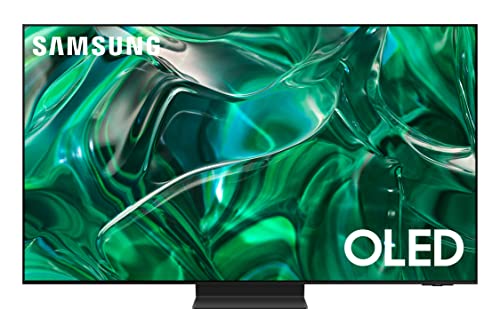
#1. Samsung QN55S95CAFXZA Television
Specifications
| Brand | Samsung |
|---|---|
| Screen Size | 55 in |
| Resolution | 4K UHD |
| Display Type | OLED |
| Refresh Rate | 120 Hz |
| Hdr Formats | HDR10, HDR10+, HLG |
| Smart Platform | Tizen |
| Dimensions | 30.4 x 10.5 x 48.2 in |
Pros
- Stunning HDR pop
- Premium contrast panel
- Smooth fast motion
Cons
- Missing Dolby Vision
This 55 in OLED Samsung stands out in the Tizen Televisions lineup thanks to its strong HDR impact and premium contrast. Scenes look bright without losing detail, and dark parts stay deep and clean, which is a big deal for mixed streaming content. Motion also stays smooth at 120 Hz, so sports and fast shows do not blur or smear as much as many 60 Hz sets.
The main trade-off is missing Dolby Vision, so some Dolby Vision titles may not look as close to what you see on Dolby Vision tuned TVs. Audio is fine for everyday viewing, but for fuller sound you will likely want a soundbar. If you want a Tizen TV that prioritizes OLED picture pop and fast action, this one is an easy top pick.
#2. Samsung QN65QN900FFXZA Television

Specifications
| Brand | Samsung |
|---|---|
| Screen Size | 65 in |
| Resolution | 8K UHD |
| Display Type | QLED |
| Refresh Rate | 120 Hz |
| Smart Platform | Tizen |
| Dimensions | 34.1 x 10.1 x 57.3 in |
Pros
- Deep blacks, vivid color
- Smooth motion, low lag
- Responsive, well-stocked apps
Cons
- Setup sensitivity
The Samsung QN65QN900FFXZA stands out in the Tizen Televisions set because it pairs Samsung QLED picture depth with Tizen's smooth, familiar home screen. You get deep blacks and vivid color that look strong in both dark and bright rooms. With 120 Hz refresh support and low lag, fast scenes stay steady for sports and responsive for gaming, and the motion handling feels clean rather than distracting.
The main trade-off is setup sensitivity. If settings are not tuned, you may notice the picture looking slightly off compared with what it can do at its best. This model fits best for buyers who want a near-premium viewing experience and do not mind spending a little time dialing in picture modes on day one.
#3. Samsung QN77S95DAFXZA Television

Specifications
| Brand | Samsung |
|---|---|
| Screen Size | 77 in |
| Resolution | 4K UHD |
| Display Type | OLED |
| Refresh Rate | 144 Hz |
| Smart Platform | Tizen |
| Dimensions | 38.7 x 0.4 x 67.60 in |
Pros
- Deep blacks, vivid color
- Smooth motion, low lag
- Strong smart TV OS
Cons
- Not enough HDMI ports
- Limited HDR formats
- Glare sensitivity
Samsung QN77S95DAFXZA stands out in the Tizen Televisions lineup with a strong OLED-style viewing experience at a fast 144 Hz refresh rate. Motion stays smooth for sports and gaming, with low lag for responsive control. The picture is a major highlight too, with deep blacks and vivid color that keep dark scenes from looking washed out.
The main trade-off is connectivity. With limited HDMI ports, it can feel tight for setups with multiple consoles, a soundbar, and a streaming box. HDR support is also more limited than some rivals, so buyers who chase the widest HDR library may want to compare. Glare sensitivity is another thing to consider if you watch in a bright, sunny room.
#4. Samsung E1SAMQN77S90CARB Television

Specifications
| Brand | Samsung |
|---|---|
| Screen Size | 77 in |
| Resolution | 4K UHD |
| Display Type | OLED |
| Refresh Rate | 120 Hz |
| Smart Platform | Tizen |
| Dimensions | 41.1 x 14.2 x 67.7 in |
Pros
- Deep blacks, vivid color
- Crisp 4K clarity
Cons
- Some blur in motion
- Limited HDR formats
- Not enough HDMI ports
Samsung E1SAMQN77S90CARB stands out in Tizen Televisions because its OLED picture brings the kind of contrast that makes streaming look more lifelike. Blacks stay deep, colors look rich, and 4K content comes through crisp. With Tizen as the core, it is also easy to move between apps and find shows without much lag for everyday use.
The main trade-offs are motion and connectivity. Fast scenes show some blur, so sports and action movies may not look as sharp as you want. HDR support is limited, and there are not enough HDMI ports for busy setups. This is best for people who care most about OLED-style contrast and a smooth Tizen experience, and who can live with fewer connection options.
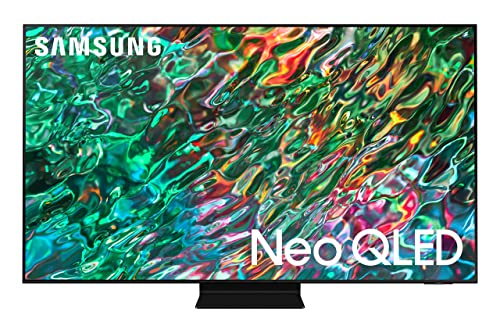
#5. Samsung E1SAMQN55QN90BARB Television
Specifications
| Brand | Samsung |
|---|---|
| Screen Size | 55 in |
| Resolution | 4K UHD |
| Display Type | Mini-LED |
| Smart Platform | Tizen |
| Dimensions | 30.2 x 9.3 x 48.3 in |
Pros
- Deep blacks, vivid color
- Premium contrast panel
Cons
- Limited HDR formats
- Blooming at angles
- Dialogue muffling
This Samsung 55-inch Mini-LED TV stands out in Tizen Televisions for its strong contrast. Dark scenes look deep, and colors stay vivid without turning washed out. It is a good match for Tizen users who watch a mix of live TV and streamed content, since the punchy picture helps make highlights pop in everyday rooms.
The main trade-off is HDR. Support is limited, so some HDR shows and discs do not look as strong as on higher-end models. Also expect some blooming when viewing from the side, and dialogue can sound a bit muffled at normal volume. Choose it if you care most about rich blacks and you watch mostly straight-on, with Tizen as your main app platform.
#6. Samsung UN55U8000FFXZA Television

Specifications
| Brand | Samsung |
|---|---|
| Screen Size | 55 in |
| Resolution | 4K UHD |
| Display Type | LED |
| Refresh Rate | 60 Hz |
| Hdr Formats | HDR10+ |
| Smart Platform | Tizen |
| Hdmi Ports | 3 ports |
| Dimensions | 29.9 x 7.8 x 48.2 in |
Pros
- Crisp 4K clarity
- Advanced HDR support
- Strong smart TV OS
Cons
- Choppy standard motion
- A bit thin and harsh
Samsung UN55U8000FFXZA is a notable pick for Tizen Televisions because it pairs a strong 4K picture with Samsung's Tizen smart platform. The 55 in LED panel looks crisp in everyday viewing, and HDR10+ support helps make bright scenes feel more detailed. It is an easy TV to live with too, thanks to a stable, quick Tizen interface for streaming and app browsing.
The main trade-off is motion. At 60 Hz, fast action can look choppy, especially with sports or camera pans. Audio is also a bit thin and harsh for movies and dialogue, so most people will want a soundbar. Choose this model if picture quality and Tizen convenience matter more than smooth motion and rich built-in sound.
What to Look For
Picture Quality Under Real Content: Check brightness and contrast, plus dark-scene detail. Look for strong black levels without washed-out colors, especially in streaming shows and HDR movies. If the model uses upscaling, confirm it does not add blur or banding to low-quality sources.
Motion Clarity for Sports and Games: Make sure the refresh rate supports smooth playback for fast action. Then verify low blur and low judder in motion-heavy scenes. If you game, also prioritize TVs that keep input lag reasonable and handle variable frame rates cleanly.
Tizen Smart Speed and App Stability: Test how quickly the TV wakes up, how fast apps open, and whether search results feel snappy. Buyers in this sub-category should also confirm the app set you need, plus casting support, works without repeated re-login prompts.
HDR Format Support That Matches Your Library: Check which HDR formats are supported, such as HDR10, HDR10+, Dolby Vision, and HLG. Then confirm the set handles HDR tone mapping without crushing shadows or blowing out highlights.
Ports and Everyday Usability: Count HDMI ports before buying. If you use a console, streaming box, and soundbar, you need enough inputs without constant cable swaps. Also factor in the physical design, including stand stability and wall-mount friendliness, so the TV sits cleanly in your space.
How We Picked
Products were identified through broad research across review sites and buyer forums, then filtered to only those that qualify as Tizen Televisions.
Scoring used the same objective pillar framework as the main Televisions post, allowing direct comparison of products within this sub-category.
Frequently Asked Questions
Do Tizen televisions get regular software updates?
Most Tizen televisions receive updates that improve apps and fix bugs. To keep them current, turn on auto updates in the TV settings. If you do not use the TV often, check for updates before a big viewing event.
What should I check when comparing Tizen televisions side by side?
Start with picture score items like brightness and black levels. Next, compare motion handling and gaming features like fast response. Finally, check audio output and how many HDMI ports you have for your devices.
How do I keep a Tizen television looking its best over time?
Use a clean, soft microfiber cloth for the screen. Avoid harsh cleaners and do not press hard on the panel. If you watch the same bright image for hours, use built-in picture settings to reduce risk of uneven wear.
When should I choose a different type of television instead of a Tizen TV?
Choose a different type if you need the best possible deep blacks or the simplest motion for dark scenes. Also consider switching if you want a specific gaming feature that a Tizen model does not support. If your room is very dark, picture type can matter more than the smart platform.
How do Tizen televisions compare with other televisions for gaming and sports?
Tizen models often do well with smooth motion and responsive controls. Look for higher refresh rates and support for gaming modes when you compare models. If you stream fast sports, prioritize motion clarity and low lag over extra smart features.