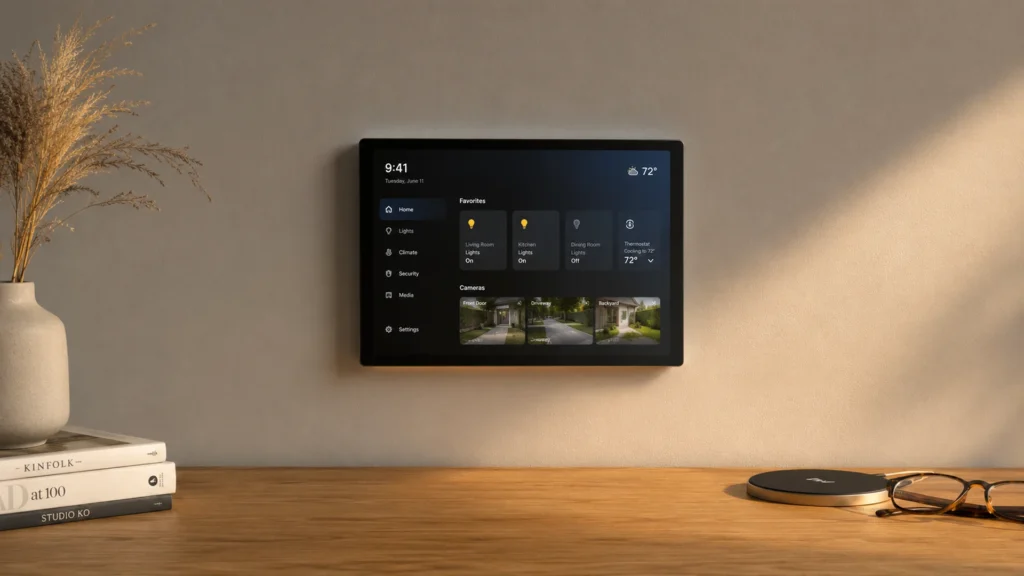
Smart home assistants are smart speakers and smart displays that listen for commands, then control your lights, plugs, locks, thermostats, and other devices. They sit in the middle of your day-to-day routines, from setting timers to changing scenes. Their value comes from how reliably they understand you and how smoothly they connect to your home.
Picking one is harder than it looks. Voice features get oversold, while wake-word detection and follow-up handling matter more than marketing claims. Smart home support can be fragmented too, with some assistants tied to specific hubs. Even the “specs” that should help can mislead, like listing many protocols without showing stable pairing, or focusing on display size while ignoring resolution and responsiveness.
This guide breaks the decision into practical criteria. You will see what to check for voice accuracy, smart home protocol support, connectivity, audio pickup and playback, display clarity, privacy controls, and overall value. You will also get a short selection process that shows how each model was judged for real-world use.
Quick Overview
Top Picks
Best Overall

Specifications
| Brand | Amazon |
|---|---|
| Voice Assistant Platform | Alexa |
| Smart Home Protocols | Zigbee, Matter, Thread |
| Display Size | 8.7 in |
Pros
- Crisp audio, low distortion
- Larger, more usable screen
- Broad smart protocol support
Cons
- Privacy feature gap
For a Best Overall smart home assistant, the Echo Show 8 hits the sweet spot with a larger, easy-to-read 8.7-inch screen. That display makes it simple to check timers, view cameras, and control rooms without keeping your phone in hand. It also stays at the center of daily routines with Alexa.
Sound quality is a standout. Voice responses come through clearly with low distortion and enough volume for most rooms. Smart home support is also strong, with major protocol coverage including Zigbee, Matter, and Thread, which helps reduce compatibility headaches. The screen also feels practical, with crisp visuals for calls, media, and on-screen smart home controls.
The main drawback is a privacy feature gap, so you will want to review the settings before settling in. If you want one smart display that works well for everyday voice control plus broad smart home connectivity, this is the one to get.
Also ranked #1 in: Touchscreen Smart Home Assistants · Alexa Smart Home Assistants
Best Spatial Sound

Specifications
| Brand | Amazon |
|---|---|
| Voice Assistant Platform | Alexa |
| Smart Home Protocols | Zigbee, Thread, Matter |
| Connectivity | Wi-Fi 6E, Bluetooth 5.3 |
| Speaker Output Power | 330 W |
| Microphone Count | 7 |
| Dimensions | 5.8 x 5.6 x 6.1 in |
Pros
- Stable, reliable automations
- Crisp audio, low distortion
- Broad smart protocol support
Cons
- can impact voice-controlled smart-home usability)
- Privacy/cloud dependence
- Ecosystem setup friction
This Echo Studio fits the Best Spatial Sound role because it is built for room-filling, low-distortion audio. With a 330 W speaker system and seven microphones for far-field pickup, it works well when you want music to sound big, not just loud.
Voice recognition stays strong across everyday commands, with quick responses and solid Alexa performance for follow-ups. For smart home control, it supports Zigbee, Thread, and Matter, plus Wi-Fi 6E and Bluetooth 5.3. That mix makes it easier to connect more device types and keep automations steady over time.
The trade-off is that voice control can feel less smooth for hands-free smart home use at times, and the experience depends heavily on Amazon cloud services. Privacy and setup can also feel more involved than simpler local-only setups. If you want the best-sounding Alexa speaker plus strong multi-protocol smart home support, this is a good pick, but if you need consistently effortless voice control for every smart home request, look at alternatives first.
Best with Siri

Specifications
| Brand | Apple |
|---|---|
| Voice Assistant Platform | Siri |
| Smart Home Protocols | Matter, Thread |
| Connectivity | Bluetooth 5.0, Wi-Fi 4 |
| Microphone Count | 4 |
| Dimensions | 5.6 x 5.6 x 6.6 in |
Pros
- Stable, reliable automations
- Room-filling clear sound
- Better far-field hearing
Cons
- Aging or limited connectivity
- Spotify support gaps
- Cluttered, hard to read
For a Best with Siri pick, this HomePod version stands out for one reason, far-field hearing that stays solid across a room. Siri is the center of the experience, and the microphones help you talk naturally from a distance without repeating yourself.
Day to day, it handles smart home control with dependable automations, especially when your setup includes Matter and Thread devices. You also get room-filling sound that works well for both music and voice. Clear playback and reliable pickup make it easier to manage requests and routines hands-free, with setup that tends to stay stable once it is done.
The main downside is connectivity that feels a bit aging, plus Spotify support that can be patchy depending on what you want to play. The interface is also cluttered and hard to read at a glance. If you live in the Apple ecosystem and want a Siri-first speaker that also runs trusted smart home routines, this is a strong fit.
Best Google Assistant

Specifications
| Brand | |
|---|---|
| Voice Assistant Platform | Google Assistant |
| Connectivity | Wi-Fi, Bluetooth |
| Display Size | 10 in |
| Display Resolution | 1280 x 800 px |
| Speaker Output Power | 30 W |
| Dimensions | 4 x 4 x 4 in |
Pros
- Crisp audio, low distortion
- Responsive touch controls
- Larger, more usable screen
Cons
- Weak privacy controls
- Few smart protocols supported
- Wi-Fi dropouts
This is a strong pick for anyone shopping for a smart home assistant built around Google Assistant. The standout is the 10-inch screen, which makes it easier to see timers, calls, and smart home status at a glance while you talk to it.
Audio is a bright spot. Sound comes through clearly with low distortion, and the 30 W speaker helps fill a room without getting harsh. Touch is also fast and easy to use, so browsing menus and controlling routines feels smooth. The bigger display gives smart home controls more room, which matters when you manage multiple devices.
Still, it has trade-offs. Privacy controls are weaker than what some people expect, and smart home support can be limited, with fewer protocols than competing hubs. Wi-Fi dropouts can also interrupt control when your network is unstable. If you want dependable Google Assistant help plus a large touchscreen, and you are okay working within a narrower smart home setup, this is the one to get.
Best Large Screen

Specifications
| Brand | Amazon |
|---|---|
| Voice Assistant Platform | Alexa |
| Smart Home Protocols | Thread, Matter |
| Display Size | 15.6 in |
| Display Resolution | 1920 x 1080 px |
| Dimensions | 10.1 x 1.4 x 16.1 in |
Pros
- Broad smart protocol support
- Crisp, high-resolution display
- Larger, more usable screen
Cons
- Weak privacy controls
- Frequent ads resurfacing
- Bypass requires workarounds
If you want a smart home assistant that is easy to use from across the room, the Echo Show 15 fits the Best Large Screen role. The standout is its 15.6-inch 1920 x 1080 display, which makes routines, camera views, and device controls much more readable than smaller smart displays.
Voice control feels solid for everyday tasks, and it handles smart home requests through Alexa with reliable day-to-day usability. It also supports key home standards like Matter and Thread, plus broad device compatibility through the Alexa ecosystem. On top of that, the larger screen gives you more space for call screens, timers, and multi-step setups.
The main downside is trust and convenience. Privacy controls can feel less satisfying than you might expect, and ads can resurface in the interface, which interrupts the experience. If you want a big, readable smart display to run routines and check rooms at a glance, this is a good pick. If privacy-first controls and a clean, ad-free home screen matter most, look elsewhere.
Best Camera Free

Specifications
| Brand | |
|---|---|
| Voice Assistant Platform | Google Assistant |
| Connectivity | Bluetooth, Wi-Fi |
| Display Size | 7 in |
| Display Resolution | 1024 x 600 px |
| Microphone Count | 3 |
Pros
- Price matches performance
- Seamless setup
- Voice Match personalization
Cons
- Few smart protocols supported
- Low-resolution display
- Occasional slow responses
For a best camera-free pick, the Google Nest Hub 7 hits the sweet spot with a dedicated smart display and far-field voice control. You get room-ready answers and a screen for quick status checks, without needing a camera on the device.
Setup is straightforward, and Voice Match personalization helps keep things on track for different people in the home. In daily use, the audio and mic array feel practical for voice commands, and the 7-inch touchscreen is bright enough for glanceable timers, routines, and media controls. Smart home control is smooth for common Google-first tasks, with stable day-to-day responsiveness when you use the supported services.
The trade-off is in the home automation side, where support for smart home protocols is limited. The display is also lower resolution at 1024 x 600 px, so fine text can look less crisp than higher-end rivals. If you want a camera-free smart display for voice-first control and quick visual help, this is the one to get.
Best Sonos

Specifications
| Brand | Sonos |
|---|---|
| Voice Assistant Platform | Alexa, Sonos Voice |
| Connectivity | Bluetooth, Wi-Fi |
Pros
- Fast, natural follow-ups
- Crisp audio, low distortion
- Reliable multiroom playback
Cons
- Indirect smart-home control
- Incomplete mic disable
- Limited Home Assistant workflows
Sonos Era 300 fits the Best Sonos role if you want smart speaker quality in a room, not just voice control. Its standout trait is how well it handles follow-up requests while staying tied to Sonos multi-room playback. That combo makes it feel more like a responsive hub for listening than a generic assistant.
Voice recognition is strong, with fast, natural follow-ups that help when your first request needs correction. Audio performance is also a highlight, with crisp sound and low distortion at louder levels. You also get reliable multi-room playback, which matters if you already live in the Sonos app and want whole-home listening.
The trade-off is smart-home control that can feel indirect, and mic mute is not as complete as you might expect. Home Assistant support is limited too. If you want the best Sonos-style voice and audio experience and can live with light smart-home depth, this is the one to get.
Best Value

Specifications
| Brand | Amazon |
|---|---|
| Voice Assistant Platform | Alexa |
| Connectivity | Wi-Fi, Bluetooth |
| Dimensions | 3.5 x 3.9 x 3.9 in |
Pros
- Price matches performance
- Compact footprint
- Everyday reliability
Cons
- Weak privacy controls
- Few smart protocols supported
- Cloud dependency
For a Best Value smart home assistant, the Echo Dot stands out with everyday reliability in a compact body. It is built around Alexa voice control, so it is a simple way to start home routines and quick voice commands without taking up much space.
Voice recognition is strong for common requests, and replies stay fast for most day to day tasks. Audio is also solid for its size, with clear voice playback and dependable far-field pickup for commands from across a room. For smart home use, the setup process is usually straightforward, and it integrates well with common Wi-Fi and Bluetooth accessories.
The main downside is trust and privacy controls, which feel limited compared with some competing hubs. It also leans more on cloud services than on local control, and smart home protocol support is not broad. If you want a dependable Alexa speaker for basic routines and voice control, this is the one to get. If you want deeper privacy controls and more local, non-cloud smart home options, look elsewhere.
What to Look For
Voice: Pick the assistant that handles follow-up requests well and rarely mishears commands. Test it with phrases you actually use, like “dim the living room lights to 30” then “make them warmer.” Far-field listening matters if you speak from the kitchen or hallway.
Smart Home: Confirm it supports the main standards you need, especially Matter, Zigbee, and Thread. Also check whether it can run the basics you expect, like schedules, scenes, and room-based controls. If your devices require a hub, make sure the assistant fits that setup instead of forcing a workaround.
Audio: Look for strong voice playback clarity and enough speaker power to stay audible in a normal room. Microphone count helps, but performance matters more, especially for commands spoken across the room. If you plan to use it for calls or media, also pay attention to whether audio stays clean at higher volume.
Display: For smart displays, prioritize readability over screen size alone. Check display resolution and whether touch input feels quick. If you want quick dashboards for routines and cameras, a sharper screen with smooth controls saves time every day.
Voice Assistant Platform: Choose the assistant that matches your existing ecosystem and habits. If you already use one platform for music, calendars, or home control, switching can add friction. It also affects how easily you get multi-user recognition and consistent responses.
Connectivity: Verify it supports the network and device connections you plan to use. Most homes rely on Wi-Fi, but Bluetooth can help for setup and nearby device pairing. If your router has weak coverage in a room where the assistant will live, plan for placement or consider a mesh setup.
Trust: Look for practical privacy controls. A physical mic mute and clear camera handling matter more than vague “privacy” statements. Also check for a track record of stable software updates, since buggy releases can break routines and device connections.
How We Selected These Products
Products were discovered through broad web searches across review sites, buyer forums, and best-of lists, so the list reflected more than one editorial opinion. We then read a large volume of real customer reviews to spot the problems buyers actually faced, such as mishears, dropped device links, or setups that took too many steps.
Next, we verified availability and core specifications directly against Amazon listings. Each model was scored against the same pillar framework: Voice, Smart Home, Audio, Display, Trust, and Value. That scoring focused on consistency and usability, not just feature checklists.
Final curation aimed for distinct roles. Instead of ranking everything by one score, we selected models that make sense for specific priorities, like a large screen for quick at-a-glance control or a setup that fits Siri or Google-first households.
Frequently Asked Questions
Which smart home assistant is best if I want the best overall experience?
Choose Amazon Echo Show 8" Smart Home Assistant for the best all-around blend of voice, smart home control, and display usefulness. It also scores very well on value for its class. It is a strong fit if you want one device to run daily routines, show camera feeds, and handle basic voice control.
What smart home assistant should I buy if I want the best sound quality?
Pick Amazon Echo Studio Smart Home Assistant for spatial, room-filling audio while still keeping smart home control. It delivers the strongest audio-focused experience in this group. If you want Siri instead, Apple HomePod (2nd Gen) Smart Home Assistant is also a top-tier audio option.
Which smart home assistant is best for privacy if I do not want a camera?
Choose Google Nest Hub 7" Smart Home Assistant if you want a touchscreen and voice control without a camera. It also does well on value and everyday smart home control. This can be a better fit if you feel uneasy about always-on visual sensing.
Is a higher price always better for smart home assistants?
Not always. Premium models can bring better audio or better displays, but voice accuracy and smart home reliability do not automatically improve with price. For example, Amazon Echo Studio Smart Home Assistant and Apple HomePod (2nd Gen) Smart Home Assistant shine on audio, while some expensive options lack strong display value or have voice friction.
Why do some smart home assistants feel less reliable even if they support modern standards like Matter?
Standards support matters, but real reliability also depends on your Wi-Fi stability and how the app handles routines. Some devices show more inconsistencies in setup, screen behavior, or control responsiveness. If you use advanced setups like Home Assistant dashboards, you may face extra workarounds that reduce day-to-day stability.