




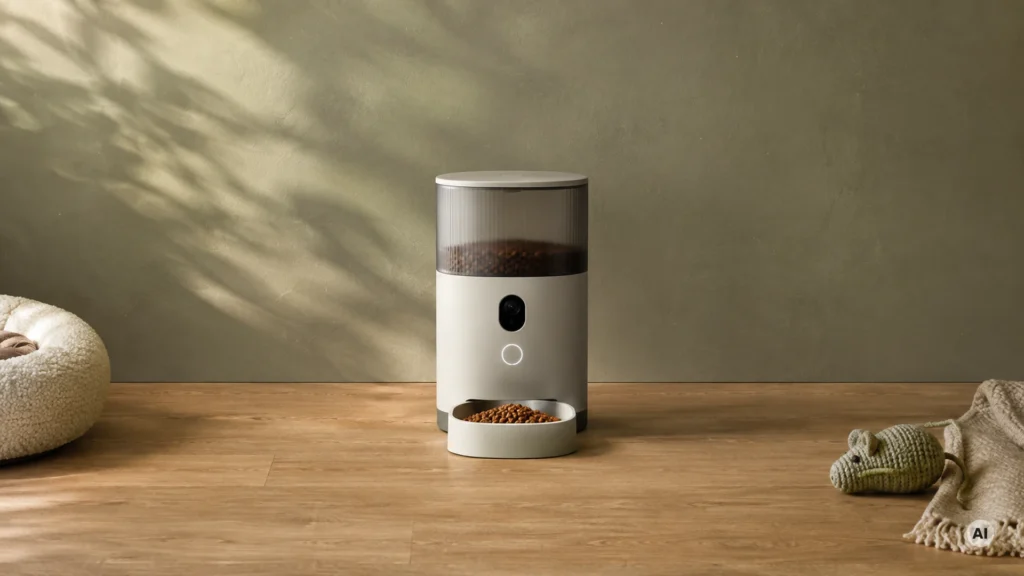
The 5 Best Camera Smart Pet Feeders in 2026

Transparency Note: This post contains affiliate links. As an Amazon Associate, we earn from qualifying purchases at no extra cost to you.

Camera Smart Pet Feeders send more than just app alerts. They let you check meal time from your phone using a built-in camera. If you work long shifts or travel, you need accurate portions first, then video that actually helps when a feeding goes wrong.

This sub-category is harder to choose than standard smart feeders. You trade between reliable food delivery and camera features. Some models use stronger camera hardware but still struggle with jams. Others focus on food control but have weaker video or limited recording options.

If you want the full range across the smart feeder category, including non-camera models and different dispensing styles, see our Best Smart Pet Feeders. That roundup helps when you do not need a camera every day.

Quick Overview

Frienhund Automatic Cat Feeder Smart Pet Feeder
#1 Frienhund Automatic Cat Feeder Smart Pet Feeder
PETKIT YUMSHARE Dual-Hopper Smart Pet Feeder
#2 PETKIT YUMSHARE Dual-Hopper Smart Pet Feeder
PETKIT YumShare Smart Pet Feeder
#3 PETKIT YumShare Smart Pet Feeder
Furbo Dog Nanny Smart Pet Feeder
#4 Furbo Dog Nanny Smart Pet Feeder
WOPET Automatic Cat Feeder Smart Pet Feeder
#5 WOPET Automatic Cat Feeder Smart Pet Feeder

Our Top Picks

#1. Frienhund Automatic Cat Feeder Smart Pet Feeder

Frienhund Automatic Cat Feeder Smart Pet Feeder
Our Score
7.8 / 10
hover for details
Feeding
7.6
Smart
6.9
Reliability
8
Build
7.7
Capacity
8.2
Value
8.4
BrandFrienhund
Food Capacity Lb15.42 lb
Meals Per Day30 meals
Pets Supported2 pets
ConnectivityWi-Fi
Power SourceAC Adapter + Battery Backup
Camera Resolution2K
  • Steady dispensing over time
  • Backup power included
  • Roomy hopper for days
  • Unstable connectivity sometimes
  • Setup complexity for novices

For camera-based smart feeding, the Frienhund Automatic Cat Feeder stands out because it also backs up the schedule. When paired with its 2K camera view, you can check meal time from your phone and still keep dispensing even if power goes out. The hopper holds 15.42 lb and supports up to 30 meals per day for as many as 2 pets, so it fits busy routines and longer stretches away. In real use, the timing stays consistent and the feeder keeps running without frequent resets.

The main trade-off is connectivity. Setup can be a bit involved for first-time smart pet owners, and the Wi-Fi link can be unstable at times. If you are the type who double-checks app status before leaving and ensures a strong signal where the feeder sits, this is a strong pick for a camera-first routine. If you need simple, hands-off setup every time, you may find the initial setup more work than you want.

#2. PETKIT YUMSHARE Dual-Hopper Smart Pet Feeder

PETKIT YUMSHARE Dual-Hopper Smart Pet Feeder
Our Score
7.5 / 10
hover for details
Feeding
7.3
Smart
7.3
Reliability
7.3
Build
8
Capacity
7.6
Value
7.8
BrandPETKIT
Pets Supported2 pets
ConnectivityWi-Fi
Power SourceAC Adapter + Battery Backup
Camera Resolution1080p
  • Secure lid, great sealing
  • Supports multiple pets
  • Backup power included
  • Multi-pet detection lag
  • Quality-control variance
  • Smart reliability inconsistency

The PETKIT YUMSHARE Dual-Hopper stands out for camera-based feeding because it ties daily meal control to visual checks. With a 1080p camera, you can confirm who is at the bowl and whether the feeding actually happened, which is especially useful when you are away or managing two pets with different routines. The secure, well-sealed lid also helps keep kibble fresh for the next scheduled drop, instead of relying only on app trust.

It is not perfect for multi-pet setups, though. Users report some lag with multi-pet detection, plus quality-control variance and smart reliability that can be inconsistent in real use. This makes it a better fit for households that want camera verification and basic dual-pet feeding, but can tolerate occasional app or detection quirks compared with the most dependable performers in the category.

#3. PETKIT YumShare Smart Pet Feeder

PETKIT YumShare Smart Pet Feeder
Our Score
7.4 / 10
hover for details
Feeding
7.1
Smart
7.1
Reliability
7.4
Build
8.1
Capacity
7.1
Value
7.9
BrandPETKIT
Pets Supported2 pets
ConnectivityWi-Fi
Power SourceAC Adapter + Battery Backup
Camera Resolution1080p
  • Secure lid, great sealing
  • Backup power included
  • Supports multiple pets
  • Wi-Fi setup friction
  • Meal timing risk
  • Limited control range

For camera-based smart pet feeding, PETKIT YumShare stands out with a 1080p viewpoint and strong “set it and forget it” basics. The lid seals securely, and backup power helps keep scheduled meals on track during brief outages. If you manage more than one pet, the feeder can handle up to two, so the camera and app become a real daily check-in tool instead of a one-off gadget.

That said, Wi-Fi setup can feel a bit fussy, and there is a small risk around meal timing depending on your environment. It also has a limited control range, so it may not work as smoothly if you often interact from far away. This is a solid pick for people who want a dependable camera-fed routine, and are willing to spend a little time getting the Wi-Fi connection right.

#4. Furbo Dog Nanny Smart Pet Feeder

Furbo Dog Nanny Smart Pet Feeder
Our Score
7.3 / 10
hover for details
Feeding
7.4
Smart
7.4
Reliability
7.2
Build
7.6
Capacity
6.7
Value
7.8
BrandFurbo
ConnectivityWi-Fi
Power SourceUSB
Camera Resolution1080p
  • Better remote monitoring
  • Crisp video feed
  • Premium build feel
  • Knockover vulnerability
  • Refill needed too often
  • Multiple launch attempts

This feeder stands out in the camera smart feeder category because you get crisp 1080p video for remote check-ins. The app makes it easy to watch what your dog is doing while scheduled meals run, which helps when you are away or want peace of mind during feeding times. Build quality also feels more premium than many peers, so the unit holds up well to daily handling.

The main trade-offs are practical. It can be vulnerable to being knocked over, and refills may be needed more often than you expect for longer trips. Some users may also see extra launch attempts when dispensing, so it is smart to test feeding a few times with your exact kibble before relying on it for an entire workweek.

#5. WOPET Automatic Cat Feeder Smart Pet Feeder

WOPET Automatic Cat Feeder Smart Pet Feeder
Our Score
7.1 / 10
hover for details
Feeding
7.1
Smart
6.9
Reliability
7.1
Build
6.4
Capacity
7.3
Value
7.9
BrandWOPET
Meals Per Day10 meals
Pets Supported2 pets
ConnectivityWi-Fi
Power SourceAC Adapter + Battery Backup
Voice Recording Sec10 sec
Camera Resolution1080p
  • More flexible schedules
  • Supports multiple pets
  • Backup power included
  • Unstable connectivity sometimes
  • Tough to maintain fully
  • Bowl free-drop workaround

This WOPET camera smart feeder stands out for families who want two things at once: scheduled feeding and visual checks. It supports up to 2 pets, lets you set up to 10 meals per day, and pairs that schedule with a 1080p camera plus 10-second voice messages. In a camera-based feeder setup, that means you can confirm the right bowl time and quickly respond if one pet shows up late or avoids the food slot.

The main trade-off is day-to-day setup comfort. Connectivity can be unstable at times, which can make camera viewing or app control less smooth than you want. Maintenance also takes a bit more effort than some simpler designs, and the feeding bowl uses a free-drop workaround that may feel fussy until you get used to it.

What to Look For

Video clarity for real checks: Look for a camera resolution of 720p or 1080p. Clearer video helps you spot stuck kibble, a cat that refuses to eat, or a dog guarding the bowl.

On-time feeding accuracy: Use the feeder's programmable schedule to set multiple meals per day. Choose models that support several daily feedings and deliver consistent portion sizes, especially if you split meals for weight control.

Connectivity that holds steady: Favor Wi-Fi (or Wi-Fi + Bluetooth if you want easier setup). If a feeder drops off the network often, the camera becomes less useful and feeding controls get delayed.

Reliability during outages and away-from-home use: Confirm whether the unit runs on AC Adapter and, ideally, includes battery backup. Backup power matters for keeping a feeding on time when power flickers or resets your home router.

Food capacity that matches your schedule: Check the hopper size and how many meals you can plan before refilling. For camera feeders used while you are away, larger capacity usually means fewer app checks and less risk of an empty hopper.

How We Picked

Products were identified through broad research across review sites and buyer forums, then filtered to only those that qualify as Camera Smart Pet Feeders.

Scoring used the same objective pillar framework as the main Smart Pet Feeders post, allowing direct comparison of products within this sub-category.

Frequently Asked Questions

What should I look for in the camera on a smart pet feeder?

Look for a clear resolution like 1080p or 2K. Also check that the live view loads fast in your home Wi-Fi. A good camera shows your pet eating and sends useful alerts. Poor video makes it harder to confirm meals.

How do camera smart feeders handle portion control and timing?

They should run scheduled feeds with consistent portion sizes. Many models let you set multiple meals per day. You should test a few settings if you use a new kibble size. Smooth dispensing matters as much as timing.

Do I need to do any special cleaning because of the camera and sensors?

No special cleaning is usually needed. Focus on keeping the food area and dispenser parts clean to prevent clogs. Wipe the camera lens gently if it gets dusty. Avoid harsh cleaners that can damage plastics or seals.

When is a camera smart feeder a better choice than other smart pet feeders?

Choose one if you want peace of mind while you are away. The camera helps you confirm your pet ate and check for unusual behavior. If you only need scheduled feeding, a non-camera model may save money. You can also consider camera features if you have one or more pets to monitor.

How do camera smart feeders compare to other smart feeders for app and connectivity?

Camera models rely on stable Wi-Fi for live video and notifications. You will also use the app to control feeding and review camera clips. Non-camera feeders usually run on simpler connectivity and feel lighter in daily use. If your Wi-Fi is weak, camera features may suffer.

See Also

Share:
On Key
You Might Also Like