13-inch plus tablets start at 13 inches and go up from there, usually aimed at note-taking, split-screen work, and long viewing sessions. For this size class, you need a screen that stays readable, smooth scrolling that does not jitter, and enough speed to handle apps side by side.
Picking the right one is hard because bigger screens often come with trade-offs. You may see heavier weight, higher power use, and fewer storage or RAM tiers under a lower price. You also need to balance display quality against battery life, since high refresh panels and bright displays can drain faster.
Looking for all types? See our Best Tablets.
Quick Overview
Our Top Picks
#1. OnePlus Pad 3 13.2 Tablet

Specifications
| Brand | OnePlus |
|---|---|
| Screen Size | 13.2 in |
| Display Resolution | 3392 x 2400 px |
| Refresh Rate | 144 Hz |
| Processor | Snapdragon 8 Elite |
| Ram | 12 GB |
| Storage | 256 GB |
| Battery Life | 18 hours |
| Weight | 3 lb |
Pros
- Blazing-fast, fluid multitasking
- All-day battery with ease
- Bright HDR10 display
Cons
- Accessory cost burden
The OnePlus Pad 3 13.2 Tablet stands out in the 13-inch plus category with a rare mix of big-screen comfort and fast daily performance. The Snapdragon 8 Elite chip and 12 GB of RAM keep multitasking smooth, so switching between apps, windows, and heavy pages feels quick. On top of that, the 13.2 in display runs at 144 Hz with a 3392 x 2400 px resolution, giving crisp text and fluid scrolling for reading, web, and creative work. HDR10 support and strong brightness make videos and bright scenes look good without constant fiddling.
There is one trade-off to note: the accessory ecosystem can add up. If you plan to use this tablet like a work machine with keyboard, stylus, or other add-ons, budget for those choices up front. This is best for people who want a large tablet that stays responsive all day, not a compromise for basic media viewing.
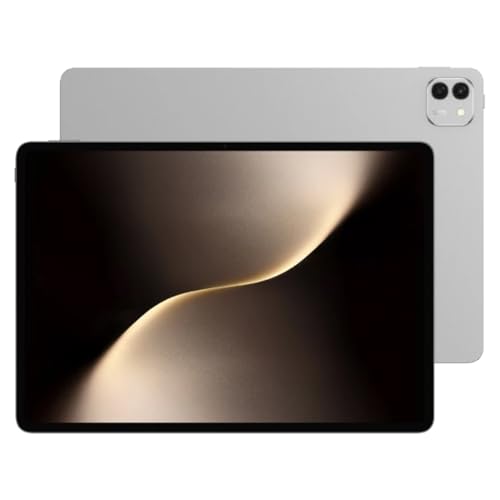
#2. Apple iPad Pro 13 Tablet

Specifications
| Brand | Apple |
|---|---|
| Screen Size | 13 in |
| Processor | Apple M4 |
| Ram | 8 GB |
| Storage | 256 GB |
| Weight | 1.3 lb |
Pros
- Blazing-fast, fluid multitasking
- Crisp, smooth scrolling quality
- Comfortable for long sessions
Cons
- Standby drain inconsistency
The Apple iPad Pro 13 Tablet stands out in 13-inch plus tablets for its all-day smoothness and fast multitasking. The Apple M4 chip keeps app switching quick and video and work apps responsive, even when you juggle multiple windows and creative tools. Scrolling feels crisp, and long reading or note sessions stay comfortable thanks to the solid overall feel.
The main trade-off is battery consistency when the tablet sits unused. If you rely on low standby drain, you may need to watch how it behaves between sessions. This model fits best if you want a large-screen tablet that feels quick every day, not just during active use.
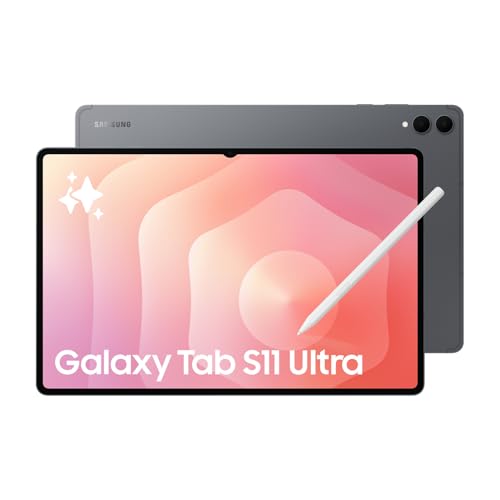
#3. Samsung Galaxy Tab S11 Ultra 14.6 Tablet

Specifications
| Brand | Samsung |
|---|---|
| Screen Size | 14.6 in |
| Display Resolution | 1848 x 2960 px |
| Refresh Rate | 120 Hz |
| Processor | MediaTek Dimensity 9400+ |
| Ram | 12 GB |
| Storage | 256 GB |
| Weight | 1.5 lb |
Pros
- Consistently responsive everyday
- Vivid, high-contrast clarity
- Minimal flex, great fit
Cons
- Bulky impractical
The Samsung Galaxy Tab S11 Ultra 14.6 Tablet stands out in the 13-Inch Plus category for its big, sharp 14.6 in display with a 120 Hz refresh rate. That smooth scrolling and clear text make it especially good for reading, split-screen work, and long note-taking sessions. Day to day use feels consistently fast, with responsive multitasking and a steady feel when switching between apps.
The main trade-off is portability. At 1.5 lb it is still comfortable for couch use, but it can feel bulky for travel or for holding for hours. This is a strong pick for people who want a large screen first, and who are fine using it as a near-desk device with a keyboard or stand.
#4. HONOR MagicPad 3 13.3 Tablet

Specifications
| Brand | HONOR |
|---|---|
| Screen Size | 13.3 in |
| Display Resolution | 3200 x 2136 px |
| Processor | Snapdragon 8 Gen 3 |
| Ram | 16 GB |
| Storage | 512 GB |
Pros
- High-detail display
- Top-tier tablet chip
- Consistently responsive everyday
Cons
- LCD downgrade
- Not OLED contrast
The HONOR MagicPad 3 13.3 Tablet stands out in the 13-inch plus category thanks to its Snapdragon 8 Gen 3 chip paired with 16 GB of RAM. Day to day use feels smooth, apps open quickly, and multitasking stays responsive. That matters on a larger tablet, where you expect the bigger screen to be used for split screen work, long reading sessions, and heavier tasks like video editing or casual gaming.
The main trade-off is the display type. You get a sharp, high-detail 3200 x 2136 px panel, but it is an LCD, not OLED, so contrast will not look as deep in darker scenes. If you mainly want fast performance on a big canvas for work, school, and media, this is a strong pick. If you care most about the richest black levels and pop, you may prefer an OLED-based option.
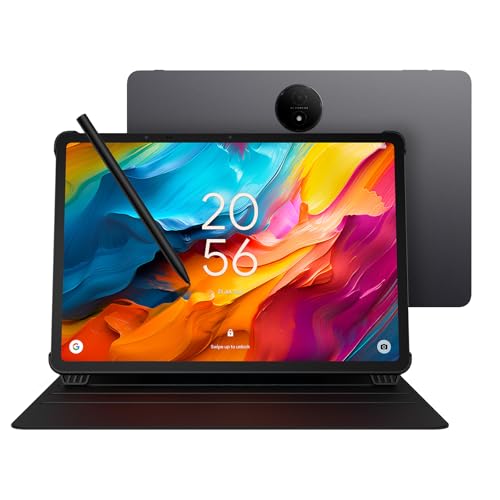
#5. TCL NXTPAPER 14 14.3 Tablet

Specifications
| Brand | TCL |
|---|---|
| Screen Size | 14.3 in |
| Display Resolution | 2400 x 1600 px |
| Refresh Rate | 60 Hz |
| Processor | MediaTek Helio G99 |
| Ram | 8 GB |
| Storage | 256 GB |
| Weight | 1.68 lb |
Pros
- Comfortable reading
Cons
- streaming instability
- awkward handheld use
- bit heavy for travel
The TCL NXTPAPER 14 14.3 Tablet stands out in the 13-Inch Plus Tablets category for reading comfort. Its 14.3 in panel at 2400 x 1600 px feels easy on the eyes, and that matters for long sessions with e-books, long articles, and study notes. The tablet also has a 60 Hz refresh rate that keeps scrolling steady enough for everyday pages and menus.
The trade-off is how it handles media and holding it for long stretches. Streaming can be unstable, and the 1.68 lb weight can feel awkward for casual, handheld use. It works best if you mainly read, then switch to a desk setup or a stand when you want to watch or multitask.
What to Look For
Performance that holds up under multitasking: Test how the tablet behaves with two or more apps open, plus heavy pages or video in the background. Prioritize stronger processor choices and RAM like 8 GB or more if you expect split-screen work.
13-inch plus display quality for long reading: Look for high resolution and a clear panel that stays sharp at sitting distance. If you plan to use a stylus, favor higher refresh rate options such as 90 Hz or 120 Hz for smoother pen and scrolling.
Battery life for real mixed use: Aim for a device that can last through a full day of browsing, notes, and video. Check reported hours for battery life and confirm that standby drain stays low when the tablet is idle for long stretches.
Weight you can handle for notes and travel: A 13-inch plus tablet can feel tiring after an hour. Compare weight before you buy and choose a balance that fits your use, whether that means couch reading or commuting with a keyboard case.
Storage and RAM match your workload: Large apps, downloads, and large media libraries need more than the minimum. Choose at least 256 GB storage if you keep offline content, and pair it with enough RAM to avoid stutter when you switch apps.
How We Picked
Products were identified through broad research across review sites and buyer forums, then filtered to only those that qualify as 13-Inch Plus Tablets.
Scoring used the same objective pillar framework as the main Tablets post, allowing direct comparison of products within this sub-category.
Frequently Asked Questions
Do 13-inch plus tablets replace a laptop for work?
Often, yes for email, web, slides, and light spreadsheets. Choose a model with strong multitasking and a keyboard option. If your work needs heavy photo or video editing, check the processor and RAM first.
What matters most for a big-screen tablet display?
Look for sharp resolution and a smooth refresh rate for scrolling. Brightness also matters if you use the tablet near windows or outdoors. Good color and contrast help for reading, notes, and watching video.
How can I keep a large tablet easy to use on daily trips?
Pick a model that stays under about 1.5 lb if possible. Use a keyboard cover or folio stand to keep your hands relaxed. Also plan for a power bank if you expect all-day video or school use.
How do 13-inch plus tablets compare to smaller tablets for reading and notes?
They usually feel better for reading long documents and taking notes with a stylus. The extra space reduces zooming and makes split-screen easier. Smaller tablets may be lighter and easier to hold one-handed.
When should I choose an 11-inch or 12-inch tablet instead?
Choose smaller sizes if you want easier carrying and simpler one-handed use. They also tend to cost less while still handling everyday apps well. If you mostly browse, read, and watch casually, you may not need the larger canvas.


