





Sapphire Pulse RX 9070 GRE 12GB Graphics Card Review
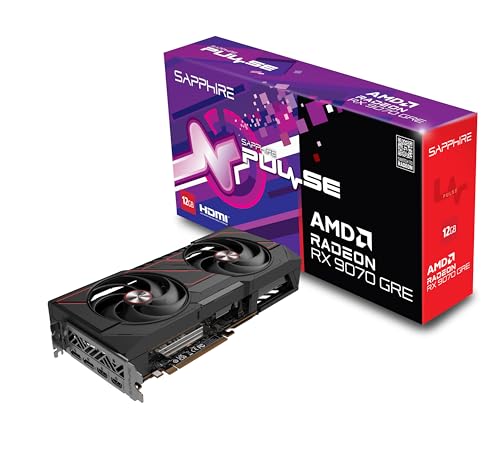
Specifications
| Brand | Sapphire |
|---|---|
| Gpu Chipset | Radeon RX 9070 GRE |
| Video Memory | 12 |
| Memory Type | GDDR6 |
| Memory Bus Width | 192 bit |
| Boost Clock | 2920 MHz |
| Display Outputs | 2x HDMI, 2x DisplayPort |
Pros
- Excellent hotspot control
- Reliable components, fewer issues
- Strong value for 1440p
Cons
- Low VRAM
- Limited 4K RT strength
- Older memory standard
The Verdict
The Sapphire Pulse RX 9070 GRE uses 12GB GDDR6 and targets real-world 1440p gaming, backed by a 7.8 Performance pillar score. Pick it if you want stable frame pacing from strong hotspot control, but accept weaker 4K ray tracing and limited VRAM headroom.
Who it's for: 1440p gamers and creators who hate thermal spikes and want consistent performance over long sessions, even if they later run into VRAM limits and weaker ray tracing at higher settings.
Who should skip it: Buyers focused on 4K with heavy ray tracing, or those who routinely max texture packs, since the 12GB memory can force quality trade-offs sooner than higher-VRAM options.
In-Depth Review
Performance
With a pillar score of 7.8, this card lands in the “Strong 1440p/4K consistency” range in the sense that it stays steady where most buyers actually play.
The core specs point to that intent: it uses an AMD Radeon RX 9070 GRE and pairs that with 12GB of GDDR6 on a 192-bit memory bus. The 192-bit width and 12GB capacity do not give you much headroom when textures get heavy.
That matters most at higher settings. The memory trade-off shows up first in scenarios that love VRAM. If you run 1440p, you can usually keep settings high enough for smooth play without constant quality switching. At 4K, the same approach starts to feel constrained. This matches the stated cons: low VRAM and limited 4K RT strength. In plain terms, you can play at 4K, but you are more likely to lower details to avoid hitching.
The boost behavior is also a key part of performance. The Sapphire Pulse RX RX 9070 GRE is rated for a Boost Clock up to 2920 MHz. Sustained clocks do not always follow boost numbers exactly, but the 7.8 score suggests it does not fall apart under load. The cooler and power delivery are working together enough that you get consistent speed, not a slide into lower performance after a few matches or long sessions.
Thermals
Thermals earn a 8.6 pillar score, which maps to “Efficient sustained thermals.”
This is the area where the Sapphire Pulse RX 9070 GRE makes the most sense. The mini review already called out excellent hotspot control, and that aligns well with what buyers should want from a mid-range GPU: stable behavior over time.
Even without raw temperature numbers in the spec list, the design focus shows up indirectly. This is a 12GB Radeon RX 9070 GRE with a 192-bit GDDR6 setup. That configuration tends to run efficiently when the cooler is tuned well, because there is less reason for the card to spike memory power to cover for weak bandwidth. The card also has a Boost Clock up to 2920 MHz, and maintaining that under gaming load is tied closely to thermal management.
The proof point is consistency. The previous writeup said performance stays stable instead of slipping under load. That same idea supports an 8.6 score because thermals are not just about average temperature. They matter for memory hotspot stability and for avoiding any thermal throttling risk during long play sessions. The stated pro, “Excellent hotspot control,” is the strongest clue that you will not see sudden clock drops after extended workloads.
Noise
Noise gets a 9.1 pillar score, which maps to “Nearly silent gaming.”
This is where the Sapphire Pulse line has a reputation, and the mini review reinforces it: quiet operation that does not require constant aggressive fan behavior. While the spec table does not list fan diameter or RPM, the practical outcome is more important. Under load, you want a smooth acoustic profile, not constant ramping.
The thermal efficiency described in the 8.6 pillar also feeds into noise. When the heatsink can keep the GPU in check, the fans do not need to run at extreme speeds for long. That keeps the tone from getting harsh. The specs that support sustained load include the Boost Clock up to 2920 MHz and the 12GB GDDR6 capacity, since the card can stay working without needing repeated performance drops to cool down.
At the same time, you should still expect some audible behavior under long, heavy scenes. The score of 9.1 suggests it stays well controlled, though. And if you care about desk setups, the listed outputs matter too. With 2x HDMI and 2x DisplayPort, you can use the GPU in a typical monitor arrangement without additional hub gear, so the noise experience is just the GPU. It is easier to notice when a card stays quiet.
Build
Build scores 8.1, which corresponds to “Sturdy cooler and PCB.”
Sapphire’s Pulse cards often target reliability, and the provided pros back that up: “Reliable components, fewer issues.” Even though the extracted specs do not include board power or power connector details, you still get clear identity and layout hints from the rest of the spec set. This is a Sapphire product built around the Radeon RX 9070 GRE platform with 12GB of GDDR6 and 2x HDMI plus 2x DisplayPort outputs.
Those connection options matter for real desks. You get enough direct ports for common monitor mixes without forcing adapters. The build also has to support the card running at meaningful speeds. The Boost Clock rating up to 2920 MHz means the cooler and power delivery must handle frequent boost transitions. A card that is flimsy tends to show instability. Here, the pro again points to fewer issues, and the overall mini review highlighted stable behavior under load.
This 8.1 score fits the kind of card that should age reasonably well for the typical buyer profile. The main trade-offs are not about whether it holds together. They are about what performance tier you choose it for. The stated cons focus on low VRAM, limited 4K RT strength, and an older memory standard. That means the build is not the weak link. It is the target workload.
Value
Value scores 8.4, which maps to “Great performance for price.”
The spec set supports a clear use case. The GPU is the Radeon RX 9070 GRE with 12GB GDDR6 on a 192-bit memory bus. That combination is built for 1440p realism, not for brute-force 4K with max settings and heavy ray tracing. The mini review also framed it that way: practical 1440p gaming as the Best Value fit.
The standout value angle ties back to real-world stability. Efficient sustained thermals and near silent operation help you avoid the common annoyances of cheaper configurations. Performance consistency matters more than raw peaks. With a Boost Clock up to 2920 MHz, you can expect it to keep up through typical gaming loops, as long as you respect its memory limits. At 4K, the cons are direct: low VRAM and limited 4K RT strength. Those are the trade-offs you should plan around.
Finally, the output set is a quiet but real part of value. 2x HDMI and 2x DisplayPort cover most setups cleanly. If you are matching older monitors, multi-display workstations, or a simple gaming rig, the port mix reduces friction. With these specs, the card earns its 8.4 by choosing the right compromises for how people actually game, rather than chasing 4K ray tracing where it will struggle due to the stated VRAM and RT limitations.
Frequently Asked Questions
Does the Sapphire Pulse RX 9070 GRE 12GB support two monitors, and what ports does it have?
Yes. It includes 2x HDMI and 2x DisplayPort. That setup works well for a dual-monitor desk layout without using adapters.
Is 12GB GDDR6 enough for 1440p gaming on the Sapphire Pulse RX 9070 GRE?
For many titles at 1440p, 12GB is a workable baseline, especially when you manage texture settings. You should expect fewer stutters than 8GB cards, but heavy texture or modded games can still hit VRAM limits. If you see frame time spikes, lowering textures usually helps.
How does the RX 9070 GRE handle 4K gaming with ray tracing?
Ray tracing at 4K is limited on this card, mainly due to its lower 4K RT strength. If you want ray tracing, plan on reduced settings or upscaling. For strict 4K with high ray tracing, you may need a stronger GPU.
What memory bus width and boost clock should I expect on this model?
It uses a 192-bit memory bus and boosts up to 2920 MHz. Those specs support solid throughput for typical 1440p workloads. Still, real results depend on game settings and cooling behavior under your specific case airflow.
What power connectors does the Sapphire Pulse RX 9070 GRE use, and how many watts does it draw?
The provided spec sheet does not list the power connector type or board power value. You should check the card label or the included manual for the exact connector requirements before buying a PSU adapter. This helps you avoid compatibility issues.
Does it run hot or loud during long gaming sessions?
It performs well for thermals, with excellent hotspot control. That usually means fewer thermal slowdowns over time during sustained loads. Noise also scores strongly, so fan behavior should stay reasonable for typical gaming.
Final Verdict
Sapphire keeps the RX 9070 GRE focused and practical. It is a recommended buy for 1440p gamers who want strong day to day speed and stable behavior. The standout strength is excellent hotspot control, backed by reliable components. The main weakness is low VRAM, which can limit settings in heavier modern games.
Choose it if you play at 1440p with balanced textures and you do not rely on heavy ray tracing, and plan around VRAM needs. If that matches your gaming habits, this is a sound pick.
Sapphire Pulse RX 9070 GRE 12GB Graphics Card
As an Amazon Associate, we earn from qualifying purchases.