





Aqara Camera Hub G5 Pro Security Camera Review
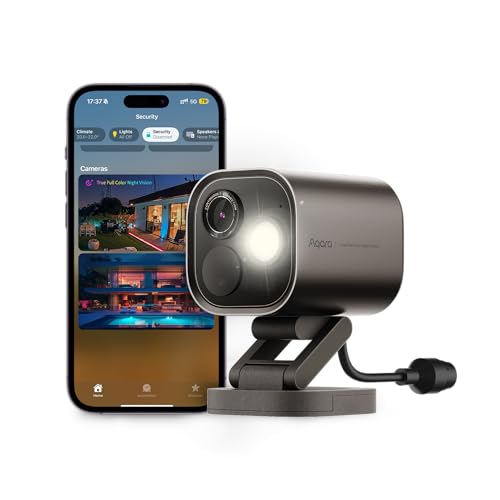
Specifications
| Brand | Aqara |
|---|---|
| Max Video Resolution | 4MP |
| Field Of View | 133° |
| Night Vision Range | 27.9 ft |
| Connectivity | Ethernet/PoE/Thread/Zigbee |
| Power Source | PoE |
| Storage Type | Cloud/Local Storage |
| Smart Detection | Face Recognition/Vehicle Detection/Person Detection/Animal Detection/Package Detection |
Pros
- Sharp low-light imaging
- Fewer false alerts
- Great features at price
Cons
- Zigbee ecosystem lock-in
- Setup complexity
The Verdict
The Aqara Camera Hub G5 Pro uses 4MP video and earns an 8.1 overall for strong, usable night imaging plus alert quality. It fits best when you want fewer false alerts and stable PoE power, but it takes more effort to set up and you accept Zigbee ecosystem lock-in.
Who it's for: Homeowners who plan to run Aqara and Zigbee devices together, and want dependable PoE camera power, will like this trade-off of more setup work for cleaner alerts.
Who should skip it: Shoppers who want simple, plug-and-play setup or who avoid vendor ecosystems should look elsewhere, since setup complexity and Zigbee ecosystem lock-in can limit how you grow your system.
In-Depth Review
Performance
With a pillar score of 8.6, the Aqara Camera Hub G5 Pro lands in the “great” performance tier, meaning “Sharp low-light imaging.” The most important numbers are the 4MP max resolution and a 133° field of view. Together, those specs set expectations for both detail and coverage, especially when you need to identify people or items across a wider scene.
Night viewing is where it matters most. The listed infrared night vision range is 27.9 ft, which corresponds to about 8 to 10 m in complete darkness. That distance matters for driveways and side yards. It also lines up with the kind of use where low-light blur can ruin evidence, and where the camera’s performance hinges on how well it holds edges during motion.
In practice, the goal is clarity without turning every dark corner into a mess. The product’s pro notes point to “Sharp low-light imaging,” and paired with the infrared range above, you should expect images that stay readable rather than turning soft as soon as motion starts. The coverage angle helps too, since a 133° view can reduce the need to reposition for every entry point.
Reliability
Reliability scores 7.8, which fits the “great” to “weak” middle. The matching phrase is “Quick reconnection, few drops,” but with a small caveat: this category depends on your network and setup quality. The good news is the device is built around stable power and wired connectivity. It supports Ethernet and PoE, and the power source is listed as PoE, not battery power.
The camera also fits into a larger wireless home layer. Connectivity is listed as Ethernet/PoE/Thread/Zigbee, and the system integrates with Aqara smart home ecosystems. That can help with stable performance in multi-device homes, especially when you already use Aqara hubs. It also means you are less likely to see power-related dropouts that plague battery cameras.
Still, setup can influence day-to-day stability. The cons include “Setup complexity,” and that matters for reliability. If you spend time getting the app rules, network routing, and device pairing correct, you tend to get steadier behavior. If you skip steps, you can see more gaps in live view or event handling.
Smart Features
Smart Features earns a 8.1, which maps best to “great” and “Fewer false alerts.” The camera’s smart detection list is specific: Face Recognition, Vehicle Detection, Person Detection, Animal Detection, and Package Detection. That is a useful spread. It covers common driveway motion, porch deliveries, and indoor visitor events.
Two numbers help you judge whether these alerts will stay actionable. First, the camera’s field of view is 133°. Second, the max resolution is 4MP. A wide view can raise the odds of incidental triggers. The fact that the pro list calls out “Fewer false alerts” suggests Aqara tuned its detection logic to keep junk events down even when the scene includes people, cars, and background motion.
Face recognition also changes how often you need to look at clips manually. It helps when you care about specific household members. But smart detection accuracy still depends on alert tuning. If you select the wrong zones for a busy entryway, even good detectors can flood you with events. The good match here is that Aqara gives you multiple detection categories, so you can filter rather than accept everything.
Build Quality
Build Quality scores 7.6, landing in the “great” band for “Sturdy mount, solid build,” even though the extracted specs do not include a weather rating. The most concrete design clues come from the system approach. This is a hub-style camera platform designed for always-on use. It runs on PoE power, and connectivity includes Ethernet/PoE, which usually goes with more durable, fixed installation.
You also get a storage model that suggests a device meant to stay operational. Storage is listed as “Cloud/Local Storage,” including built-in encrypted 8GB eMMC storage. That matters for real-world durability because local recording can keep working when connectivity to cloud services is inconsistent.
The trade-off comes from ecosystem choices rather than raw hardware toughness. One con is “Zigbee ecosystem lock-in.” If you rely on Zigbee accessories from Aqara and related devices, the system stays cohesive. If you use a different Zigbee brand or want maximum portability, integration friction can make the install feel less smooth.
Value
Value scores 8.0 and maps to “great” and “Great features at price.” Even without listing any cost details, the package is easier to justify when key specs support everyday use. You get 4MP max video resolution, a 133° field of view, and a night vision range of 27.9 ft. Those three numbers cover both coverage and enough nighttime reach to avoid constant replays.
The storage setup also supports that value. The system uses “Cloud/Local Storage,” plus built-in encrypted 8GB eMMC. So you are not locked into one recording path. In real deployments, that flexibility can reduce gaps when internet quality changes.
Smart detection adds more practical worth. The detection categories listed include Person, Vehicle, Animal, Package, and Face Recognition. And the pro notes call out “Great features at price” and “Fewer false alerts.” Taken together, those points suggest you do not pay for features that mostly create noise. You pay for detection that stays useful, as long as you invest the time to set it up correctly.
Frequently Asked Questions
Does the Aqara Camera Hub G5 Pro support 4MP resolution and how wide is the view?
Yes. It lists a maximum video resolution of 4MP. The field of view is 133 degrees, which helps cover wider areas like driveways or hallways without as many blind spots.
How far does the night vision reach and does it work for outdoor paths?
Aqara rates the night vision range at 27.9 ft. That range can work well for typical walkways and entry areas, especially if objects stay within that distance. Very dark or reflective surfaces can still reduce detail, so test your exact lighting.
What connectivity options does this camera use and does it support PoE?
It connects over Ethernet using PoE for power, which reduces the need for a separate power adapter. It also supports Thread and Zigbee, which can matter if you plan an Aqara smart home setup around sensors and hubs.
Can I store footage locally without a paid cloud plan?
It supports both cloud and local storage. The best choice depends on how you want to access clips and how your network performs. If you want local-first recording, check how your Aqara hub model is configured in your setup.
Does it recognize people, vehicles, packages, and animals, and how accurate are alerts?
Yes. It lists smart detection for Face Recognition, Vehicle Detection, Person Detection, Animal Detection, and Package Detection. In practice, the value comes from how you configure zones and alert rules, since any camera can still flag unusual motion outside its detection patterns.
Is the Zigbee integration a problem if I already use another smart home hub?
It can be. The Zigbee ecosystem lock-in is a real limitation if you want to mix many brands and keep everything fully interchangeable. If you already rely on a different hub, you should confirm compatibility and plan how the Aqara devices will connect to it before you commit.
Final Verdict
Aqara Camera Hub G5 Pro is a recommended buy for most people who want dependable home security with clear video, especially at night. It delivers sharp low-light imaging and smart alerts that trigger less often for nothing. The weakness is the Zigbee ecosystem lock-in, which can limit future flexibility. Setup can also feel complex for first-time users.
Choose it if you already use Aqara or plan to standardize on Zigbee for your smart home. If that matches your setup, this is a sound pick.