





Anker 568 USB-C Docking Station Review
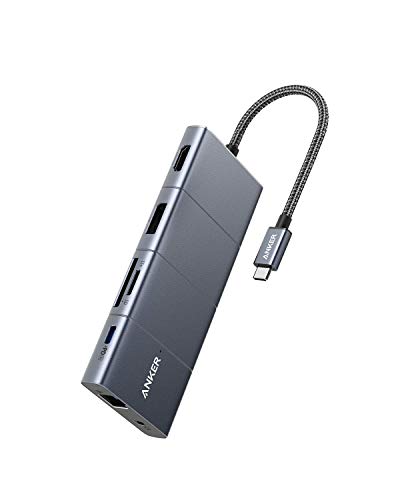
Specifications
| Brand | Anker |
|---|---|
| Host Connection | USB-C |
| Max Displays Supported | 2 Displays |
| Video Output Ports | 1 x HDMI, 1 x DisplayPort |
| Max Resolution Supported | 3840 x 2160 @ 60 Hz |
| Power Delivery | 100 W |
| Usb Ports Total | 4 Ports |
| Ethernet Speed | 1 Gbps |
| Memory Card Reader | SD/microSD |
Pros
- Fast high-watt charging
- 4K+ clarity
- Stable dual-display output
Cons
- Too few USB ports
- Gigabit-limited networking
The Verdict
With 100 W USB-C power delivery, the Anker 568 keeps a laptop charging while you run a work desk with two monitors. It is a strong Best Value choice for stable 4K video, but you may hit limits fast if you need more than 4 USB ports or want faster than 1 Gbps wired transfers.
Who it's for: People with a two-display setup who want one-cable docking and solid daily charging, and who accept fewer USB ports and gigabit Ethernet for file sharing.
Who should skip it: Buyers who rely on many USB peripherals at once or regularly move large files over Ethernet, since the port count is tight and networking tops out at 1 Gbps.
In-Depth Review
Performance
Anker scores 7.3 here, which lands in the “Crisp, stable video” lane for this category.
The core reason is straightforward: the dock supports dual displays with two video outputs, HDMI and DisplayPort. It targets up to 2 displays, with each display rated for up to 3840 x 2160 at 60 Hz.
In real desk use, that means you can run a common 4K monitor on HDMI and another 4K display on DisplayPort without having to hunt for the “right” cable order. It also matters that the dock is not trying to create video from USB data modes that can be more finicky. The published spec is specific: one HDMI port and one DisplayPort port.
On the day to day performance side, the dock’s job is to keep video stable while the laptop also charges and peripherals stay active. The 100 W power delivery rating helps keep that load predictable, which reduces the odds of the classic “it looks fine until I plug in something else” pattern. The dock also adds quick file workflow support via its SD and microSD card reader slots, which can keep you from moving large files through slower paths while your monitors stay running.
Connectivity
Anker scores 7.7 for Connectivity and that matches “Well-balanced workstation ports.”
This dock gives you 4 USB data ports in total. The published layout is 1 USB-C data port plus 3 USB-A ports, which covers the everyday mix: a mouse or keyboard in USB-A, a faster thumb drive in USB-A, and at least one USB-C option for newer peripherals.
For video, you get 1 x HDMI and 1 x DisplayPort. For networking, you get a single Ethernet port rated at 1 Gbps. For file transfers, you also get an SD and a microSD card reader. Together, this port map fits the common “two monitors plus everyday desk gear” routine.
The weakness is not the layout. It is the math. With only 3 USB-A plus 1 USB-C data port, you will likely hit limits if you run a webcam, audio interface, external drive, and a fast card reader all at once. The dock also skips the kind of richer networking or extra downstream charging controls you see on larger docking stations, but that is a trade for the tighter port count.
Power
Anker scores 7.6 on Power, which aligns with “Stable PD under load.”
The dock’s pass-through power delivery is rated up to 100 W. That is the key number for laptop users who want one cable to handle charging while the dual-display setup stays active.
This dock also keeps the power story tied to real workflow loads. It supports two displays and up to 3840 x 2160 at 60 Hz, plus it has 4 USB data ports and an SD and microSD card reader. In other words, you are not just charging in a vacuum. The dock is built for common office traffic: monitors, a few USB peripherals, and occasional card reads.
Where this matters most is negotiation stability. A 100 W rating does not guarantee every laptop will always draw the same current, but it gives the dock headroom to avoid falling back to slow charging when the laptop screen and peripherals are working together. If you regularly connect power hungry devices through the USB-A ports, this rating makes the dock more likely to keep behavior consistent rather than throttling in practice.
Compatibility
Anker scores 7.1 for Compatibility and sits in the “Good support, some quirks” range.
The dock is host-connected over USB-C, and its display method is direct and simple: one HDMI and one DisplayPort for up to 2 displays. That reduces some of the complexity that comes with certain multi-display approaches.
The published max display target is also clear: dual displays up to 3840 x 2160 at 60 Hz using HDMI and DisplayPort simultaneously. Clear targets help with predictable detection on Windows and macOS setups that support USB-C display output. It also helps users who swap monitors often, since they can stick to a known cable mapping.
Still, compatibility is not only about “it works.” Sleep and wake issues, or occasional renegotiation after monitor power cycling, can show up even with good docks. This dock’s spec focus does not mention anything like MST, so you should expect the dual output to rely on the dock and host being willing to run both display paths cleanly. If your routine involves heavy sleep mode use, plan on testing the exact monitor pair you use most, at the highest mode you intend to run.
Value
Anker scores 8.6 for Value, which maps to “Strong features for the price.”
The dock hits a practical set of work needs with specific specs that cover real tasks. It supports dual-display output up to 2 displays, using HDMI plus DisplayPort, with each path rated at up to 3840 x 2160 at 60 Hz.
It also pairs that display support with 100 W USB-C power delivery and 4 total USB data ports. The SD and microSD card reader adds a simple way to move files without extra USB adapters. And networking at 1 Gbps gives you a wired option for stable video calls or basic office bandwidth needs.
The trade-off is visible in the cons: too few USB ports and gigabit-limited networking. If you work with large external drives, backup tools, or heavy file transfers, 1 Gbps can feel constraining versus faster links. And if your desk already uses multiple USB devices, 4 ports total may force an added hub. Even with those limits, the dock’s combination of dual 4K at 60 Hz support plus 100 W pass-through charging keeps it in the strong value lane. It is a focused dock for everyday setups rather than a one-stop hub for every peripheral imaginable.
Frequently Asked Questions
Does the Anker 568 USB-C docking station support dual monitors, and what resolution can it handle?
Yes, it supports up to 2 displays. It lists support for up to 3840 x 2160 at 60 Hz. It uses one HDMI port and one DisplayPort, so you can mix and match the two connections.
What USB ports are included on the Anker 568 dock, and how many total ports do I get?
The dock provides 4 USB ports total. With only 4 ports, you may need a hub if you use multiple peripherals like a mouse, keyboard, webcam, and external drive at the same time.
Can I charge my laptop at the same time as using the monitors and Ethernet?
The dock supports USB-C power delivery up to 100 W, so it can charge many common laptops while you work. Real performance depends on your laptop’s power needs, but 100 W gives enough headroom for typical office setups. Charging stability is usually better when you avoid overloads on the USB ports.
How fast is the Ethernet on the Anker 568 dock, and is it limited?
It provides 1 Gbps Ethernet. That sounds fast, but it can still feel limited for very large file transfers compared with faster multi-gig networks. If your internet and network gear support more, this dock will not reach beyond gigabit speeds.
Will the Anker 568 docking station work for macOS and Windows without extra drivers?
It connects to the host via USB-C and focuses on plug-and-play use, but real compatibility can vary by laptop model and macOS or Windows version. If you use dual displays, also expect some sleep and wake quirks on certain systems. Test your exact monitor setup after any OS update.
Does the dock include an SD card reader, and can it read microSD too?
Yes, it includes an SD and microSD card reader. This helps if you move files from cameras or handheld devices without using a separate USB card reader. For best reliability, fully insert the card before starting transfers.
Final Verdict
Anker 568 is a recommended buy for people who want dependable dual display and strong laptop charging in a simple desk setup. It delivers stable multi monitor output with 4K clarity, which matters day to day. The main drawback is the port count, so you may need extra hubs for busy peripherals.
Choose it if your work fits its streamlined layout and you can live with gigabit networking, since a fast Ethernet link is not the focus. If that matches your kitchen, this is a sound pick.
Anker 568 USB-C Docking Station
As an Amazon Associate, we earn from qualifying purchases.