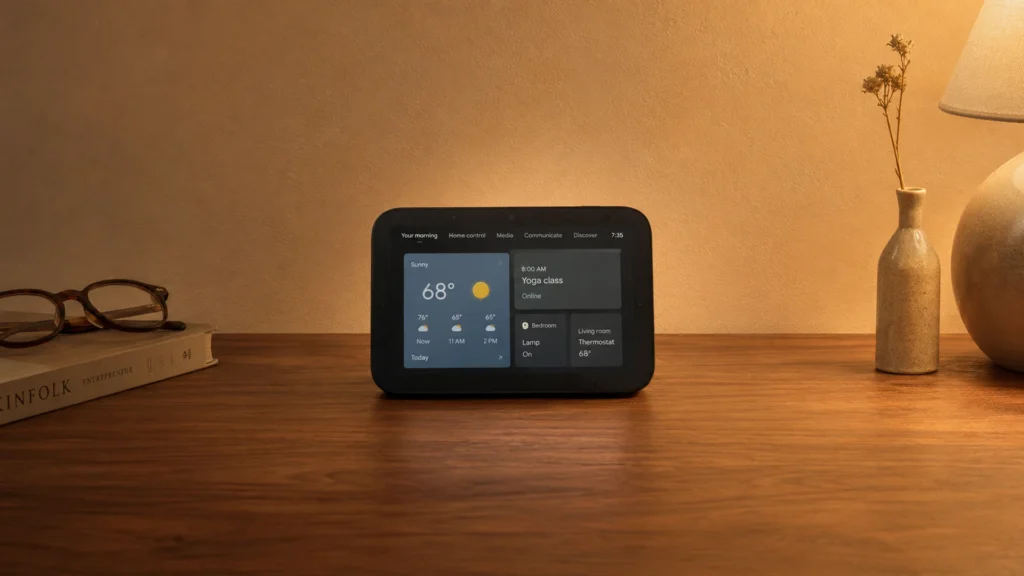
Touchscreen Smart Home Assistants are wall and countertop smart displays with microphones, speakers, and a touch screen for device control. This category is for buyers who want tap-first shortcuts, quick status checks, and voice control for lights, thermostats, cameras, and routines.
Choosing the right one is harder than it looks because the screen size, audio pickup, and smart home support often trade off against each other. A larger display helps with media and controls, but it also raises cost. Different voice platforms can limit wake word accuracy and follow-up commands. Smart home protocols also matter when you plan to add devices over time.
To see how these models fit into the wider lineup, compare them with our broader guidance in the main post: Looking for all types? See our Best Smart Home Assistants.
Quick Overview
Our Top Picks
#1. Amazon Echo Show 8" Smart Home Assistant

Specifications
| Brand | Amazon |
|---|---|
| Voice Assistant Platform | Alexa |
| Smart Home Protocols | Zigbee, Matter, Thread |
| Display Size | 8.7 in |
Pros
- Crisp audio, low distortion
- Larger, more usable screen
- Broad smart protocol support
Cons
- Privacy feature gap
The Amazon Echo Show 8 stands out among touchscreen smart home assistants thanks to its big, easier-to-read screen and solid audio. You can check cameras, control lights, and run routines at a glance, without squinting or doing extra taps. Voice control also feels dependable for everyday tasks, and the sound stays clear at higher volumes, which helps when the room is noisy.
The main trade-off is privacy controls. It has a privacy feature gap compared with some competitors, so it is worth reviewing the mute and data settings before relying on it across bedrooms or private spaces. This is a strong choice for households that want a central touchscreen hub for Matter, Zigbee, and Thread devices and prefer Alexa-based smart home control.
#2. Amazon Echo Show 11" Smart Home Assistant

Specifications
| Brand | Amazon |
|---|---|
| Voice Assistant Platform | Alexa |
| Smart Home Protocols | Zigbee, Matter, Thread |
| Display Size | 11 in |
| Microphone Count | 1 |
| Dimensions | 7.2 x 10 x 5 in |
Pros
- Stable, reliable automations
- Crisp audio, low distortion
- Responsive touch controls
Cons
- Weak privacy controls
- Limited microphone array
- Ad-driven screen experience
The Amazon Echo Show 11 stands out in touchscreen smart home assistants thanks to its hands-on smart home control plus a large 11 in screen for at-a-glance details. Touch is quick and the interface makes it easy to manage routines, view live camera feeds, and run common commands without repeating yourself. Audio is also a strong match for this category: voices come through clearly, even at higher volume, with low distortion and good overall room pickup.
Still, it is not the best pick if privacy controls are a top priority. The experience can feel ad-driven on the screen, and microphone support looks basic for a device in this class. Choose it if you want a dependable Alexa hub with stable automations and a responsive touchscreen, and you do not mind tighter privacy expectations.
#3. Google Nest Hub Max 10" Smart Home Assistant

Specifications
| Brand | |
|---|---|
| Voice Assistant Platform | Google Assistant |
| Connectivity | Wi-Fi, Bluetooth |
| Display Size | 10 in |
| Display Resolution | 1280 x 800 px |
| Speaker Output Power | 30 W |
| Dimensions | 4 x 4 x 4 in |
Pros
- Crisp audio, low distortion
- Responsive touch controls
- Larger, more usable screen
Cons
- Weak privacy controls
- Few smart protocols supported
- Wi-Fi dropouts
The Google Nest Hub Max 10 stands out in touchscreen smart home assistants for its big, easy-to-use 10 in display paired with clear, low-distortion audio. Touch controls feel quick, so room-wide requests, quick setting changes, and media browsing do not feel buried in menus. The 30 W speaker also helps when you want the assistant to be heard from across the room without the sound getting harsh.
It has some limitations for smart home control depth. Smart home support is narrower than many competing hubs, and Wi-Fi dropouts can interrupt routines when your network is unstable. Privacy controls also feel less robust than you might want for always-listening devices. This is a good fit if you mainly want a responsive touchscreen experience and reliable Google Assistant basics, and you are comfortable keeping your device setup within the supported lanes.
#4. Amazon Echo Show 15" Smart Home Assistant

Specifications
| Brand | Amazon |
|---|---|
| Voice Assistant Platform | Alexa |
| Smart Home Protocols | Thread, Matter |
| Display Size | 15.6 in |
| Display Resolution | 1920 x 1080 px |
| Dimensions | 10.1 x 1.4 x 16.1 in |
Pros
- Broad smart protocol support
- Crisp, high-resolution display
- Larger, more usable screen
Cons
- Weak privacy controls
- Frequent ads resurfacing
- Bypass requires workarounds
With its 15.6 in 1920 x 1080 screen, the Amazon Echo Show 15 is one of the most practical options for touchscreen smart home control. The large display makes it easier to see device status, camera views, timers, and routine steps in one place. It also ties into smart home setups with broad Matter and Thread support, which helps when your home uses modern, multi-vendor devices.
The trade-off is trust and control. Privacy controls are not as strong as you might want, and the software can bring back ads after you have tuned the experience. Also, getting certain tweaks or removing unwanted behavior can require workarounds. This makes it best for people who want a big, readable smart hub first, and can live with Amazon's UI decisions second.
#5. Google Nest Hub 7" Smart Home Assistant

Specifications
| Brand | |
|---|---|
| Voice Assistant Platform | Google Assistant |
| Connectivity | Bluetooth, Wi-Fi |
| Display Size | 7 in |
| Display Resolution | 1024 x 600 px |
| Microphone Count | 3 |
Pros
- Price matches performance
- Seamless setup
- Voice Match personalization
Cons
- Few smart protocols supported
- Low-resolution display
- Occasional slow responses
The Google Nest Hub 7 is a strong pick if you want a touchscreen assistant that feels easy to use day to day. Voice Match lets it recognize you, so home and media requests can be more personal. Setup is usually smooth, and the 7 in 1024 x 600 px screen makes it simple to glance at timers, cameras, and smart home controls without pulling out a phone. Audio is also dependable for a tabletop smart display, with clear playback for voice prompts and calls.
The main drawback is smart home reach. Support for smart home protocols is limited compared with some competing hubs, so device compatibility can be more hit-or-miss. The display resolution is not especially sharp, and response times can feel slow at moments, especially when you use multiple controls in quick succession. This model fits best for people who mainly want Google Assistant control and a clean touchscreen interface, rather than broad protocol support for every device.
#6. Google Nest Hub 1st Gen Smart Home Assistant

Specifications
| Brand | |
|---|---|
| Voice Assistant Platform | Google Assistant |
| Connectivity | Wi-Fi, Bluetooth |
| Display Size | 7 in |
| Display Resolution | 1024 x 600 px |
| Dimensions | 7.02 x 2.65 x 4.65 in |
Pros
- Price matches performance
- Camera-free privacy
- Google Home reliability
Cons
- Few smart protocols supported
- Low-resolution display
- Occasional connectivity issues
Google Nest Hub 1st Gen stands out in touchscreen smart home assistants thanks to Google Assistant reliability paired with a privacy-forward design. It has no camera, and there is a clear mic mute option. The 7 in 1024 x 600 px screen makes it easy to tap through home controls, check timers and doorbell feeds when supported, and manage routines without always speaking.
The trade-off is that smart home protocol support is limited, so buyers with more diverse hubs may hit gaps. Some users also report occasional connectivity hiccups, which can interrupt device control and automations. This model fits best for households that want a simple Google-centered setup and day to day voice and touch control over broad cross-protocol compatibility.
#7. Amazon Echo Show 5" Smart Home Assistant

Specifications
| Brand | Amazon |
|---|---|
| Voice Assistant Platform | Alexa |
| Display Size | 5.5 in |
| Display Resolution | 960 x 480 px |
| Dimensions | 3.2 x 5.8 x 3.6 in |
Pros
- Crisp audio, low distortion
- Price matches performance
- Home Assistant access
Cons
- Weak privacy controls
- Low-resolution display
- Ad-driven distractions
The Amazon Echo Show 5 stands out in the touchscreen smart home category because the screen is paired with solid, clean audio for everyday voice control. In real rooms, spoken commands land quickly and playback stays clear with low distortion. There is also a practical upside for tinkerers: Home Assistant access can make this small display more useful than a basic reminder screen.
The trade-off is comfort and focus. Privacy controls feel weak, and the 5.5 in display runs at 960 x 480 px, so text and icons can look soft at a glance. Amazon also leans into ad driven distractions, which can interrupt the calm, glance-and-go experience many people want from a smart home assistant.
What to Look For
Touchscreen readability: Pick a screen size that matches your use. Smaller displays work for quick toggles and timers. Larger displays help you manage multiple devices and view camera feeds without squinting. Also check that touch response feels immediate, not laggy.
Voice assistant reliability: The best touchscreen hubs correctly hear spoken commands from across the room and handle follow-up questions without resetting the conversation. If your home has noise, prioritize models known for fewer mishears and steady wake word detection.
Smart home protocol support: Look for support that matches your device plans. If you already use Matter, Zigbee, or Thread, choose a hub that can connect reliably. Wi-Fi is common, but some ecosystems still depend on Zigbee or Thread for smoother local control.
Microphone count and far-field pickup: A touchscreen hub sits where people talk and move. More far-field microphones usually improve command accuracy for kitchen and living room use. Test expectations by checking whether the mic setup is meant for room-wide voice control.
Privacy and day-to-day trust: Choose a unit with clear mic and camera mute options and straightforward privacy controls. Also factor in update behavior and long-term reliability, since a hub that glitches can break routines and device control.
How We Picked
Products were identified through broad research across review sites and buyer forums, then filtered to only those that qualify as Touchscreen Smart Home Assistants. Each pick in this category is a touchscreen smart display designed for room-friendly voice control and on-screen smart home management.
Scoring used the same objective pillar framework as the main Smart Home Assistants post, allowing direct comparison of products within this sub-category. Voice, smart home support, audio, display quality, trust, and value determined the final ranking, so buyers can compare touchscreen size and daily control behavior without mixing in unrelated smart speaker-only models.
Frequently Asked Questions
What smart home setup steps are typical for touchscreen smart assistants?
Most touchscreen assistants start by joining your Wi-Fi during setup. Then you connect smart plugs, lights, and sensors using the companion app. After that, you link your smart home account and let the device scan for compatible hardware. Finally, you test one command and one on-screen routine to confirm everything works.
Do touchscreen smart home assistants need a hub for smart devices?
Sometimes yes, but it depends on the devices you own. If your devices use Zigbee or Thread, the assistant may need a built-in radio or a separate hub. If your devices are Wi-Fi only, you can often set them up without an extra hub. Check the smart protocols supported before you buy new sensors.
How do I keep the touchscreen readable and responsive day to day?
Place the device where you can see the screen at a normal angle. Avoid direct sunlight, since it can wash out the display. Keep the firmware updated because touch and response often improve with updates. If the screen feels laggy, restart the assistant and check your Wi-Fi signal.
When should I choose a touchscreen smart assistant instead of a smart speaker?
Choose a touchscreen model when you want visual controls like camera views, timers, and smart home dashboards. Speakers are usually better if you mainly use voice and want lower cost. A touchscreen also helps with setup, since you can tap through device pairing. If you care most about music quality, compare speaker output power and microphone range too.
What is the main difference between touchscreen and non-touch smart assistants for smart home control?
Touchscreens make it easier to control many devices at once, especially routines and security alerts. Non-touch assistants rely more on voice and simple audio cues. With a touchscreen, you can confirm the state of devices at a glance. That can reduce mistakes when you manage lights, thermostats, and cameras in the same room.


