





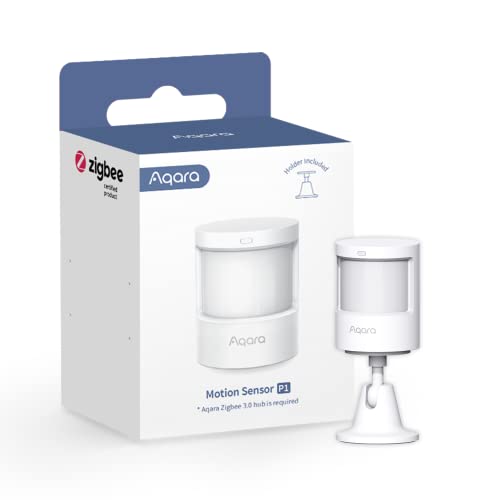
Aqara Zigbee 3.0 Motion Sensor P1 Motion Sensor Review
Specifications
| Brand | Aqara |
|---|---|
| Detection Range | 4 to 7 ft |
| Detection Angle | 150 to 170 deg |
| Power Source | Battery |
| Connectivity | Zigbee |
| Mounting Type | Wall |
| Operating Temperature | 14 to 131 °F |
Pros
- Consistent triggers, low false alarms
- Wide coverage, quick
- Useful sensitivity and timers
Cons
- Dark-object miss-detection
- Battery-powered maintenance
- Hub-dependent integration
The Verdict
The Aqara Zigbee 3.0 Motion Sensor P1 uses a 4 to 7 ft detection range and earns a 8.2 overall score for dependable motion alerts. It works best with a Zigbee hub, and it can miss movement on dark surfaces, plus you will need battery upkeep.
Who it's for: People building a Zigbee smart home who want reliable hallway and room motion with simple tuning, and who accept that integration depends on a hub and that battery changes are part of the deal.
Who should skip it: Buyers who need consistent motion detection in very dim or dark areas, or who want no maintenance, should look for sensors that are less prone to dark-surface misses and run on non-battery power.
In-Depth Review
Performance
At a 8.1 score, the Aqara Zigbee 3.0 Motion Sensor P1 lands in the “Wide coverage, quick” zone.
In day-to-day use, it focuses on one job: spotting movement fast enough to matter, then sending alerts without long pauses.
The coverage math helps explain why it feels dependable in hallways and open door zones. The stated detection range is 4 to 7 ft, with a detection angle that spans 150 to 170 degrees. That wide cone matters when people move across a sensor’s view instead of straight toward it.
There is one clear performance trade-off. Aqara motion sensors can struggle with dark surfaces, which matches the listed con of “Dark-object miss-detection.” If you place the sensor where shadows or dark clothing fill most of its field of view, you may see occasional misses. The practical takeaway: aim for consistent contrast in the path you want to detect, and keep motion within the 4 to 7 ft band for the most consistent results.
Reliability
With an 8.2 score, the P1 matches the “Consistent triggers, low false alarms” expectation.
Reliability here is less about impressive tech and more about stable behavior from one wake-up cycle to the next.
Its operating temperature range is 14 to 131 F, which supports steady indoor use across typical seasonal swings. That matters for reliability in rooms that run cooler at night or warmer during the day. Also, because it connects over Zigbee, it relies on a hub-based ecosystem rather than Wi-Fi chatter. That setup often keeps event timing cleaner for motion devices.
Still, reliability is not the same as perfection. The listed drawback “Battery-powered maintenance” hints at a longer-term reality. Motion sensors with battery power tend to keep working until they do not. When battery level drops, detection responsiveness can become less consistent. Plan for periodic replacement so you do not end up troubleshooting missed triggers caused by power decline.
Installation
At 8.0, the P1 is in the “Quick mounting and pairing” neighborhood.
Installation works best when you already plan around Zigbee. The sensor is connectivity type Zigbee and it expects an Aqara Zigbee 3.0 hub for integration.
Physical placement is straightforward. The mounting type is wall, and the included bracket supports wall or ceiling options. That flexibility helps you position the sensor within the 150 to 170 degree coverage angle instead of leaving it aimed too narrowly at the ground.
Pairing and commissioning are only as smooth as your hub setup. If your hub ecosystem already handles other Aqara Zigbee devices, the P1 tends to fit in quickly. If you are starting from zero, budget extra time for hub discovery and device onboarding, because hub-dependent setup is part of the design.
Features
Scoring 8.3, the P1 fits the “Useful sensitivity and timers” description.
It does not need a long feature list to be useful. The main value comes from tuning when motion alerts fire.
The sensor detection pattern lines up well with practical tuning. It uses a wide detection angle of 150 to 170 degrees at an effective distance of 4 to 7 ft. That combination means your sensitivity setting has real impact. If you set it too low, you miss smaller movements in the cone. If you set it too high, you risk alerts from normal activity within that same coverage zone.
It also supports a timer approach for alert timing control, which helps you manage motion events in places like hallways. The downside list includes “Hub-dependent integration,” so the smart behavior you get depends on whether your hub and automations handle those motion events cleanly.
Value
With a 8.5 score, the P1 earns the “Price matches the performance” sentiment.
This model offers a focused mix: wide-enough coverage, quick enough triggering, and the kind of tuning that makes motion alerts usable in more than one room layout.
Key specs support that value story. The sensor covers 4 to 7 ft with a 150 to 170 degree field, so a single unit can watch a meaningful area without requiring a dense sensor grid. It also runs across a broad 14 to 131 F range, which reduces the risk that seasonal temperature swings undermine detection.
There are two value pressures to keep in mind. First, the con “Dark-object miss-detection” means some placements will demand more careful aiming and environmental control. Second, “Battery-powered maintenance” means long-term upkeep is part of ownership. If you can tolerate those trade-offs and already use an Aqara Zigbee 3.0 hub, the P1 remains a strong, practical motion choice built around dependable sensing and usable control.
Frequently Asked Questions
How far can the Aqara Zigbee 3.0 Motion Sensor P1 detect movement?
Aqara lists a detection range of 4 to 7 ft. Real results depend on how the sensor faces the motion and how much the room lighting or surfaces affect movement contrast. In practice, it works best when you mount it where people will cross its line of sight.
What is the motion detection angle on the Aqara P1?
The sensor uses a wide detection angle of about 150 to 170 degrees. That wide cone helps cover hallways and open areas, but you still need to aim the unit so motion passes across the field rather than moving directly toward it.
Does this motion sensor work with Zigbee without Wi-Fi?
It connects through Zigbee, so it needs a Zigbee hub to function in most smart-home setups. Without a compatible hub and Aqara integration, you will not get motion events in your app or automations.
How do I mount the Aqara P1 and where should I place it?
The P1 mounts to a wall, so you can place it near entryways, corridors, or rooms you want to track. Keep it within the 14 to 131 F operating range, and avoid spots where it points at highly reflective or dark backgrounds.
Why might the sensor miss motion in a darker room?
Some shoppers report dark-object miss-detection. If your setup includes low light or dark surfaces, the sensor may fail to notice subtle movement. Try improving lighting, repositioning the sensor, or increasing sensitivity in the Aqara app if your hub supports those settings.
How often do I need to change the battery on the Aqara P1?
The sensor runs on a battery, so you will eventually need maintenance. Aqara does not list a specific battery life here, so your runtime depends on how often it triggers and how your hub handles reporting. Plan to check the battery level in the app regularly.
Final Verdict
Aqara’s motion sensor is a strong choice for most home automations. It delivers consistent triggers with low false alarms and fast response, and it covers a good area. The weak spot is occasional miss detection with dark objects. Battery power also means periodic maintenance, and full smart features depend on a compatible hub.
Choose it if you want dependable motion detection with practical sensitivity and timing controls, especially indoors where lighting stays predictable. If that matches your setup, this is a sound pick.
Aqara Zigbee 3.0 Motion Sensor P1 Motion Sensor
As an Amazon Associate, we earn from qualifying purchases.