




Tablet keyboards without touchpad are the simpler kind of keyboard accessory. You get keys for typing, but you do not get a built-in trackpad for moving the cursor. That matters if you use a mouse, a trackball, or mostly tap on the tablet screen. In this category, you want firm key feel, stable attachment, and shortcuts that do not rely on a navigation pad.
Choosing one is harder than it sounds. Many popular tablet keyboard cases include a touchpad, so you must filter those out. You also trade off between key comfort and bulk. Slim cases often feel more flexible. Compact Bluetooth keyboards feel better to type on, but they may not protect your tablet or lock in as securely.
Use the picks below if your setup prefers tapping on-screen or using an external mouse, not a built-in touch surface. Looking for all types? See our Best Tablet Keyboards.
Quick Overview
Our Top Picks
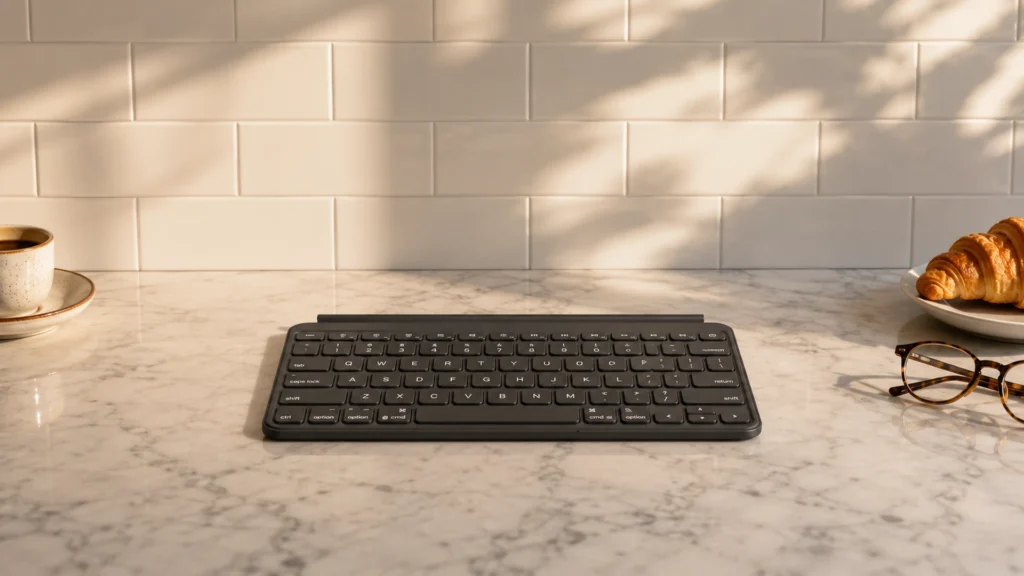
#1. Logitech MX Keys Mini Bluetooth Keyboard

Specifications
| Brand | Logitech |
|---|---|
| Form Factor | Keyboard Case |
| Connection Type | Bluetooth |
| Touchpad | No |
| Backlit Keys | Yes |
| Battery Life | 10 |
| Weight | 1.5 |
Pros
- Crisp travel, steady layout
- Useful shortcuts and stability
- Backlit keys included
Cons
- Short battery runtime
- No touchpad
- Bluetooth pairing quirks
If you want a tablet keyboard with no touchpad, the Logitech MX Keys Mini stands out for how well it focuses on typing. The keys have crisp travel and a steady layout, so you can type accurately without fighting flex or wobble. Backlit keys also help when you are working in dim rooms, since you do not have to guess where each key sits.
The main trade-off is that it relies on Bluetooth and a separate pointing method since it has no trackpad. Battery life is rated around 10 hours, so frequent writers may need more charging than expected. Pairing can also be a bit fussy at first, which matters if you swap devices often. This is best for people who already have a mouse or who prefer fast, clean typing over added navigation controls.
#2. ZAGG Rugged Book Pro 11" Keyboard Case

Specifications
| Brand | ZAGG |
|---|---|
| Compatibility | iPad Pro 11 in (M5), iPad Pro 11 in (M4) |
| Form Factor | Keyboard Case |
| Connection Type | Bluetooth |
| Touchpad | No |
| Backlit Keys | Yes |
| Weight | 2.5 |
Pros
- Secure, reliable attachment
- Strong magnets and hinges
- Useful shortcuts and stability
Cons
- Heavy keyboard
- No touchpad
This ZAGG Rugged Book Pro 11 stands out in the tablet keyboard without a touchpad category by focusing on a stable typing setup rather than navigation. It is made for iPad Pro 11-inch (M5) and iPad Pro 11-inch (M4), and the case uses strong magnets and hinges to keep the keyboard aligned while you work. Shortcut keys and a firm stand angle make it easier to type for longer stretches without needing a trackpad.
The main trade-off is bulk. At about 2.5 lb, it is not the most travel-friendly option, especially if you detach it often. This is best for people who want rugged protection plus comfortable, reliable keystrokes on an iPad Pro 11-inch, and who do not mind using the iPad screen for pointing.
#3. ZAGG Slim Book Go 11" Keyboard Case

Specifications
| Brand | ZAGG |
|---|---|
| Compatibility | iPad Pro 11 in (Gen 2), iPad Pro 11 in (Gen 1) |
| Form Factor | Keyboard Case |
| Connection Type | Bluetooth |
| Keyboard Layout | US QWERTY |
| Backlit Keys | Yes |
| Weight | 1.3 lb |
Pros
- Secure, reliable attachment
- Fair price, great typing
- Backlit keys included
Cons
- Missing touchpad
- Bulky detached keyboard
For people who want a tablet keyboard but do not need a built-in touchpad, the ZAGG Slim Book Go 11 stands out with its case-style design and consistently usable typing. It is made for the iPad Pro 11 in (Gen 1) and iPad Pro 11 in (Gen 2), and the keyboard case attaches in a way that stays put while you work. Backlit keys make it easier to see what you are typing in darker rooms, which matters when you are relying on the keyboard alone.
The main trade-off is bulk when it is detached, so it may feel less convenient for quick trips. If you type mostly at a desk, or you already use a separate mouse, this is a strong pick for comfort and stability without paying the attention cost of a touchpad.
#4. ZAGG Rugged Book 11" Keyboard Case

Specifications
| Brand | ZAGG |
|---|---|
| Compatibility | iPad Pro 11 in (M5), iPad Pro 11 in (M4) |
| Form Factor | Keyboard Case |
| Connection Type | Bluetooth |
| Touchpad | No |
| Backlit Keys | Yes |
Pros
- Secure, reliable attachment
- Strong magnets and hinges
- Backlit keys included
Cons
- No touchpad
- Some added bulk
- Fit cutout uncertainty
In a category where many keyboard cases try to cover everything with a trackpad, the ZAGG Rugged Book 11 stands out by leaning into a clean, touchpad-free typing setup for iPad Pro 11-inch (M4) and iPad Pro 11-inch (M5). It uses strong magnets and hinges to keep the case aligned when you type, which matters more than people expect when you do not have a built-in pointer to fall back on. Backlit keys help you stay accurate in dim rooms without adding extra controls you may not want.
The trade-off is bulk and some uncertainty around how the cutouts line up with your exact iPad buttons and ports. This is a better fit for people who already use an external mouse or rely on the iPad screen for navigation, and who want a more sturdy, case-like keyboard feel. If you expect a thin travel cover, it may feel thicker than slimmer Bluetooth keyboard folios.
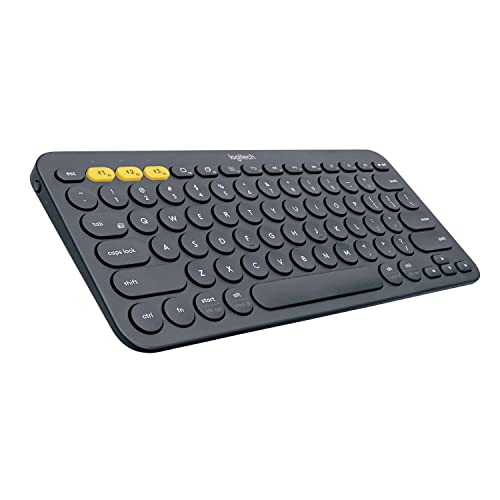
#5. Logitech K380 Multi-Device Bluetooth Keyboard

Specifications
| Brand | Logitech |
|---|---|
| Form Factor | Keyboard Case |
| Connection Type | Bluetooth |
| Touchpad | No |
| Backlit Keys | Yes |
| Battery Life | 24 months |
| Weight | 0.9 |
Pros
- Secure, reliable attachment
- Fair price, great typing
- Smooth device switching
Cons
- No touchpad
- No key backlighting
- No macro programming
This Logitech K380 stands out in the tablet keyboard without touchpad space because it focuses on the basics: steady, comfortable typing plus easy multi-device use. You switch between up to three Bluetooth devices without fumbling with cables, which helps when your tablet shares time with a phone or laptop. The keys feel solid for a compact keyboard, and the attachment stays in place during everyday typing.
The main trade-off is also clear. There is no touchpad, so you still need your tablet screen for pointing and scrolling. It also has no key backlighting, so darker rooms may make typing slower. This makes it a good match for people who mainly want a dependable typing experience and already prefer touch gestures for navigation.
#6. Logitech Keys-to-GO 2 Portable Keyboard

Specifications
| Brand | Logitech |
|---|---|
| Compatibility | iOS, iPadOS, macOS, Apple TV |
| Form Factor | Keyboard Cover |
| Connection Type | Bluetooth |
| Touchpad | No |
| Weight | 0.5 lb |
Pros
- Slim profile, easy carry
- Lightweight keyboard
Cons
- No touchpad
- Poor long-session comfort
- Mushy key feedback
This Logitech Keys-to-GO 2 stands out in the no-touchpad tablet keyboard space because it is genuinely travel friendly. It uses a slim keyboard-cover style and stays light at about 0.5 lb, so it packs easily for meetings, school, or commuting. Since there is no trackpad, it also keeps the setup simple for users who already move the cursor with a mouse or on-screen controls.
The trade-off is typing comfort. The keys feel a bit mushy, and longer sessions can get tiring. It is a solid pick if you mainly want lightweight, on-the-go typing and you do not need a built-in pointer, but it is less ideal for users who type for hours without taking breaks.
#7. Arteck Ultra-Slim Bluetooth Keyboard

Specifications
| Brand | Arteck |
|---|---|
| Compatibility | iPad 10.2-inch, iPad Air, iPad 9.7-inch, iPad Pro, iPad mini, iPhone |
| Form Factor | Keyboard Case |
| Connection Type | Bluetooth |
| Keyboard Layout | QWERTY |
| Touchpad | No |
| Battery Life | 120 hr |
| Weight | 0.5 lb |
Pros
- Fair price, great typing
- Slim profile, easy carry
- Long-lasting battery
Cons
- Mushy keys, uneven spacing
- No touchpad
- Slight wobble over time
Designed for people who do not want a touchpad, the Arteck Ultra-Slim Bluetooth Keyboard stands out for how easy it is to live with for long typing sessions. The keys feel responsive for a slim keyboard, and the layout stays consistent, which helps when you are using a tablet as your main work device. It is also light and easy to carry, and the battery life is rated up to 120 hr, so you spend less time charging and more time typing.
The trade-off is in the feel and stability. Some keys can feel mushy, and spacing can feel uneven, which may slow you down if you like a firmer key press. Over time, there is a slight wobble, so it is best for desks or laps where you keep your tablet steady. This is a good fit if you want a compact keyboard case for compatible iPad models and you prefer using the tablet screen for navigation rather than a built-in trackpad.
What to Look For
Exact tablet compatibility: Check the listed model support, not just the screen size. Tablet keyboard cases can miss button and camera cutouts, and the fit can loosen over time. If the listing does not name your tablet model family, assume it will not sit right.
Typing comfort over cursor control: Since there is no touchpad, your fingers do all the work. Prioritize full-size key spacing, solid key presses, and a layout that matches your language needs. If the keys feel mushy or cramped, you will notice it during longer emails.
Case stability for daily transport: For keyboard cases, look for strong hinges and a secure magnetic or latch hold. A keyboard that shifts while you type will throw off your muscle memory. It should also keep the tablet aligned when you open and close it.
Wireless connection that stays reliable: Prefer stable Bluetooth support for quick pairing and consistent typing. If the keyboard uses a tablet specific connector, verify it is the one your model supports. A keyboard that frequently disconnects ruins the point of a no-touchpad setup.
Practical extras (only the ones you will use): Backlit keys help if you type in dim rooms. Shortcut rows matter if you switch apps often. Stick to extras that run smoothly, since there is no touchpad layer to cover for slower navigation.
How We Picked
Products were identified through broad research across review sites and buyer forums, then filtered to only those that qualify as Tablet Keyboards without Touchpad.
Scoring used the same objective pillar framework as the main Tablet Keyboards post, allowing direct comparison of products within this sub-category.
Frequently Asked Questions
Will a tablet keyboard without a touchpad be hard to use day to day?
Not usually, if you already use your tablet’s screen or a separate mouse. Without a touchpad, you rely on taps and swipes for cursor control. Many people pair it with the on-screen pointer for basic editing and navigation.
What should I check first when buying a keyboard without a touchpad?
Check that the keyboard supports your exact tablet model and generation. If it uses magnets or clips, confirm the ports and cutouts match your tablet. Also verify the connection type, usually Bluetooth, so pairing works smoothly.
How do I keep a keyboard without a touchpad from wearing out too fast?
Clean key tops with a soft, dry cloth and avoid harsh cleaners. Close or fold the case gently if the keyboard folds. Store it flat when possible to reduce hinge stress and key wobble.
How is a keyboard without a touchpad different from one with a touchpad?
A touchpad keyboard helps you move the cursor without touching the screen. Without a touchpad, you tap and swipe directly on the tablet, which can feel more precise for some tasks. Both can be great for typing, but the workflow changes for editing and scrolling.
When should I choose a different type of tablet keyboard instead of a no-touchpad option?
Choose a keyboard with a touchpad if you do lots of writing and editing away from the tablet screen. Consider a detachable or folio style if you need stronger protection for travel. Pick a simpler Bluetooth keyboard if you want the least bulk and the easiest setup.


