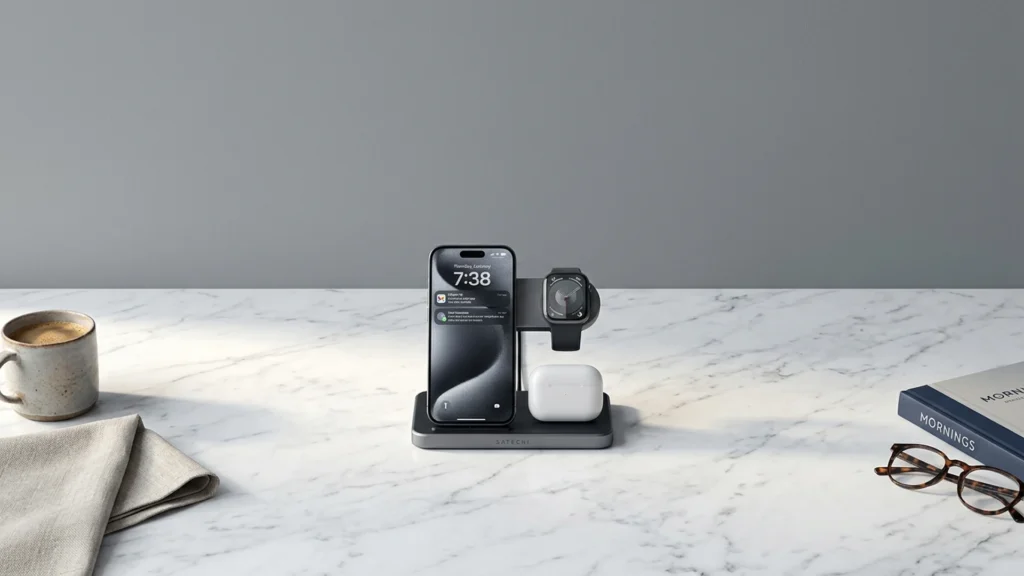
Qi2 3-in-1 wireless chargers hold three devices at once, usually a Qi2 phone spot plus separate places for earbuds and a watch or accessory. In this sub-category, buyers should care about strong magnet alignment for the phone, stable power delivery during long sessions, and reliable placement for the other two devices.
The hard part is trade-offs. More power can mean more heat. Better magnet alignment can depend on case thickness and how the stand is angled. And since these docks share one power supply, charging speed can shift when you use all three spots together.
If you also want models that cover different standards beyond Qi2, see our Best Wireless Chargers.
Quick Overview
Our Top Picks
#1. Belkin BoostCharge Pro 3-in-1 Wireless Charger

Specifications
| Brand | Belkin |
|---|---|
| Charging Standard | Qi2 |
| Max Wireless Output | 15 W |
| Number Of Devices | 3 |
| Form Factor | Foldable |
| Dimensions | 5.6 x 2.5 x 4.1 in |
| Weight | 0.9 lb |
Pros
- Reliable wattage delivery
- Strong alignment across devices
- Sturdy base, no wobble
Cons
- Premium price concern
The Belkin BoostCharge Pro is notable in the Qi2 3-in-1 wireless charger category because it keeps alignment consistent while charging multiple devices at once. In real use, the phone, earbuds, and watch spots stay steady, which helps reduce the little drops in power that can happen when coils shift. The sturdy base also matters for long sessions, since the setup does not wobble when you adjust your phone angle.
The main trade-off is that you are paying for the solid build and dependable placement, not for extra speed on paper. If you want a simple, desk-friendly 3-in-1 stand for Qi2 phones and you care about secure positioning more than chasing the fastest wattage, this is a strong fit.
#2. Anker MagGo 3-in-1 Wireless Charger

Specifications
| Brand | Anker |
|---|---|
| Charging Standard | Qi2 |
| Max Wireless Output | 15 W |
| Number Of Devices | 3 |
| Form Factor | 3-in-1 |
| Input Port | USB-C |
| Input Power | 40 W |
| Dimensions | 3.5 x 2.36 x 0.98 in |
Pros
- Reliable wattage delivery
- Sturdy base, no wobble
- Easy, secure device hold
Cons
- External power required
- Cramped tri-device layout
In the Qi2 3-in-1 charger category, Anker's MagGo-style setup stands out for the way it stays put and keeps charging stable. With Qi2 support up to 15 W and a sturdy, wobble-free base, it is easier to drop your phone on without fighting for alignment. The tri-device layout is also practical in real use, since the phone, earbud case, and a second device hold securely in place during longer sessions.
The trade-off is that it still needs an external power source, so it is more desk than nightstand. The third-device arrangement can feel a bit tight, especially if your accessories use thick cases or you want the most comfortable viewing angle. This is a strong pick for anyone who prioritizes reliable placement and steady charging over a more spacious layout.
#3. Satechi 3-in-1 Qi2 Wireless Charging Station

Specifications
| Brand | Satechi |
|---|---|
| Charging Standard | Qi2 |
| Max Wireless Output | 15 W |
| Number Of Devices | 3 |
| Form Factor | 3-in-1 |
| Input Port | AC |
| Dimensions | 5.7 x 3.5 x 3.5 in |
| Weight | 0.7 lb |
Pros
- Reliable wattage delivery
- Faster charging
- More devices supported
Cons
- Missing power adapter
Satechi’s Qi2 3-in-1 charging station stands out for how smoothly it handles day-to-day multi-device charging. With a 15 W max output target and Qi2 support, it keeps power delivery consistent once phones and earbuds sit in the right spots. The three-in-one layout also reduces cable clutter, since your phone, and two other compatible devices, all rest on the same base.
The main trade-off is setup. The station does not include a power adapter, so you need the right AC source for it to perform at its best. This makes it a better pick for people who already have quality USB-C power bricks at home or work, rather than for those starting from scratch.
What to Look For
Qi2 charging standard support: Confirm the charger is built for Qi2, not just generic Qi. Qi2 performance depends on magnet alignment, so it should clearly support Qi2 on the phone pad.
Max wireless output per device: Check the stated maximum watts for the phone spot and the combined behavior when three devices charge. If the listing only gives a single number, look for notes on speed when earbuds and a watch are also active.
Number of devices and placement layout: Make sure the stand matches how you actually charge. Qi2 3-in-1 docks vary in which device gets priority power and how the earbuds cradle sits, so verify you can place both earbuds consistently without pushing them out of position.
Input port and input power: Prefer USB-C input power setups that match the charger’s stated requirements. Underpowered input can reduce output or cause slowdowns, especially when all three pads run at once.
Convenient form factor for daily use: Choose a dock style that stays stable on your desk. Look for good viewing angle for the phone and a base that does not wobble when you pick up or reposition the watch and earbuds.
How We Picked
Products were identified through broad research across review sites and buyer forums, then filtered to only those that qualify as Qi2 3-in-1 Wireless Chargers.
Scoring used the same objective pillar framework as the main Wireless Chargers post, allowing direct comparison of products within this sub-category.
Frequently Asked Questions
What makes a Qi2 3-in-1 charger better than a standard Qi stand?
Qi2 uses stronger alignment and helps your phone sit in the right spot faster. This usually improves charging consistency and reduces drop offs. Many Qi2 models also work better with MagSafe style magnets when your phone supports it.
Do Qi2 3-in-1 chargers support charging for both iPhone and Android at the same time?
Most Qi2 3-in-1 chargers support Qi or Qi2 wireless charging for phones in general. However, iPhone models may need MagSafe compatibility for the best alignment. If you charge a phone plus earbuds at once, you may see slower speeds depending on the charger.
How should I place my phone on a Qi2 3-in-1 charger to avoid slow charging?
Set the phone centered on the main wireless pad and keep it flat against the surface. Use the built in magnet guidance if your model supports it. If your case is thick or has a metal ring, remove it and test again.
Will charging heat up my phone or earbuds on a 3-in-1 Qi2 station?
Wireless charging creates heat, especially when you charge multiple devices at once. Most chargers manage heat with power control, but you should still expect some warmth. If it feels very hot, stop charging and let the devices cool.
When should I choose a different type of wireless charger instead of a Qi2 3-in-1?
Choose a single device charger if you only need faster charging for one phone. Choose a MagSafe only charger if you want the strongest magnet snap for iPhones that support it. Choose a car or travel charger if you need a lighter, more portable setup.
How do Qi2 3-in-1 wireless chargers compare to other wireless chargers in terms of setup time?
Qi2 chargers usually take less time to align because the magnets guide placement. Multi device chargers can still require careful centering for the phone and each accessory. If you switch devices often, this alignment boost can be a big daily win.


