


havit HV-F2056 15.6″-17″ Cooling Pad Review
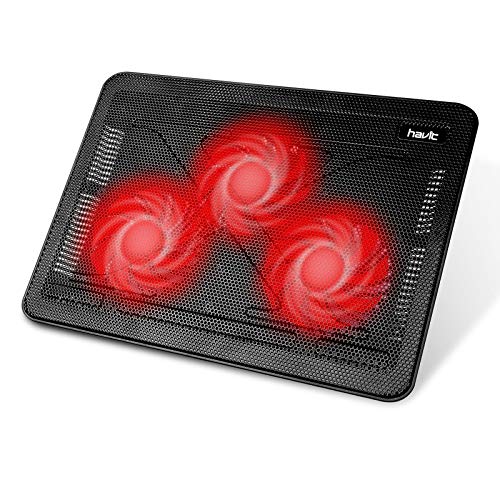
Specifications
| Brand | havit |
|---|---|
| Supported Laptop Size | 15.6-17 in |
| Number Of Fans | 3 |
| Fan Speed | 1100 RPM |
| Noise Level | 25 dB |
| Adjustable Height Levels | 2 Levels |
| Dimensions | 1.1 x 15 x 11 in |
| Weight | 1.6 lb |
Pros
- More airflow coverage
- Fits more laptops
- Low noise during use
Cons
- Low RPM cooling
- Limited adjustability
- Sparse durability evidence
The Verdict
The havit HV-F2056 cooling pad targets 15.6 to 17 inch laptops with three fans, and it scores 8.8 in Noise. It is a good pick for office and everyday use where you want a calmer fan tone, but it may not drop temps much during long gaming sessions. The cooling hinges on its 1100 RPM max, so heavy workloads can still run warm.
Who it's for: People who use a 15.6 to 17 inch laptop on a desk for work or browsing, and who accept smaller temperature drops in exchange for quiet operation and light portability at 1.6 lb.
Who should skip it: Gamers and creators who stress their laptop for hours, since the low max fan speed can limit real temperature improvement during sustained loads.
In-Depth Review
Performance
With a pillar score of 7.1, this pad lands closer to “Some hotspot reduction” than “Consistent temperature drops.” It uses three fans, rated at about 1100 RPM, and that helps spread airflow over more of the laptop base.
That airflow reach matters for real laptops, because it supports 15.6 to 17 inch machines, not just a narrow band. The pad is sized at 15 by 11 inches, which gives it room to sit under larger chassis without immediately running out of surface area.
Still, the core limitation is fan speed. At 1100 RPM, the cooling tends to feel restrained under sustained workloads. The cons call out “Low RPM cooling,” and the mini-review already hints at what that means in practice for gaming or long, heavy sessions: fewer meaningful temperature drops when the laptop keeps dumping heat.
Ergonomics
Havit scores 7.6 for ergonomics, which fits the “Rock-solid, easy adjust” label. It offers two adjustable height positions. That is not a wide range, but it is usually enough to find a comfortable setup for typing and for airflow to clear the bottom vents.
Stability also helps when you move between desk and couch. The pad weighs 1.6 lb, so it stays portable. The dimensions listed as 1.1 by 15 by 11 inches suggest a low-profile footprint that will not dominate your work surface.
The trade-off is adjustability. “Limited adjustability” is the stated con, and the spec backs it up with only 2 height levels. If you like a very specific screen or keyboard angle, you may end up using the same setting most of the time.
Build Quality
The build quality pillar score is 7.3, putting it in the “Mostly solid, slight flex” zone. The pad is light at 1.6 lb, and that weight often comes with a trade-off in stiffness. It can feel fine for everyday use, but it may not inspire the same confidence as heavier cooling stands.
Support for 15.6 to 17 inch laptops suggests the frame has to cover a larger base area. At 15 by 11 inches, the structure needs to keep that coverage stable while the laptop rests on top. In this category, even small flex can matter, especially if the laptop’s bottom sits unevenly over the mesh.
The con is “Sparse durability evidence.” That is also a sign to be cautious. The specs do not give much detail on materials, fan mounts, or long-term component quality. Based on what is available, the safer expectation is practical ownership, not long-term hard-use confidence.
Noise
Noise scores 8.8, which maps to “Low noise during use.” The numbers help here. An informed.blog review for this model lists noise at about 25 dB, which is low enough to stay in the background during office tasks.
Fan behavior matters too. This model runs three fans at around 1100 RPM. That speed typically avoids the high-pitched whine you hear from faster cooling pads. The supplied pros include “Low noise during use,” and the 25 dB rating gives that claim a measurable anchor.
So for daily work, study, or casual gaming, the sound profile should feel easy to live with. If your laptop already has its own fan profile, the cooling pad is less likely to become the dominant noise source.
Value
Value lands at 8.2, which fits “Smart buy for power.” It is not chasing maximum temperature drops. Instead, it aims for a practical mix: 3 fans, a broad 15.6 to 17 inch compatibility range, and a low-noise operating level around 25 dB.
The inclusion of multiple fans matters for everyday thermal comfort. “More airflow coverage” is listed as a pro, and the 15 by 11 inch size plus 3 fan layout supports that idea. The pad also keeps the setup portable, weighing 1.6 lb, which supports its use as a carry-along stand.
Still, value depends on your workload. The con “Low RPM cooling” is the biggest limiter. If you need major reductions during sustained, high-power gaming, this model’s 1100 RPM top speed is likely to feel modest. For office use and general airflow support, the spec set aligns well with the pillar score.
Frequently Asked Questions
Will the havit HV-F2056 cooling pad fit a 17 inch laptop?
Yes. The HV-F2056 supports laptops from 15.6 to 17 inches, so most 17 inch models should sit on the pad without hanging off the edges. Check your laptop base dimensions and corner clearance, since larger chassis can still overhang slightly.
How many fans does the havit HV-F2056 have, and what speed are they running?
It uses three fans with a listed speed of 1100 RPM. That combination aims for better airflow coverage across the laptop base. In practice, it may not drop temperatures as much as higher-RPM pads under very heavy gaming loads.
Is the HV-F2056 loud enough to disturb work or video calls?
The listed noise level is 25 dB, which is relatively quiet for a 3-fan pad. You should still expect audible fan sound when the fans run continuously, but it should stay manageable for desk work and study. If you are sensitive to high fan tones, listen to it at your normal laptop volume.
What are the adjustable height levels on this cooling pad?
It offers two height levels. This lets you choose a more comfortable typing angle and a bit of airflow separation from the desk. If you want a wide range of angles, two fixed positions may feel limiting.
What is the size and weight of the havit HV-F2056 so I know if it fits my desk?
The pad measures 1.1 x 15 x 11 inches and weighs about 1.6 lb. That footprint works well on most standard desks, but the 15 inch width can crowd tight setups with peripherals. The light weight makes it easy to move between a home desk and a study area.
Does the HV-F2056 cool well for gaming sessions, or is cooling limited by low RPM?
The main concern is the 1100 RPM fan speed. During sustained gaming or other heavy workloads, cooling improvement may feel modest compared with higher-RPM designs, and you might still see hot spots. It can help with airflow, but do not expect the same level of temperature reduction as top-tier, fast-spinning pads.
Final Verdict
This havit cooling pad is a good lightweight choice for buyers who want broad airflow and quiet operation. It supports a wider laptop range, and the fan noise stays low in everyday use. The weakness is real though: cooling is limited by low RPM, so heavy sustained loads may still run hot. If you game on occasion or mainly work at normal loads, it will fit.
Check that your laptop model sits firmly on the deck at its available height, and only expect moderate temperature drops under stress. If that matches your use, this is a sound pick.