




The 4 Best Liquid-Cooled Gaming PCs in 2026

Transparency Note: This post contains affiliate links. As an Amazon Associate, we earn from qualifying purchases at no extra cost to you.

Liquid-cooled gaming PCs use an AIO or custom loop to move heat away from the CPU and keep performance steady. If you shop this category, you care less about showy cooling names and more about how the system behaves while you game for hours. Look for builds that keep CPU boost behavior stable and avoid heat-related slowdowns.

Picking the right one is hard because liquid cooling shifts risk. You trade simpler air cooling for pump and radiator dependability. You also have to match the radiator size and fan setup to the heat your CPU and GPU generate. Finally, many compact liquid designs limit airflow paths, which can raise GPU temps and increase noise when the game gets heavy.

To compare options beyond just cooling, use the same checklist we apply across our larger lineup, then narrow to the liquid-cooled picks that fit your resolution and play style. Looking for all types? See our Best Gaming PCs.

Quick Overview

Dell Alienware Area-51 Gaming PC
#1 Dell Alienware Area-51 Gaming PC
Corsair Vengeance i5200 Gaming PC
#2 Corsair Vengeance i5200 Gaming PC
Skytech Azure 3 Gaming PC
#3 Skytech Azure 3 Gaming PC
Corsair ONE i500 Gaming PC
#4 Corsair ONE i500 Gaming PC

Our Top Picks

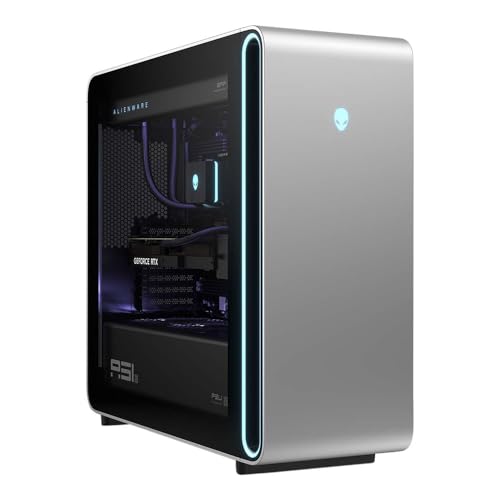
#1. Dell Alienware Area-51 Gaming PC
Dell Alienware Area-51 Gaming PC
Our Score
8.2 / 10
hover for details
Performance
9
Thermals
7.8
Build
8.1
Upgrade
7.4
Value
7.8
BrandDell
ProcessorIntel Core Ultra 9 285K
Graphics CardNVIDIA GeForce RTX 5090
Memory64 GB
Storage4 TB SSD
Power Supply1500 W
Operating SystemWindows 11 Home
Dimensions22.4 x 24 x 9.1 in
  • Blazing high FPS
  • Solid build with reliable parts
  • Premium value gap
  • Proprietary constraints

The Dell Alienware Area-51 is notable in liquid-cooled gaming PCs because it targets the highest sustained frame rates without relying on risky heat management. Pairing an Intel Core Ultra 9 285K with an NVIDIA GeForce RTX 5090, it delivers smooth, fast gaming performance that fits demanding, high-refresh setups. The liquid cooling approach helps keep long sessions steadier, so games are less likely to slow down as the system warms.

The trade-off is less about thermals and more about ownership. Alienware’s design choices can feel restrictive if you like to tinker, and that makes upgrades and routine maintenance more effort than with fully modular, standard-layout towers. This is best for gamers who want top-tier speed and are comfortable leaving the internals mostly alone after purchase.

→ Read full review

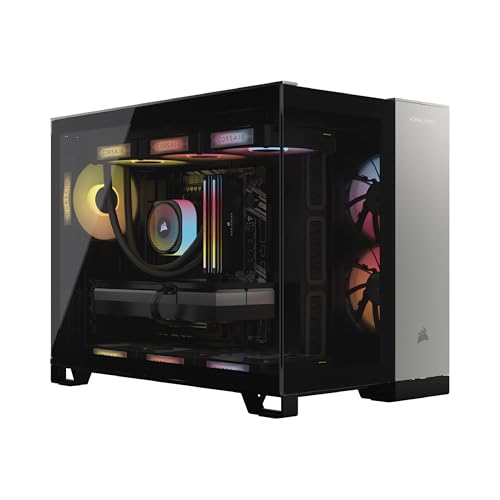
#2. Corsair Vengeance i5200 Gaming PC

Corsair Vengeance i5200 Gaming PC
Our Score
7.8 / 10
hover for details
Performance
8.3
Thermals
7.1
Build
7.8
Upgrade
7.4
Value
7.7
BrandCorsair
ProcessorIntel Core Ultra 9 285K
Graphics CardNVIDIA GeForce RTX 5090
Memory64 GB
Storage2 TB M.2 SSD + 2 TB M.2 SSD
Operating SystemWindows 11 Pro
Dimensions14.8 x 18.4 x 12 in
Weight36.5 lb
  • Smooth, stable frame pacing
  • High-end gaming CPU
  • Powerful dedicated GPU
  • Potential thermal throttling
  • Long startup time
  • Limited real-world proof

Corsair Vengeance i5200 stands out in liquid-cooled gaming PCs because it pairs a top-tier Intel Core Ultra 9 285K with an NVIDIA GeForce RTX 5090 while keeping gameplay smooth. Frame pacing is a clear strength, which matters just as much as raw FPS when you want consistent motion in fast shooters and action-heavy single-player games. In this class, the liquid setup is usually chosen to protect sustained boost behavior, and this system is tuned to do that without obvious hiccups during typical long sessions.

The main trade-off is thermals and start-up time. Some users report potential thermal throttling, which can show up when the PC is pushed for extended periods. Also, the long startup time is a real annoyance if you play in short bursts. This is best for buyers who want premium gaming smoothness and plan to keep the machine running reliably, not for anyone who needs quick on and off behavior or stress-free cool and quiet performance in every scenario.

→ Read full review

#3. Skytech Azure 3 Gaming PC

Skytech Azure 3 Gaming PC
Our Score
7.7 / 10
hover for details
Performance
7.8
Thermals
7.6
Build
7.4
Upgrade
7.2
Value
8.2
BrandSkytech Gaming
ProcessorAMD Ryzen 7 7700X
Graphics CardNVIDIA GeForce RTX 5070
Memory32 GB
Storage1 TB Gen4 NVMe SSD
Power Supply850 W
Operating SystemWindows 11 Home
Dimensions17.8 x 17.2 x 9.1 in
Weight34.1 lb
  • Strong gaming for the cost
  • High-end gaming CPU
  • Powerful dedicated GPU
  • Limited benchmark evidence
  • Config variance risk

Skytech Azure 3 is notable in liquid-cooled gaming because it pairs a strong CPU with an RTX 5070, keeping frame rates smooth across modern titles while the liquid cooling helps manage heat during long sessions. With a Ryzen 7 7700X and 32 GB RAM, this build is tuned for responsiveness, not just peak numbers. The 850 W power supply also gives it enough headroom for the GPU to stay fed under load.

The main trade-off is that there is limited public benchmark detail, and some buyers may see config variance depending on the exact parts included. That means it is best for shoppers who can confirm the final GPU model and cooling setup for their order. If you want a liquid-cooled rig for 1440p style play and you care about sustained gaming temps, this is a solid option to consider.

#4. Corsair ONE i500 Gaming PC

Corsair ONE i500 Gaming PC
Our Score
7.0 / 10
hover for details
Performance
7.1
Thermals
6.6
Build
7.2
Upgrade
6.4
Value
7.8
BrandCorsair
ProcessorIntel Core i9-14900F
Graphics CardNVIDIA GeForce RTX 5070
Memory32 GB
Storage1 TB M.2 SSD
Power Supply1000 W
Operating SystemWindows 11 Home
Dimensions15.3 x 11.8 x 7.6 in
Weight27.1 lb
  • High-end gaming CPU
  • Plenty of RAM
  • Large SSD game drive
  • Throttling performance drops
  • Loud under load
  • Warms up during long sessions

The Corsair ONE i500 stands out in the liquid-cooled gaming PC lane because it pairs a high-end Intel Core i9-14900F with an RTX 5070 in a compact, all-in-one style package. In real gaming, that CPU and GPU mix targets strong frame rates with responsive feel. It is also backed by 32 GB of RAM and a 1 TB SSD, so modern titles load quickly and stay smooth as you move between games or maps.

The main trade-off is cooling behavior over long sessions. Reports point to throttling performance drops, plus the system running loud under load and warming up during extended play. If you want a sleek liquid-cooled setup for regular gaming sessions, it can fit well. If you play for hours and hate noise or dips in sustained speed, you may want to compare other liquid-cooled builds with more headroom for long, heavy workloads.

What to Look For

Cooling layout and radiator size: Confirm where the radiator sits and how much surface area it has. A larger radiator with well-sized fans usually holds CPU temps better, which helps keep frame pacing smooth.

Noise under load: Liquid cooling can still get loud if the fans ramp hard. Prefer systems that keep fan speeds reasonable during sustained gaming, not just during short benchmarks.

CPU-GPU balance for your target games: Liquid cooling mainly protects the CPU. Make sure the rest of the parts match so the GPU can deliver FPS without constant CPU bottlenecks or sudden drops.

Build quality where failures matter: AIOs add pump and seal components. Choose builds with reputable components and good warranty coverage, since you want clear support if cooling parts ever need service.

Upgrade paths with room for airflow: Check whether you can replace RAM, add storage, and swap the GPU without blocking radiator hoses or strangling case airflow. Limited clearance makes future upgrades harder and can worsen temperatures.

How We Picked

Products were identified through broad research across review sites and buyer forums, then filtered to only those that qualify as Liquid-Cooled Gaming PCs.

Scoring used the same objective pillar framework as the main Gaming PCs post, allowing direct comparison of products within this sub-category.

Frequently Asked Questions

What is the difference between liquid cooling and air cooling for gaming?

Liquid cooling moves heat away from the CPU faster than typical air coolers. That often helps with lower temperatures and steadier boost speeds during long game sessions. You may also hear less fan noise at the same performance.

Will a liquid-cooled gaming PC stay fast over time, or does it need upkeep?

Most liquid setups need very little day-to-day work. Still, you should check the cooler and pump area when you open the case for dust cleaning. If the system starts running hotter or louder, you should inspect it sooner.

How often should I clean a liquid-cooled gaming PC?

Clean dust filters and intake fans every month or two, depending on your room. Full internal cleaning every 3 to 6 months helps keep airflow strong. Dust buildup can make both air and liquid cooling perform worse.

How do I choose the right liquid cooling option for my build?

Pick a system that matches your CPU heat output and your case space for radiator mounting. Larger radiators usually cool more quietly, but they need clearance in the case. Also check the fan setup, since radiator fans affect noise more than people expect.

When should I consider a non-liquid Gaming PC instead?

Consider air cooling if you want the simplest setup and lowest maintenance. It can also fit small cases better and cost less for similar gaming speed. If you mainly game short sessions, air cooling may feel just as good.

How do liquid-cooled Gaming PCs compare to other Gaming PCs in terms of noise?

Liquid cooling can reduce fan noise by letting fans run at lower speeds while holding stable temperatures. Many builds still use high fan speeds under heavy loads, so noise depends on fan curves and case airflow. Look for setups known for quiet sustained performance, not just low idle temperatures.

See Also

Share:
On Key
You Might Also Like