




GeForce RTX 5060 Gaming PCs focus on one goal: steady frame rates in modern games at mainstream settings. Buyers in this sub-category want enough CPU headroom to avoid stutters, enough cooling to hold boost clocks, and a setup that feels responsive day to day.
The hard part is trade-offs. Many RTX 5060 builds cut corners to hit a lower price. That usually shows up in slower SSD space, limited RAM, weaker power supplies, or cases that run loud under load. You also have to check the whole balance, not just the graphics card.
Use the checklist below to compare only what matters for RTX 5060 buyers, then match it to your games and screen. Looking for all types? See our Best Gaming PCs.
Quick Overview
Our Top Picks
#1. CyberPowerPC Gamer Xtreme VR Gaming PC

Specifications
| Brand | CyberpowerPC |
|---|---|
| Processor | Intel Core Ultra 5 225F |
| Graphics Card | NVIDIA GeForce RTX 5060 8GB |
| Memory | 32 GB |
| Storage | 2 TB NVMe SSD |
| Operating System | Windows 11 Home |
| Dimensions | 19.9 x 17.7 x 8.6 in |
| Weight | 35 lb |
Pros
- Strong gaming for the cost
- Plenty of RAM
- Large SSD game drive
Cons
- Weak/low-tier GPU
- PSU transparency lacking
This CyberPowerPC Gamer Xtreme is one of the more sensible picks for GeForce RTX 5060 gaming builds, mainly because it does not skimp on the “everyday” parts that make games feel smooth. You get an Intel Core Ultra 5 225F paired with 32 GB of RAM and a roomy 2 TB NVMe SSD, which helps with big game installs and keeps multitasking from bogging things down. In day to day play, the system feels responsive thanks to the storage and memory headroom, even when newer games push higher CPU and loading demands.
The main trade-off is tied directly to the RTX 5060 itself. Reviews that point out a low-tier GPU match the idea that this PC is best for 1080p settings, not for chasing maxed out graphics at higher resolutions. Also, PSU transparency is limited, so buyers who care deeply about the exact power supply specs may want to confirm details before purchase. If you want a balanced setup around an RTX 5060 with lots of RAM and storage, this one fits that target well.
#2. MAINGEAR Classic MG-1 Gaming PC

Specifications
| Brand | MAINGEAR |
|---|---|
| Processor | AMD Ryzen 5 9600X |
| Graphics Card | NVIDIA GeForce RTX 5060 |
| Memory | 16 GB |
| Storage | 1 TB NVMe SSD |
| Dimensions | 8.1 x 19 x 16.9 in |
Pros
- Strong gaming for the cost
- Large SSD game drive
Cons
- Weak/low-tier GPU
- Limited RAM
- Price premium
MAINGEAR Classic MG-1 stands out in the GeForce RTX 5060 gaming PC group by pairing an RTX 5060 with a strong CPU, the AMD Ryzen 5 9600X. In practice, that combo helps keep gameplay smooth in modern titles, especially when you are aiming for high frame rates at 1080p. The 1 TB NVMe SSD also reduces wait times for game loads and map switching, which matters more than people expect in everyday play.
The trade-off is configuration choices that may limit long sessions and future upgrades. It includes only 16 GB of RAM, which can feel tight for newer, heavier games and background apps. Also, while the system aims for solid gaming performance, the RTX 5060 is still a lower-tier card in this class, so you may need to use reasonable graphics settings for the smoothest experience.
#3. MSI Codex Z2 Gaming PC

Specifications
| Brand | msi |
|---|---|
| Processor | AMD Ryzen 7 8700F |
| Graphics Card | NVIDIA GeForce RTX 5060 |
| Memory | 32 GB |
| Storage | 1 TB SSD |
| Power Supply | 650 W |
| Operating System | Windows 11 Home |
| Dimensions | 12.3 x 23.7 x 21.6 in |
| Weight | 28.6 lb |
Pros
- Strong gaming for the cost
- Plenty of RAM
- Large SSD game drive
Cons
- Underpowered PSU
- Random shutdown risk
This MSI Codex Z2 stands out for RTX 5060 gaming builds because it pairs a modern Ryzen 7 8700F with 32 GB of RAM and a 1 TB SSD. In day to day play, that balance helps new games feel smooth and responsive, especially when you keep multiple apps open or run heavier settings. It is a practical setup for 1080p to 1440p gaming, where the RTX 5060 class GPU matters most.
The big trade off is its 650 W power supply, which is noted as underpowered. There is also a random shutdown risk, so it may not suit people who want maximum stability for long sessions. If you are comfortable doing due diligence and want a strong all around RTX 5060 experience without skimping on RAM and storage, this one is worth a closer look.
#4. Dell Tower Plus EBT2250 Gaming PC

Specifications
| Brand | Dell |
|---|---|
| Processor | Intel Ultra 7-265 |
| Graphics Card | NVIDIA GeForce RTX 5060 |
| Memory | 32 GB |
| Storage | 1 TB SSD |
| Power Supply | 460 W |
| Operating System | Windows 11 Pro |
Pros
- Strong gaming for the cost
- Plenty of RAM
- Large SSD game drive
Cons
- Warms up during long sessions
- Underpowered PSU
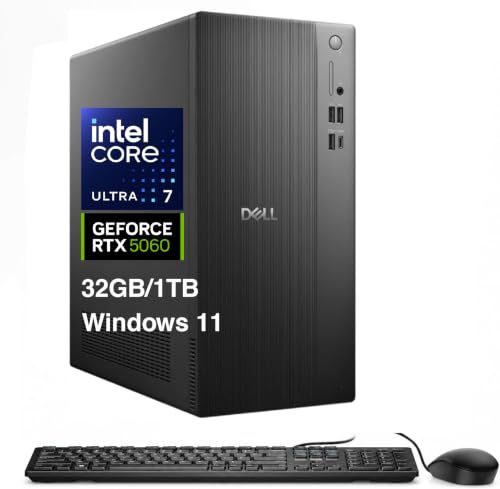
This Dell Tower Plus is notable for delivering solid gaming results with an NVIDIA GeForce RTX 5060 class build, while also keeping everyday usability high. The system pairs the RTX 5060 with an Intel Ultra 7-265 and includes 32 GB of RAM, which helps in newer games and multitasking. Storage is also ready for the long run, with a 1 TB SSD for a main game library.
The trade-off is sustained comfort under load. It tends to warm up during long sessions, so performance may feel less consistent during extended play. The bigger concern is the underpowered 460 W PSU, which can limit upgrade headroom. This is a good fit for players who want smooth RTX 5060 gaming out of the box and do not plan major hardware changes soon.
What to Look For
Frame rate balance (CPU and GPU pairing): Look for an RTX 5060 build that does not fall apart in CPU-heavy games. If the CPU is weak for the price, you will see dips that make gameplay feel uneven even when the GPU looks strong on paper.
Cooling that sustains performance: Check for parts and airflow that keep both the GPU and CPU under control during long sessions. If the reviews mention throttling, hot chassis temps, or loud fan curves, skip it for RTX 5060 since this card is sensitive to sustained power limits.
Fast SSD for game load times: Prefer a modern NVMe SSD with enough space for your library. Small SSDs or mixed drives can force more downloads, installs, and asset streaming pauses, which hurts the RTX 5060 experience at its target resolutions.
RAM capacity that matches today’s games: Aim for at least 16 GB. If you see 8 GB class configurations, plan on upgrades right away. Too little RAM causes stutter and texture hitching in current titles.
Power supply headroom for stable gaming: Select builds that use a quality, correctly sized PSU for the full system. RTX 5060 rigs can still draw more power than you expect under load, and an undersized or low-quality PSU can create instability or noisy fan behavior.
How We Picked
Products were identified through broad research across review sites and buyer forums, then filtered to only those that qualify as GeForce RTX 5060 Gaming PCs.
Scoring used the same objective pillar framework as the main Gaming PCs post, allowing direct comparison of products within this sub-category.
Frequently Asked Questions
What kind of gaming should a GeForce RTX 5060 Gaming PC target?
A GeForce RTX 5060 Gaming PC is best for smooth 1080p gaming. You can also aim for 1440p in lighter games or with smart settings. Use a mix of medium to high settings for steady frame rates.
Do I need to worry about CPU bottlenecks with a GeForce RTX 5060?
Yes, your CPU matters, especially in fast esports games. Look for a balanced pairing like a strong midrange Intel Core i5 or AMD Ryzen 5 class CPU. If the CPU feels weak, you may see lower FPS even with the RTX 5060.
How important are cooling and noise on these RTX 5060 builds?
Thermals affect performance and comfort during long sessions. Prioritize good airflow cases and cooler setups that keep GPU temperatures under control. If a PC runs hot, it may throttle and drop FPS.
What is the easiest way to upgrade storage or RAM later?
Check for open RAM slots and a free M.2 SSD slot before you buy. A good case layout makes it easier to add parts without removing everything. Also confirm the power supply has enough headroom for future upgrades.
When should I choose a different type of Gaming PC instead of an RTX 5060 model?
Choose a different option if you want heavy 4K gaming or very high frame rates in demanding titles. RTX 5060 builds are usually tuned for 1080p and solid 1440p. If your goal is ultra settings at higher resolutions, you may need a stronger GPU tier.
How do GeForce RTX 5060 Gaming PCs compare to other Gaming PCs in value?
RTX 5060 models usually offer strong 1080p performance per dollar. Higher GPU tiers can feel better in heavy games, but they often raise the total cost a lot. For many buyers, RTX 5060 hits the sweet spot between price and playable frame rates.


