Transparency Note: This post contains affiliate links. As an Amazon Associate, we earn from qualifying purchases at no extra cost to you.
This Wi-Fi baby monitor guide focuses on how you can view your baby: by smartphone app, a dedicated parent unit, or both. It also highlights stated network requirements, since an app-based option may depend on the home Wi-Fi setup.
Options range from the Nanit Pro Camera & Floor Stand, which is listed for smartphone viewing, to models that pair app access with a parent unit. The eufy E21 listing also describes local and Wi-Fi modes, so it may suit shoppers weighing remote access against a local viewing option.
For monitors that explicitly work without Wi-Fi, compare our no-Wi-Fi picks instead. Looking for all types? See our Best Baby Monitors.
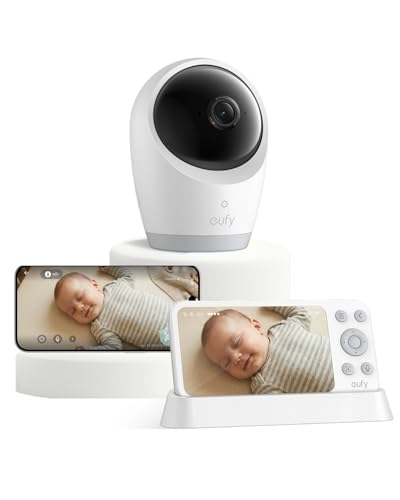
For caregivers who want app viewing but also want a dedicated screen at home, the eufy Security E21 Baby Monitor is notable for its dual viewing setup. Its 4K UHD camera pairs with a 5-inch parent display, and the supplied listing describes both Wi-Fi and local monitoring. That gives families two viewing paths, though the exact network requirements and remote-viewing behavior are not established by the checked specifications.
The camera can pan 330° and tilt 60°, which may help caregivers adjust the view from the parent unit or app. Infrared night vision is specified, but real-world image and alert performance are not verified. If you want a clearly stated Wi-Fi app setup with a 5-inch screen and 1080p camera, the VTech WiFi Baby Monitor is a documented alternative; the eufy listing instead emphasizes higher resolution and both Wi-Fi and local viewing.
For caregivers who want app access as well as a separate screen, the VTech WiFi Baby Monitor pairs a smartphone app with a 5-inch parent display. Its 1080p camera and stated 360° pan and 147° tilt give the app-viewing setup room to frame a wider area remotely. The selected bundle is one camera, so it suits a single-room view rather than a multi-camera setup.
The app uses Wi-Fi, so remote viewing depends on a working network; the supplied details do not state a specific Wi-Fi band. If you want a choice between Wi-Fi app viewing and local viewing without Wi-Fi, the eufy Security E21 Baby Monitor lists both modes. Choose VTech if its dedicated parent display alongside app access better fits your routine.
For Wi-Fi monitoring, the CüboAi 3 stands out for its stated 2.5K QHD camera resolution. That gives app-based viewing a higher listed resolution than the 1080p VTech WiFi Baby Monitor, which may suit caregivers who prioritize a more detailed image. The supplied details confirm Wi-Fi, but do not establish remote-viewing requirements or whether a parent unit is included.
Choose the eufy Security E21 Baby Monitor if you want confirmed viewing through both a smartphone app and a dedicated parent unit. For the CüboAi 3, the viewing setup and network requirements remain unspecified, so check those details before choosing it for remote access or a separate screen.
Phone-based viewing; a model-specific review mentions live streaming and two-way audio
Cons
One owner said Insights features require payment after the first year
Requires Wi-Fi and a smartphone app
For Wi-Fi monitoring that centers on a phone, the Nanit Pro uses a smartphone app and a 1080p camera. Its listing also describes live streaming and two-way audio, so caregivers can check in and speak through the app. That setup suits families who want phone-based viewing rather than making a separate parent screen the focus.
The trade-off is that viewing depends on Wi-Fi and the smartphone app, not a standalone workflow. One owner reported that Insights features require payment after the first year, so check which functions matter to you. If you want app viewing alongside a dedicated parent unit, the VTech WiFi Baby Monitor is another option in this comparison.
For app-based monitoring, the Owlet Dream Duo 3 pairs a 2K camera with the Dream Sock in one app. Its Dream Sight camera supports 2.4 GHz and 5 GHz Wi-Fi, while the sock uses 2.4 GHz Wi-Fi, so check that your home network supports both bands where needed.
This setup depends on Wi-Fi and a smartphone app; it does not list a dedicated parent unit. Choose it if you want the camera and sock monitoring together in the app. For a local viewing option alongside app access, the eufy Security E21 Baby Monitor lists both a dedicated parent unit and smartphone app.
For Wi-Fi baby monitoring, this Momcozy pairs a smartphone app with a dedicated 5-inch parent display. Its 1080p camera gives caregivers two ways to check in, while the direct FHSS connection is a separate option from app viewing over Wi-Fi. That setup suits households that want a handheld screen at home and app access as well.
App access requires 2.4 GHz Wi-Fi, so check that your home network supports this band before setup. The parent display and FHSS connection offer another way to monitor without relying on the app's Wi-Fi link; choose a phone-only model such as the Nanit Pro Baby Monitor if you prefer app viewing without a dedicated parent unit.
One Reddit user reports adding the BOIFUN app to a computer; exact model unclear
Cons
App setup requires 2.4 GHz Wi-Fi
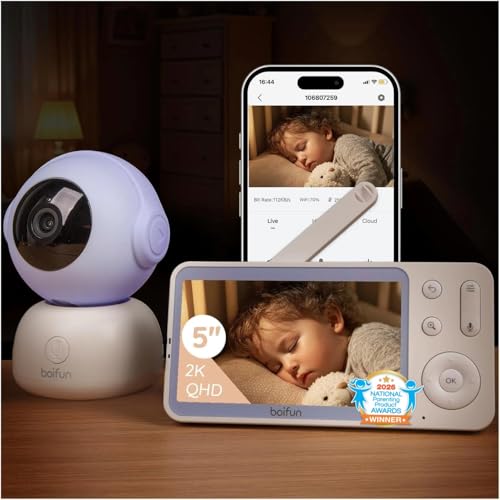
For caregivers who want both app viewing and a separate screen at home, this BOIFUN 2K WiFi Baby Monitor pairs a smartphone app with a 5-inch parent display. Its listed 2K camera resolution is a useful detail for shoppers comparing video specifications, though it does not by itself establish real-world image quality.
App setup requires 2.4 GHz Wi-Fi, so check that your home network supports that band before pairing. If you also want a local viewing option that can work without Wi-Fi, the eufy Security E21 Baby Monitor lists both app and dedicated-parent-unit viewing, plus dual Wi-Fi and local modes.
What to Look For
Viewing setup: Choose a smartphone-app model if you want app-based viewing; select a product that also lists a dedicated parent unit if you want that separate viewing option. The VTech VM901 and Momcozy BM04 list both, while the Nanit Pro Camera & Floor Stand lists smartphone-app viewing.
Network requirements: Check the stated Wi-Fi condition before choosing an app-based monitor. The Momcozy BM04 listing specifies 2.4 GHz Wi-Fi for app access, while the BOIFUN Baby 2TM specifies 2.4 GHz Wi-Fi for setup only. Those details describe different requirements, so confirm which workflow fits your home network.
Local monitoring trade-off: If you want an option beyond Wi-Fi viewing, consider the eufy E21 offer, whose title describes Wi-Fi and no-Wi-Fi modes. That may matter if you value a local option as well as app access. Shoppers seeking monitors explicitly designed to work without Wi-Fi should compare the no-Wi-Fi guide.
We identified candidate Wi-Fi baby monitors through broad research across review sites and buyer forums, then filtered the list to products that qualify for this sub-category. Product details and offer qualifications are limited to the supplied information.
We scored the selected products with the same research-based pillar framework used for the main Baby Monitors post. This supports direct comparison within the Wi-Fi sub-category, but scores are assessments based on available research, not firsthand product tests.