Televisions with Google TV use the Google TV interface on top of Android-based streaming and search. For buyers, that means you should judge the TV on daily navigation speed, search results accuracy, and how smoothly apps open. It also means you should check input features for streaming boxes, gaming consoles, and cable receivers, since Google TV TVs often live with multiple sources.
The hard part is the trade-off between picture performance and everyday responsiveness. Some sets look strong on contrast and HDR, but still feel slower in menus. Others run Google TV smoothly, yet lean on weaker upscaling or less controlled backlights for dark scenes. Your best choice depends on whether you stream more than you game, and how bright your viewing space is.
Looking for all types? See our Best Televisions.
Quick Overview
Our Top Picks
#1. Sony XR77A95L Television

Specifications
| Brand | Sony |
|---|---|
| Screen Size | 77 in |
| Resolution | 4K UHD |
| Display Type | QD-OLED |
| Hdr Formats | Dolby Vision |
| Smart Platform | Google TV |
| Dimensions | 40.4 x 15.4 x 67.9 in |
Pros
- Stunning HDR pop
- Smooth motion, low lag
- Full sound with solid bass
Cons
- Limited uniformity data
- Few smart negatives
Sony XR77A95L stands out in the Google TV lineup thanks to its QD-OLED picture. HDR content looks vivid with deep, inky blacks and strong contrast, so movies and shows keep more detail in dark scenes. Motion also stays smooth, and the TV feels quick to respond, which matters when you bounce between streaming and live sports.
Google TV runs clean for everyday use, with easy search and a familiar app layout. The main trade-off is that published info on screen uniformity is limited, which can matter on large, solid color scenes. Built-in audio is a bright spot too, with clear dialogue and solid bass for casual viewing without extra gear.
#2. Sony K-65XR80M2 Television

Specifications
| Brand | Sony |
|---|---|
| Screen Size | 65 in |
| Resolution | 4K UHD |
| Display Type | QD-OLED |
| Refresh Rate | 120 Hz |
| Hdr Formats | Dolby Vision |
| Smart Platform | Google TV |
| Hdmi Ports | 4 ports |
| Dimensions | 32.8 x 13.3 x 56.9 in |
Pros
- Deep blacks, vivid color
- Smooth motion, low lag
- Responsive, well-stocked apps
Cons
- Unquantified update cadence
This 65 in Sony QD-OLED model stands out in the Google TV category thanks to its mix of deep blacks and lively color, backed by a 120 Hz panel for cleaner fast scenes. Watching sports and action movies on Google TV looks more stable than on typical 60 Hz sets, and it stays responsive for gaming with low lag. The Google TV experience also feels quick day to day, with a solid set of apps and search that makes it easy to find what you want.
The main trade-off is uncertainty around long-term software update timing, which matters for any Google TV owner who wants new features to keep arriving. If you care most about picture quality and smooth motion, this is a strong pick for a main living room TV. If update cadence is a top priority, you may want to confirm Sony's support plan before buying.
#3. Sony K65XR80 Television

Specifications
| Brand | Sony |
|---|---|
| Screen Size | 65 in |
| Resolution | 4K UHD |
| Display Type | OLED |
| Refresh Rate | 120 Hz |
| Hdr Formats | Dolby Vision |
| Smart Platform | Google TV |
| Dimensions | 33.8 x 9.9 x 56.9 in |
Pros
- Deep blacks, vivid color
- Responsive, well-stocked apps
- Clean setup, sturdy stand
Cons
- Plastic back build
- High price value doubts
Sony’s K65XR80 stands out in the Google TV TV lineup thanks to its OLED picture performance. You get deep blacks and vivid color, and Dolby Vision HDR looks especially strong in dark scenes. The 120 Hz panel also helps keep fast content looking smooth, which makes sports and action movies feel more stable than on many slower sets.
Trade-offs are real. The back is mostly plastic, so it does not feel as premium as some competitors. Also, the overall fit and finish and performance level can still feel like a tough match if you mainly want a low-key, budget-friendly Google TV experience. This is best for shoppers who care more about OLED contrast and motion than about build materials or saving money.
#4. TCL 65QM9K Television

Specifications
| Brand | TCL |
|---|---|
| Screen Size | 65 in |
| Resolution | 4K UHD |
| Display Type | Mini-LED |
| Refresh Rate | 144 Hz |
| Hdr Formats | Dolby Vision |
| Smart Platform | Google TV |
Pros
- Deep blacks, vivid color
- Full sound with solid bass
Cons
- Uncertain firmware rollout
- Late model availability
This TCL 65QM9K is notable among Google TV sets because it pairs Google TV convenience with Mini-LED picture quality. You get deep blacks and vivid color, and the HDR look stays detailed without the haze you sometimes see on simpler backlights. For movie nights, it feels strong in both bright scenes and darker ones, with solid local contrast that makes images look more grounded.
Motion and smart performance are good, but not class-leading for every use. The 144 Hz panel helps with fast action, yet the bigger concern is long-term software timing, since firmware rollout can be uncertain. This TV fits well for shoppers who want a Google TV experience and a more cinematic picture first, and who are okay waiting if updates take longer in some regions.
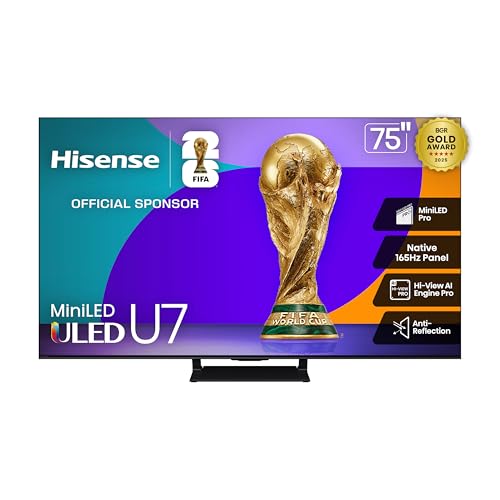
#5. Hisense 75U75QG Television
Specifications
| Brand | Hisense |
|---|---|
| Screen Size | 75 in |
| Resolution | 4K UHD |
| Display Type | Mini-LED |
| Refresh Rate | 165 Hz |
| Hdr Formats | HDR10+, Dolby Vision |
| Smart Platform | Google TV |
| Dimensions | 37.9 x 3 x 65.7 in |
Pros
- Deep blacks, vivid color
- Advanced HDR support
- Strong smart TV OS
Cons
- Not enough HDMI ports
- So-so fit and finish
- Firmware update risk
With Google TV built in, the Hisense 75U75QG is a strong pick for people who want a simple streaming hub and fast voice search without extra boxes. The standout part for this sub-category is the Mini-LED picture quality. It delivers deep blacks and vivid color, with solid HDR10+ and Dolby Vision support, so movies and high-contrast shows look more dimensional than you typically get from mainstream Google TV sets.
The trade-off is connectivity and the usual software caution. The TV has not enough HDMI ports for many setups, so you may need a switch if you use multiple consoles or streamers. Also, fit and finish feels only average, and firmware updates can be a bit of a question mark, so this is best for buyers comfortable living with occasional software changes.
#6. TCL 55QM6K Television

Specifications
| Brand | TCL |
|---|---|
| Screen Size | 55 in |
| Resolution | 4K UHD |
| Display Type | Mini-LED |
| Refresh Rate | 144 Hz |
| Hdr Formats | Dolby Vision, HDR10+, HDR10, HLG |
| Smart Platform | Google TV |
| Dimensions | 30.5 x 11.6 x 48.4 in |
Pros
- Deep blacks, vivid color
- Strong features at price
- Strong smart TV OS
Cons
- Not enough HDMI ports
- A bit thin and harsh
This TCL 55QM6K stands out for a classic Google TV setup paired with mini-LED picture quality. In this segment, that combo matters because Google TV is how you find apps and live content, while mini-LED helps the screen look deeper and more detailed. Expect deep blacks and vivid color, plus strong HDR support like Dolby Vision and HDR10+. Motion also stays solid at up to 144 Hz, which helps with sports and fast scenes.
The main trade-off is connectivity and built-in sound. It has not enough HDMI ports for multiple devices, so you may need an HDMI switch. The speakers can sound a bit thin and harsh, especially at higher volume, so casual viewing works, but serious movie nights likely call for a soundbar.
What to Look For
Picture that holds detail in both bright and dark scenes: Use the Picture pillar to compare brightness, contrast, and black levels. With many Google TV models, HDR performance depends on the display type and local dimming behavior, so watch for blooming and crushed blacks in dark movies.
Motion clarity for sports and gaming: Check for a refresh rate that fits your use. Prefer TVs that handle fast motion cleanly without heavy blur or judder. Also confirm game-friendly features like VRR and ALLM support, since Google TV TVs often act as your main gaming screen.
Google TV speed and stability: Test how fast the home screen loads, how quickly apps resume, and whether search finds what you want. A laggy interface hurts more on Google TV than on some other platforms because you use search and recommendations daily.
HDMI setup for all your devices: Look for enough HDMI ports for your setup, especially if you use a soundbar plus a console plus a streaming box. More ports reduce the need for swapping and keep your sources from switching late or breaking picture settings.
Audio that is clear at normal volume: Many Google TV buyers use built-in speakers when a soundbar is not an option. Focus on dialog clarity and low distortion when you turn it up, since muffled voices feel worse in streaming content.
How We Picked
Products were identified through broad research across review sites and buyer forums, then filtered to only those that qualify as Televisions with Google TV.
Scoring used the same objective pillar framework as the main Televisions post, allowing direct comparison of products within this sub-category.
Frequently Asked Questions
What makes a TV qualify as a Television with Google TV?
It runs the Google TV smart platform. You get Google Assistant voice search and a home screen that mixes live TV and app suggestions. Setup usually uses your Google account for app downloads and personalized recommendations.
Do Google TV TVs handle upscaling for non-4K content well?
Many Google TV sets include built-in upscaling for HD and older shows. The quality varies by picture chip and local dimming options. If you watch a lot of cable or streaming in 1080p, check reviews for edge detail and reduced blur.
How do I set up live TV and streaming on a Google TV model?
Start by connecting your Wi-Fi, then sign in with your Google account. Google TV guides you through adding streaming apps and, if supported, a live TV source. Use the input and channels settings to keep everything in one place.
When should I choose a different TV type instead of Google TV?
Choose a different smart platform if you care more about a specific app ecosystem or features. Some people prefer faster gaming tools or a simpler home menu. Also consider display type first, since it affects contrast and motion more than the smart platform.
How do Google TV TVs compare to TVs with Roku or Fire TV for app access?
Google TV typically offers strong search and easier discovery across apps. Roku often feels simpler for basic viewing. Fire TV can bundle well with Amazon services. All three support major streaming apps, so the main difference is how fast and easy you find what you want.