





Yale Assure Lock SL Smart Lock Review
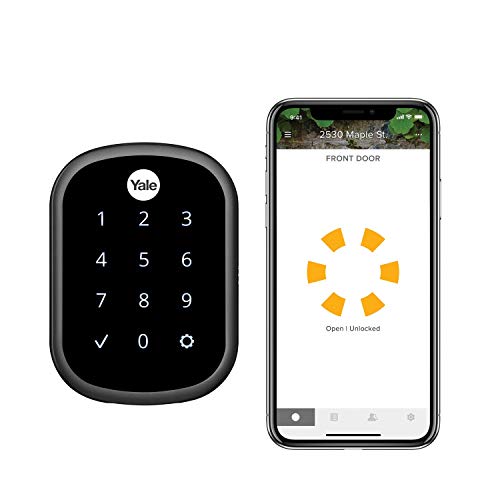
Specifications
| Brand | Yale |
|---|---|
| Lock Type | Deadbolt |
| Connectivity | Wi-Fi |
| Unlock Methods | Voice, App, Keypad |
| Power Source | Battery |
| Battery Life | 18 mo |
| Smart Home Compatibility | Alexa, Google Assistant, Apple Home |
| Ansi Bhma Grade | Grade 2 |
| Door Thickness Compatibility | 1.375-2.25 in |
Pros
- Worth every penny
- Deadbolt security
- Long battery life
Cons
- Module-dependent features
- HomeKit reliability issues
- External power workaround
The Verdict
Yale Assure Lock SL is a Wi-Fi smart deadbolt built for long runtime, rated at 18 mo battery life. It suits most people who want reliable daily access, but some capabilities depend on a module, and HomeKit performance can be inconsistent.
Who it's for: Busy households that use keypad or app access most days, and accept that not every smart add-on works the same, especially under HomeKit.
Who should skip it: HomeKit-first buyers who need stable behavior with no workaround, since the lock has known HomeKit reliability issues.
In-Depth Review
Security
With a 7.6 Security score, the Yale Assure Lock SL lands in the “Sturdy build, strong defenses” range.
It is a deadbolt design, not a knob lock. That matters for real-world resistance to leverage and prying.
Yale also rates the lock as ANSI/BHMA Grade 2. That is not the absolute top grade, but Grade 2 is a trusted benchmark for residential door hardware. In use, security also depends on how the lock behaves after you leave. This model supports auto-lock behavior and still lets you regain control manually through the keypad, app, or voice routines.
Credential handling is where smart locks often feel less solid than a traditional key. Here, your access path spans Keypad, the Yale Access App, and voice assistants. That reduces pressure to keep handing off physical keys. Still, smart access means you should treat your phone account and voice assistant setup as part of your home security plan, not an afterthought.
Reliability
The Reliability score is 7.7, which fits the “Consistently dependable daily” template.
The big reliability win is battery life. The lock runs on four AA batteries and is rated for about 18 months on average. That alone lowers the odds of mid-season lockouts caused by dead batteries.
Day-to-day operation also matters. This model uses a keypad, app, and voice workflow, which gives you multiple ways in. In practice, that redundancy helps. If one method slows down for any reason, you still have another unlock path at the door.
However, the “smart” part can add friction when network or accessory behavior changes. The documented trade-off here is that some capabilities rely on an added module. If you depend on a specific automation, test it early so you know what happens when the home system has an off day. That is especially relevant if you want the lock to behave the same every time it is commanded.
Usability
With a 7.9 Usability score, Yale lands in the “Simple, intuitive access” zone.
Owners do not need a complicated routine just to get in. The lock supports keypad entry, and it also works through the Yale Access App for remote control and status checks.
For guests, keypad access is the most straightforward. It reduces confusion when people arrive without the app. You also get voice control tied to major assistants, including Alexa and Google Assistant. That can make hands-free entry feel natural when you are carrying things.
The key usability detail is how these methods overlap. You are not locked into a single access path. Even with smart control, the keypad keeps the lock usable in the same way a regular deadbolt is usable. The setup and routine use are generally easier when your household knows which method they will use most.
Connectivity
The Connectivity score is 7.1, mapping to “Some lag away from home.”
This lock uses Wi-Fi operation with the Connect Wi-Fi Bridge. That bridge approach can work well, but it introduces a dependency beyond the door itself.
Remote control depends on the home network path and how voice assistant or app commands are routed. On paper, the lock integrates with Alexa, Google Assistant, and Apple Home. For everyday control, the app gives you quick commands when the network is stable. For away-from-home use, you should expect that response time and reliability follow your Wi-Fi and bridge setup, not just the lock.
The connectivity caution is tied to the same theme as the overall cons: some smart features depend on an accessory module. That can affect which automations work as expected. And there are also known HomeKit reliability issues. If HomeKit is your primary platform, treat this as a compatibility-first purchase and test your key scenarios.
Value
Yale scores 8.0 for Value, which maps to “Worth every penny.”
The best argument for value is the mix of core hardware and day-to-day practicality. You get a deadbolt form factor, ANSI/BHMA Grade 2 security rating, and battery life rated at 18 months on four AA batteries.
That battery number is not a minor spec. It changes the experience. Less frequent battery changes mean fewer times you have to stand at the door with tools and worry about what happens if the battery level drops unexpectedly. It also supports the idea that the lock should stay functional between routine maintenance checks.
Value also depends on fit and install compatibility. This model supports doors from 1.375 to 2.25 inches thick. When the lock fits your door without extra complications, the smart part stays focused on access rather than troubleshooting. The main value tension is that you may need workarounds for certain integrations, such as the documented External power workaround, and some capabilities are module-dependent.
Frequently Asked Questions
What connectivity does the Yale Assure Lock SL use, and can I control it remotely?
This lock uses Wi Fi for remote control. It also supports smart home platforms including Alexa, Google Assistant, and Apple Home. If your Wi Fi connection is unstable, remote commands may feel delayed.
How long does the battery last on the Yale Assure Lock SL?
Yale rates the lock for about 18 months on battery. Battery life can drop if you use the lock frequently or if Wi Fi signal strength is weak. You can usually see the battery status in the app before it reaches a low level.
What door thickness does this deadbolt fit?
It works with doors between 1.375 and 2.25 inches thick. If your door is outside that range, you may need a different lock or hardware kit. Measure before you buy so installation stays straightforward.
Is voice unlocking available, and how does it compare to using the keypad?
You can unlock with voice commands, the app, and the keypad. In daily use, the keypad tends to feel fastest for guests because it does not depend on your phone. Voice and app control work best when your Wi Fi stays stable.
Does the Yale Assure Lock SL always auto lock, and what happens if it misreads a credential?
The lock includes smart locking behavior and lets you control it manually through the app or keypad. If a credential fails, you can try again right away, and you still have the option of using the physical key. The experience depends on correct setup and properly entered codes.
The reviews mention HomeKit reliability issues. Is that a deal breaker for iPhone users?
Some users report HomeKit reliability problems, so it may not behave as consistently as you expect with Apple Home. Alexa and Google Assistant support can still work normally, so many iPhone households rely on those instead. If HomeKit matters most to you, plan to test remote access and automations after setup.
Final Verdict
Yale Assure Lock SL is a good choice for most homes that want strong deadbolt protection and long battery life. Owners will likely appreciate how dependable everyday access feels. The weakness shows up with module dependent features and spotty HomeKit reliability, plus the need for an external power workaround in edge cases.
If you use it mostly as a solid keypad and want typical smart control, this lock fits well. If you rely on HomeKit for daily routines, double check compatibility before you commit. If that matches your setup, this is a sound pick.
Yale Assure Lock SL Smart Lock
As an Amazon Associate, we earn from qualifying purchases.