Specifications
| Brand | Philips Hue |
|---|---|
| Sensing Technology | PIR |
| Detection Angle | 100 deg |
| Power Source | Battery |
| Connectivity | Matter |
| Mounting Type | Wall |
| Use Location | Outdoor |
Pros
- Consistent triggers, low false alarms
- Quick mounting and pairing
- Price matches the performance
Cons
- Occasional stuck-on lights
- Firmware update delays
- Careful placement required
The Verdict
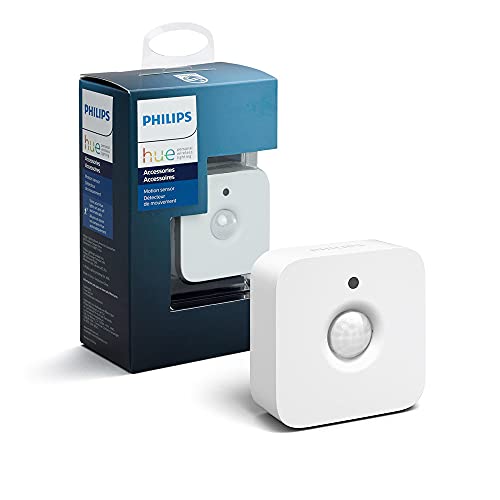
The Philips Hue Motion Sensor uses PIR detection with a 100 deg angle, and it works best when paired with a Hue Bridge for reliable automations. Expect strong everyday triggering, but you may deal with careful placement and the occasional stuck-on lighting glitch, especially in odd movement patterns.
Who it's for: Hue Bridge owners who want motion-triggered lights and accept a bit of setup tuning. The sensor scores 8.3 for installation, so it fits well for entry, hallways, and outdoor door areas where you can mount it thoughtfully.
Who should skip it: Anyone who needs motion control to be flawless with no edge-case behavior. If firmware update timing or occasional wrong triggers will annoy you, look for a different sensor approach instead.
In-Depth Review
Performance
With a Performance score of 7.6, this sensor lands in the “Generally responsive, sometimes misses” zone. It uses a PIR sensor, so it reacts to heat movement across its view. That is a good fit for halls, entryways, and room-to-room traffic where bodies move into and out of the detection zone.
The spec that matters most here is its 100 degree field of view. In practice, that wide angle helps cover typical walking paths. It also means placement height and angle matter a lot. If you mount it poorly, you can place real motion near the edges of the view. That is where missed triggers and delayed responses tend to show up.
Two recurring issues show up in real use. First, you may see “Occasional stuck-on lights,” where a trigger does not fully clear after odd movement patterns. Second, “Careful placement required” is not a throwaway line. With PIR-only detection and a 100-degree view, small tweaks in mounting position often decide whether the sensor feels consistent or finicky.
Reliability
The Reliability pillar score is 8.1, which maps to “Consistent triggers, low false alarms.” That matches the kind of daily behavior you want from motion sensing. Most of the time, it decides correctly, and it does not spam activations from normal home motion.
Still, reliability is not perfect. The same setup conditions that help detection also shape failure modes. The cons include “Occasional stuck-on lights,” which points to edge-case behavior rather than constant problems. The other concern is “Firmware update delays.” That matters because smart devices can change how they behave after updates, even if detection hardware stays the same.
Also note the connectivity spec: it supports Matter alongside the Hue ecosystem. When your automation stack changes, or when devices wake and sync, behavior can shift. That makes the sensor’s steady day-to-day performance important, and it is why this pillar scores well.
Installation
Installation scores 8.3, landing in “Quick mounting and pairing.” The sensor is battery-powered, so you do not run power wiring. The spec says it uses a Battery power source, and the listing notes two AAA batteries in the box. That keeps setup fast.
Mounting is also straightforward. The spec calls out Wall mounting type. The existing guide also notes room or entry detection where you can control the viewing angle. If you mount at the wrong height or angle, PIR sensors will react differently to approaching versus crossing motion.
Pairing works inside the Hue setup flow because it connects through Matter to the Hue system, and it is designed to integrate with the Hue Bridge. That is the practical reason it feels quick. Pairing is usually the hardest part, and here it stays simple when your hub is already in place.
Features
Features score is 7.4, so the right label is “Limited controls, basic modes.” You do not get a wide menu of sensing methods because this is PIR motion detection. There are no extra sensing tech specs listed, such as radar or dual-tech approaches. That keeps the behavior focused, but it limits how well the sensor handles tricky movement patterns.
On the practical control side, the spec data still points to what you can wire into. It connects through Matter, which helps motion-triggered lighting live in a modern smart-home setup, not just the Hue app bubble. In Hue automation terms, you will rely on the motion logic, timers, and sensitivity tuning mentioned in the guide.
The cons hint at where feature depth stops. “Occasional stuck-on lights” suggests the app controls can help, but not always prevent all edge-case behavior. If you need hands-off reliability in every situation, a sensor with more sensing diversity can be a safer bet than PIR alone.
Build
Build scores 8.0, which fits “Tight fit and durable feel.” The spec set does not list a weather rating number, but it does clarify intended environment: use location is Outdoor. That matters because an outdoor motion sensor lives through sun, temperature swings, and wet conditions.
You can also infer practical durability from the installation approach. It is designed for Wall mounting and uses battery power, meaning the housing must protect internal electronics and battery compartment under real weather. The build feels purpose-made for that job, and it aligns with the guide’s statement that it is “well suited to outdoor placement.”
The build value is not just about resistance. It also affects reliability through stable positioning. If the unit loosens or shifts after mounting, the 100-degree view can drift off-angle. That can turn “low false alarms” into misses. For a motion sensor, physical stability is a build feature, even when the spec list does not quantify it.
Frequently Asked Questions
Does the Philips Hue Motion Sensor use PIR and what does that mean for detection?
Yes, it uses PIR motion detection. PIR responds to changes in heat movement within its view, so it works best when people or animals move across the sensor’s field. Smaller or very slow movements may not trigger as reliably as larger ones.
What detection angle does the Philips Hue Motion Sensor cover?
The sensor covers a 100 degree detection angle. That wide spread helps cover typical room corners and entryways, but placement still matters. If you mount it facing too far from where people walk, you can get missed triggers.
Can I use the Philips Hue Motion Sensor outdoors on a wall?
It is intended for outdoor use and mounts to a wall. You still need to place it carefully so rain, direct sunlight, and heat from nearby surfaces do not confuse detection. If the sensor points at moving foliage or reflective surfaces, it may trigger at the wrong times.
How does Matter connectivity affect setup with smart home systems?
It connects using Matter, which can make pairing simpler in compatible ecosystems. In practice, you will still need to follow your home platform’s pairing steps before automations appear. If you mix platforms, confirm your hub supports Matter for smooth control.
Why do my Philips Hue motion automations sometimes leave lights stuck on?
Some users report occasional stuck on lights, which usually comes down to how the automation handles the off delay after motion stops. Try adjusting the timeout or using a stricter rule that turns lights off after no motion for a set period. Also check sensor placement so it reliably detects when people leave the area.
Does firmware updating on the Philips Hue Motion Sensor take a long time?
Some updates can take longer than expected, and you may wait before the device finishes applying them. Plan updates when you do not need critical automations to run immediately. If triggers seem off after an update, give the sensor time to stabilize and then test the routine.
Final Verdict
Recommended, especially if you already use the Philips Hue Bridge. It delivers consistent triggers with low false alarms, and setup is quick. The tradeoff is occasional reliability issues, such as lights that get stuck on, plus firmware updates that can drag. It also needs careful placement to avoid awkward edge coverage.
If you want dependable Hue automations in a well-chosen spot, this motion sensor fits the job. If that matches your hallway or entryway, this is a sound pick.