





NUKI Smart Lock Review
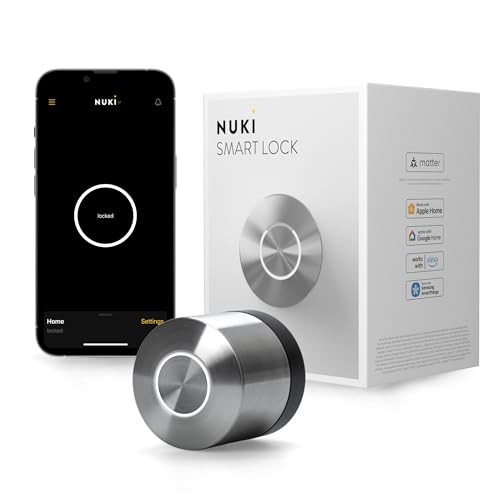
Specifications
| Brand | NUKI |
|---|---|
| Lock Type | Deadbolt |
| Connectivity | Bluetooth, Wi-Fi, Matter, Thread |
| Unlock Methods | App, Key |
| Power Source | 4 AA Batteries |
| Battery Life | 6 mo |
| Smart Home Compatibility | Apple Home, Alexa, Google Assistant, SmartThings, Matter |
Pros
- Deadbolt security
- Multiple protocol support
- Broad smart home support
Cons
- No physical backup
- Disposable battery only
- Keypad connection dropouts
The Verdict
The NUKI Smart Lock uses Matter over Thread, with Bluetooth and Wi-Fi for day-to-day access. With a 6-month battery life, it is a good pick for routine smart-home use, but you need to accept no physical backup and occasional keypad connection dropouts.
Who it's for: People setting up Matter smart home automations who want flexible unlocking and cross-platform support, and who are willing to manage dead-battery risk themselves.
Who should skip it: Buyers who need guaranteed keypad reliability and a true fail-safe power backup, since connection dropouts and battery-only power can cause lock access delays.
In-Depth Review
Security
With a Security score of 7.3, the NUKI Smart Lock aims for “Sturdy build, strong defenses.”
It is a deadbolt design, and that matters for day to day safety. A deadbolt generally changes the whole feel of a lock. It engages deeper than many latch-based solutions.
NUKI also supports multiple ways in. The lock can unlock through the Nuki app or with a physical key. That combination helps when your phone is dead or your network has issues. In real use, that reduces the chance that a single failure mode turns into a locked-out situation.
Still, the security story is only as strong as the power and control path. The lock runs on 4 AA batteries, and its battery life is rated at up to 6 months. The biggest concern is not the deadbolt itself. It is what happens when the batteries fail, especially with no physical backup power. In the real world, security gaps often come from the quiet edge cases, not the marketing line.
Reliability
Reliability lands at 7.8, mapping to “Consistently dependable daily.”
That score fits the way this lock balances local and network connectivity. It supports Bluetooth and Wi-Fi, and it also supports Matter over Thread. In practice, that gives you more paths to reach the lock, instead of one connection type.
You also get a clear expectation for battery maintenance. NUKI rates battery life at up to 6 months using 4 AA batteries. Longer intervals help reliability. Less frequent battery work reduces the chance of setup mistakes and last-minute replacements. It also helps status accuracy, since the lock is less likely to fall into a low-power state midweek.
However, reliability is not only about the lock hardware. The cons call out “Keypad connection dropouts.” That suggests the lock can miss commands in setups that depend on a specific keypad or pairing path. Even if your primary control is the app, dropouts can still affect how smoothly your access routines run.
Usability
Usability scores 8.2, which fits “Simple, intuitive access.”
The unlock methods are straightforward: app control and a physical key. For owners, that is a good baseline. For guests, it is a practical fallback when phones fail or when app access feels like too much.
Setup also benefits from the lock’s ecosystem reach. The NUKI Smart Lock supports Apple Home, Alexa, Google Assistant, SmartThings, and Matter. That reduces the need for workarounds when you already live inside one platform. It also helps when the household wants voice control, remote unlock, or shared routines without rethinking the whole smart home.
There is still a usability trade-off tied to power. The cons include “Disposable battery only.” That makes battery management a core part of daily life. If batteries run low, the lock can turn from “set it and forget it” into an active maintenance task. You need a plan for when and how you replace the 4 AA batteries, rather than assuming it will always stay invisible.
Connectivity
Connectivity scores 7.6, mapping to “Reliable connection, quick control,” but with a realistic edge.
The lock supports Bluetooth, Wi-Fi, and Matter over Thread. That mix can improve responsiveness because it does not force every command through one route.
Where this matters is remote control and smart home timing. Wi-Fi gives you reach through your home network. Bluetooth can keep local unlock fast when you are near the door. Matter over Thread is especially useful for consistent smart home behavior when your home uses Thread-capable devices. In other words, you can pick the path that best matches your environment.
Still, the cons include “Keypad connection dropouts.” Even with multiple protocol support, connection layers can fail. If your access flow relies on the keypad path, those dropouts can create friction. The connectivity score reflects that tension: there is strong ecosystem support, but not every control path appears equally consistent in every setup.
Value
Value scores 8.0, aligning with “Worth every penny,” but with clear boundaries.
The lock covers three major needs: deadbolt security, multiple unlock paths, and wide platform compatibility. It supports Apple Home, Alexa, Google Assistant, SmartThings, and Matter. It also uses both Bluetooth and Wi-Fi, plus Matter over Thread.
The power numbers are also easy to plan around. It runs on 4 AA batteries, with battery life rated up to 6 months. That is a concrete maintenance cycle. It can reduce the hassle of frequent battery changes, which often becomes the hidden cost of smart locks over time.
What holds value back is the trade-off between convenience and fail safe behavior. The cons list “No physical backup” and “Disposable battery only.” If you want a lock that never leaves you waiting on battery replacement, this is not built around that promise. For most households, the 6-month battery life is enough. For others, especially busy homes and frequent guest turnover, the lack of physical backup power matters more than the rest of the spec sheet.
Frequently Asked Questions
Does the NUKI Smart Lock work with Matter and Thread, or is it only Wi Fi and Bluetooth?
The NUKI Smart Lock supports Bluetooth, Wi Fi, and also Matter and Thread. That means you can control it directly nearby over Bluetooth, and you can keep remote access when you set up the supported home network side. It also supports multiple smart home ecosystems like Apple Home and Alexa.
How long do the 4 AA batteries last in the NUKI Smart Lock, and how do I know when to replace them?
NUKI lists a battery life of about 6 months on 4 AA batteries. The lock reports status in the NUKI app, so you can watch for low battery warnings. Replace all four AA batteries at once to keep performance consistent.
What unlock methods can family members use, and does it include a way for manual entry if the phone app fails?
You can unlock using the NUKI app or using a physical key. The lock is a deadbolt design, so it does provide a manual option for entry. However, some shoppers report problems keeping the keypad connection stable, so rely on the key and app paths if a keypad connection acts up.
Is the NUKI Smart Lock suitable for a door with unusual thickness or a specific deadbolt cylinder type?
I do not have specific door thickness compatibility details for this model in the provided specs. Before you install, check that your door supports a deadbolt conversion and that your existing cylinder and faceplate geometry match what NUKI requires in its installation guide. If you share your door and deadbolt model, you can confirm fit more reliably.
Why do people mention keypad connection dropouts on the NUKI Smart Lock, and what should I do if it happens?
Some users report keypad connection dropouts, which can mean a temporary failure when you try keypad entry. If it happens, try using the app or the key to avoid getting locked out. You should also confirm the lock maintains stable connectivity through Wi Fi for remote use.
Does the NUKI Smart Lock have a physical backup beyond the key if Wi Fi or the app goes down?
In the reported cons, there is no physical backup noted beyond the key option. In other words, if connectivity issues occur, you should plan to use the key for manual entry. For safety, keep the key accessible in case the app cannot reach the lock.
Final Verdict
NUKI Smart Lock is a solid pick for people who want smart control with Matter support and broad ecosystem compatibility. It brings strong deadbolt security and generally dependable daily use. Still, its weak point is connectivity issues, including keypad connection dropouts, which can turn normal entry into a hassle. It also lacks a physical backup option.
Choose it if you want Matter-based access and reliable app control, and you can tolerate occasional connection quirks. Pair it with careful credential and battery habits. If that matches your needs, this is a sound pick.
NUKI Smart Lock
As an Amazon Associate, we earn from qualifying purchases.