




The 8 Best Gaming Keyboards in 2026

ON THIS PAGE
Best Gaming Keyboards Featured
Transparency Note: This post contains affiliate links. As an Amazon Associate, we earn from qualifying purchases at no extra cost to you.

Shopping for a gaming keyboard should feel exciting, not overwhelming โ€” but with dozens of models, confusing specs, and noisy marketing claims, itโ€™s easy to get lost. Thatโ€™s why weโ€™re committed to making this process simple and reliable for you. We dig into what matters: real-world durability, switch feel, key rollover, software stability, and how a keyboard actually performs in the heat of a game. Our goal is to help you make the best purchase decision so you get a high-quality keyboard that fits your playstyle and budget.

To do that, we donโ€™t rely on a single spec sheet or one-off impressions. We analyzed thousands of customer reviews across platforms, compared features side-by-side, and looked for patterns that indicate long-term satisfaction or common problems. We cross-referenced those findings with manufacturer specs and recent firmware updates to catch hidden differences. The result is a curated list of keyboards that consistently deliver โ€” whether you want tactile mechanical switches for competitive play, a compact layout for desk space, or a feature-packed option with RGB and macro support. Weโ€™ll explain the trade-offs clearly, point out who each keyboard is best for, and highlight any deal-breakers you need to know about. Consider this your practical, no-fluff guide to choosing a gaming keyboard that will actually improve your setup โ€” not just look flashy on the shelf.

Our Top Picks

Best Overall

ASUS ROG Azoth
Overall Rating
4.7
Brand
ASUS
Key Rollover
N-key rollover (NKRO) โ€” wired / 2.4 GHz; 6-key rollover (6KRO) โ€” Bluetooth
Actuation Force
40 g
Dimensions
1.6 x 12.8 x 5.4 in
Weight
2.6 lb

The ASUS ROG Azoth absolutely earns its Best Overall placement by balancing high-end build, customization, and daily practicality. Tri-mode connectivity with ROG SpeedNova gives genuinely low-latency wireless performance for gaming, and the absurd battery life in RF mode (with OLED and RGB off) means you wonโ€™t be tethered to a charger. The integrated 2-inch OLED and the tactile multi-function knob make day-to-day control and monitoring feel effortless, and Mac support broadens its appeal beyond Windows-only users.

Where it really shines for typists and modders is the chassis and switch package: a silicone gasket mount plus layered dampening foam creates a controlled, satisfying sound and a flex-free feel, while hot-swappable, pre-lubed ROG NX switches and doubleshot PBT caps deliver great out-of-the-box typing. The included DIY kit is generous and thoughtful for newcomers. A couple of areas are more average โ€” RGB and software customization arenโ€™t revolutionary compared with niche enthusiast offerings โ€” but overall itโ€™s an excellent, versatile flagship.

Best for Streamers

Corsair Vanguard Pro 96
Overall Rating
4.7
Brand
Corsair
Key Rollover
N-key rollover (NKRO)
Actuation Force
30-35 g
Dimensions
1.7 x 15.3 x 5.6 in
Weight
2.4 lb

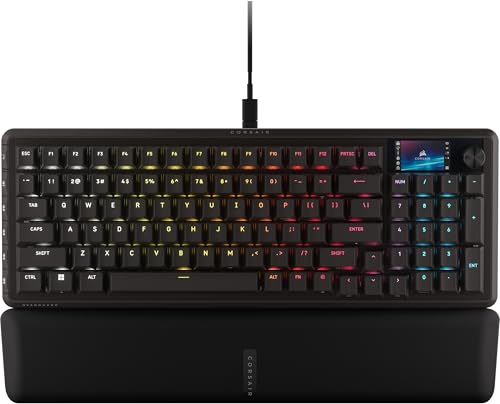
For streamers who need speed, custom control and a small footprint, the Corsair Vanguard Pro 96 checks a lot of boxes. Its compact 96% layout keeps arrow keys and a tenkey pad while staying about the size of a TKLโ€”great for cramped desks or multi-monitor setups. The bright 1.9" IPS LCD plus six programmable G-keys and a rotary dial make onโ€‘theโ€‘fly scene changes, alerts, and quick macros feel effortless and visually satisfying.

Under the hood, MGX Hyperdrive Hall Effect switches deliver rapid, wobble-free actuation with magnetic rapid-trigger capability and dual-actuation optionsโ€”perfect when milliseconds matter during live interactions. 8,000Hz hyper-polling further reduces input lag so commands and hotkeys register instantly. The only mildly average aspect today is customization depth: iCUE support is coming soon, so software-driven tweaks are currently limited. Overall, its blend of speed, compact practicality and built-in display makes the Vanguard Pro 96 a compelling pick for streamers who want dedicated controls without sacrificing responsiveness.

Best for Esports

Razer Huntsman V3 Pro Mini
Overall Rating
4.5
Brand
Razer
Key Rollover
N-key rollover (NKRO)
Actuation Force
40 g
Dimensions
11.6 x 4 x 1.4 in
Weight
1.1 lb

If you're chasing every possible advantage in competitive shooters, the Razer Huntsman V3 Pro Mini is built around that single-minded goal. Its Rapid Trigger and Genโ€‘2 analog optical switches let you tune actuation from a hairโ€‘light 0.1 mm up to 4.0 mm, so movement and flick shots feel immediate and repeatable. Razer Snap Tap (with the latest firmware) adds another layer by prioritizing the newest input between two keys, which translates to near-instant directional changes โ€” exactly the kind of responsiveness that matters in highโ€‘level FPS play. Onboard LED indicators and oneโ€‘touch adjustment make it easy to tweak actuation or sensitivity midโ€‘session without opening software, so you can experiment on the fly and save settings straight to the keyboard.

Itโ€™s not all flash โ€” the compact Mini layout sacrifices some dedicated keys and may feel cramped if you rely on extra macros or media controls โ€” but for pure speed, precision, and esportsโ€‘focused movement, this board is a strong pick.

Best Adjustable Actuation

SteelSeries Apex Pro TKL Gen 3
Overall Rating
4.5
Brand
SteelSeries
Key Rollover
N-key rollover (NKRO)
Actuation Force
45 g
Dimensions
14 x 5 x 1.6 in
Weight
2.1 lb

If you care about dialing in exactly how a key feels, the Apex Pro TKL Gen 3 is hard to beat. The new OmniPoint 3.0 Hall Effect switches give you an impressive 40 levels of adjustable actuation, plus claimed 20x faster actuation and much lower response times โ€” which translates to noticeably snappier inputs in fast-paced play. Rapid Trigger and Rapid Tap further shave latency for quicker presses, and Protection Mode is a thoughtful touch that reduces accidental nearby key activations when you need pinpoint inputs. The OLED smart display and GG QuickSet presets make switching profiles and game-ready settings straightforward without fumbling in menus, and the compact TKL layout keeps desk real estate tidy for esports setups.

Not everything is revolutionary: build quality and keycap feel are solid but not dramatically different from other high-end boards, and getting used to the sheer number of actuation options takes a little tinkering. Overall, if adjustable actuation is your priority, this keyboard delivers precise control and performance.

Best for Macro Control

Razer BlackWidow V4 Pro Full-Size
Overall Rating
4.4
Brand
Razer
Key Rollover
N-key rollover (NKRO)
Actuation Force
50 g
Dimensions
1.7 x 18.4 x 6 in
Weight
3.6 lb

If you live and breathe custom keybinds, the BlackWidow V4 Pro makes macro control feel effortless. What really sells it are the eight dedicated macro keys and the programmable command dial โ€” together they let you layer complex actions and tweak settings without fumbling through menus. The Yellow mechanical switches deliver fast, smooth actuation, so macros fire instantly, and the built-in sound dampeners keep things quieter than you'd expect during intense sessions. Per-key lighting and the three-side underglow give useful visual feedback for different profiles, which helps when you need to remember custom layouts on the fly.

The plush magnetic leatherette wrist rest is a comfortable touch for long play, and doubleshot ABS keycaps mean legends wonโ€™t fade even with heavy use. Those ABS caps and the leatherette finish arenโ€™t the absolute premium choices out there, but theyโ€™re solid and practical. Overall, this keyboard balances responsive switches and thoughtful macro controls in a way that feels tuned for serious bind-heavy players.

Best Modular Design

Glorious GMMK 3
Overall Rating
4.3
Brand
Glorious
Key Rollover
N-key rollover (NKRO)
Actuation Force
45 g
Dimensions
1.8 x 13.3 x 6 in
Weight
1.5 lb

The GMMK 3 really earns its spot in the Best Modular Design category by putting customization front and center. Its nine points of modularity and dual HE/MX hotswap support make swapping switches, plates, and keycaps effortless, so you can fine-tune sound, feel, and aesthetics without soldering. The Glorious Fox HE magnetic switches add a smooth, linear feel and, combined with customizable actuation and Rapid Trigger, offer genuinely snappy inputs that benefit fast-paced gaming. The 8,000 Hz polling rate and 4:1 dynamic keystroke further underline its focus on peak responsiveness.

Beyond the headline features, the keyboard covers expected basics like a standard layout and software-driven customization, which most users will find perfectly adequate. Build and finish are solid but not revolutionary โ€” the standout is how easily you can adapt the board to your preferences. If modularity and top-tier input speed matter to you, the GMMK 3 makes refreshing choices that reward tinkering and performance alike.

Best Portable Wireless

ASUS ROG Falchion RX
Overall Rating
4.2
Brand
ASUS
Key Rollover
N-key rollover (NKRO)
Actuation Force
40 g
Dimensions
12.1 x 4.3 x 1 in
Weight
1.3 lb

If portability and battery life are your top priorities, the ROG Falchion RX makes a compelling case. Its clever 65% TKL layout squeezed into a 60% frame keeps your desk uncluttered and makes it easy to toss in a bag, while the protective cover that doubles as a tray mount adds real travel value. Connectivity options are flexible โ€” Bluetooth for up to three devices, a low-latency 2.4 GHz RF mode powered by ROG SpeedNova (advertised for 430+ hours with RGB off), or wired USB when you need zero compromise. The pre-lubed RX low-profile optical switches are a standout: smoother, quicker actuation with minimal debounce, and the Red or Blue choices let you pick linear or clicky feedback. Two layers of silicone foam tame echoes for a quieter, more satisfying typing feel, and convenient media controls, on-the-fly macro recording, plus Mac compatibility round out the experience.

On the flip side, the compact form means fewer dedicated keys, which some productivity users will find limiting, and tri-mode connectivity is increasingly standard in this segment. Overall, however, itโ€™s an excellent pick if portable wireless performance and refined typing are what you value most.

Best Budget Compact

Newmen GM326
Overall Rating
4.1
Brand
Newmen
Key Rollover
N-key rollover (NKRO)
Actuation Force
45 g
Dimensions
12.6 x 4.7 x 1.5 in
Weight
-

The Newmen GM326 earns its Best Budget Compact spot by nailing the essentials you actually use every day. Its 75% layout frees up desk space without sacrificing important keys, and the detachable USBโ€‘C cable makes it easy to pack for work or trips. The rainbow backlighting (six colors, 20 modes) adds a fun, customizable touch that punches above its price.

Where it shines is practicality: hotโ€‘swappable 3โ€‘pin sockets and linear red switches give a smooth, fast feel and let you experiment with different switches later. The multiโ€‘function knob is surprisingly handy for quick volume control, and the indicator lights for Caps, Win lock, and OS mode are clear and useful. Full antiโ€‘ghosting and broad OS compatibility mean it works for gamers, writers, and coders alike.

Expect a few budget concessions โ€” ABS keycaps instead of PBT and a mostly plastic build โ€” but for the price, the GM326 delivers a compact, versatile keyboard with thoughtful features.

What To Look For

Picking the right gaming keyboard can noticeably improve your comfort, responsiveness and in-game accuracy. Focus on practical features that match your play style and desk setup to find the best fit.

  • Switch type and feel: Choose between mechanical, optical or membrane switches and consider actuation force, travel and tactile feedback because they determine typing comfort and reaction speed.
  • Anti-ghosting and key rollover: Look for N-key rollover and robust anti-ghosting to ensure simultaneous key presses register reliably during complex inputs and fast combos.
  • Build quality and materials: A solid frame, aluminum top plate and quality keycaps increase durability and reduce flex for consistent performance over time.
  • Size and layout (form factor): Decide on full-size, tenkeyless, or compact layouts based on whether you need a numpad, prefer mouse space, or want easier portability.
  • Backlighting and RGB customization: RGB and per-key lighting can improve visibility and personalization, so check brightness, effects and whether lighting profiles are stored onboard.
  • Programmability and macro keys: Dedicated macro keys or fully programmable layers let you assign complex commands and shortcuts for faster execution in games and apps.
  • Connectivity and compatibility: Pick wired, wireless or hybrid options and confirm multi-device support, low-latency modes and OS compatibility for a seamless setup.
  • Ergonomics and wrist support: Comfort features like angled feet, detachable wrist rests and keycap profiles help reduce strain during long sessions and improve accuracy.
  • Software and firmware: Intuitive configuration software and regular firmware updates make it easier to customize lighting, macros and keep the keyboard stable.
  • Price, warranty and service: Balance features against cost, check warranty length and customer support reputation to protect your investment and simplify repairs.

Prioritize the few features that matter most to your playstyle and setup to choose a keyboard that delivers comfort, responsiveness and long-term value.

How We Select Our Products

When we set out to choose the top gaming keyboards for this roundup, we treated the task like assembling a reliable toolkit rather than flipping through shiny product pages. First, we gathered quantitative data: aggregated customer ratings from multiple major retailers and marketplaces, with extra weight given to verified purchases and recent reviews. That gave us a broad sense of real-world satisfaction and common failure points. We then dove into qualitative review analysis โ€” reading hundreds of individual reviews, pulling out recurring praises and complaints, and filtering out likely fake or incentivized posts by looking for suspicious patterns and timing.

Next came a detailed feature-by-feature comparison. We looked beyond marketing blurbs to assess switch types and feel, actuation force, travel distance, anti-ghosting/Nโ€‘key rollover, polling rate and latency, build materials, keycap quality, layout options (full, TKL, 60%), onboard memory, macro and software flexibility, RGB/customization, ergonomics, and included accessories like wrist rests. Durability signals such as warranty length, reported longevity, and community repair experiences also mattered. For value-for-money scoring, we compared performance and features against price across budget, midrange, and premium tiers to spotlight where you get the most bang for your buck.

We didnโ€™t stop at desk research. Where possible we conducted hands-on tests for typing and gaming, measured responsiveness, and consulted power users and competitive players to verify real-world suitability. Finally, we synthesize all of this into transparent scores and clear recommendations, re-testing and updating as new models and firmware arrive. Our goal is simple: give you well-researched, trustworthy picks so you can buy with confidence.

Final Thoughts

Picking the right gaming keyboard can actually change how you play โ€” and how much you enjoy playing. The biggest benefit is getting a device that suits your personal style: tactile mechanical switches give satisfying feedback and faster actuation for competitive shooters, while quieter membrane or low-profile switches might be better if you stream, share a room, or prefer softer keypresses. Matching switch type to your preferences reduces fatigue and improves accuracy, so your hands and your aim both thank you.

Beyond switches, the right keyboard answers practical needs. Compact layouts free up desk space and improve mouse movement for FPS games, while full-size boards with dedicated macro keys and a numpad help MMO and productivity setups. Features like N-key rollover, anti-ghosting, and reliable wireless or wired connectivity prevent missed inputs during intense moments. Good build quality, spill resistance, and a comfortable wrist rest extend lifespan and comfort โ€” important if you game for hours. Software that lets you customize lighting, remap keys, and create profiles adds flexibility, especially if you switch between games or stream.

Choosing wisely also saves money and frustration. Instead of grabbing whateverโ€™s trendy, consider what matters most to you: noise level, portability, programmable keys, or tactile feel. Try switches in-store or sample switch testers, read current reviews, and weigh warranty and support. When your keyboard matches your needs, you get smoother gameplay, less strain, and a setup that feels like it was made for you โ€” and that makes the whole hobby more fun.

Share:
On Key
You Might Also Like