





How to Steady High-Magnification Binoculars

At high magnification, small movements of your hands can make a distant subject jump across the view. The practical fix is to add support in stages: first improve your hold, then brace your body or binoculars against something solid, and use a tripod when you need a steadier view for longer observation. Image-stabilized binoculars can reduce the same problem, but they do not remove the need to handle and set up the instrument comfortably.
Try the low-effort adjustments first; reach for a tripod if they do not give you a view you can use. The right solution depends on the binoculars, your posture, the subject and how long you want to observe. For broader product selection, see TheTopZone’s binocular Top Picks.
Start with a relaxed, supported hold
Hold the binoculars close to your face and grip the barrels firmly enough to control them without squeezing hard. Bring your elbows in toward your torso rather than holding them wide. A balanced stance can help too: stand with your feet comfortably apart and distribute your weight evenly. These adjustments reduce the amount of your arms that is unsupported. A practical steady-holding guide likewise recommends a relaxed grip and tucked elbows, while noting that magnification makes hand movement more apparent (Hardclubs’ guide to steady binocular viewing).
Try viewing while seated if the setting allows. Rest your elbows on your thighs, or brace your upper arms against your chest. If seated, supported posture feels less steady than standing for a particular subject, switch back; there is no single stance that suits every viewer or viewing situation. Avoid clenching or holding your breath for a long time. If your arms begin to tire, lower the binoculars, relax, and resume when comfortable.
For a quick check, pick a stationary subject and compare the view before and after bringing your elbows closer to your body. If the image still shifts too much to follow details, add an external brace rather than simply gripping harder.
Use a solid rest without passing on vibration
Lean your shoulder or back against a tree, wall or other stable surface. You can also rest your elbows on a railing or a padded surface. This supports your body while leaving your hands free to position the binoculars. When seated, a bag or folded jacket under your elbows can provide a more comfortable rest than a hard edge.
If you rest the binoculars themselves on something, put a soft layer between them and the support. A hard contact can transmit movement instead of damping it; a field guide on binocular steadiness recommends using a hand or soft gear between the instrument and a hard rest (Crate Club’s binocular-holding guide). Keep the eyepieces and objective lenses clear of the support, and do not force the binoculars against an object. If the resting point is awkward or shifts when you breathe, support your arms instead.
Bracing is particularly useful when you need a short, steadier look but do not want to carry or set up a support. It may be less convenient when you need to move quickly between subjects or when there is no stable surface nearby.
When a tripod or adapter helps
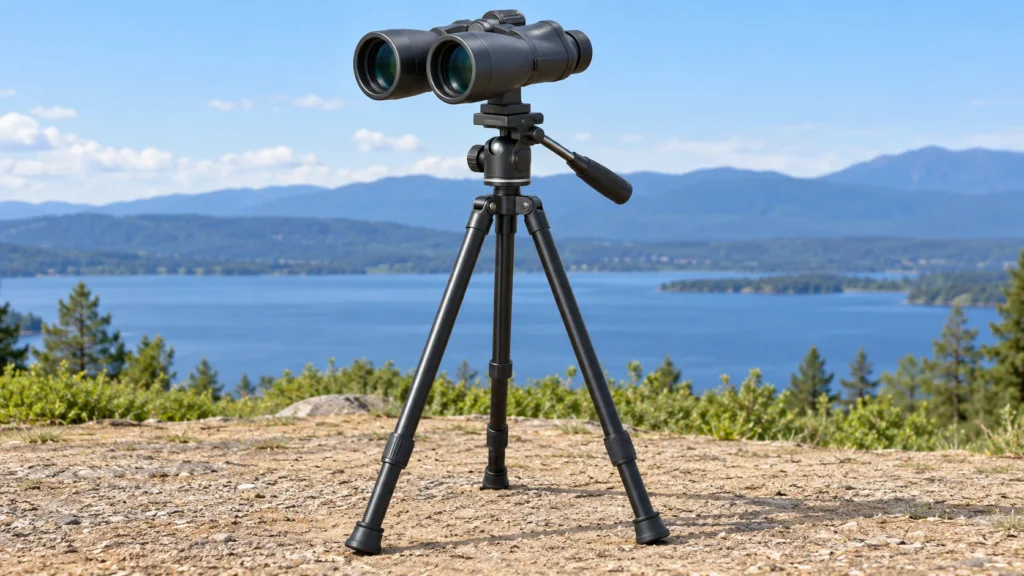
A tripod is worth considering when handholding and bracing still leave the view too unsteady, especially for prolonged observation or repeated checks of a distant, relatively stationary subject. A tripod provides a separate support for the binoculars; it can be less practical when you need to keep moving, scan rapidly, or work in a place where setting up is difficult. A steady-viewing guide from Hardclubs also identifies tripods as a way to reduce hand shake, particularly with high-magnification binoculars.
Before buying an adapter, check the manual or manufacturer’s instructions for your exact binocular model. Confirm that it has a suitable tripod attachment point, or that the manufacturer specifies a compatible adapter. Do not assume every binocular can be mounted the same way. Follow the adapter’s instructions, make sure the connection is secure, and avoid overtightening. Set the tripod on stable ground and adjust its height so you can look through the binoculars without hunching or stretching. If you cannot confirm compatibility, contact the manufacturer rather than trying to force a fit.
A tripod can steady the instrument, but it does not make every viewing situation convenient. If your subject moves often, you may have to reposition the support as you follow it. For a brief observation, a comfortable elbow rest may be faster. If you already own a compatible tripod, test the setup somewhere safe and level before relying on it outdoors.
What image stabilization changes
Image-stabilized binoculars use a stabilization system intended to counter movement and produce a steadier view. A guide to binocular stability describes this as a way to reduce the visible effects of hand shake, including at higher magnifications (Hardclubs). How a particular model works, how to activate it and whether it can be mounted on a tripod are model-specific questions: check that model’s manual instead of assuming all stabilization systems behave alike.
Stabilization changes the approach because you may be able to observe handheld without adding a tripod for every look. Still, use a relaxed hold, support your arms when convenient, and follow the maker’s operating instructions. If you are comparing a stabilized model with a conventional binocular, weigh the convenience of handheld viewing against your need for a fixed support; this guide cannot establish which model is best for you. Do not infer compatibility with a tripod or adapter from stabilization alone.

A practical decision: brace, mount or stabilize?
Suppose you are watching a distant, stationary subject from a lookout and your high-magnification binoculars show a visibly unsteady image. First, tuck your elbows in and see whether the view becomes usable. If not, sit or lean against a solid surface and support your arms. If the image is still too unsettled for the detail you want, and your binocular manual confirms a compatible tripod connection, mount the binoculars and adjust the support for a relaxed viewing position. If you need to remain mobile, a compatible image-stabilized binocular may be worth considering instead, after checking its manual and intended use.
This is a decision sequence, not a guarantee that any one method will eliminate shake. Wind, fatigue, posture, the particular binoculars and individual steadiness can all affect what feels usable. If a mount is incompatible, unstable or uncomfortable, stop and use a supported handheld position instead.
If the view is still shaky
- Shake increases as you keep watching: Lower the binoculars and rest your arms before trying again; fatigue can make sustained handheld viewing harder.
- The image jumps when you lean on something: Check whether the support or your posture is moving. Brace your body or elbows instead of pressing the binoculars against a hard surface.
- The tripod setup feels awkward: Reposition the tripod for a comfortable viewing height and check that its feet are stable. Do not continue with a loose or forced adapter connection.
- Stabilization does not seem to help: Check the exact model’s manual for operating instructions and limitations; do not assume its controls or mounting guidance match another model.
Start with posture and bracing because they require no special attachment. Add a tripod when you need more support and can confirm a safe, compatible setup. Consider image stabilization when handheld use matters and the specific model’s instructions suit your needs.